A driver installation is not accepted merely because nvidia-smi prints a table. A GPU server can load a kernel module yet still fail when a container needs a newer CUDA feature, when Secure Boot rejects a rebuilt module after a kernel update, or when Fabric Manager does not match the loaded driver on an NVSwitch platform.
The safe approach is to treat the NVIDIA driver, CUDA user-space stack and fabric services as separate but connected compatibility contracts. Choose the approved driver branch first, record the operating-system and platform requirements, install from one managed package source, and prove the whole stack after a reboot before adding workloads.
This guide is for operators commissioning Ubuntu GPU servers. It explains the decision and acceptance process rather than naming one universal driver version. NVIDIA branches, Ubuntu kernels and application requirements change, so the current NVIDIA support tables and the server vendor's qualified configuration remain authoritative.
Start with a five-layer compatibility record
Do not begin with a command copied from another server. Record the target state first:
| Layer | Decision to record | Evidence before installation | Acceptance evidence | | --- | --- | --- | --- | | Hardware | Exact GPU, PCIe or SXM form factor, and whether NVSwitch is present | Server bill of materials, firmware inventory and lspci | All expected devices visible after reboot | | Operating system | Ubuntu release, running kernel and Secure Boot policy | /etc/os-release, uname -r, mokutil --sb-state | Driver module loads under the approved boot policy | | Driver | Qualified production branch and package source | NVIDIA release notes, application support matrix and vendor guidance | Loaded kernel and user-space components report the intended branch | | CUDA workload | Toolkit or container release, minimum driver and required features | Application release notes and CUDA compatibility tables | Representative application initialises and exercises every required GPU | | Fabric | PCIe-only, direct NVLink or NVSwitch generation | Chassis specification and topology record | Required fabric service is active and topology is healthy |
The critical distinction is between what the hardware needs, what the operating system can build and load, and what the application expects from the CUDA driver API. Combining those into a single "CUDA version" field is how fleets become inconsistent.
Complete the firmware and BIOS baseline and the Ubuntu installation acceptance checks first. Driver troubleshooting is much faster when missing GPUs, PCIe faults, clock problems and storage errors have already been excluded.
Choose the driver branch before the CUDA toolkit
The host driver is the foundation. Select a branch that satisfies all of these constraints:
1. It supports the exact GPU generation and server platform. 2. It supports the Ubuntu release and running kernel used by the node. 3. It meets the minimum driver requirement of the intended CUDA applications or containers. 4. It includes the security and defect fixes required by the organisation. 5. It is qualified by the workload owner and, where applicable, the server or appliance vendor.
A newer branch is not automatically a safer production choice. It can introduce a new kernel-module build, user-space library set and maintenance behaviour. Conversely, an old long-lived branch may be stable but too old for a required CUDA feature or a new GPU generation. Record the reason for the branch, the owner who approved it and the event that will trigger requalification.
NVIDIA's current Ubuntu packaging uses open GPU kernel modules for supported modern data-centre GPUs. For current branch 590 and later, NVIDIA's Ubuntu instructions use the nvidia-open meta-package and the current pinning-package layout. Earlier branches use different branch-specific package names and pinning conventions, so do not apply the 590+ examples to an older branch without checking that branch's installation guide.
Read the CUDA line in nvidia-smi correctly
The "CUDA Version" shown by nvidia-smi is often misread as the CUDA Toolkit installed on the host. It indicates the highest CUDA driver API level supported by that driver. It does not prove that nvcc, a particular runtime library, cuDNN, NCCL or an application framework is installed.
Record these separately:
- loaded NVIDIA driver version;
- installed host toolkit, if any;
- container CUDA runtime and libraries;
- application build target and required GPU architecture;
- minimum driver specified by the application or container release.
CUDA has backward compatibility for applications built with older toolkits running on newer drivers. CUDA 11 and later also provide minor-version compatibility within a major toolkit family when the driver meets the documented minimum. That flexibility has limits: features which need a newer driver can return cudaErrorCallRequiresNewerDriver, and PTX-based workloads can require a newer driver than a simple version-range check suggests.
Forward compatibility is a separate mechanism for supported data-centre GPUs and selected systems. It uses a cuda-compat-* package to provide newer user-space driver libraries over an older kernel-mode driver. It is not a general fix for an unqualified host and should be adopted only when the NVIDIA compatibility matrix explicitly covers the GPU, base driver and toolkit combination.
Use one package-management path on Ubuntu
NVIDIA recommends distribution-specific packages where possible because they participate in the host package manager. Mixing a runfile installation, Ubuntu archive packages and NVIDIA repository packages creates ambiguity about which files own the kernel modules and user-space libraries.
Before installation, capture the baseline:
``bash cat /etc/os-release uname -r mokutil --sb-state lspci -nn | grep -i nvidia apt-cache policy | sed -n '1,120p' dpkg -l | grep -E 'nvidia|cuda|fabric|nvlink' ``
Confirm that the headers match the running kernel. NVIDIA's Ubuntu guide uses:
``bash sudo apt install linux-headers-$(uname -r) ``
Enable the approved NVIDIA repository by following the current Ubuntu instructions, then install the branch pinning package if the deployment requires one. The branch is a controlled input, not a value to copy from this article:
``bash BRANCH="590" # example only: replace with the approved branch from the current NVIDIA guide sudo apt install "nvidia-driver-pinning-${BRANCH}" sudo apt install nvidia-open ``
For a compute-only host, NVIDIA documents a smaller package set using the compute libraries and open DKMS module. That can reduce desktop dependencies, but use it only when the operational team understands which optional components are excluded.
Review the complete APT transaction before accepting it. A plan that removes the running kernel, mixes driver branches or replaces packages from an unexpected repository is a stop condition. Retain the package list and repository configuration with the node record.
Keep Secure Boot as part of the acceptance test
With Secure Boot enforcing, Ubuntu signs third-party DKMS modules with a Machine Owner Key. When no enrolled key is available, the installation can generate one and require an operator to complete MOK enrolment at the next reboot.
That has three operational consequences:
- the remote console must remain available through the reboot;
- the MOK fingerprint and enrolment step must be handled by an authorised operator;
- a future kernel update must rebuild and sign the module successfully.
Do not disable Secure Boot simply because nvidia-smi cannot communicate with the driver. Check whether the module built, whether its signature is trusted and whether the expected kernel is running. Disabling a security policy can hide the immediate symptom while leaving the package and lifecycle problem unresolved.
Install Fabric Manager only when the platform needs it
Fabric Manager is not a generic performance add-on for every multi-GPU server. It manages NVSwitch fabrics on supported systems. A PCIe server without NVSwitch should not be given an unnecessary fabric service merely because it has several GPUs.
For NVSwitch systems, the driver and fabric components are one qualification unit. Record the full loaded driver version and the full Fabric Manager package version, not only the branch number, and confirm that the NVIDIA compatibility guidance permits that exact pair. NVIDIA's Fabric Manager service checks the loaded driver stack during initialisation and aborts if it is incompatible. Partial upgrades are therefore visible as a failed service rather than a working fabric.
Platform generation matters:
| Platform class | Fabric action | | --- | --- | | PCIe GPUs without NVSwitch | Do not install Fabric Manager solely for multi-GPU use; validate PCIe and any direct NVLink topology instead | | HGX A100, H100 or H200 NVSwitch systems | Install the Fabric Manager package matching the approved full driver release and enable the service as documented | | HGX B100, B200 or B300 systems with fourth-generation NVSwitch | Follow the current NVLink 5 and NVLSM packaging instructions; do not assume the older Fabric Manager recipe is sufficient |
NVIDIA documents minimum driver families for NVSwitch generations and additional InfiniBand management dependencies on current HGX B100/B200/B300 platforms. Treat those as platform prerequisites, not optional tuning.
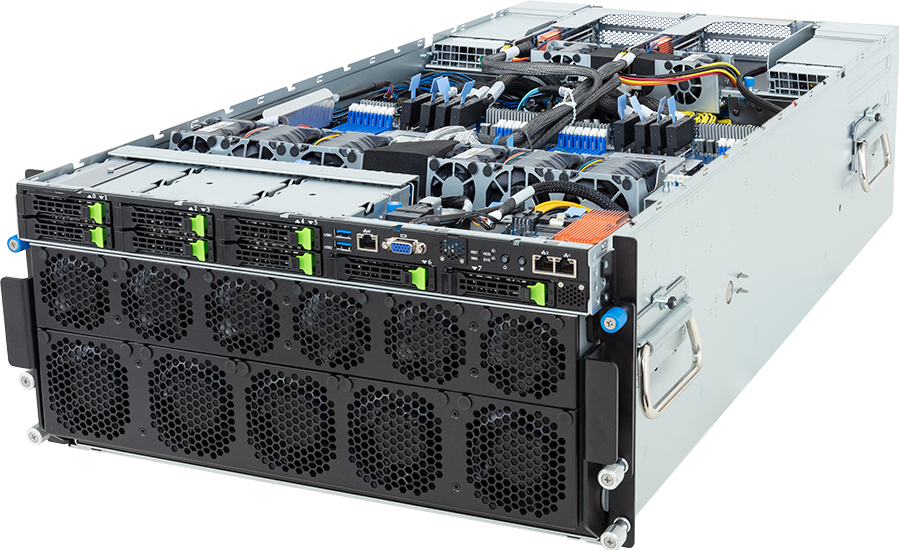
The GIGABYTE G593-ZD1-AAX3, for example, is an HGX H200 server with NVSwitch. Its software acceptance path therefore differs from a conventional PCIe GPU server even if both expose eight GPUs.
Reboot before declaring the driver healthy
A successful package transaction proves only that files were installed. Reboot into the intended kernel, keep the BMC console open, and capture:
``bash uname -r cat /proc/driver/nvidia/version lsmod | grep '^nvidia' nvidia-smi nvidia-smi -q nvidia-smi topo -m systemctl --failed journalctl -p err -b --no-pager ``
On an NVSwitch platform, record the full package versions and check the service explicitly:
``bash dpkg -l | grep -E "nvidia|fabric" sudo systemctl status nvidia-fabricmanager sudo journalctl -u nvidia-fabricmanager -b --no-pager ``
Use the service name and package layout documented for the installed platform generation. Confirm that every expected GPU appears, the topology matches the accepted hardware record and no device is isolated or missing.
Do not use nvidia-smi alone as the workload test. It exercises management interfaces, not the complete application path. After the base driver passes, run a small application built from the same CUDA, framework and container stack intended for production. It should enumerate every assigned GPU and exercise the functions on which the real workload depends.
Add the toolkit or container runtime after the host passes
Many production nodes do not need a full CUDA Toolkit on the host. Containers can carry CUDA user-space libraries while using the host kernel driver. This reduces host state, but it does not remove the driver compatibility contract: the container still declares a minimum driver and may use features unavailable on an older branch.
Before admitting a container, record:
- image digest rather than only a mutable tag;
- CUDA runtime and framework versions inside the image;
- minimum driver requirement;
- required GPU compute capability;
- NCCL and communication-library versions for multi-GPU workloads;
- whether PTX or just-in-time compilation is used;
- the exact acceptance command and expected output.
Do not install several toolkits until one application works. A symlink named /usr/local/cuda can conceal which toolkit a build used, while LD_LIBRARY_PATH can override the libraries selected by the package manager or container runtime. Keep the path explicit and capture it in the evidence.
Pin the qualified state and rehearse the next update
Once the canary node passes, freeze the inputs that make it reproducible: Ubuntu release, kernel, NVIDIA repository, driver branch or exact version, fabric package, container image digest and application build. NVIDIA now supplies Ubuntu pinning packages for branch and version control; use them deliberately and review how they interact with the organisation's patch process.
A pin is not permission to ignore security updates. Define an update lane:
1. Review NVIDIA driver release notes and application support changes. 2. Apply the candidate branch to one representative canary. 3. Reboot and repeat hardware, Secure Boot and fabric checks. 4. Run the representative CUDA and communication workload. 5. Compare results and logs with the previous accepted baseline. 6. Promote the package set through the fleet only after the evidence is signed off.
Kernel and driver changes belong in the same maintenance record because DKMS rebuilds can fail even when the package manager exits successfully. For NVSwitch servers, include Fabric Manager or NVLSM in the same transaction and verification set.
Diagnose the mismatch before changing versions
| Symptom | Likely compatibility boundary | First evidence to collect | | --- | --- | --- | | nvidia-smi reports no devices | Kernel module, Secure Boot, PCIe visibility or hardware state | lspci, module build logs, dmesg, MOK state and BMC events | | NVML reports a driver/library mismatch | Kernel module and user-space libraries are from different transactions, or the system has not rebooted | Loaded module version, package list and running kernel | | Fabric service exits during start | Fabric Manager or NVLSM does not match the loaded driver or platform generation | Service journal, package versions and chassis topology | | Application says the driver is insufficient | Driver is below the toolkit or application minimum | Application release notes, driver version and CUDA compatibility table | | cudaErrorCallRequiresNewerDriver | The application uses a feature outside minor-version compatibility | Driver API level, toolkit release and feature requirement | | Driver worked until a kernel update | Module rebuild or signing failed for the new kernel | DKMS status, headers, module signature and booted kernel | | Some GPUs are missing from topology | Hardware enumeration, PCIe/NVLink fault or incomplete fabric initialisation | nvidia-smi topo -m, BMC log, Fabric Manager log and firmware inventory |
Change one layer at a time. Repeatedly installing different branches destroys the package and log evidence needed to identify the boundary.
Driver-stack acceptance checklist
A node is ready for DCGM diagnostics and workload benchmarking only when all of the following are true:
- [ ] The approved Ubuntu release and intended kernel are running.
- [ ] One documented repository and installation method owns the NVIDIA packages.
- [ ] The selected driver branch supports the GPU, OS and application stack.
- [ ] Secure Boot is in the approved state and the module signature is accepted.
- [ ] Every expected GPU appears after a clean reboot.
- [ ]
nvidia-smi topo -mmatches the recorded PCIe, NVLink or NVSwitch design. - [ ] Fabric Manager or NVLSM is installed only where required and its service is healthy.
- [ ] The representative CUDA application or container passes on every intended GPU.
- [ ] Package versions, repository state, logs and test output are retained.
- [ ] The next update has a named owner, canary process and rollback plan.
The driver is an operating-system component, the CUDA stack is an application dependency, and Fabric Manager is a platform service. Treating those as three separate records connected by explicit compatibility checks produces a fleet that can be upgraded and audited without guesswork.
Questions operators ask
Should the CUDA Toolkit version match the driver version exactly?
No. The supported relationship is defined by NVIDIA's backward, minor-version and forward-compatibility rules. The driver must meet the workload's minimum and feature requirements; identical version labels are not a general requirement.
Does every eight-GPU server need Fabric Manager?
No. Fabric Manager is required for supported NVSwitch platforms, not simply because a server contains several GPUs. Identify the chassis topology first.
Can a driver branch be upgraded without changing CUDA containers?
Often, because newer drivers retain backward compatibility, but the exact container, framework and communication stack still needs a canary test. NVSwitch services and Secure Boot module signing must be revalidated with the host update.
Is nvidia-smi enough for acceptance?
No. It is necessary evidence that the management interface can see the GPUs, but it does not prove that the production container, CUDA features, NCCL path or NVSwitch fabric works correctly.
Sources and further reading
- NVIDIA Driver Installation Guide
- NVIDIA Ubuntu driver installation instructions
- NVIDIA driver pre-installation actions
- NVIDIA open GPU kernel module packaging
- NVIDIA version locking for Ubuntu and Debian
- NVIDIA CUDA Compatibility
- NVIDIA CUDA minor-version compatibility
- NVIDIA Fabric Manager User Guide
- Ubuntu Secure Boot documentation
> Plan an NVSwitch server with the software acceptance path included -> Configure the GIGABYTE G593-ZD1-AAX3