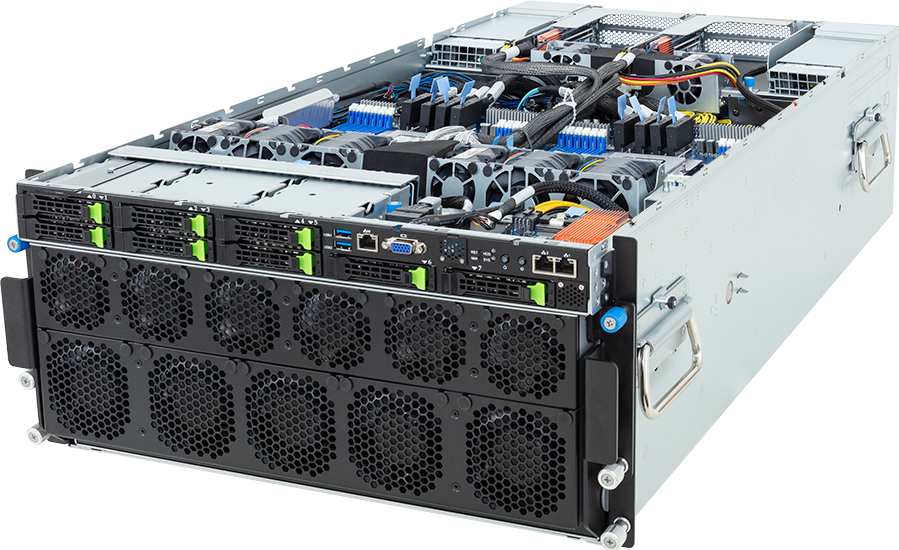
At 91 kg and 945 mm deep, the GIGABYTE G593-ZD1-AAX3 is a facility decision before it is a GPU decision. The 5U chassis carries an air-cooled NVIDIA HGX H200 baseboard with eight SXM GPUs, six 3000 W power supplies and enough high-speed expansion for a serious scale-out fabric. It needs the right rack, power feeds, cooling, lifting plan and network design to do useful work.
Rev. 3.x pairs that fixed H200 platform with dual AMD EPYC 9005 or 9004 processors, 24 DDR5 RDIMM slots, eight front Gen5 hybrid bays and 12 PCIe Gen5 x16 expansion slots. It is built for large-model training, multi-GPU inference and HPC jobs that benefit from eight GPUs connected through NVLink and NVSwitch. A team looking for a few independent PCIe GPUs should buy a different class of server.
Configure the GIGABYTE G593-ZD1-AAX3 after the workload, fabric and facility constraints are known. The base specification is only the beginning of an HGX deployment.
Exact model and revision
GIGABYTE uses the G593-ZD1 family for several cooling and accelerator combinations. The suffix prevents an expensive misunderstanding:
- AAX3 is the air-cooled NVIDIA HGX H200 version covered by this review.
- LAX3 is the related direct-liquid-cooled H200 version.
- AAX1 is air-cooled HGX H100.
- LAX1 is direct-liquid-cooled HGX H100.
Rev. 3.x adds support for AMD EPYC 9005 alongside EPYC 9004 and uses ordering code 6NG593ZD1DR000ACX3*. GIGABYTE labels the earlier Rev. 1.x as legacy and lists EPYC 9004 only, with a different ordering code and power arrangement. Keep the revision, suffix and order code together in the quote.
| Area | G593-ZD1-AAX3 Rev. 3.x | Design consequence | | --- | --- | --- | | Chassis | 5U, 447 x 219.7 x 945 mm | Deep, heavy rack installation with substantial airflow | | Accelerator | NVIDIA HGX H200 eight-GPU SXM baseboard | Fixed H200 platform, not optional PCIe GPU cards | | GPU memory | 141 GB HBM3e per GPU, about 1.1 TB per node | Supports memory-heavy models and multi-GPU jobs, subject to software overhead | | Scale-up fabric | Fourth-generation NVLink and third-generation NVSwitch | High-bandwidth communication inside the node | | CPU | Two AMD EPYC 9005 or 9004 processors, SP5 | Dual-socket parts only; P suffix CPUs are invalid | | Memory | 24 DDR5 RDIMM slots, 12 channels per CPU | One DIMM per channel when all 24 slots are populated | | Front storage | Eight 2.5-inch Gen5 NVMe/SATA/SAS-4 hybrid bays | One shared eight-drive pool; SATA/SAS need storage hardware | | Internal storage | Two M.2 positions, Gen3 x4 and Gen3 x1 | Unequal paths for boot or service media | | Expansion | Eight LP and four FHHL Gen5 x16 slots | Fabric, DPU and storage adapters need a planned slot map | | Base network | Two 10GbE Intel X710-AT2 ports plus management | Cluster fabric is selected separately | | Power | Six 3000 W Titanium supplies in 5+1 | Facility-grade C19 feeds and redundancy planning | | Weight | 91 kg net, 120.2 kg packaged | Lift equipment and an installation method are required |
What the HGX H200 board changes
The accelerator section is one integrated eight-GPU baseboard. Each H200 carries 141 GB of HBM3e with NVIDIA's published 4.8 TB/s memory bandwidth. Across the node, the raw HBM capacity is roughly 1.1 TB. Fourth-generation NVLink connects the GPUs through third-generation NVSwitch, and GIGABYTE states 900 GB/s of GPU-to-GPU bandwidth.
That is different from eight independent PCIe cards. Software can divide a large job across the GPUs with a scale-up fabric designed for frequent GPU-to-GPU traffic. Tensor parallel training, large-model fine-tuning, tightly coupled HPC and high-throughput inference can all benefit when the workload and framework use that topology correctly.
The 1.1 TB number is not usable model capacity. Framework allocations, CUDA context, communication buffers, activations, optimiser states and KV cache all take memory. Training and inference also produce very different memory profiles. Size the target model with its precision, sequence length, batch policy and parallelism scheme rather than comparing model file size with the sum of eight labels.
H200 is particularly relevant where memory capacity and bandwidth are the barrier on an H100-class system. It is less convincing when the workload fits comfortably on one or two smaller GPUs, or where utilisation will remain sporadic. In that case, PCIe servers or hosted capacity can cost less and use far less rack power.
The board is fixed. An H100, B200 or set of RTX PRO cards should not appear as selectable replacements inside this product. Buyers who need a different GPU generation should choose the exact GIGABYTE variant or another platform.
Dual EPYC host selection
Rev. 3.x supports two AMD EPYC 9005 or 9004 processors in SP5. GIGABYTE publishes cTDP support up to 400 W in the normal specification and up to 500 W at a 25 C ambient condition, subject to its CPU qualification list.
The host CPUs feed data, run storage and network stacks, prepare batches, manage processes and handle whatever CPU-side stages surround the GPU job. They should be sized for those duties. A larger core count may help simulation pipelines, compilation, decoding or preprocessing, while a GPU-bound inference service may care more about frequency and I/O handling.
One rule is absolute: do not install AMD EPYC processors whose model names end in P in this dual-socket build. AMD defines those as single-socket products. The public GPUMachines selector currently inherits several P models from the shared SP5 catalogue even though the product's reviewed admin list excludes them. Treat those public entries as a renderer defect until the socket-count filter is corrected.
GIGABYTE warns that a one-CPU installation leaves some memory or PCIe functions unavailable. That is expected in a board whose channels and I/O paths are divided between two sockets. This system should normally be planned as a balanced two-CPU node.
EPYC 9005 extends the platform to newer Zen 5 and Zen 5c options, up to 192 cores per socket in AMD's wider family, plus a faster DDR5 generation. EPYC 9004 remains relevant where a qualified configuration, software baseline or sourcing plan favours the earlier generation. Use the current GIGABYTE QVL rather than assuming every SP5 part works at every cTDP.
Twenty-four DDR5 channels need a deliberate population
The motherboard has 24 RDIMM slots, one for each memory channel across the two processors. Populating all 24 gives a balanced one-DIMM-per-channel arrangement. Installing fewer modules can leave channels idle and reduce host bandwidth, even if total capacity looks adequate.
EPYC 9005 and 9004 have different memory-speed limits, and the final rate depends on processor, DIMM part number, rank and firmware. GIGABYTE's current product page lists up to 6400 MT/s for 9005 and up to 4800 MT/s for 9004. Record the expected operating rate for the exact bill of materials.
Host RAM serves more than the Linux kernel. Data loaders, page cache, CPU preprocessing, container services, scheduler components, distributed-storage clients and monitoring agents all consume it. A node can have more than a terabyte of GPU memory yet still stall because the CPU side is undersized.
Start with 24 matched Micron enterprise RDIMMs where the capacity requirement permits. Larger modules may be needed for CPU-heavy simulation or data-processing work, but they should remain balanced between sockets and channels. Check memory failure behaviour as well; a production AI node needs a plan for ECC events and a clear replacement procedure.
Eight hybrid front bays and two unequal M.2 paths
All eight front 2.5-inch bays share a Gen5 hybrid backplane. A bay can serve NVMe, SATA or SAS-4 when the required storage card and cabling are present. The system does not provide eight drives of each type. It provides eight physical positions in total.
NVMe is the direct choice for local training data, scratch and checkpoint writes. SATA may provide a lower-cost service tier. SAS needs an add-in card and makes sense only when its controller and operational features are part of the intended design. GIGABYTE also states that RAID requires an add-in card.
Two internal M.2 positions can hold boot or service media, but their links differ. One is PCIe Gen3 x4 from CPU 1, while the other is Gen3 x1 from CPU 0. A mirrored pair may still be useful for operating-system resilience, although its behaviour and performance should be tested rather than assumed from the matching form factor.
Local storage is one layer of the data path. An eight-H200 node used for training may need a shared storage system that can feed several servers concurrently, absorb checkpoints and avoid turning the fabric into a queue. Calculate dataset reads, augmentation, checkpoint size, interval and recovery time. Then size local NVMe, shared storage and network together.
Twelve Gen5 slots do not mean twelve arbitrary NICs
Two PCIe switch assemblies provide eight low-profile Gen5 x16 slots and four risers provide four full-height, half-length Gen5 x16 slots. This is generous I/O, but card placement still affects airflow, cabling and service access.
GIGABYTE states that BlueField-3 DPUs and SuperNICs are supported with PCIe slot-tray modifications at an ambient limit of 30 C. That qualification should be followed literally. A card appearing in the connector does not prove the correct tray, fan policy or firmware combination.
A single-node deployment may use a pair of fast NICs for storage and user traffic. A multi-node training cluster usually needs several GPU fabric rails, storage links and management connections. The right quantity depends on topology and failure design, not on filling every slot.
Build a port map that records:
1. Which GPU or PCIe switch path each fabric NIC uses. 2. Switch name, port, speed and rail assignment. 3. Optic, cable type, length and connector at both ends. 4. Storage network and expected read/write traffic. 5. Management, provisioning and service-network separation. 6. Redundancy behaviour when a NIC, cable or switch fails.
For current Ethernet fabrics, NVIDIA ConnectX and BlueField options can provide 200, 400 or 800GbE depending on platform and switch generation. InfiniBand choices include HDR, NDR and XDR classes. Do not mix speed labels without checking port mode, cable reach and switch support.
The onboard Intel X710-AT2 provides two 10GbE ports. They are useful for service, provisioning or ordinary Ethernet, but they are not a substitute for the scale-out fabric of a multi-node HGX cluster. Front and rear management LAN ports connect to the BMC, with GIGABYTE specifying the front management port as default when both are cabled.
Air cooling, power and installation
AAX3 is the air-cooled version. Its fan inventory is substantial: motherboard fans, PCIe-tray fans and a GPU tray containing six 60 mm and eleven 80 mm high-speed units. That cooling design makes the server workable without facility liquid loops, but it transfers the heat to room air and raises the rack airflow requirement.
Six 3000 W 80 PLUS Titanium power supplies operate as 5+1. Redundancy means five supplies support the intended system load after one fails; it does not mean all six labels should be added as unrestricted component capacity. GIGABYTE requires C19 power cords and states that they are not included.
Plan power from the finished build. Include the fixed HGX board, both CPUs, 24 DIMMs, drives, NICs, fans and conversion losses. Check the required input voltage and balance supplies across independent PDUs or feeds according to the facility design. A short synthetic load is not enough; use a representative GPU, storage and network workload to verify steady-state draw and thermal behaviour.
The chassis is 945 mm deep and weighs 91 kg before rails and cables. GIGABYTE ships an L-shaped rail kit. Rack-post spacing, rear PDU placement, door clearance and cable bend radius need checking. Use a server lift and an agreed installation method; this equipment is too heavy for an improvised two-person lift.
GIGABYTE publishes a 10 to 35 C operating range, while certain BlueField-3 configurations carry the tighter 30 C statement. Facility inlet temperature, altitude, component choice and firmware fan policy can narrow the practical envelope. An air-cooled H200 server also affects nearby equipment, so rack blanking and hot-aisle containment matter.
Where the data centre cannot remove the heat economically or the rack has a firm air-cooling limit, compare the G593-ZD1-LAX3 liquid-cooled variant. Choosing AAX3 simply because the room has no liquid loop can push the problem into electrical and mechanical cooling instead.
Workload fit
G593-ZD1-AAX3 is credible for:
- Large language model training and fine-tuning that uses all eight GPUs.
- High-throughput inference where model memory or KV cache benefits from H200 capacity.
- Scientific simulation and HPC codes that use NVLink-connected accelerators.
- Multi-user research infrastructure with scheduling, quotas and monitored utilisation.
- A repeated node design for an air-cooled HGX cluster.
- Private deployments where data location or operational control rules out a public shared service.
It is a poor first purchase for an unproven workload. Teams still measuring model fit, software compatibility or weekly GPU demand can learn more cheaply on a smaller PCIe system or hosted H200 capacity. One underused HGX node ties up power, rack space and capital whether jobs run or not.
H200 is also no longer the newest NVIDIA HGX generation. B200 and B300 platforms provide different memory, compute, power and cooling profiles. H200 can remain the right answer where Hopper software maturity, qualification, availability or a known application baseline matters. A new long-life cluster should compare those options on measured workload behaviour rather than generation name alone.
Use the HGX server catalogue to compare air-cooled and liquid-cooled platforms. A PCIe GPU server may be a better match for independent jobs, visual computing or teams that need replaceable accelerator cards.
Configuration checklist
Before approving the system, record:
1. Exact Rev. 3.x order code and AAX3 air-cooling suffix. 2. Dual-socket-qualified EPYC 9005 or 9004 processors and cTDP. 3. Twenty-four-DIMM memory population, part numbers and expected speed. 4. Model, framework, precision, sequence length, batch policy and parallelism plan. 5. Eight-bay storage mix, controller choice and checkpoint requirements. 6. M.2 boot design and recovery process. 7. Fabric topology, NIC or DPU model, slot position and rail assignment. 8. Switch ports, optics, cables and spare strategy. 9. Storage-system throughput and recovery-time target. 10. C19 feeds, PDU capacity, measured-load target and redundancy rule. 11. Cooling capacity, inlet-temperature limit and hot-aisle path. 12. Rack depth, lift method, rail fit, cable space and service clearance. 13. BMC security, firmware ownership, monitoring and spare-parts policy.
Acceptance testing should exercise the complete path. Run a multi-GPU job, drive the intended storage and fabric traffic, inspect link mapping, test checkpoint recovery, confirm BMC access and remove one supported power feed. Record GPU, CPU, memory, NIC and inlet temperatures under sustained load.
FAQ
Does G593-ZD1-AAX3 use eight PCIe H200 cards?
No. It uses an NVIDIA HGX H200 baseboard with eight SXM GPUs, NVLink and NVSwitch. The accelerator assembly is fixed and included in the system platform.
How much GPU memory does the node provide?
Each H200 has 141 GB of HBM3e, giving about 1.1 TB across eight GPUs. Framework and workload overhead reduce the memory available for model data.
Can it support EPYC 9005 processors?
Rev. 3.x supports dual AMD EPYC 9005 or 9004 processors, subject to the GIGABYTE QVL and cTDP limits. The older Rev. 1.x lists EPYC 9004 only.
Can I select an EPYC CPU ending in P?
No. AMD EPYC P models are single-socket processors. The G593-ZD1-AAX3 is a dual-socket server and needs processors qualified for two-socket use.
Are all eight front bays NVMe capable?
Yes, the hybrid backplane supports Gen5 NVMe. The same physical bays can also support SATA or SAS-4 with the required storage hardware, but the combined drive count cannot exceed eight.
Does it include 400GbE or InfiniBand adapters?
No cluster fabric is implied by the base specification. The server provides two onboard 10GbE ports; high-speed Ethernet or InfiniBand adapters are selected and mapped to the deployment topology.
What is the difference between AAX3 and LAX3?
AAX3 is the air-cooled H200 model. LAX3 uses direct liquid cooling. Facility heat-removal capability, rack density and operating policy should decide between them.
How many power supplies does Rev. 3.x use?
It has six 3000 W 80 PLUS Titanium supplies arranged as 5+1. C19 power cords are required and are not included in the package according to GIGABYTE.
Verdict
G593-ZD1-AAX3 is a well-defined air-cooled HGX H200 node, not a generic eight-GPU chassis. Its fixed SXM baseboard, 1.1 TB of HBM3e, dual EPYC host and 12 Gen5 expansion slots can support demanding training, inference and HPC work. Rev. 3.x also keeps the host side current with EPYC 9005 support.
The purchase only makes sense when the surrounding design is ready. The server needs dual-socket CPUs, a balanced memory population, a real fabric topology, facility-grade C19 power, significant air cooling and safe handling for a 91 kg chassis. Its public configurator should also stop offering single-socket EPYC P processors before a quote is accepted.
Open the G593-ZD1-AAX3 configurator and submit the workload, node count, storage source, fabric plan, rack power and cooling constraints for technical review.
Technical sources
- GIGABYTE G593-ZD1-AAX3 Rev. 3.x product page
- GIGABYTE G593-ZD1-AAX3 Rev. 3.x datasheet
- GIGABYTE G593-ZD1-AAX3 Rev. 3.x manual
- NVIDIA H200 product specifications
- NVIDIA HGX AI Factory component reference
- AMD EPYC 9005 processor family
- AMD EPYC 9004 processor family
Specifications, firmware and qualification lists can change. Confirm the exact revision, processor list, adapter support and facility requirements before ordering.