Rack depth can disqualify E263-Z34-AAJ1 before anyone compares processors or accelerators. A specification table helps only after the team has agreed which bottleneck or operating constraint the purchase must solve.
Start with the alternative, then justify the larger system. Choose E263-Z34-AAJ1 when placement close to the data is a hard requirement and the final components can be qualified inside the site's electrical and airflow limits. A conventional rack server or hosted node is the better buy when physical placement is not the constraint.
Review the E263-Z34-AAJ1 configuration options on GPUMachines before treating the base chassis as a finished design.
Executive Summary
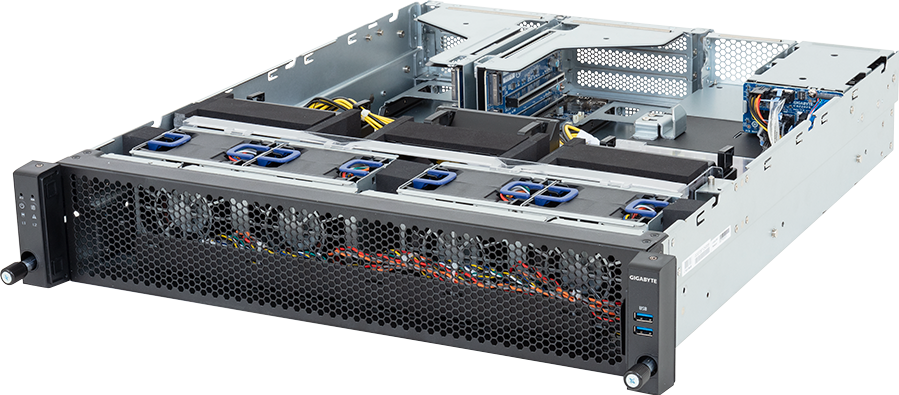
GIGABYTE E263-Z34-AAJ1 is a short-depth 2U edge server for one AMD EPYC 9005 or 9004 processor and up to two qualified dual-slot PCIe 5.0 GPUs. GIGABYTE lists 12 DDR5 RDIMM slots, two OCP NIC 3.0 PCIe 5.0 x16 positions, two rear 2.5-inch Gen5 NVMe/SATA/SAS-4 bays, one internal M.2 slot and 1+1 redundant 2000 W 80 PLUS Titanium power supplies.
It suits edge inference, computer vision, rendering, scientific applications and private AI services that fit within two PCIe GPUs. A single socket removes cross-socket NUMA traffic and leaves a clean relationship between the CPU, memory and I/O. The two OCP positions also allow data and service networks to be planned without sacrificing either accelerator slot.
The strongest reason to choose it is the combination of two full-length GPU positions and a 520 mm chassis depth. It is excessive for a single low-power inference card, yet too small for communication-heavy multi-GPU training or a large local dataset. GPU qualification, power-cable support and rack voltage must be checked for the exact order.
Configure the GIGABYTE E263-Z34-AAJ1 through GPUMachines.
Key Specifications
| Area | Verified platform detail | | --- | --- | | Form factor | 2U edge server, 438 x 87.5 x 520 mm | | CPU platform | AMD EPYC 9005 or AMD EPYC 9004 | | CPU sockets | 1, SP5/LGA 6096 | | GPU support | Two qualified full-height, full-length dual-slot PCIe 5.0 GPUs | | Memory | 12 DDR5 RDIMM slots, one per processor memory channel | | Storage | Two rear 2.5-inch Gen5 NVMe/SATA/SAS-4 hot-swap bays and one internal PCIe 3.0 x4 M.2 position | | PCIe expansion | Two PCIe 5.0 x16 GPU slots plus two OCP NIC 3.0 PCIe 5.0 x16 positions | | Networking | One 1 Gb/s Intel I210-AT port, dedicated management LAN and two OCP 3.0 network positions | | Power | 1+1 redundant 2000 W 80 PLUS Titanium power supplies; output depends on input voltage | | Management | ASPEED AST2600 BMC with GIGABYTE Management Console and remote KVM | | Best-fit workloads | Edge inference, computer vision, rendering, bounded fine-tuning, scientific GPU work and regional private AI |
The table describes the manufacturer platform. GPU card, power cable, operating-system support and OCP adapter compatibility remain dependent on the current qualification lists.
Platform Highlights
- The 520 mm depth is the defining physical feature. The chassis can enter racks that reject many mainstream accelerator servers. Rail length, rear drive access and cable bend radius still need measurement.
- One EPYC socket provides twelve memory channels. CPU cores, memory and PCIe devices sit in one NUMA domain, which simplifies placement for inference and data processing. The chosen processor still has to keep two GPUs fed.
- Both accelerator slots receive Gen5 x16 paths. Independent inference workers, rendering tasks and scientific jobs can use the two cards without sharing a reduced-width slot. Peer traffic remains PCIe traffic; this is not an NVSwitch server.
- Two OCP slots protect the accelerator capacity. High-speed service and storage NICs can be fitted without occupying a GPU position. CPU lane ownership, NCSI support and airflow must be checked for the selected adapters.
- Local storage is small by design. Two hot-swap bays and one M.2 device suit boot, cache, models and temporary data. A larger dataset needs shared storage or an upstream object service.
Our Technical View
The E263-Z34-AAJ1 should be treated as a compact two-GPU compute node, not a general-purpose server with a pair of optional accelerators. Its short chassis, rear storage and dedicated GPU risers indicate a deployment where compute density and physical fit matter more than drive count.
That makes it credible for edge sites and regional facilities, but the word edge should not excuse loose engineering. Two high-power GPUs and a 400 W-class processor can place substantial demand on a shallow rack. GIGABYTE lists four 80 mm fans rated at high speed; the resulting noise and exhaust belong in a controlled equipment room.
The single socket is a useful constraint. There is no second processor to buy, cool or licence, and no inter-socket path for the operating system to cross. For inference, rendering and many scientific applications, that can be cleaner than a dual-socket host whose second CPU exists mainly to provide more I/O. Here, EPYC already supplies a large lane budget.
Storage is the counterweight. A buyer looking at two large GPUs may also imagine terabytes of model weights, video or scientific data inside the server. The E263 does not offer that layout. It expects data to arrive over the network or to be reduced to an active working set in the rear bays. The two OCP positions make that design plausible, provided the network is ordered with the machine rather than added after deployment.
For tightly coupled training, two GPUs may still work for models and fine-tuning jobs that fit. Yet there is no basis for assuming NVLink from the chassis specification. GPUMachines should confirm the selected cards and any supported bridge. Buyers whose job depends on constant high-bandwidth GPU-to-GPU exchange should compare an HGX platform before fixing the architecture.
Best-Fit Workloads
Edge inference
Two GPUs can run separate model replicas, different services or one partitioned model. The EPYC processor handles request processing, retrieval, tokenisation and other host work. Capacity planning must include concurrent context memory and model switching rather than quoting only GPU compute.
Computer vision and sensor processing
Camera groups or sensor pipelines can be divided between accelerators. Local NVMe can buffer data during a network interruption, though long-term video retention belongs on separate storage. Decode placement matters because CPU, GPU and specialist media engines can each change the resource balance.
Rendering and visual computing
Independent frames and scenes map well to two PCIe GPUs. Professional software may require certified drivers or specific card families, so the current application and GIGABYTE support lists should be reconciled before order.
Research and bounded fine-tuning
A lab can run model evaluation, fine-tuning or scientific code when the working set fits the selected GPU memory. Two cards do not guarantee useful scaling. Test the framework's parallelism and data movement on the intended accelerator family.
Regional private AI
Organisations can place retrieval and inference close to users or sensitive data while maintaining central model and dataset storage. Remote management, update control and secure network access become part of the service because edge sites often have limited hands-on support.
Who Should Consider It
Consider the E263-Z34-AAJ1 when the requirement is one or two full-length PCIe GPUs in a rack with roughly 520 mm of server depth. It fits teams that have a defined upstream storage service and want the network flexibility of two OCP positions.
The ideal buyer knows the accelerator model, application, site voltage, rack dimensions and data source. Those details turn the chassis from an attractive format into a supportable system.
Who Should Not Buy It
Do not select this platform for an office merely because the chassis is shallow. High-speed fans, redundant server power supplies and GPU exhaust can make it loud and hot. A tower workstation will usually suit desk-side use better.
Large-model training across many accelerators needs another class of system. Two PCIe GPUs cannot replace eight SXM GPUs on NVSwitch, and several E263 nodes require a deliberate scale-out network. A storage-heavy job should also look elsewhere because only two front-line hot-swap devices are available.
One modest accelerator may fit a smaller, lower-power server. Paying for two GPU risers, two OCP slots and 2000 W redundant supplies makes sense only when the deployment can use them.
Architecture Notes
CPU choice and I/O ownership
GIGABYTE supports EPYC 9005 and 9004 processors on SP5. The platform lists a 400 W configurable TDP under normal conditions, with a higher figure at a specified ambient condition; the final CPU support list and thermal policy need checking. Processor selection should follow host work, licence cost and memory demand.
The single socket owns both GPU and OCP paths. This removes cross-socket I/O but does not remove contention in software. Network interrupts, storage traffic, inference workers and data preparation still share CPU resources. Pinning and IRQ placement can help under sustained load.
Memory population
Twelve DIMM slots match the processor's twelve memory channels. Fit equal supported RDIMMs across active channels to retain bandwidth. EPYC 9005 and 9004 have different published memory-speed ceilings on this platform, so processor and memory generations should not be treated as interchangeable line items.
Host RAM needs to cover the operating system, model loading, page cache, retrieval indexes and CPU-side transforms. It does not replace GPU memory, but too little host memory can slow model swaps or force avoidable storage reads.
GPU layout
Two FHFL positions connect at PCIe 5.0 x16. Card length, width, cooling style and connector position must match the riser and cable set. GIGABYTE's product documentation points buyers to optional cables for some older accelerators and includes 12VHPWR cables in the current package list. That still does not qualify every card.
Server-qualified passive or directed-airflow accelerators behave differently from workstation cards with open shrouds. Use the current QVL and confirm combined power, not just individual card TDP.
Storage and data path
The two rear hot-swap bays can use Gen5 NVMe, SATA or SAS-4 paths, with an add-in card required for SAS. One internal M.2 device uses a PCIe 3.0 x4 interface. A sensible layout might mirror two SATA devices for service data and use M.2 for boot, or use two NVMe devices for model cache with a protected network boot or recovery plan.
There is no universal answer. The point is to avoid storing the only copy of a model, index or dataset on a compact edge node. Define how the cache is rebuilt and how long that takes after replacement.
Networking
One 1 Gb/s host port and a separate management port cover basic access, not serious model or video movement. The two OCP 3.0 x16 positions can carry high-speed adapters supported by the server. They may be used for redundant data paths, separate storage and service networks, or different trust zones.
Check switch ports, optics, cable reach and driver support with the NIC. Management should remain reachable if a data fabric is congested or being reconfigured.
Power and cooling
The 2000 W output is available only at the stated high-voltage input range. GIGABYTE's specification shows reduced maximum output at lower voltage. A final bill of materials must therefore be matched to building supply, PDU current and redundant-feed design.
Four high-speed fans move air through the 2U chassis. Keep the cold aisle clear, check the accelerator's airflow direction and model the server after one fan or power path fails. Edge rooms often have less cooling reserve than central data centres.
Configuration Guidance
Select the GPU from memory and software needs. Record the model format, batch size, context length, renderer or scientific library and required driver branch. Then confirm the card against the GIGABYTE qualification and cable information.
Choose an EPYC processor for the host pipeline. CPU-heavy decode, retrieval and preprocessing may justify more cores or frequency. GPU-bound services can spend budget on accelerator memory and networking instead of the largest CPU.
Populate all active memory channels evenly. Plan the final capacity early; replacing small DIMMs later wastes money. Include memory for concurrent model loading and operating-system cache.
Keep local storage narrow in purpose. Use it for boot, model cache, indexes, scratch or short ingest buffers. Put durable data on a protected system and document cache refill after node replacement.
Order OCP networking with the server. Separate management from application traffic. Where uptime matters, use adapters and switches that provide genuinely independent paths.
Check rack fit as a complete assembly. Add rail depth, rear drives, power plugs, transceivers and cable bends to the 520 mm chassis figure. Confirm that rear hot-swap media can be serviced without disturbing adjacent cabling.
Recommended Configuration Paths
Two-GPU inference node
Choose qualified large-memory GPUs, an EPYC CPU sized for request and retrieval work, balanced RAM and NVMe cache. Use redundant high-speed OCP networking when the service must survive a link or switch failure.
Computer-vision appliance
Fit GPUs with the required decode and inference support, enough CPU for stream handling, and local buffering sized to the permitted network outage. Send retained video and metadata to protected upstream storage.
Research server
Use accelerators supported by the intended framework, RAM for datasets and model loading, plus one fast OCP path to shared storage. Keep job state and source data outside the node so experiments survive maintenance.
Single-GPU starter build
One qualified GPU can leave a growth path, but compare the finished price and idle draw with a smaller server or workstation. Reserve the second slot only when the site power and expected workload make expansion credible.
Alternatives and Related Systems
The E264-AG0-AAS1 raises density to four GPUs while remaining relatively short, but it uses a different Intel platform and has its own power and qualification decisions. A full-depth PCIe GPU server offers more cards and often more local storage. HGX is the relevant alternative for tightly coupled training.
Browse the GPUMachines edge AI server category for other depth and GPU counts. The edge AI infrastructure design guide covers remote operation and site constraints, while HGX versus PCIe GPU servers explains the interconnect decision.
Buying Through GPUMachines
GPUMachines can review the selected EPYC processor, DIMM population, accelerator qualification, GPU power cables, local media and OCP cards against the current E263-Z34-AAJ1 support information. The quotation should identify which parts are manufacturer-qualified and which details still depend on the intended operating system or application.
Deployment planning can cover rack depth, rails, rear service space, high-voltage power feeds, network ports, optics and remote-management access. Hosted and finance routes depend on the finished configuration and current terms.
FAQ
How many GPUs fit in the E263-Z34-AAJ1?
GIGABYTE lists two full-height, full-length PCIe 5.0 x16 positions for qualified dual-slot GPUs. Card model, power cable and supported population need confirmation.
Is the server suitable for LLM training?
It can run training or fine-tuning that fits two PCIe GPUs, but it is not an HGX system. Communication-heavy large-model work may need NVLink/NVSwitch and more accelerators.
Why are the drive bays at the rear?
The front of a short GPU chassis is used for airflow and controls. Rear hot-swap storage preserves that path, although service access and cable placement need thought.
How much RAM should be installed?
Size RAM for model loading, retrieval, data preparation and concurrent services, then populate the twelve channels evenly. CPU and supported DIMMs determine the final speed.
Does it need high-voltage power?
Full PSU output depends on the input range. GIGABYTE publishes lower output at 100-127 V, so the configured GPU and CPU load must be checked against site voltage.
Can the two OCP slots use separate networks?
Yes, with supported adapters. They can provide redundant paths or separate service and storage traffic. The network design must also include switches, optics and driver support.
Is the 520 mm depth the complete rack requirement?
No. Rails, rear drives, power plugs, transceivers and cable bend radius add space. Measure the complete installation before order.
Can GPUMachines confirm a GPU configuration?
Yes. GPUMachines can compare the proposed card, quantity, power and cable set with current manufacturer support, then review memory, storage, networking and site conditions.
Verdict
GIGABYTE E263-Z34-AAJ1 is a convincing two-GPU server for shallow racks and bounded edge workloads. One EPYC socket, twelve memory channels and two OCP positions give it enough host and network capacity without making the chassis larger than the deployment requires.
Its limitations are equally clear: little local storage, only two GPUs and no promised scale-up fabric. Buyers who accept those boundaries get a focused edge node. Buyers who need a training platform, a storage server or desk-side acoustics should choose another format.