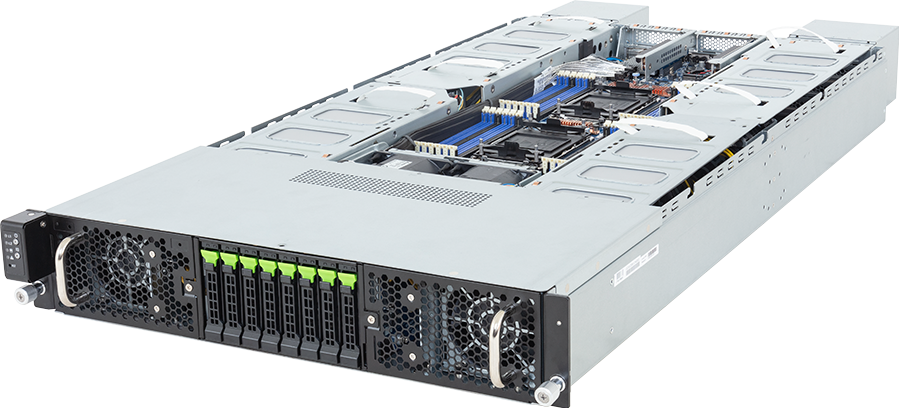
An eight-GPU server can be built in two very different ways. An NVIDIA HGX system puts SXM GPUs on a baseboard and connects them through NVLink and NVSwitch, so the GPUs behave as one tightly connected compute domain. A PCIe GPU server installs discrete accelerator cards in slots, which gives the buyer more choice over GPU count, card type, cooling and expansion.
That architectural difference matters more than the number of GPUs on the quotation. HGX suits jobs that continually move model state, gradients or tensors between GPUs. PCIe suits independent inference workers, rendering, virtual workstations, mixed research queues and projects that need to start with fewer accelerators.
Neither design is the automatic premium choice. An HGX node can waste money, rack power and operational effort when the jobs do not use its scale-up fabric. A PCIe platform can become the expensive mistake when a large model must span several GPUs and communication stalls the work.
Short answer
Choose an HGX server when one job needs several or all eight GPUs to exchange data at high speed. Large-model training, distributed fine-tuning within a node, tightly coupled HPC and low-latency inference for models that cannot fit on one card are the clearest cases.
Choose a PCIe GPU server when the scheduler will place separate jobs on separate cards, when graphics or video features matter, or when the organisation needs a wider choice of accelerator, CPU and chassis. PCIe is usually the more adaptable route for inference fleets, research teams, render farms and virtual workstations.
Before selecting either, answer four questions: how much memory a single job needs, how often its GPUs communicate, how the server will be scheduled, and what the rack can cool. Those answers remove most of the guesswork.
HGX and PCIe are platform choices, not just GPU choices
What an HGX server contains
NVIDIA HGX is a baseboard platform supplied through server manufacturers. Current eight-GPU HGX systems combine SXM accelerators with NVLink and NVSwitch. The OEM then builds the rest of the node around that board: host CPUs, system memory, local NVMe, network adapters, power supplies, fans or liquid-cooling hardware, management and service access.
NVIDIA's reference architecture lists eight H100, H200 or B200 GPUs on the relevant HGX baseboard. It gives H100 and H200 platforms 900 GB/s of GPU-to-GPU bandwidth and 7.2 TB/s of total NVLink fabric bandwidth. For HGX B200, those figures rise to 1.8 TB/s per GPU and 14.4 TB/s across the node. These are platform figures, not a promise that an application will scale by the same factor.
NVSwitch is the important part. It gives every GPU a high-bandwidth route to its peers instead of making GPU traffic compete solely through PCIe switches, CPU root complexes or system memory. Software still has to use the topology properly, but the hardware starts with a far stronger scale-up path.
An HGX node is also a fixed accelerator assembly. Buyers do not normally order two SXM GPUs now and add six later. The GPU generation and count belong to the baseboard, while the configurable choices sit around it.
What a PCIe GPU server contains
A PCIe GPU server uses accelerator cards installed in standard expansion slots. The cards may be NVIDIA RTX PRO, L40S, H200 NVL, AMD Instinct, Intel accelerators or another product supported by that server's qualified-vendor list. The exact mix depends on slot width, lane routing, power connectors, firmware and cooling.
This layout gives an OEM room to offer two, four, eight or sometimes more double-width cards. It can also leave slots for high-speed network adapters, storage controllers, DPUs or other devices. Some systems support direct liquid-cooled cards, while many use passive cards and a high-pressure fan wall.
Do not assume that every physically fitting card is supported. A server qualified for a 350 W GPU may not cool a 600 W card, and a full-length card may obstruct cabling or a neighbouring slot. The server model, riser revision, power distribution and GPU QVL must agree.
NVIDIA's RTX PRO 6000 Blackwell Server Edition illustrates the PCIe route. It provides 96 GB of GDDR7 ECC memory on a PCIe Gen 5 x16 card, with configurable power from 400 W to 600 W. NVIDIA positions RTX PRO servers for AI, simulation, graphics, video and virtual workstation work, with systems containing up to eight cards in its reference design.
The decisive test: how much GPU-to-GPU traffic does the job create?
Model size alone does not settle the choice. A model that fits on one GPU and serves many independent requests can run well on a PCIe fleet. The same total model size split across tensor-parallel workers may depend heavily on collective communication, which moves the decision towards HGX.
Training usually involves repeated exchanges of gradients and parameters. Tensor parallelism can require communication inside many layers. Pipeline parallelism moves activations between stages. Mixture-of-experts models can produce all-to-all traffic as tokens move between experts. These patterns reward a fast, predictable scale-up fabric.
Independent batch inference looks different. If each GPU holds its own model replica and receives a separate request queue, little peer traffic may cross the server. In that case, the value sits in memory per card, inference throughput, host-to-device data supply and the number of isolated workers, not in an all-to-all NVSwitch fabric.
Ask the software team for a communication profile rather than a broad label such as "AI workload". The right evidence includes the parallelism method, number of GPUs per job, collective operations, model memory footprint, batch and context assumptions, and measured communication time on the current platform.
Workload fit
Large-model training and multi-GPU fine-tuning
HGX is the normal starting point when a single training run spans most of a node. The baseboard gives NCCL collectives a high-bandwidth path between every GPU, and each generation packages a large pool of HBM into one scale-up domain. NVIDIA's published reference design gives an eight-GPU HGX H200 node 1,128 GB of HBM3e and an HGX B200 node 1,440 GB of HBM3e.
PCIe can still train models. It is a sensible development platform for jobs that fit on one card, loosely coupled experiments and teams whose queue contains many small runs. It can also serve distributed training when the application and network topology suit it. The warning concerns jobs that need heavy intra-node exchange: buying eight cards does not create an HGX-equivalent fabric.
LLM inference
Inference divides into at least two purchasing patterns.
For a model that fits on one GPU, replicas spread across PCIe cards can produce a clean, efficient serving pool. Each card has a defined failure and scheduling boundary. Different teams can receive separate GPUs, and the operator can scale capacity in smaller increments.
For a model split across several GPUs, interconnect becomes part of the token path. Long context, large key-value caches and strict latency targets can make the scale-up fabric important. HGX becomes easier to justify when profiling shows that peer communication limits prefill or decode performance.
Do not buy from a vendor benchmark headline alone. Test the model, quantisation, sequence lengths, concurrency and service software that will run in production. A throughput result at short input length may say little about a long-context service.
Rendering, simulation and virtual workstations
PCIe cards are normally the better fit where RT cores, display pipelines, video engines or vGPU profiles form part of the requirement. RTX PRO server cards are built for mixed AI and visual computing, while a PCIe chassis can expose individual cards to separate users or virtual machines.
HGX can run scientific simulation and visualisation workloads, but it should earn its cost through communication behaviour or memory scale. If each renderer or simulation worker remains independent, an RTX PRO platform may give the buyer more scheduling flexibility and a lower facility burden.
HPC
The phrase HPC covers both outcomes. Codes dominated by tightly coupled GPU collectives can suit HGX. Embarrassingly parallel parameter sweeps, Monte Carlo jobs and independent scientific workers can suit PCIe. Profiling the target solver matters more than its department label.
Memory is more than a total capacity figure
Eight 96 GB PCIe GPUs give 768 GB of aggregate GPU memory, but they do not create one transparent 768 GB allocation. The framework must partition the model or data, and the interconnect must carry the resulting traffic. The same caveat applies to HGX: NVLink and NVSwitch provide the fabric, but software still divides the work.
Start with the largest allocation that one process or one model shard needs. Then account for weights, optimiser states, gradients, activations, key-value cache, temporary workspaces and framework overhead. Add a margin for the actual deployment software. Marketing capacity figures rarely include all of those consumers.
When a model fits on one RTX PRO 6000 card, 96 GB per worker may support a useful independent-serving design. When the job needs several hundred gigabytes in one tightly coupled process group, the HBM pool and NVSwitch topology of HGX carry more weight.
CPU, RAM and PCIe topology still matter
HGX does not remove the host from the data path. The server still needs enough CPU cores and system memory bandwidth for data preparation, decompression, tokenisation, orchestration and storage traffic. NUMA placement also affects NIC and NVMe access.
NVIDIA's HGX reference architecture calls for two host CPUs, balanced PCIe connectivity across sockets, and symmetric memory population. That is a design baseline for the reference architecture, not a universal minimum for every purchased server. The OEM specification and workload validation remain authoritative for a particular product.
PCIe servers demand even closer topology inspection because accelerator cards, network adapters and storage devices share the available lanes and switches. A drawing should show which GPU and NIC connect to each CPU root complex. Without it, a system can look well populated in a bill of materials while forcing traffic across the socket interconnect.
For GPU Direct Storage, RDMA and distributed jobs, place the high-speed NICs and NVMe paths deliberately. Slot count by itself is not enough.
Networking changes once the server leaves one node
NVLink is an internal scale-up fabric. It does not replace the cluster network.
Multi-node training still needs a high-bandwidth east-west network with suitable adapters, switches, optics, cables, congestion control and topology. NVIDIA's HGX AI Factory reference design separates east-west compute traffic from north-south management and storage traffic, and it shows high-speed adapters connected with balanced CPU and PCIe placement.
A PCIe inference farm may need less peer traffic, but storage ingest, model distribution and request flow can still saturate weak network links. Size the network from measured data movement and the failure domain, not from the accelerator name.
The GPUMachines InfiniBand cluster solutions and Ethernet cluster solutions pages cover the two main scale-out paths. The final choice needs port arithmetic and a rack-level design.
Rack power, cooling and installation
HGX compresses a large amount of power into one node. NVIDIA lists HGX B200 GPUs as configurable up to 1 kW per GPU; the server also contains CPUs, DIMMs, storage, NICs, switches, fans and power-conversion losses. The complete chassis input can therefore sit well above the sum of nominal GPU power.
That has practical consequences. Check rack feed voltage, usable PDU capacity, connector type, redundant-feed derating, cold-aisle temperature, exhaust handling and whether the data hall accepts the chassis weight. Liquid-cooled models also need CDU, facility-water and leak-management decisions.
PCIe does not automatically mean low power. Eight RTX PRO 6000 Server Edition cards configured at 600 W already account for 4.8 kW before the host platform. PCIe does, however, give a buyer more room to select fewer cards or a lower card power setting when the workload allows it.
Use measured or OEM maximum system input for rack planning. A sum of GPU TDP values cannot replace a complete server figure.
Scheduling, isolation and service model
HGX works best when the scheduler can allocate large GPU groups without leaving unusable fragments. An eight-GPU training job maps neatly to one node; a queue full of one-GPU jobs may consume the same expensive platform without using its main advantage.
PCIe cards make smaller allocations straightforward. They also suit mixed queues where graphics users, inference services and research jobs need different accelerator counts. MIG or vGPU support may create smaller boundaries, but support varies by GPU, software release, hypervisor and licence. Check the current NVIDIA support matrix before committing to a virtualisation plan.
Service access differs too. Replacing a PCIe card and servicing an HGX baseboard are not the same job. Ask how the OEM handles field replacement, firmware bundles, Fabric Manager, health checks and baseboard faults. For hosted systems, confirm who owns that work and what spare strategy applies.
Cost: compare useful capacity, not chassis price
The cheaper server is the one that completes the intended work within its facility and support constraints. A PCIe node can have a lower entry cost because it may start with fewer GPUs, but expanding it later may require matching cards, available slots, power headroom and validated firmware. HGX costs more upfront and arrives as a fixed eight-GPU platform, yet it can avoid the communication penalty of stretching PCIe across a tightly coupled job.
Build the comparison around:
- price of the complete validated node, including CPUs, memory, storage and network adapters;
- usable GPU memory for the actual model and precision;
- rack power and cooling changes;
- licences, scheduler integration and operational support;
- expected utilisation under the real job mix;
- scale-out network and storage requirements.
A per-GPU price hides too much. So does a theoretical throughput figure with no workload, software or power context.
A practical selection path
Start with PCIe when
- most jobs use one GPU or run as independent replicas;
- the deployment mixes AI, rendering, simulation, video or virtual workstations;
- the team needs two or four GPUs before it needs eight;
- card-level scheduling and replacement matter more than maximum peer bandwidth;
- rack power or budget makes a fully populated HGX node hard to justify.
Browse the current PCIe GPU server catalogue and filter by GPU count, platform and cooling before comparing exact QVLs.
Start with HGX when
- one job routinely spans four or eight GPUs;
- profiling shows significant time in GPU collectives or peer transfers;
- the model requires a large, tightly connected HBM pool;
- the software stack already targets HGX and NVSwitch;
- the facility can supply and cool the complete node.
The HGX server catalogue covers H200, B200 and B300 systems from several OEMs. Compare the host platform as carefully as the baseboard because DIMM layout, NVMe bays, network slots and cooling differ.
Proof-of-concept checklist
Run the same software image and representative dataset on the shortlisted systems. Record end-to-end job time, GPU utilisation, memory headroom, communication time, storage throughput, network counters, host CPU load and wall power. For inference, include the real prompt and output distributions, concurrency and latency percentile targets.
Repeat the test after a GPU or network-path failure if availability matters. A design that posts a good steady-state number but takes hours to recover may be the wrong production platform.
The acceptance document should also record driver, CUDA, framework, firmware and Fabric Manager versions. That prevents a later software change from being mistaken for a hardware defect.
Common buying mistakes
Treating every eight-GPU server as equivalent
An eight-card PCIe chassis and an eight-GPU HGX system can share a rack-unit label while behaving very differently. Read the topology diagram and accelerator form factor.
Buying aggregate memory without checking the shard
Add up GPU memory only after the software team has shown how the model divides and what communication that division creates.
Ignoring the network and storage path
A fast scale-up node can sit idle while it waits for checkpoints, datasets or traffic from another rack. Include those systems in the proof of concept.
Assuming a future GPU will fit
Slot width, board length, power, connector layout, airflow and firmware qualification can all change. Only the OEM QVL confirms support.
Choosing HGX for prestige
If the queue contains independent one-GPU jobs, spend the difference on more useful capacity, storage, networking or operational resilience. HGX needs a communication-heavy reason to exist.
FAQ
Is HGX always faster than a PCIe GPU server?
No. HGX provides a much stronger intra-node GPU fabric, but an application must use several GPUs and exchange enough data for that advantage to matter. Independent jobs can run just as well on separate PCIe cards, subject to the chosen GPU and host configuration.
Can PCIe GPUs use NVLink?
Some data-centre PCIe products support specific NVLink arrangements, while others such as L40S do not. A point-to-point or paired link is not the same as the all-to-all NVSwitch fabric on an HGX baseboard. Check the exact GPU and server documentation.
Can an HGX server be divided between users?
It can, but the supported method depends on GPU generation, MIG or vGPU support, hypervisor, driver and licence. Full-node training allocation remains the cleanest way to use the platform's scale-up design.
Does an HGX server replace a fast cluster network?
No. NVLink and NVSwitch connect GPUs inside the node. Multi-node training, shared storage and cluster services still need a scale-out network.
Which design is better for private AI inference?
PCIe is often the better first choice when each service fits on one card and requests can be distributed across replicas. HGX becomes more relevant when one model instance spans several GPUs or strict latency depends on fast peer communication.
What should GPUMachines validate before quotation?
Provide the model and precision, GPU count per job, memory estimate, framework, expected concurrency, dataset and checkpoint behaviour, network topology, rack power and cooling limits. GPUMachines can then compare exact server platforms and prepare a configuration whose CPU, RAM, storage, NICs and accelerator support agree with the OEM documentation.
Use the GPU Cluster Configurator for an initial rack-scale view, then request a technical review before treating the generated design as an installation bill of materials.
Technical sources
- NVIDIA HGX platform
- NVIDIA HGX AI Factory reference architecture: components
- NVIDIA Fabric Manager user guide
- NVIDIA RTX PRO 6000 Blackwell Server Edition
- NVIDIA RTX PRO AI Factory reference architecture: components
- NVIDIA-Certified Systems list
Specifications and support matrices can change with firmware, driver and platform revisions. Confirm the exact OEM server, GPU QVL and software release before purchase. Vendor performance figures should be treated as claims until reproduced with the intended model, dataset and configuration.