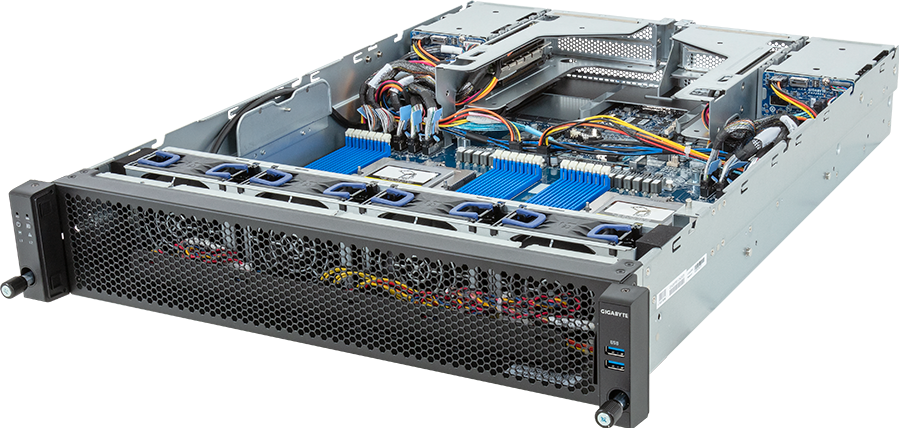
Place Edge AI Infrastructure Design Guide from remote operations: location, acoustics, thermals, remote management and user access decide whether local AI hardware is helpful or limiting.
Translate Edge AI Infrastructure Design Guide against cluster blocks, fabric oversubscription and shared storage; avoid forcing a workstation or edge box to behave like a shared datacentre platform. For GPUMachines, Edge AI Infrastructure Design Guide should produce a shortlist that reflects concurrency and uptime expectations.
Executive Summary
- Who it is for: teams planning multi-site inference, local data processing, remote management and resilient operations.
- Headline platform: tower GPU workstations, edge AI servers, compact systems and selected PCIe GPU servers.
- Why it matters: the wrong form factor can create noise, cooling, power, management or serviceability problems.
- When it is overkill: single lab prototypes with no deployment plan.
Compare tower GPU workstations, edge AI servers, PCIe GPU servers and GPU Cloud before deciding whether the workload should stay local or move into a shared platform.
Key Planning Table
| Area | What to check | | --- | --- | | GPU | VRAM, driver needs, model size, display or headless use | | CPU | Host processing, data preparation and PCIe lane support | | Memory | Dataset staging, development tools and local services | | Storage | NVMe capacity for models, datasets, scratch and outputs | | Form factor | Tower, rack workstation, compact system or edge server | | Noise and cooling | Office use, lab use, data centre use or industrial site | | Networking | Local access, shared storage, remote management and site uplinks | | Operations | Backups, patching, user access and remote support |
Platform Highlights
- Workstations are excellent for fast iteration because users can develop, test and inspect models without waiting for shared cluster queues.
- Edge systems are valuable when latency, data locality or intermittent connectivity makes centralised inference unsuitable.
- Rack workstations are easier for IT teams to power, cool, cable and manage than desk-side towers in larger deployments.
- GPU choice should be based on VRAM, thermals, driver support and workload duration, not only raw peak performance.
- Small form factor systems can be useful, but they should not be mistaken for full training servers.
Our Technical View
In the GPUMachines portfolio, Edge AI Infrastructure Design Guide sits between individual productivity and shared infrastructure. A workstation can be the fastest way to unblock researchers, developers or creative teams. An edge server can keep inference close to cameras, sensors, machines or local users. A rack GPU server becomes stronger when the workload needs shared access, uptime or multi-user scheduling.
The best choice is rarely the most powerful machine available. It is the system that fits where the work happens. For Edge AI Infrastructure Design Guide, the strongest designs are honest about physical location, user access, serviceability, noise, power and upgrade path.
Best-Fit Workloads
This category fits multi-site inference, local data processing, remote management and resilient operations. It is particularly relevant for local model evaluation, computer vision, generative image work, application prototyping, teaching labs, private assistants and small production inference at the edge.
It is less appropriate for multi-node LLM training, very high-throughput inference, shared GPU hosting or production clusters that need central scheduling and formal operational processes. Those workloads should be compared with HGX server platforms, PCIe GPU servers and the GPU cluster configurator.
Who Should Consider It
Consider this route if users need local control, quick iteration, direct application access or deployment near data sources. Universities, studios, engineering teams, manufacturers and field operations can all benefit when the machine is matched to the site rather than forced into a central model.
Who Should Not Buy It
Do not use a workstation or compact edge platform as a substitute for a real cluster when many users, long queues or large models are involved. Do not place noisy, high-power towers in offices without checking acoustics and heat. Do not deploy edge AI without a plan for remote monitoring, model updates and physical support.
Architecture Notes
For tower workstations, airflow, PSU headroom, chassis clearance and GPU slot spacing are crucial. For rack workstations, rack power, service access and remote management become more important. For edge systems, temperature range, dust, vibration, network availability and physical security may decide whether the deployment is sustainable.
PCIe lane allocation matters when GPUs, capture cards, NICs and NVMe devices share the same platform. Storage should include fast local NVMe for active work and a plan for syncing data to central storage where needed. If the workload later scales into a shared platform, the early system should not trap data or workflows in a dead end.
Configuration Guidance
Choose GPU memory for the model or workload, not for marketing labels. Populate system RAM generously enough for development tools, datasets and local services. Use NVMe for active models and scratch data, and connect to central storage where teams need shared projects or backups.
Networking should support remote access, file movement and management. For edge deployments, separate operational management from application traffic where practical. GPUMachines can review whether Buy & Host or GPU Cloud is a better route when local facilities are not suitable.
Recommended Configuration Paths
- Best for AI development: tower workstation with high-memory GPU, strong CPU, generous RAM and fast local NVMe.
- Best for managed lab use: rack workstation or PCIe GPU server with remote access, shared storage and clear user policy.
- Best for edge inference: compact or rugged edge server with remote management and a tested deployment process.
- Best for growth: start local, measure usage, then migrate repeated workloads into PCIe GPU servers, HGX server platforms or hosted private infrastructure.
Alternatives and Related Systems
If the workload is small, a compact system may be enough. If users need quiet desk-side development, a tower workstation is attractive. If IT wants central control, rack workstations or PCIe GPU servers make more sense. If the workload is already multi-user, compare GPU Cloud, Buy & Host and GPU cluster configurator.
Buying Through GPUMachines
GPUMachines can help with GPU selection, CPU/RAM balance, storage layout, noise and cooling questions, rack deployment, edge deployment and upgrade planning. The aim is to keep the system useful beyond the first model experiment.
Form-Factor Depth: What Changes the Choice
Edge AI Infrastructure Design Guide deserves more than a quick recommendation because the visible product choice is only one part of the platform. The practical design is shaped by local users, thermal limits, remote management and site deployment constraints, plus the support model that will keep the system useful after the first deployment.
The buyer is usually deciding where the work should physically happen: at a desk, in a rack, at the edge or inside a hosted private environment. In a GPUMachines review, the useful conversation starts with the role of Edge AI Infrastructure Design Guide, then works outward to the server, rack, network, storage and hosting route. This prevents the article from becoming a spec sheet and gives the buyer a clearer view of what must be true before the recommendation is safe.
For Edge AI Infrastructure Design Guide, the important planning route is to compare tower workstation, rack workstation, compact edge system, PCIe server and hosted GPU capacity. The strongest option is not always the largest platform. It is the one that keeps the workload productive without forcing unnecessary operational complexity.
Evidence to Collect Before Configuration
Before a final quote or configuration review, the buyer should collect evidence that describes the real workload. For Edge AI Infrastructure Design Guide, the most useful inputs are:
- Desk-side versus rack location.
- Noise, heat and power limits.
- GPU memory and driver requirements.
- Shared storage or local NVMe workflow.
- Remote access, backup and support expectations.
These inputs make the discussion more concrete. They also help GPUMachines distinguish between a temporary proof of concept, a production service, a research platform and a long-term private AI estate. Those four cases can point to very different hardware even when the public keyword looks similar.
Deployment and Support Notes
The deployment path should be chosen with utilisation, data movement, service level, power, cooling and support ownership in mind. If the system will run in a customer facility, the rack power, cooling, cable routing and remote management model need to be checked early. If GPUMachines hosts the system, the conversation shifts towards access, data movement, management responsibility and how the service will be operated day to day.
A serious deployment should also include a plan for monitoring, patch windows, user access, backups, failed-component replacement and configuration drift. Those points may sound less exciting than GPU choice, but they decide whether the platform remains dependable after the first successful run. For buyers comparing several options, this is often where the most sensible choice becomes obvious.
Misconfiguration Risks to Avoid
Common mistakes for Edge AI Infrastructure Design Guide include:
- Putting noisy, hot systems into spaces that cannot support them.
- Mistaking a workstation for shared production infrastructure.
- Forgetting remote management, backup and user access controls.
- Choosing compact hardware before checking sustained thermal behaviour.
The safest way to avoid these mistakes is to keep the buying process evidence-led. Define the workload, map the data path, choose the operating model, and only then settle the final GPU, CPU, RAM, storage and networking configuration. That sequence gives GPUMachines a better basis for review and gives the buyer a clearer reason for each part of the bill of materials.
Practical Review Checklist
Use this checklist before treating the article recommendation as final:
- Confirm the exact workload, model, dataset or business case behind the article topic.
- Decide whether the target is evaluation, production inference, fine-tuning, training, research, hosting or edge deployment.
- Check whether the selected route needs workstation access, PCIe GPU servers, HGX servers, shared storage, a high-speed fabric or hosted private capacity.
- Validate power, cooling, noise, rack, cabling and service-access assumptions before hardware is ordered.
- Define who owns monitoring, user access, backups, incident response, software updates and future expansion.
- Ask GPUMachines to review the configuration if any requirement is uncertain, especially around GPU compatibility, memory population, NIC placement, rack density or hosting.
This checklist is deliberately practical. It turns Edge AI Infrastructure Design Guide from a keyword into a buying conversation that can be acted on by engineering, procurement and operations teams.
Capacity Planning Detail
For Edge AI Infrastructure Design Guide, capacity planning should be written down before the configuration is treated as final. The useful planning document does not need to be complicated, but it should name the expected users, workload classes, data location, service targets and growth assumptions. It should also describe what happens when demand is higher than expected: whether the team queues jobs, adds another GPU, moves to a hosted node, expands a rack block or changes the model strategy.
The most important planning variable is physical location, acoustics, thermals and user workflow. If that variable is vague, the hardware decision will also be vague. A buyer can still move forward, but the quote should be understood as a starting point rather than a final architecture. GPUMachines can then review the assumptions and flag where CPU lanes, memory channels, NIC placement, NVMe capacity, shared storage, rack power or cooling could limit the build.
Review Questions for GPUMachines
A useful review should ask whether the proposed platform fits the actual operating model. For Edge AI Infrastructure Design Guide, that means checking whether the system belongs near users, in a rack, at an edge site or in a hosted environment. It also means confirming who will manage updates, monitor utilisation, respond to failures, control user access and decide when the system should be expanded.
Buyers should be especially cautious when a requirement is described only as a target GPU count or a fashionable model name. Those shortcuts hide the details that usually decide success: precision, concurrency, storage movement, network traffic, physical installation, support ownership and budget timing. A 2,000-word article can explain the trade-offs, but the final configuration should still be tied to measurable assumptions.
The strongest GPUMachines outcome is a design that can be justified in plain language. Each major component should have a reason: the GPU for the workload, the CPU for platform balance, the RAM for host-side pressure, the NVMe for active data, the network for traffic separation, the chassis for cooling and serviceability, and the deployment route for the organisation's operating maturity.
FAQ
Is a workstation enough for LLM work?
It can be enough for smaller models, quantised inference, evaluation and development. Large training or high-concurrency serving usually needs server infrastructure.
Should I choose tower or rack format?
Choose tower for direct user access and simpler desk-side workflows. Choose rack format when IT management, power, cooling, cabling and shared access matter more.
Does edge AI need a datacentre GPU?
Not always. Edge AI often needs the right thermal envelope, reliability and model size rather than the largest accelerator.
Can GPUMachines help move from workstation to cluster?
Yes. GPUMachines can review when a workflow has outgrown local systems and should move to PCIe servers, HGX infrastructure or hosted private GPUs.
What is the most common mistake?
The common mistake is ignoring location: office noise, rack power, remote management and physical access can be as important as GPU model.
Verdict
Edge AI Infrastructure Design Guide should be decided by workflow location, user profile and growth path. The ideal buyer knows whether they need local iteration, managed rack access or edge autonomy. If the workload is already shared, heavy and business-critical, move the design toward servers or hosted private infrastructure sooner.
Final step: compare tower GPU workstations, edge AI servers and PCIe GPU servers with GPUMachines before locking in the form factor.