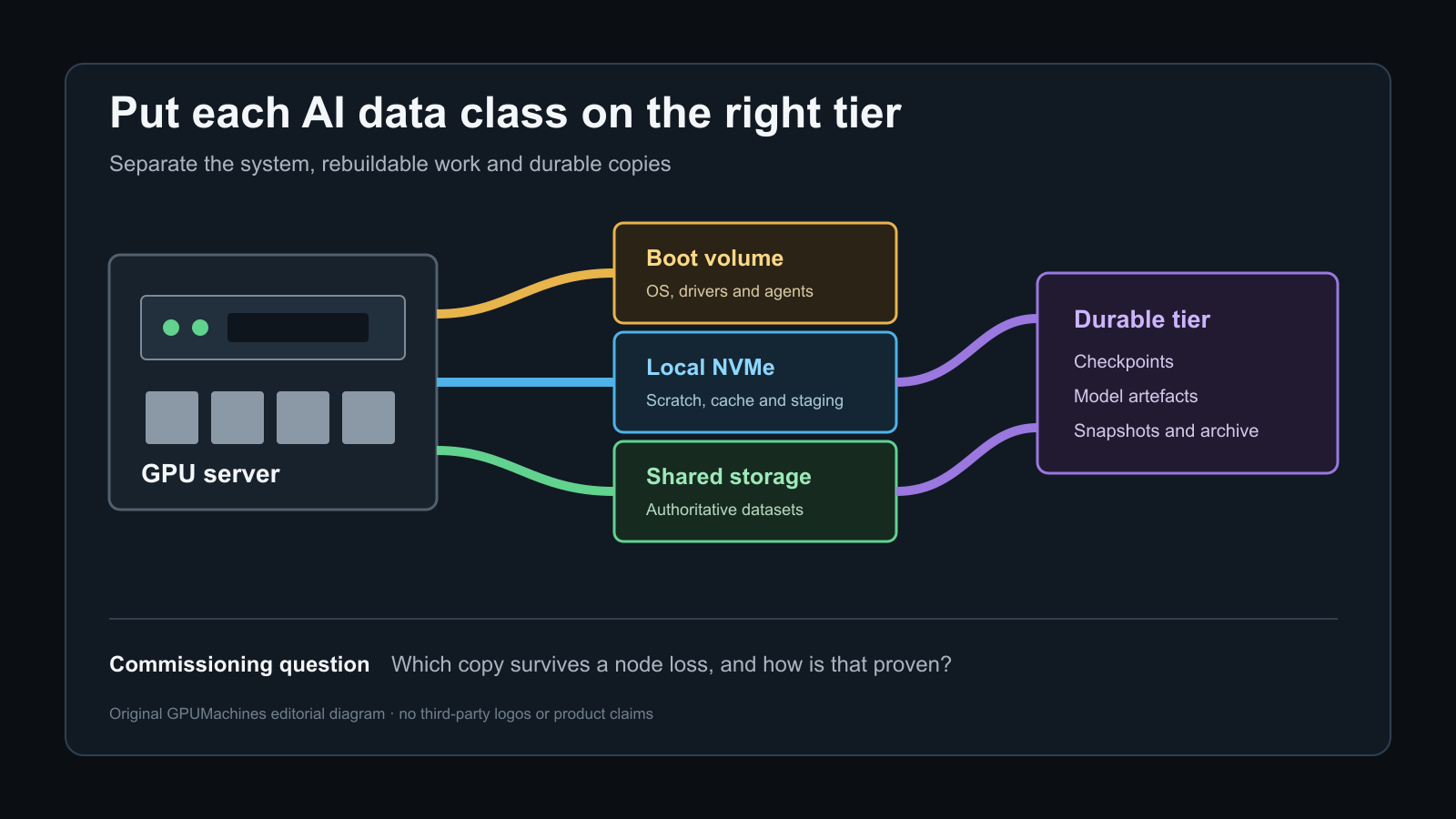
A GPU server can pass its compute checks and still disappoint in production because the storage layout was treated as an afterthought. A fast local NVMe volume does not replace durable shared storage, and a large shared filesystem does not automatically give each training job the latency or metadata performance it needs.
The practical answer is usually tiered. Keep the operating system separate from workload data. Use local NVMe for rebuildable scratch space, cache and short-lived staging. Keep authoritative datasets, model artefacts and durable checkpoints on shared or protected storage. Add object or archive storage where retention and cost matter more than immediate access.
This guide turns that principle into a commissioning plan. It covers device discovery, mount ownership, local versus shared storage decisions, checkpoint behaviour, small-file pressure, capacity headroom and the tests needed before users move real data onto the platform.
Decide what must survive before choosing a layout
Start with data durability, not drive count. List the data classes the system will hold and decide how each one is recreated, protected and recovered.
| Data class | Typical examples | Normal home | Recovery expectation | | --- | --- | --- | --- | | Operating system | Ubuntu, drivers, CUDA packages, monitoring agents | Dedicated boot devices or protected system volume | Rebuildable from the approved image, with configuration retained elsewhere | | Authoritative dataset | Training corpus, validated labels, reference features | Shared protected storage or governed object storage | Must survive a compute-node loss and follow the organisation's retention policy | | Local working set | Shards, unpacked samples, compiled kernels, temporary preprocessing output | Local NVMe scratch or cache | Rebuildable without restoring the server from backup | | Checkpoints | Model state, optimiser state, scheduler state and training progress | Durable shared storage, sometimes staged through local NVMe | Recovery point must match the stated restart objective | | Model artefacts | Exported weights, tokenisers, evaluation results, release bundles | Shared protected storage or model registry | Versioned, attributable and recoverable | | Logs and telemetry | Job logs, metrics, audit records | Central logging or shared service path | Retained according to operational and compliance requirements |
The key distinction is between a copy that accelerates work and a copy that the business depends on. RAID 0 local NVMe can be a sensible cache because the data can be repopulated. The same layout is a poor only copy of a week-long training run unless the failure and recovery policy explicitly accepts that risk.
NVIDIA documents the same tiered pattern for current DGX rack-scale systems: local NVMe can cache shared data and temporarily accelerate checkpointing, while the primary dataset and durable checkpoints remain on high-performance shared storage. That is a useful architectural reference, not a requirement to copy a DGX configuration on every custom server.
Inventory every storage path before changing it
Do not format or assemble volumes until the installed devices and controller paths are recorded. The server may contain separate boot media, CPU-attached NVMe bays, switch-attached NVMe, RAID-controller volumes and network storage interfaces. Rear-panel labels do not reveal all of those failure domains.
Use read-only discovery commands to build the first evidence set:
``text lsblk -e7 -o NAME,SIZE,TYPE,FSTYPE,MOUNTPOINTS,MODEL,SERIAL findmnt --real nvme list lspci -tv ``
Compare the operating-system view with the server manual, bill of materials and cabling record. Record the physical bay, device serial, firmware, PCIe address, NUMA locality, controller and intended role. If the system presents a hardware RAID volume, keep the member-drive and controller record with the logical device information.
Stop if a device contains an unexpected filesystem, encryption header, volume signature or data. Do not assume that an unmounted disk is unused. A commissioning record should identify who authorised any destructive provisioning step and where the recovery copy exists. This guide intentionally omits device-specific wipe and format commands because a generic command is not a safe substitute for the approved build plan.
Keep the boot path separate from workload pressure
The operating system should remain predictable while users fill scratch space or generate checkpoints. A dedicated boot pair or protected system volume gives the clearest boundary. If the hardware has only one pool of drives, use explicit capacity limits and monitoring so a workload cannot consume the free space needed for package updates, logs and recovery operations.
Do not place datasets in arbitrary directories under the root filesystem. Use named mount points with a documented purpose, for example:
``text /srv/ai/local-scratch /srv/ai/shared-datasets /srv/ai/checkpoints /srv/ai/models ``
The names are examples; consistency across nodes matters more than the exact prefix. A scheduler, container or training script should see the same path on every node where that path is expected. Avoid silent fallbacks in which an absent network mount leaves an ordinary local directory at the same location. A job can then write terabytes to the root disk while appearing to use shared storage.
For the operating-system baseline and first-login work that should precede storage provisioning, use the Ubuntu GPU server commissioning guide.
Use local NVMe for work that is genuinely local
Local NVMe is valuable when the workload can exploit low latency and high host-side bandwidth. Typical uses include caching hot dataset shards, staging archives before preprocessing, storing temporary shuffle output, holding compiler caches and absorbing short-lived checkpoints before a controlled flush to durable storage.
Local storage does not become shared because every node uses the same path name. A job that moves from one node to another will see different contents unless a data service synchronises them. Record whether the scheduler treats local storage as a consumable resource and how a job cleans up after success, failure or pre-emption.
Choose protection according to the role:
- Rebuildable cache or scratch: striping may improve aggregate throughput, but one device failure can invalidate the whole local pool. The cache population and cleanup process must be automated.
- Persistent local state: use a protected layout appropriate to the controller, device count and recovery objective. Verify degraded behaviour and rebuild operations using the platform vendor's procedure.
- Boot and service data: prioritise predictable recovery over peak benchmark numbers. Keep spare-capacity and log-growth requirements visible.
Do not claim aggregate drive bandwidth from the sum of product specifications. PCIe topology, controller paths, filesystem behaviour, queue depth, transfer size, thermal limits and the application all affect the result. Measure the installed path with the intended data pattern.
Make shared storage the durable coordination layer
Shared storage is normally the source of truth for multi-node training. It allows every participating node to read the same dataset, lets a replacement node resume from a checkpoint and keeps model artefacts independent of one server's local devices.
The protocol and platform may be NFS, a parallel filesystem, scale-out NAS, distributed block storage or an object-backed data service. Choose it from the workload and operations model rather than from a headline throughput figure.
Ask these questions before acceptance:
1. How many nodes and jobs will read concurrently? 2. Are files large and sequential, small and numerous, or a mixture? 3. How quickly and how often are checkpoints written? 4. Does the workload rename or atomically replace checkpoints? 5. What capacity, snapshot, replication and backup policy applies? 6. Which team owns the client, network and storage service during an incident? 7. Can the platform preserve user and group identity consistently across nodes? 8. What happens when one storage path, switch, client mount or metadata service fails?
NVIDIA's BasePOD reference architecture places storage traffic on the Ethernet management and storage fabric, separate from the high-speed compute fabric and out-of-band management. A custom cluster may use another design, but the storage path still needs named capacity, failure and ownership assumptions. The GPU server network separation guide explains how to document that boundary.
Plan for metadata as well as bandwidth
AI storage discussions often focus on gigabytes per second. Many production slowdowns instead begin with metadata: opening many small files, walking directories, checking permissions, creating temporary files or listing a checkpoint tree.
Record both the byte and object profile of the dataset. Ten terabytes held in a few large shards behaves differently from ten terabytes held in millions of images or token fragments. If the framework supports a suitable sharded format, packaging small objects can reduce open and stat pressure, but it changes update and recovery workflows. Test the actual framework and dataset representation rather than rewriting the corpus only to improve a storage benchmark.
Capacity planning also needs more than dataset size. Include:
- the authoritative dataset and expected growth;
- one or more transformed or tokenised copies where the pipeline creates them;
- active checkpoints and the retention window;
- model artefacts, evaluation output and temporary exports;
- snapshots, replication and filesystem overhead;
- local cache headroom and cache-eviction behaviour;
- free space reserved for recovery, maintenance and failed-job cleanup.
A volume that is 70% full at commissioning may become operationally full much sooner if snapshot retention or abandoned checkpoints are invisible to ordinary users. Record which measurement represents billable capacity, usable capacity and currently reclaimable space.
Set identity, permissions and quotas before copying data
Storage becomes difficult to repair after many jobs have created files with inconsistent ownership. Confirm user and group identifiers across the nodes, define the project-group model and decide who can create top-level directories.
Use service accounts only for services that need them. Do not make shared datasets world-writable to avoid an identity problem. Prefer group ownership, default ACLs or another supported policy that survives new directory creation. Record the expected umask, set-group-ID directory behaviour and any ACL inheritance.
Quotas should protect the service without making jobs fail mysteriously. Where the storage platform supports project or directory quotas, map them to an accountable team or workload. Expose quota and free-space telemetry to users and operators. A failed checkpoint caused by quota exhaustion must be distinguishable from a network, application or storage-device failure.
Test access from the same identity and container context used by production jobs. A root shell on the host can hide UID mapping, root-squash, supplemental-group and container-mount problems.
Define checkpoint semantics, not only a checkpoint directory
A checkpoint is useful only if the training framework can reopen it after the failure being planned for. Document:
- the files or objects that form one complete checkpoint;
- whether all ranks write and whether they must finish together;
- how completion is marked;
- whether the framework writes to a temporary location and renames atomically;
- how partial checkpoints are detected and removed;
- the local staging and durable flush sequence, if used;
- the maximum acceptable time and work lost after a restart;
- how many generations remain online and how older copies are archived.
Local checkpoint staging can reduce the time a training step waits for shared storage, but it introduces a second completion state. A checkpoint present on local NVMe is not durable if the node can fail before the flush finishes. Monitoring must show whether the checkpoint is local, transferring or confirmed on the protected destination.
Test a restart from a completed checkpoint. Do not stop at measuring write speed. A small representative recovery proves naming, permissions, version compatibility and the operator procedure without risking a full production run.
Treat GPUDirect Storage as an application and platform decision
GPUDirect Storage can provide a direct data path between storage and GPU memory, avoiding the ordinary bounce path through CPU system memory. NVIDIA's design guide explains that this can reduce CPU load and improve bandwidth or latency when I/O is on the critical path and the application uses a supported explicit data path.
That does not mean every workload, filesystem or NVMe device automatically benefits. The application or framework, CUDA and cuFile stack, GPU, driver, filesystem or block system, kernel, NIC or storage controller and system topology must form a supported combination. An application that parses data extensively on the CPU may remain CPU-mediated even when the storage platform advertises GDS support.
Record GDS as one of three states:
- not required: the workload meets its objective through the ordinary I/O path;
- planned but not yet accepted: the hardware and software design may support it, but validation remains outstanding;
- accepted: the exact installed stack and application path have passed the vendor-supported functional and performance tests.
Do not enable an unsupported path merely to improve a synthetic result. A stable conventional path is preferable to an unowned acceleration configuration.
Commission the storage in layers
Run tests in an order that keeps faults interpretable.
1. Record device and service health
Capture device inventory, firmware, controller state, filesystem or client version, mount options and storage-service health. Resolve media errors, link errors, degraded arrays and unexpected capacity before generating load.
2. Verify mounts and path identity
Reboot a test node and confirm that every required mount returns at the correct path. Verify that a failed shared mount does not expose a writable local fallback. Confirm source, filesystem type and options with findmnt.
3. Test permissions and quotas
Create, read, rename and remove test data as the production user and group. Repeat inside the production container or scheduler context. Check the expected quota reporting and denial behaviour.
4. Measure a representative local pattern
Use a temporary test area with an agreed size, block pattern, queue depth and duration. Record whether the test data fits in memory and whether direct I/O or cache dropping is appropriate to the question. The goal is a reproducible baseline, not the largest number the server can display.
5. Measure the shared path from one node
Test the real protocol and a representative file mix. Capture client, network and storage telemetry together so a low result can be located rather than merely repeated.
6. Increase concurrency deliberately
Add nodes and processes in known steps. Watch throughput, latency, metadata operations, retransmits, storage queues and CPU utilisation. A shared system should be accepted against an aggregate workload and per-job fairness objective, not a single-client peak.
7. Exercise dataset staging and cache reuse
Stage a sample of the real dataset, run a first-read path and then repeat the access. Confirm where each copy resides, how cache occupancy is measured and what evicts it. Prove that stale local data cannot silently replace an updated authoritative version.
8. Write and reopen a checkpoint
Create a representative checkpoint, confirm completion on the durable tier, restart the application and read it back. Include cleanup of an intentionally incomplete checkpoint where the framework supports that test.
9. Test one supported failure
Use a maintenance window and an approved procedure to remove one redundant path, client connection or storage component. Record which I/O continues, which pauses, how alerts fire and how the service returns to a healthy state. Do not improvise failure injection on a production dataset.
10. Recheck after reboot and failover
Confirm mounts, identity, capacity, telemetry and a short application test after restart. A successful benchmark before reboot does not prove persistent configuration.
Common storage commissioning failures
Training reads are fast once, then slow after a reboot. The first test measured a warm page cache or local cache without documenting it. Separate cold, warm and staged results and record the cache state.
The shared mount disappears and jobs fill the root disk. The mount point remained as a writable local directory. Add a mount dependency or guard appropriate to the platform and monitor both mount identity and root capacity.
One node cannot read files created by another. User IDs, group IDs, ACLs or container mappings differ. Repair identity and inheritance rather than granting broad write permissions.
A checkpoint directory exists but the job cannot resume. The checkpoint was partial, created by an incompatible software version or never flushed from local staging. Test recovery as part of every accepted workflow.
Four drives deliver less than four times one-drive performance. The drives share a PCIe path, controller, CPU link, thermal envelope or filesystem bottleneck. Use the topology record and telemetry to locate the actual limit.
GPUDirect Storage is installed but CPU use remains high. The application may not use the supported direct path, or the stack may fall back. Check the vendor's validation and tracing method for the installed release before attributing the result to GDS.
The benchmark is excellent but real training still waits for data. The test used large sequential files while the workload performs small reads, metadata-heavy access or CPU preprocessing. Benchmark the application-visible path and dataset shape.
Build the storage handover record
The completed record should include:
- every storage device, controller, firmware and physical bay;
- boot, local scratch, cache, shared dataset, checkpoint and archive roles;
- filesystem, mount, client and storage-service versions;
- mount paths, options and startup dependencies;
- ownership, groups, ACL inheritance and quota policy;
- network interfaces, switches and routes used by shared storage;
- local cache population, eviction and cleanup behaviour;
- checkpoint completion, flush, retention and recovery procedure;
- healthy, degraded and failed-state test results;
- monitoring dashboards, alert thresholds and named owners;
- backup, snapshot and restore responsibility;
- approved destructive-provisioning record, stored separately from credentials.
Do not include passwords, private keys, access tokens or unnecessary private addressing in the handover copy. Reference the organisation's approved secrets system and access process instead.
Size the storage with the workload and server order
Local drive bays, CPU lanes, PCIe switches, storage controllers and network adapters compete for real chassis resources. Decide the storage tiers while the server and cluster are being configured, not after the GPU slots and NICs have consumed the available topology.
Use the GPU cluster configurator to define the compute nodes, then ask GPUMachines for a storage and network review based on dataset size, file shape, checkpoint behaviour, concurrency, retention and recovery objectives. The lowest-cost design may be a protected shared tier plus modest local cache. A data-intensive training platform may justify more local NVMe, a parallel filesystem and a validated direct-I/O path.
The storage is ready when the team knows which copy is authoritative, what can be discarded, how a failed job resumes and how performance changes as nodes are added. Device count alone cannot answer those questions.