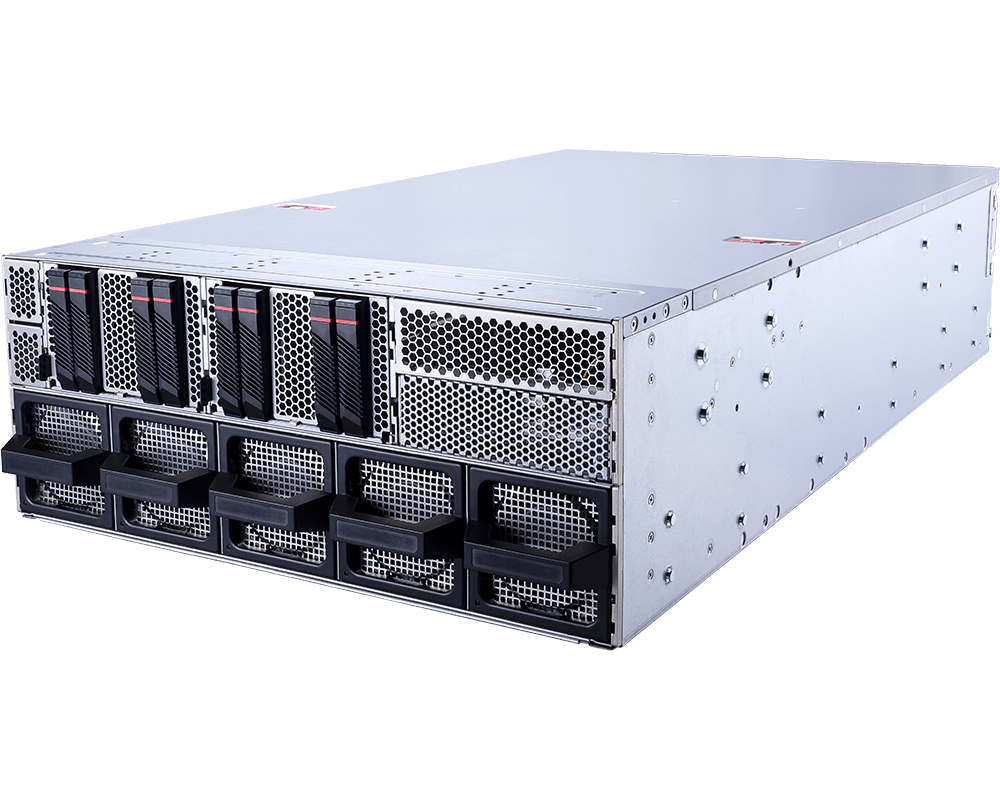
Eight GPUs in 4U can describe two very different machines. One may be built as a tightly coupled accelerator appliance; another may be intended to run separate inference replicas, render jobs or research experiments. The MSI CG480-S6053 belongs to the second, more configurable camp. It combines dual AMD EPYC 9005 processors with eight double-width PCIe GPU positions, thirteen PCIe 5.0 x16 slots in total and a front row of eight U.2 NVMe bays.
That distinction matters before a buyer starts selecting GPUs. The CG480-S6053 offers unusually broad freedom over accelerator, network and storage choices, but it does not turn eight PCIe cards into an HGX baseboard with NVLink and NVSwitch. Teams should choose it because their workload benefits from PCIe flexibility, independent GPU scheduling or custom I/O, not simply because the chassis has room for eight cards.
Configure the MSI CG480-S6053 eight-GPU server with GPUMachines.
Executive Summary
The MSI CG480-S6053 is a 4U NVIDIA MGX server for organisations that need a dense, configurable PCIe GPU platform around AMD EPYC 9005. MSI specifies support for as many as eight double-width accelerators, including NVIDIA H200 NVL and RTX PRO 6000 Blackwell Server Edition options. The platform also provides four additional PCIe 5.0 x16 positions through the switch complex and one CPU-attached x16 slot, giving the system room for high-speed network adapters, storage controllers or other specialist I/O.
Its strongest case is mixed or partitionable GPU work. Inference services, rendering queues, virtual workstations and research environments can schedule cards independently and avoid paying for an interconnect architecture they may not use. The platform is also useful when a buyer needs a particular NIC layout or wants to combine GPUs with other PCIe devices.
It is overkill for a single modest model, a lightly used lab or work that fits comfortably on one or two GPUs. It is also the wrong default for large-model training jobs whose performance depends on frequent all-to-all GPU communication. In that case, compare it with an HGX system before committing to a PCIe design.
Key Specifications
| Area | Verified platform detail | Buying implication | |---|---|---| | Form factor | 4U rack server, 438.5 x 175 x 800 mm | Requires a full-depth rack and planned front-to-rear airflow | | CPU platform | Two AMD EPYC 9005 processors, up to 500W each | High core counts and twelve memory channels per socket suit data preparation and multi-service hosts | | Memory | 24 DDR5 RDIMM slots, twelve channels per CPU, one DIMM per channel, up to 6400 MT/s | Populate symmetrically to preserve bandwidth; capacity depends on the selected DIMMs | | GPU support | Up to eight double-width PCIe GPUs via the switch complex | Flexible per-GPU scheduling; no assumption of HGX NVSwitch connectivity | | Local storage | Eight hot-swap U.2 PCIe 5.0 x4 NVMe bays; two M.2 2280/22110 PCIe 3.0 x2 positions | Good local scratch and model-cache capacity, with separate mirrored boot options | | PCIe expansion | Thirteen PCIe 5.0 x16 slots: eight double-width GPU, four single-width via switch and one single-width from CPU0 | Strong scope for fast NICs and specialist cards, subject to the validated slot map | | Networking | Two integrated 10GBase-T ports using Intel X710-AT2; dedicated 1Gb management | Production GPU traffic will usually need additional high-speed NICs | | Management | ASPEED AST2600, IPMI 2.0, Redfish, dual BIOS/BMC design, TPM 2.0 | Suitable for remote fleet operations and automated management | | Power | Four 3200W Titanium supplies in 3+1 redundancy | Rack power, connector and failover loading must be designed before purchase | | Cooling | Two EVAC CPU cooling modules and ten hot-swap fans | Built for sustained server airflow, not an office environment | | Best-fit workloads | Multi-GPU inference, rendering, research, GPU hosting and independent accelerator jobs | Best when flexibility matters more than a tightly coupled GPU fabric |
Specifications above are based on MSI's current product page and datasheet. Final support depends on the chosen GPU, firmware, ambient temperature, power feed and complete bill of materials.
Platform Highlights
- Eight GPUs without a fixed accelerator stack. Buyers can select cards to match memory capacity, precision support, certification needs and budget. That is useful for hosting providers and research teams whose GPU requirements change faster than the rest of the server.
- Thirteen x16 expansion positions. The additional slots are not a decorative line in the specification. They provide the physical route for high-bandwidth Ethernet or InfiniBand, storage acceleration and specialist data-ingest cards, although the final population must be checked against the riser and airflow plan.
- Twelve memory channels per EPYC socket. A GPU server can still be starved by its host. The EPYC 9005 memory subsystem helps when CPU-side tokenisation, preprocessing, simulation control or data decompression is substantial.
- Eight front U.2 Gen5 bays. Local NVMe can hold hot model weights, temporary training shards, render assets or checkpoint staging data close to the accelerators. It should be treated as a performance tier rather than an automatic substitute for protected shared storage.
- Serviceable 4U design. Hot-swap fans, front-access drives and remote management reduce routine service friction. The benefit appears over the life of a fleet, not only during the first installation.
Our Technical View
The CG480-S6053 occupies the flexible end of the eight-GPU range. It gives an infrastructure team more freedom than an HGX appliance, especially when the work consists of many separate GPU tasks or when a custom combination of NICs and accelerators is required. The AMD host platform, eight U.2 bays and spare PCIe positions make it a credible base for a self-contained inference or visual-computing node.
Its main limitation is architectural rather than cosmetic. PCIe provides the host and device attachment, but it does not reproduce the high-bandwidth, many-to-many GPU communication fabric of an HGX baseboard. Some H200 NVL configurations can use supported NVLink relationships, but buyers should not infer that every eight-card arrangement behaves like an eight-GPU HGX system. Topology, supported bridges and framework behaviour must be verified for the exact configuration.
For that reason, GPUMachines would position this model for workload flexibility first. A team running eight independent inference replicas may use it very effectively. A team trying to train one enormous model across all eight accelerators may be better served by HGX, even if the headline GPU count is identical.
Best-Fit Workloads
High-throughput and multi-tenant inference
Inference schedulers can assign separate models, replicas or customer workloads to individual GPUs. The 4U chassis provides the density, while the spare PCIe slots allow production network interfaces to be sized around actual token traffic and service-level objectives. Local NVMe can reduce repeated weight loading, but model distribution and cache invalidation still need an operational design.
Rendering and visual computing
Rendering engines often scale through independent frames or tiles rather than constant GPU-to-GPU communication. Eight PCIe accelerators can therefore be a more natural fit than an expensive tightly coupled baseboard. GPU choice should account for memory per scene, software certification and any display or virtual-workstation requirements.
Research and mixed accelerator labs
Research groups may need different GPU memory capacities, network adapters or data-acquisition cards. The CG480-S6053's expansion layout supports that kind of deliberate customisation. Reproducibility still benefits from standardising nodes within a cluster; flexibility should not become an unmanaged collection of one-off builds.
GPU hosting
A hosting provider can partition the system by assigning complete GPUs to separate tenants or services. Isolation, telemetry, reset behaviour and remote recovery should be tested with the selected virtualisation or container stack. The server's dedicated management interface helps operations, but it does not replace a proper control plane.
Scientific and engineering applications
Workloads with strong per-GPU compute and modest inter-GPU exchange can use the platform well. Applications dominated by collective communication need topology-aware benchmarking before procurement. The answer depends on the solver, dataset and decomposition method, not the number of GPU logos on a specification sheet.
Who Should Consider It
- AI service providers running several models or inference replicas on one node.
- Studios and engineering teams with parallel rendering or visual-computing queues.
- Universities and laboratories that need a configurable eight-GPU PCIe host.
- Enterprises that require specific NIC, storage or specialist PCIe combinations.
- GPU hosting operators that want dense, individually schedulable accelerators.
- Teams standardising on AMD EPYC 9005 for host compute and memory bandwidth.
Who Should Not Buy It
Do not start with this system if the workload uses only one or two GPUs. A tower workstation or smaller rack server will usually be simpler to power, cool and operate. A four-GPU server may also provide a better utilisation curve for teams that are still proving demand.
It should not be chosen as a lower-cost imitation of HGX for communication-heavy training. If one job must span all eight GPUs and spend significant time in collective operations, compare measured application behaviour on the proposed PCIe topology with an HGX alternative. The purchase price is only one part of the calculation; idle accelerators caused by communication bottlenecks are expensive.
The server is also unsuitable for shallow racks, quiet offices or facilities that cannot provide the required redundant high-voltage feeds and cooling. Its 800 mm chassis depth does not include cable bend radius, rear access or power-distribution space.
Architecture Notes
CPU and memory
Dual EPYC 9005 processors provide abundant PCIe connectivity and twelve memory channels per socket. CPU selection should follow host work rather than prestige. Inference servers that perform heavy tokenisation, retrieval, decompression or request routing can justify more host cores. GPU-bound rendering workers may benefit more from moderate CPUs and a larger accelerator budget.
Memory should be populated symmetrically across both sockets and all available channels before adding excess capacity to a subset of channels. NUMA placement matters: CPU threads, NIC interrupts, storage queues and GPU processes should be kept close to the devices they serve where the operating system and application permit it.
GPU topology
The eight double-width positions attach through a PCIe switch complex. That supports high aggregate connectivity and makes independent scheduling practical. It does not guarantee uniform peer-to-peer behaviour for every card and software stack. GPUDirect RDMA, peer access, IOMMU settings and supported link features should be checked against the final GPUs, NICs, drivers and firmware.
Storage
Eight U.2 Gen5 NVMe bays can deliver a capable local tier. A sensible layout separates mirrored boot devices from application data, uses multiple drives for parallel reads and reserves capacity for wear, rebuilds and checkpoints. For a cluster, shared storage still has to feed multiple nodes consistently. The local tier can cache or stage data, while Lustre, Ceph, Weka, DDN, VAST or another validated platform provides the shared namespace according to workload needs.
Networking
The integrated dual 10GbE ports are useful for management services, ordinary application traffic or installation, but they are not a default data fabric for eight modern GPUs. High-throughput distributed jobs may need 200GbE, 400GbE or InfiniBand, often with more than one adapter. NIC count, PCIe slot choice, rail design, switch radix and storage traffic all affect the final layout.
Power, cooling and serviceability
Four 3200W supplies in 3+1 mode provide redundancy only if the upstream design can carry the failure case. A rack PDU and circuit plan must account for the selected GPU power, CPU power, fans, drives and NICs at sustained load. Confirm inlet-temperature limits and avoid estimating heat rejection from nominal PSU capacity alone. Hot-swap components help maintenance, but adequate rear clearance and a documented service route remain essential.
Configuration Guidance
Choose CPUs for the data path
Start with measured or estimated CPU work per GPU. Select higher-core EPYC parts for preprocessing-heavy pipelines and multi-tenant inference. Prefer fewer, faster cores when latency-sensitive orchestration dominates. Check software licensing where fees are tied to cores.
Populate RAM for bandwidth first
Use balanced DIMMs across all twelve channels per socket. For many inference hosts, system RAM should comfortably hold active model artefacts, CPU-side caches and service overhead in addition to ordinary OS demand. Do not quote a universal RAM-to-GPU ratio; quantisation, offload and dataset handling alter it.
Separate boot, cache and protected data
Use mirrored M.2 devices for the operating system where the validated carrier and RAID method permit it. Use the U.2 tier for high-throughput scratch, model cache or checkpoint staging. Keep durable training data and irreplaceable results on protected storage with tested backup and recovery.
Design the network before filling the slots
Reserve the correct slots for the required NICs before adding optional devices. Define whether storage and GPU traffic share a fabric, whether management is physically separated and how many switch ports each node consumes. A later NIC upgrade can be awkward if power, airflow or slot locality were not planned.
Decide where the server will live
On-premise deployment suits teams with suitable rack power, cooling, network operations and physical access. Hosted deployment can shorten the path to a correctly powered rack and provide remote-hands support. Compare both over the expected utilisation period rather than treating hosting as a temporary afterthought.
Recommended Configuration Paths
Multi-model inference host
Specify eight datacentre GPUs with memory sized to the model portfolio, balanced EPYC processors, fully channelled RAM, mirrored boot devices and several U.2 drives for model cache. Add redundant high-speed Ethernet suited to north-south request traffic and any east-west model service. This path values independent GPU scheduling and operational isolation.
Rendering and visual-computing node
Choose GPUs around software certification, VRAM per scene and licensing. Moderate host CPUs may be sufficient, while local NVMe capacity becomes important for assets and temporary frames. Build a network path that can ingest projects and return results without leaving the GPUs waiting.
Research or HPC node
Prioritise host memory bandwidth, dataset staging and low-latency fabric. Validate peer-to-peer GPU communication with the intended application. If scaling one job across all eight cards is central, include an HGX comparison in the acceptance test rather than assuming the PCIe design will be equivalent.
Cost-controlled four-GPU start
The chassis can be considered for phased growth only after MSI and GPUMachines verify the supported partial population, airflow blanks, power cabling and slot order. In many cases a purpose-built four-GPU server is cleaner and less costly. The 4U platform makes sense when expansion to eight GPUs is credible and scheduled, not merely possible.
Alternatives and Related Systems
Read the GPUMachines guide to HGX versus PCIe GPU servers when the main question is interconnect architecture. The comparison of RTX PRO 6000 PCIe systems and HGX servers is useful for research and enterprise AI teams choosing between flexible GPU capacity and scale-up training performance.
A four-GPU rack server is a better alternative when utilisation cannot justify eight accelerators. An HGX system is the stronger candidate for tightly coupled large-model training. Teams without suitable facility power or operations can also consider GPUMachines Buy & Host, subject to current service availability and the final configuration.
Buying Through GPUMachines
GPUMachines can review the complete CG480-S6053 design rather than treating GPU selection as an isolated line item. That includes supported accelerators, CPU and memory population, boot and NVMe layout, NIC placement, transceivers, switch ports, rack power, cooling and deployment location. Compatibility is configuration-dependent and should be confirmed against the current MSI support matrix and firmware before ordering.
The same review can cover on-premise delivery, hosted deployment, leasing or Buy & Host options where available. For cluster projects, GPUMachines can also help map node count to the scale-out network and storage design so the servers are not purchased ahead of the fabric that must feed them.
Frequently Asked Questions
Is the MSI CG480-S6053 better for training or inference?
It is particularly well suited to inference, rendering and mixed workloads that can schedule GPUs independently. It can run training jobs, but communication-heavy training across all eight GPUs should be compared with an HGX platform using the actual framework and model.
Does it support NVIDIA H200 NVL?
MSI lists support for up to eight H200 NVL accelerators, alongside RTX PRO 6000 Blackwell Server Edition options. The exact supported arrangement, link topology, thermal conditions, firmware and cabling must be confirmed for the final bill of materials.
Are the integrated 10GbE ports enough?
They may be enough for management, installation or modest application traffic. Eight-GPU distributed workloads and high-rate inference commonly justify additional 100, 200 or 400Gb networking. The required rate depends on model traffic, storage design and cluster topology.
How much RAM should be installed?
There is no safe universal figure. Populate the EPYC memory channels symmetrically, then size capacity for preprocessing, model artefacts, CPU-side cache, concurrent services and growth. GPUMachines can review a proposed workload and DIMM layout.
Can the U.2 bays replace shared cluster storage?
They provide a strong local cache and scratch tier. They do not automatically provide a shared namespace, cross-node resilience or backup. Multi-node training usually needs a separate shared-storage design.
Can the server start with fewer than eight GPUs?
Potentially, but the supported slot order, power cables, airflow blanks and expansion path must be validated. If the system will remain at four GPUs, a dedicated four-GPU chassis may be more efficient.
What facility checks are required?
Confirm rack depth, rail compatibility, power voltage and connectors, redundant circuit capacity, PDU outlets, inlet temperature, heat rejection, network ports and rear service clearance before delivery.
Verdict
The MSI CG480-S6053 is a strong fit for buyers who need eight configurable PCIe GPUs, substantial host memory bandwidth and enough expansion room to build a deliberate network and storage path. Its best argument is flexibility: independent accelerators, custom NICs and useful local NVMe in a serviceable 4U platform.
That same flexibility is the reason to evaluate it honestly. It is not an HGX system, and it should not be bought on GPU count alone for a communication-heavy training workload. Choose it when the software benefits from PCIe-attached GPUs and the infrastructure team is prepared to design the full node around them.
Configure the MSI CG480-S6053 with GPUs, memory, storage and networking through GPUMachines.
Sources and Further Reading
Specifications checked on 14 August 2026. Product support and component compatibility remain configuration-dependent.