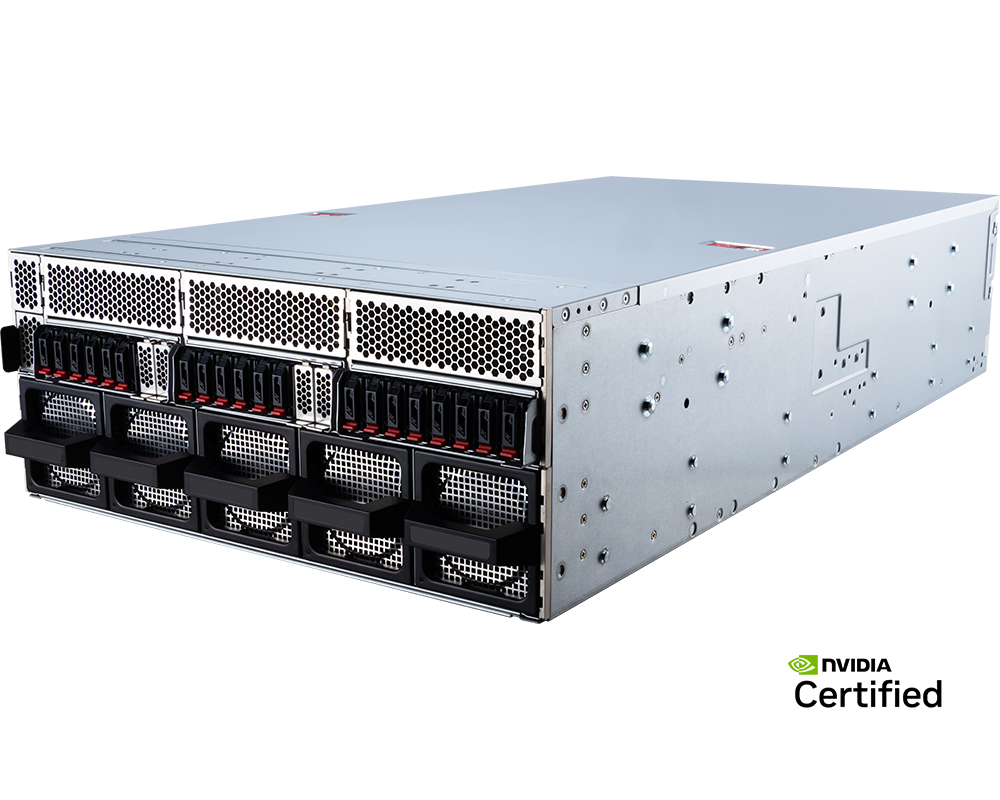
The most revealing number on the MSI CG480-S5063 is not eight. Eight GPU positions are expected in this class; twenty front-access E1.S bays are not. They make this 4U Intel Xeon 6 server interesting to buyers whose accelerators repeatedly load large model sets, retrieval indexes or checkpoint data and who want a dense local NVMe tier beside the GPUs.
That storage density does not remove the need for shared storage, and it should not distract from the machine's core architecture. The CG480-S5063 is an eight-GPU PCIe platform, not an HGX NVSwitch system. Its value lies in combining independently schedulable accelerators, a current Intel host, abundant E1.S storage and enough PCIe expansion for a serious network design.
Configure the MSI CG480-S5063 eight-GPU server with GPUMachines.
Executive Summary
The MSI CG480-S5063 is a 4U NVIDIA MGX and NVIDIA-Certified System built around two Intel Xeon 6 processors. MSI lists support for as many as eight double-width GPUs, including NVIDIA H200 NVL and RTX PRO 6000 Blackwell Server Edition options. Thirty-two DDR5 DIMM slots support balanced two-socket memory configurations, while twenty hot-swap E1.S PCIe 5.0 NVMe bays provide a distinctive local data tier.
It is aimed at inference hosting, research, visual computing and other workloads that can exploit separate PCIe accelerators. The E1.S layout is especially relevant when models, embeddings or temporary datasets must be staged locally at high throughput. Five total x16 positions beyond the eight GPU slots provide scope for fast network interfaces and other devices, subject to the validated riser map.
The machine becomes a poor fit when only a few GPUs will be used, when the facility cannot support its power and depth, or when one training job requires the high-bandwidth many-GPU fabric of HGX. The right comparison is architectural, not simply Intel versus AMD.
Key Specifications
| Area | Verified platform detail | Buying implication | |---|---|---| | Form factor | 4U NVIDIA MGX server, 438.5 x 175 x 800 mm | Full-depth rack deployment with planned cable and service clearance | | CPU platform | Two Intel Xeon 6 processors: 6700E, 6500P or 6700P families, up to 350W | Choice between core-density and P-core profiles should follow the host workload | | Memory | 32 DDR5 DIMM slots, eight channels per CPU and two DIMMs per channel | Greater capacity flexibility than a one-DIMM-per-channel design, with speed depending on population | | Memory speed | RDIMM up to 6400 MT/s at 1DPC; platform-specific 2DPC rates; MRDIMM up to 8000 MT/s at 1DPC with supported P-core CPUs | DIMM type, processor and population must be selected together | | GPU support | Up to eight double-width PCIe GPUs through the switch complex | Suits independent and partitionable workloads; does not imply HGX NVSwitch | | Local storage | Twenty hot-swap E1.S PCIe 5.0 x4 NVMe bays, ten associated with each CPU | Dense local model cache, scratch and checkpoint staging with NUMA-aware layout | | Boot storage | Two M.2 PCIe 5.0 x2 positions from CPU0 | Suitable for a separate mirrored operating-system tier where validated | | PCIe expansion | Eight double-width GPU slots and five further PCIe 5.0 x16 positions, thirteen x16 in total | Room for high-speed network and specialist I/O, subject to slot and cooling validation | | Networking | Two integrated 10GBase-T Intel X710-AT2 ports; dedicated management | Additional high-speed data fabric is likely for production GPU use | | Power | Four 3200W Titanium PSUs in 3+1 redundancy | Upstream feeds and PDUs must carry the degraded redundancy case | | Cooling | Ten hot-swap fans | Datacentre airflow and inlet temperature remain part of the configuration | | Best-fit workloads | Data-heavy inference, multi-model serving, GPU hosting, rendering and research | Strong when local NVMe density and PCIe flexibility matter together |
The table reflects MSI's current product and specification pages. Supported speeds and devices vary with processor, DIMM population, firmware, GPU power and environmental conditions.
Platform Highlights
- Twenty E1.S Gen5 bays. This is the feature that separates the CG480-S5063 from many eight-GPU servers. It can provide a large, serviceable local tier for model weights, vector indexes, checkpoints or scratch data without using rear PCIe slots for storage adapters.
- Intel Xeon 6 choice. Buyers can choose E-core 6700E parts for dense parallel host services or P-core 6500P/6700P options for stronger per-core behaviour and MRDIMM support. The correct answer depends on software, not a generic hierarchy.
- Thirty-two DIMM slots. Two-DIMM-per-channel capability gives capacity headroom, although higher population can reduce memory speed. A bill of materials should show both capacity and resulting data rate.
- Eight independently useful GPU positions. Inference replicas, render workers and research jobs can be allocated by card. That operational flexibility can matter more than peak inter-GPU bandwidth.
- NVIDIA certification. Certification provides a defined hardware and software support context. It does not guarantee application performance or remove the need to validate the chosen GPU, firmware and framework combination.
Our Technical View
The CG480-S5063 makes the most sense when the local data path is part of the purchasing decision. Many GPU server proposals focus on accelerator count and leave model loading, checkpoint writes and dataset staging to be solved later. Twenty E1.S bays give this platform an unusually capable answer, particularly for inference hosts that keep several large models warm or for research environments that rotate datasets frequently.
There is a caveat. Local NVMe improves one node; it does not create a shared cluster namespace. A large fleet can become difficult to operate if every node holds a different copy of each model and there is no disciplined distribution, versioning and recovery process. The E1.S tier should therefore be designed as part of a hierarchy: mirrored boot, local cache or scratch, and protected shared storage where the workflow requires it.
The other important boundary is the GPU fabric. The system's PCIe switch architecture supports eight accelerators and useful peer connectivity, but it is not the same as an HGX baseboard with NVSwitch. GPUMachines would favour this model for data-rich independent GPU services. For one tightly coupled training job, the acceptance plan should include an HGX comparison.
Best-Fit Workloads
Multi-model inference and retrieval-augmented generation
An inference service may need several model families, quantisations and tenant-specific adapters, plus a substantial retrieval index. The E1.S tier can keep frequently used assets close to the GPUs and reduce dependence on repeated network reads. CPU selection should account for tokenisation, retrieval and request handling, while NIC capacity should follow real concurrency and response targets.
High-throughput batch inference
Batch jobs often divide cleanly across GPUs and read large input collections. Local NVMe can stage those inputs, while the eight accelerators process separate partitions. The workflow needs a controlled method to populate and drain the local tier; otherwise fast drives merely move the queue to another part of the system.
Rendering and media pipelines
Twenty drives can hold active assets, caches and temporary output for a dense rendering node. PCIe GPUs are a natural match for independent frames or scenes. Confirm application certification, VRAM needs and licence terms before choosing accelerators.
Research platforms
Universities and laboratories may use the machine for several concurrent experiments, each with its own model and dataset. The capacity to divide GPUs and storage is useful, but quota management, data provenance and reproducible environments should be planned from the start.
GPU hosting
Hosting providers can assign whole GPUs and local NVMe namespaces to services or tenants. This can reduce noisy-neighbour effects, although isolation still depends on the selected container or virtualisation stack. Remote management, telemetry and automated recovery need testing before the platform enters a commercial service.
Who Should Consider It
- Organisations serving several AI models from one node.
- Teams that need a dense local NVMe cache beside eight GPUs.
- Research groups running concurrent, independent experiments.
- Rendering and content-production environments with large active datasets.
- GPU hosting providers that value per-card and per-volume allocation.
- Intel-standardised estates moving to Xeon 6.
Who Should Not Buy It
A smaller GPU server is the sensible choice if utilisation cannot keep eight accelerators busy. The E1.S feature should not be used to justify unnecessary GPU density. Teams beginning with one or two models may get a cleaner operational result from two- or four-GPU systems and a shared storage service.
The CG480-S5063 is also not the automatic choice for training one very large model across all eight GPUs. Collective communication can dominate scaling efficiency, and an HGX system's NVLink/NVSwitch fabric may be materially more appropriate. Compare the proposed software and model on representative hardware where the investment warrants it.
Do not deploy the system in a shallow rack or lightly provisioned equipment room. An 800 mm chassis still requires rails, rear cable radius and maintenance space. Four 3200W supplies and eight high-power GPUs demand a proper redundant power and cooling plan.
Finally, avoid the design if local drive sprawl would conflict with your governance model. Twenty bays make capacity easy to add; they do not automatically provide consistent data protection, encryption, lifecycle policy or cluster-wide visibility.
Architecture Notes
Xeon 6 selection
The supported Xeon 6 families create meaningful design choices. E-core processors can provide many host threads for preprocessing, multiple inference services and background data tasks. P-core processors may be preferable where per-thread latency, software licensing or MRDIMM support matters. Check the exact processor against MSI's current compatibility list and the intended DIMM technology.
Memory population
With eight channels per CPU and two slots per channel, the platform can favour either bandwidth or capacity. One DIMM per channel provides the cleanest high-speed population. Two DIMMs per channel can raise capacity but may lower the supported data rate. Populate both sockets symmetrically and document the achieved speed rather than quoting only the memory module's label.
E1.S storage topology
MSI divides the twenty front E1.S bays across the two CPUs. This is useful for bandwidth but introduces NUMA locality. Storage workers and GPU jobs should be placed with awareness of which CPU owns each drive and which PCIe switch path serves each accelerator. A simple filesystem benchmark can miss cross-socket traffic that appears under the real application.
Drive endurance matters as much as headline throughput. Checkpoint-heavy work can write continuously, while model caches may be read-dominant. Select endurance classes accordingly, reserve spare capacity and define replacement and secure-erasure procedures.
GPU and I/O fabric
Eight double-width devices attach through the PCIe switch complex, leaving additional x16 positions for network interfaces. Peer-to-peer transfers, GPUDirect RDMA and IOMMU behaviour depend on the exact topology, GPUs, NICs, drivers and firmware. The slot map should be part of the configuration record, not an installation-day decision.
Network and shared storage
Dual 10GbE is not a universal production fabric for eight GPUs. Model distribution, distributed inference or cluster training may need 200GbE, 400GbE or InfiniBand. Shared storage traffic can use the same fabric only when congestion and quality of service have been designed. In larger clusters, separate rails or disciplined traffic classes can prevent storage bursts from delaying GPU collectives.
Power and cooling
The 3+1 PSU arrangement should be modelled with one supply unavailable. Confirm the input voltage, connectors, PDU branch capacity and upstream redundancy. The selected GPU power limit, CPU choice, drive count and NICs all contribute to the thermal load. Ask for a configuration-specific power estimate instead of using PSU faceplate capacity as consumption.
Configuration Guidance
Define the local storage job
Decide whether E1.S is a cache, scratch tier, checkpoint target or protected local dataset store. Each role has different endurance, RAID and capacity needs. Avoid filling all twenty bays before the data lifecycle is defined.
Keep the operating system separate
Use the M.2 positions for a mirrored boot design where supported. This preserves the front bays for application data and simplifies service. Confirm how RAID or software mirroring interacts with remote recovery and firmware updates.
Select CPU and RAM together
Choose the Xeon family based on host work, then select RDIMM or supported MRDIMM population. Balance memory across both sockets. Capacity planning should include active model copies, CPU-side caches, retrieval indexes and service overhead, not only dataset size.
Reserve NIC capacity early
Specify network rate, port count and protocol before finalising the risers. Include transceivers, cables and switch ports in the quote. For cluster work, document rail mapping and failure behaviour; two fast ports are valuable only if the topology uses them coherently.
Plan drive operations
Twenty removable drives create monitoring and replacement work. Integrate NVMe health, temperature, firmware and wear data into the operations stack. Label slots and map serial numbers so a remote-hands technician can replace the intended device.
Recommended Configuration Paths
Data-heavy inference host
Use eight GPUs with memory sized to the model portfolio, P-core or E-core Xeon 6 processors selected for measured host demand, balanced RAM, mirrored M.2 boot and a striped or pooled E1.S cache sized for all hot models. Add redundant high-speed Ethernet and maintain a protected source of truth for model artefacts outside the node.
Multi-tenant GPU hosting
Prioritise accelerators that support the intended isolation method, generous system memory, per-tenant E1.S allocation and redundant data NICs. Test reset, monitoring and fault containment. Preserve the dedicated management network for BMC access rather than mixing it with customer traffic.
Research and experimentation
Choose capacity-rich RAM, a mix of E1.S endurance suitable for dataset staging and checkpoints, and a cluster fabric that can be expanded. Standardise container images and data paths so results can be reproduced on another node.
Rendering node
Select GPUs for certified application support and VRAM, use the E1.S tier for active project assets and caches, and size host CPUs to the renderer's preparation work. A high-throughput link to central project storage remains necessary for collaboration and protection.
Alternatives and Related Systems
Buyers deciding whether the eight GPUs need a scale-up fabric should read HGX versus PCIe GPU servers. For research and enterprise AI, the RTX PRO 6000 PCIe versus HGX guide explains why model fit and communication pattern matter more than a simple GPU-count comparison.
An AMD-based eight-GPU PCIe server may be preferable where twelve-channel memory and EPYC standardisation matter more than the twenty-bay E1.S layout. A four-GPU platform is usually better for smaller teams. HGX should be considered for tightly coupled training. Where facility readiness is the constraint, GPUMachines Buy & Host can be evaluated against on-premise deployment, subject to current availability.
Buying Through GPUMachines
GPUMachines can review the CG480-S5063 as a complete data path: Xeon family, DIMM type and population, GPU support, E1.S capacity and endurance, boot design, NIC placement, switch ports, optics, rack power and cooling. This matters because the platform's most useful options interact. A two-DIMM-per-channel memory plan changes speed; a full drive population changes power and heat; a high-speed NIC plan consumes specific slots and switch ports.
For multi-node projects, the review can extend to shared storage, fabric topology, deployment and hosting. Compatibility and performance remain configuration-dependent, so the final bill of materials should be checked against current MSI documentation and the software stack before ordering.
Frequently Asked Questions
Why does the MSI CG480-S5063 have twenty E1.S bays?
They provide a dense, hot-swap local NVMe tier for caches, model weights, temporary datasets and checkpoints. Their value depends on a defined data lifecycle; they are not automatically a substitute for shared storage or backup.
Is it an HGX server?
No. It is an NVIDIA MGX PCIe GPU platform. Eight supported GPUs do not imply an HGX NVSwitch fabric. Buyers with tightly coupled training workloads should compare both architectures.
Should I choose Xeon 6700E or a P-core processor?
E-core parts can suit highly parallel host services, while P-core parts may suit per-thread latency, licensing and supported MRDIMM configurations. The application profile and memory plan should drive the choice.
How much E1.S capacity is sensible?
Size it from the hot working set, checkpoint volume, redundancy method, endurance and rebuild policy. Leave operational headroom. Filling every bay with the largest drive is not a data-management strategy.
Does the system need a 400Gb network?
Not automatically. High-rate distributed work may justify 200 or 400Gb links, while independent inference services may be constrained by north-south demand instead. Model loading, storage traffic and cluster communication should be measured or estimated separately.
Can E1.S drives be shared between nodes?
The drives are local to the server. Software can expose local data over a network, but that is a separate distributed-storage design with its own resilience and operational requirements.
What should be checked before rack installation?
Verify rail and rack depth, rear clearance, voltage, connectors, redundant PDU capacity, inlet temperature, network ports, optics, cable paths and heat rejection for the selected bill of materials.
Verdict
The MSI CG480-S5063 is not merely another 4U eight-GPU server. Its twenty E1.S bays make it a compelling platform for buyers who know why they need a large local data tier and can operate it coherently. Xeon 6, thirty-two DIMM slots and extensive PCIe expansion complete a flexible inference, research or rendering node.
The machine is less convincing when storage has no defined role or when one training job needs all eight GPUs to communicate as a tightly coupled unit. In those cases, a simpler PCIe server, shared-storage investment or HGX system may deliver a better result. Choose the CG480-S5063 when local data movement is part of the workload architecture, not an afterthought.
Configure the MSI CG480-S5063 with GPUs, E1.S storage, memory and networking through GPUMachines.
Sources and Further Reading
Specifications checked on 14 August 2026. Processor, memory, GPU, drive and network support remain configuration-dependent.