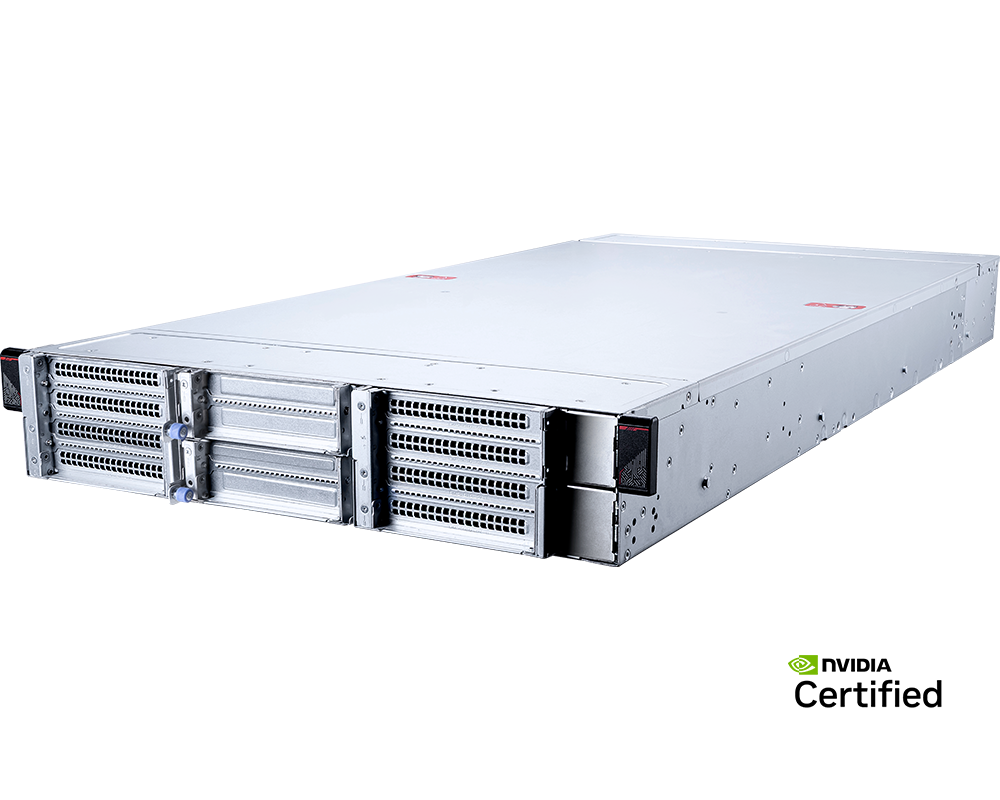
Putting four high-power GPUs into 2U saves rack space; it does not make the server small in every practical sense. The MSI CG290-S3063 is 900 mm deep, expects datacentre airflow and uses four 2400W power supplies in a 2+2 arrangement. It is a dense rack platform, not a shallow edge appliance or an office workstation.
For the right buyer, that density is useful. A single Intel Xeon 6 processor, four double-width PCIe GPU positions, three additional x16 slots and local Gen5 NVMe create a compact unit for inference, rendering, research or hosted GPU capacity. The system works best when four accelerators are the natural scheduling unit and rack U is scarce.
Configure the MSI CG290-S3063 four-GPU 2U server with GPUMachines.
Executive Summary
The MSI CG290-S3063 is a 2U NVIDIA MGX server supporting one Intel Xeon 6500P or 6700P processor and up to four double-width PCIe GPUs. MSI lists RTX PRO 6000 Blackwell Server Edition configurations and references H200 NVL support in the platform overview. Sixteen DDR5 DIMM slots provide two-DIMM-per-channel capacity, with supported MRDIMM speeds up to 8000 MT/s at one DIMM per channel on appropriate P-core CPUs.
Four rear U.2 PCIe 5.0 NVMe bays and two M.2 Gen5 positions provide local storage. Three additional PCIe 5.0 x16 single-width slots can carry high-speed NICs or specialist adapters. The single-socket host reduces NUMA complexity compared with dual-socket eight-GPU designs, although it also limits total host cores, memory channels and capacity.
This model suits organisations that want four serious GPUs in the smallest rack footprint that remains serviceable as a conventional server. It is overkill for one-GPU work and a poor fit for shallow racks, low-voltage circuits that cannot deliver full PSU output, or training jobs that require an eight-GPU NVSwitch domain.
Key Specifications
| Area | Verified platform detail | Buying implication | |---|---|---| | Form factor | 2U rack server, 438.5 x 88 x 900 mm | Saves rack units but requires a deep rack and generous rear clearance | | CPU platform | One Intel Xeon 6500P or 6700P processor, up to 350W and 136 PCIe lanes | Simpler NUMA domain; lower aggregate host capacity than a dual-socket platform | | Memory | 16 DDR5 DIMM slots, eight channels and two DIMMs per channel | Good single-socket capacity; speed varies by DIMM type and population | | Memory speed | RDIMM up to 6400 MT/s at 1DPC and 6000 at 2DPC; MRDIMM up to 8000 at 1DPC with supported P-core CPUs | Processor and memory technology must be selected together | | GPU support | Four PCIe 5.0 x16 double-width positions | Dense four-GPU node for independent or moderately coupled workloads | | Additional expansion | Three PCIe 5.0 x16 single-width slots | Room for data NICs or specialist adapters, subject to thermal validation | | Local storage | Four rear U.2 PCIe 5.0 x4 NVMe bays | Fast local cache and scratch, but rear service access is required | | Boot storage | Two M.2 PCIe 5.0 x2 positions | Separate OS tier, with mirroring subject to the validated design | | Networking | Add-in data networking; dedicated management through ASPEED AST2600 | NIC selection must be included in the initial configuration | | Power | Four 2400W Titanium PSUs in 2+2 redundancy; full output requires the supported high-voltage input range | Voltage, C19 cabling and redundant PDU capacity are pre-purchase checks | | Environmental note | MSI lists supported high-power GPU configurations at 30C ambient | Inlet temperature must be controlled for the chosen accelerators | | Best-fit workloads | Four-GPU inference, rendering, research, simulation and hosting | Strong when rack density and a single CPU domain matter |
Specifications are based on MSI's current overview and specification page. Exact GPU support, power output and thermal limits depend on the final configuration and facility input.
Platform Highlights
- Four double-width GPUs in 2U. The platform halves the rack-unit footprint of many four-GPU systems. This can matter in colocation or dense clusters where rack space is priced and power is already available.
- Single-socket Xeon 6 architecture. One CPU removes cross-socket memory and I/O paths. That can simplify affinity and reduce unnecessary host cost for workloads whose CPU demand is moderate.
- Three spare x16 slots. A four-GPU node still needs network connectivity. The additional slots provide room for fast Ethernet or InfiniBand without displacing an accelerator.
- Current memory options. Sixteen slots support capacity growth, while supported MRDIMM configurations can raise memory data rate. The selected Xeon and DIMM population govern what is actually available.
- Rear U.2 service model. Four Gen5 NVMe bays keep the front available for airflow, but technicians need rear access to replace drives. That affects rack placement and operational procedures.
Our Technical View
The CG290-S3063 is a density-led four-GPU platform. Its single-socket design is not a compromise when the workload does not need two CPUs; it can be an advantage. Fewer NUMA boundaries make process, NIC and GPU placement easier, and host budget can be directed towards accelerators or networking. For inference replicas, render workers and many research jobs, four GPUs per node is also a manageable failure and scheduling domain.
The 2U label should not obscure the physical and electrical reality. At 900 mm deep, the server may be longer than some 4U systems. Four redundant 2400W supplies require the correct input voltage and C19 power distribution, and the supported high-power GPU environment assumes controlled inlet temperature. A buyer saving rack U must still allocate depth, power and cooling.
The machine is not intended to mimic an eight-GPU HGX server. Four PCIe GPUs can communicate through the host topology and supported peer paths, but there is no eight-GPU NVSwitch domain. GPUMachines would position it for compact, repeatable four-GPU nodes rather than the largest single-node model-training jobs.
Best-Fit Workloads
Multi-GPU inference
Four cards can host separate model replicas, model families or tenant workloads. The single CPU can handle request routing, tokenisation and data movement if selected for the measured concurrency. One or more high-speed NICs should be added according to north-south demand and any inter-node parallelism.
Rendering and media processing
Independent frames, scenes or video segments can map efficiently across four PCIe GPUs. Local U.2 storage can cache active assets, while central storage remains the source of truth. GPU choice should follow software certification and memory per scene rather than peak theoretical arithmetic alone.
Scientific simulation
Codes with strong per-GPU compute and manageable communication can use four accelerators effectively. Validate PCIe peer access and the application's scaling curve. If the solver needs constant exchange across more than four GPUs, cluster fabric or an HGX alternative becomes central.
Research team server
A laboratory can divide the node into individual GPU jobs or allocate all four cards to one experiment. The four-GPU boundary is easier to schedule than an expensive eight-GPU node when individual researchers rarely need the whole machine. Container standards and quotas help avoid conflicts.
Hosted GPU capacity
The 2U footprint can suit colocation and Buy & Host economics where rack units matter. Power density may become the binding constraint before physical U, so compare both. Remote management and a documented rear-service process are necessary for unattended operation.
Who Should Consider It
- AI teams whose natural workload unit is one to four GPUs.
- Hosting providers seeking dense, repeatable 2U GPU nodes.
- Research groups that need a shared four-GPU rack server.
- Rendering and engineering teams with parallel job queues.
- Intel-standardised estates that want a single-socket Xeon 6 host.
- Buyers with suitable deep racks, high-voltage power and datacentre cooling.
Who Should Not Buy It
Do not choose the CG290-S3063 for a shallow communications rack, branch office or desk-side environment. The chassis is 900 mm deep, the fans and power system are designed for a datacentre, and rear U.2 drives require service clearance.
It is unnecessary for workloads that consistently use one GPU. A workstation or smaller server will usually be easier to deploy and may offer better CPU, acoustic or display options. If two GPUs are the stable requirement, compare purpose-built two-GPU systems rather than buying empty slots for an uncertain future.
The server is also not the best starting point for a single model that already needs eight tightly connected accelerators. Multiple CG290 nodes add scale-out network hops, while an HGX platform provides a local scale-up fabric. Model architecture and communication volume should decide.
Facilities limited to low-voltage input should verify available PSU output very carefully. MSI specifies full 2400W PSU output only in the supported higher-voltage range. Derated supplies can change which GPUs and redundancy conditions are viable.
Architecture Notes
Single CPU and PCIe lanes
One Xeon 6 processor provides up to 136 PCIe lanes for four GPUs, three additional x16 slots and local storage. The absence of a second socket simplifies affinity: all host memory belongs to one NUMA node, although PCIe switches and root-complex paths still shape device locality. This can reduce configuration mistakes in container and virtualisation environments.
The trade-off is host ceiling. A dual-socket server can provide more cores, memory channels and total RAM. If preprocessing, simulation control or data services consume substantial CPU, estimate that demand before relying on a single socket.
Memory design
Eight channels and sixteen slots allow one- or two-DIMM-per-channel configurations. Populate one matched DIMM in every channel before adding a second. Supported speed varies with CPU and memory type; MRDIMM may provide higher data rate with suitable P-core Xeon 6 parts, while capacity-focused 2DPC layouts can run more slowly.
System RAM should cover active CPU-side model artefacts, preprocessing buffers, storage cache and concurrent service overhead. GPU memory remains separate; large system RAM does not make an oversized model execute efficiently on insufficient GPU VRAM unless the software deliberately supports offload.
GPU topology and spacing
Four double-width PCIe 5.0 x16 positions are arranged for server airflow and high-power accelerators. Confirm supported card dimensions, auxiliary power connectors, power limit and thermal conditions. Consumer cards are not interchangeable with validated server GPUs simply because the connector fits.
For multi-GPU software, inspect the actual topology and peer-to-peer support. Four PCIe cards can be effective for data-parallel or independent tasks, but collective efficiency depends on transfers, framework and batch size.
Storage and rear service
Four U.2 Gen5 bays provide local scratch, model cache or checkpoint staging. Their rear location means drive replacement occurs in the hot aisle. Ensure rails and cable management allow access without disconnecting network or power cables. Use the M.2 positions for mirrored boot where supported and keep irreplaceable data on protected storage.
Networking
The three single-width x16 slots allow a deliberate NIC design. A standalone inference server may need redundant 25, 100 or 200GbE rather than the fastest available link. Distributed training or high-rate storage could justify 400GbE or InfiniBand. Include optics, cables and switch ports when comparing costs.
Power and cooling
Two active plus two redundant 2400W supplies can preserve service through failures only if each power feed and PDU supports the design. Confirm high-voltage input, C19 outlets, cable rating and phase balance. Calculate heat from the configured components and expected utilisation, then check MSI's ambient limits for the chosen GPUs.
Configuration Guidance
Select the GPU before final power design
Start with VRAM, software support and workload fit. Use the selected card's validated power profile to size PSUs, feeds and cooling. Do not assume all double-width GPUs have the same electrical or thermal requirements.
Right-size the single CPU
Choose enough cores and frequency for tokenisation, data loading, simulation control or rendering preparation. Avoid paying for cores that remain idle behind GPU-bound jobs. Check core-based software licences.
Populate RAM symmetrically
Use all eight channels before 2DPC. Decide whether capacity or peak memory rate matters more, then select RDIMM or supported MRDIMM accordingly. Record the expected operating speed in the quote.
Reserve NIC slots
Define whether the node needs one data port, redundant ports, separate storage traffic or multiple cluster rails. Place adapters according to MSI's validated slot and airflow plan. Keep BMC management on the dedicated management network.
Plan for rear maintenance
Document cable routes and label the U.2 bays. Leave enough service loop for cables and enough aisle access to replace a drive. A dense 2U server can be easy to install and awkward to repair if rear space was ignored.
Recommended Configuration Paths
Four-GPU inference server
Use four datacentre GPUs sized to the model set, a Xeon 6 CPU matched to request preparation, balanced RAM, mirrored M.2 boot and U.2 drives for model cache. Add redundant high-speed Ethernet and test failover without relying on the customer-facing network for management.
Research node
Specify generous system memory, several U.2 drives for temporary datasets and checkpoints, and a fabric that allows future cluster expansion. Use scheduler policies that permit one-, two- and four-GPU allocations without stranding capacity.
Rendering worker
Choose GPUs from the renderer's certified list, moderate host CPU capacity and enough local NVMe for active assets. A fast link to central project storage is still required. Validate acoustics and environment by treating it as a datacentre system, not a studio workstation.
Cost-controlled hosted deployment
Fit the number of GPUs justified by near-term demand only after MSI confirms supported partial population, airflow and cabling. Compare phased growth with a smaller chassis. In colocation, model power and rack U together because the power allocation may cap density first.
Alternatives and Related Systems
The GPUMachines comparison of HGX and PCIe GPU servers helps buyers decide whether four flexible cards are sufficient or a scale-up fabric is required. Teams considering professional Blackwell accelerators can also read RTX PRO 6000 PCIe machines versus HGX-class servers.
A two-GPU workstation or rack server is better for small teams. A 4U eight-GPU PCIe platform suits denser independent workloads. HGX is the alternative for tightly coupled training. Where rack facilities are the obstacle, GPUMachines Buy & Host can be compared with on-premise deployment, subject to service and configuration availability.
Buying Through GPUMachines
GPUMachines can review the CG290-S3063 configuration across GPU support, Xeon selection, RDIMM or MRDIMM population, boot and U.2 storage, NIC placement, rails, rack depth, voltage, C19 power distribution and cooling. The system's compact height makes these checks more important, not less.
For cluster or hosted projects, the review can include switch ports, optics, storage throughput, rack power density and remote operations. Final compatibility depends on the complete bill of materials, firmware and environmental conditions, so current MSI documentation should be checked before ordering.
Frequently Asked Questions
Is the MSI CG290-S3063 an edge server?
It is compact in rack height but 900 mm deep and designed for datacentre power and airflow. It may suit a regional datacentre, but it is not a shallow branch-office appliance.
Can it run four RTX PRO 6000 Blackwell Server Edition GPUs?
MSI lists support for four such GPUs under specified environmental conditions. The exact cards, firmware, power cables, inlet temperature and bill of materials must be validated.
Why use one CPU for four GPUs?
A single socket reduces NUMA complexity and can supply enough PCIe lanes and host compute for many inference, rendering and research workloads. CPU-heavy preprocessing may justify a dual-socket alternative.
Does it need high-voltage power?
MSI states that full 2400W PSU output is available only in the supported higher-voltage input range. Confirm facility voltage, connectors and redundancy before selecting high-power GPUs.
Are four U.2 drives enough for training data?
They can provide useful local cache and scratch capacity. Dataset size, checkpoint rate and resilience may still require shared parallel or distributed storage.
What network card should be installed?
The answer depends on whether traffic is inference, storage or distributed compute. Choose port rate and protocol from measured demand, then verify slot, optic, switch and software support.
Is four GPUs in 2U always more efficient than four GPUs in 4U?
No. It saves rack units but may increase power density and impose stricter airflow, depth and service constraints. Compare the full rack design and operating model.
Verdict
The MSI CG290-S3063 is a credible four-GPU platform for buyers who value rack density and a simpler single-socket host. It can serve inference, rendering, research and hosting workloads without carrying the complexity of an eight-GPU node.
Its limits are unusually important to the buying decision. A 900 mm chassis, rear U.2 service, high-voltage PSU requirements and controlled inlet temperature make this a datacentre product in every sense. Choose it when four GPUs in 2U solve a real density problem and the facility is ready for the power and depth.
Configure the MSI CG290-S3063 with four GPUs, Xeon 6, memory, NVMe and networking through GPUMachines.
Sources and Further Reading
Specifications checked on 14 August 2026. GPU support, PSU output, memory speed and environmental limits remain configuration-dependent.