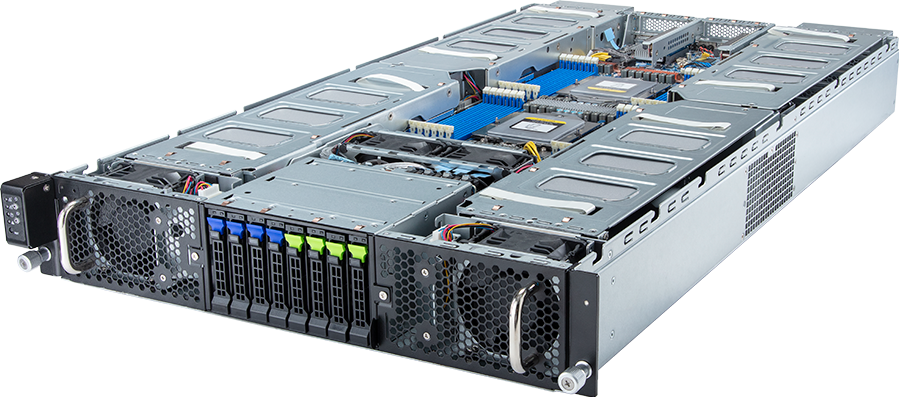
The GIGABYTE G293-Z42-AAP1 is a dense 2U server for as many as eight dual-slot PCIe Gen 5 accelerator cards. It is not an AMD Instinct MI350X appliance, and GIGABYTE does not describe it as a fixed-accelerator system. The server's value comes from fitting qualified PCIe GPUs, dual AMD EPYC processors, 24 DDR5 DIMMs and eight front drive bays into a compact chassis.
That density creates a demanding configuration job. A card can fit the slot count yet fail the platform's dimensional, power, thermal or firmware rules. GIGABYTE specifies a maximum GPU envelope of 285 x 111.5 x 39.5 mm and says the system is validated with one uniform GPU model. Buyers should therefore treat the GPU qualified-vendor list, riser revision and power configuration as part of the product identity.
For independent inference workers, rendering queues, simulation batches and research jobs, this layout can put a large amount of PCIe compute into 2U. For a single communication-heavy job that spans all eight GPUs, compare an HGX NVSwitch server before assuming that GPU count alone settles the choice.
Technical review summary
G293-Z42-AAP1 Rev. 3.x supports dual AMD EPYC 9005 or 9004 processors, with 12 DDR5 memory channels per socket and 24 DIMM slots in total. Eight full-height, full-length PCIe Gen 5 x16 GPU slots connect through Broadcom PEX89048 switches; two additional low-profile Gen 5 x16 slots connect to CPU 0 for network or storage adapters.
The front backplane divides its eight 2.5-inch bays into two groups. Four bays support Gen 5 NVMe, SATA or SAS. The other four support SATA or SAS. SAS needs an add-in controller, and hardware RAID also needs an add-in card. That distinction must appear in a valid configurator because the system does not provide eight interchangeable NVMe positions.
Two onboard 10GbE ports and a dedicated management interface cover ordinary access and BMC traffic. GPU clusters, shared storage or multi-node training will normally need additional high-speed NICs in the two low-profile slots.
The chassis is 800 mm deep and uses dual 3,000 W 80 PLUS Titanium power supplies. Rack depth, feed voltage, redundancy mode, card power and inlet temperature all need checking before quotation.
Verified specification
| Area | GIGABYTE G293-Z42-AAP1 Rev. 3.x | |---|---| | Form factor | 2U rackmount, 448 x 87.5 x 800 mm | | CPU sockets | 2 x SP5, LGA 6096 | | CPU families | AMD EPYC 9005 and EPYC 9004 | | Memory | 24 DDR5 RDIMM slots, 12 channels per processor | | EPYC 9005 memory speed | Up to 6,400 MT/s, subject to CPU and DIMM population | | EPYC 9004 memory speed | Up to 4,800 MT/s, subject to CPU and DIMM population | | GPU slots | 8 x FHFL PCIe Gen 5 x16 through PEX89048 switches | | GPU limit | Up to eight dual-slot cards; maximum 285 x 111.5 x 39.5 mm; one uniform model | | Additional expansion | 2 x low-profile PCIe Gen 5 x16 from CPU 0 | | Front storage | 4 x 2.5-inch Gen 5 NVMe/SATA/SAS plus 4 x 2.5-inch SATA/SAS | | SAS and RAID | SAS and hardware RAID require add-in cards | | Onboard network | 2 x 10GbE through Broadcom BCM57416 | | Management | Dedicated 1GbE BMC port, ASPEED AST2600 | | Power | Dual 3,000 W 80 PLUS Titanium supplies |
These are chassis capabilities. The final build remains subject to GIGABYTE's supported parts list, firmware and environmental limits.
Eight GPU slots do not mean eight arbitrary GPUs
GIGABYTE calls the platform an eight-GPU server, but its documentation adds two restrictions that matter in procurement. The first is physical: the maximum card dimensions are smaller than some high-power full-length accelerators. The second is qualification: all installed GPUs must use one validated model.
Mixing different accelerators can create mismatched power, cooling, driver and firmware behaviour. Even cards with the same slot width may use different connectors, heatsinks or airflow. The product's PCIe Gen 5 label only describes the host interface; it does not approve every Gen 5 card.
Check the exact board part number rather than a family name. NVIDIA, AMD and other vendors can sell air-cooled, liquid-cooled, server, workstation and region-specific versions under related names. A quotation should identify the OEM GPU SKU, power setting, firmware and cable kit.
The current GIGABYTE literature identifies the G293-Z42-AAP1 as an NVIDIA-Certified data-centre server and lists it in the company's PCIe GPU support material. That still does not justify copying a GPU from another GIGABYTE model's list. Confirm the Rev. 3.x QVL for the proposed card and count.
PCIe switch topology and workload behaviour
The eight GPU slots connect through PEX89048 PCIe switches rather than eight independent CPU-direct links. This arrangement provides the slot count and Gen 5 width needed for a dense server, but application behaviour depends on how peer traffic crosses those switches and CPU root complexes.
For independent workloads, the topology is often a good fit. A scheduler can assign separate inference replicas, render frames, simulation cases or research containers to individual cards. Each worker mainly uses its own GPU memory, so full all-to-all communication is not the purchasing goal.
One model split across all eight cards presents a different problem. Tensor parallelism, gradient exchange and other collectives can generate sustained peer traffic. PCIe switches help route that traffic, but they do not create the NVLink and NVSwitch fabric used by HGX baseboards. Profile the actual framework and model before selecting this chassis for tightly coupled work.
The two low-profile slots originate from CPU 0. A high-speed NIC installed there may have an uneven path to GPUs associated with the other socket or switch domain. Ask for the complete block diagram and map NIC, storage and GPU traffic before the server is built.
The HGX versus PCIe platform guide covers the communication decision in more detail.
AMD EPYC 9005 and 9004 host platform
Rev. 3.x adds AMD EPYC 9005 support while retaining EPYC 9004. GIGABYTE sets a normal processor TDP limit of 210 W and permits cTDP up to 240 W at a 30 degrees Celsius ambient condition. That environmental caveat matters in a 2U eight-GPU chassis; a hotter inlet can reduce the supported CPU or GPU envelope.
CPU choice should follow host-side work. Inference servers may need cores for tokenisation, request handling and data preparation. Rendering and simulation can use significant CPU time between GPU stages. Storage and network processing also consume cores and memory bandwidth.
Buying the highest core count is not automatically correct. Per-core speed, licence model, memory demand and NUMA placement can favour a different part. Use dual processors when the required PCIe and memory functions depend on both sockets; GIGABYTE warns that a single-CPU configuration disables some PCIe or memory resources.
The GPUMachines configurator should offer only EPYC processors that match the platform generation, socket, power and firmware. Older EPYC 7002 or 7003 parts do not belong in this SP5 server.
Memory population is one DIMM per channel
The platform exposes 24 DIMM slots across two processors, which maps to 12 channels per socket and one slot per channel. A fully populated 24-DIMM build gives each channel a module. Lower-capacity builds should preserve symmetry across sockets and channels instead of concentrating memory on one processor.
EPYC 9005 configurations support DDR5 RDIMMs up to 6,400 MT/s according to GIGABYTE, while EPYC 9004 configurations support up to 4,800 MT/s. Actual speed depends on the selected CPU, DIMM type, capacity, rank and firmware. Do not combine advertised maximums from different generations in one build.
Size RAM around the job rather than GPU count alone. The host may hold dataset caches, preprocessing buffers, virtual machines, containers and checkpoint data. A shared eight-GPU research server often needs more host memory than a fixed inference appliance running one controlled service.
Micron enterprise RDIMMs can provide a consistent catalogue choice where the exact module appears on the supported memory list. Keep module capacity and speed uniform within the vendor's population rules.
Storage: four tri-mode-capable bays and four SATA/SAS bays
The front panel has eight hot-swap 2.5-inch positions, but the interfaces differ:
- Bays in the first group can accept Gen 5 NVMe, SATA or SAS drives.
- The second group accepts SATA or SAS, not NVMe.
- SAS requires a separate SAS controller.
- Hardware RAID requires a separate RAID card.
That layout should be represented accurately in the configurator. If a buyer assigns two NVMe drives to the first four bays, the remaining positions in that group may still accept NVMe, SATA or SAS according to the selected backplane and controller. The other four bays must not be sold as NVMe.
For AI use, place the operating system on a mirrored boot arrangement where the approved hardware permits it, then reserve fast NVMe for model staging, active datasets, checkpoints or scratch. SATA or SAS can suit logs, capacity tiers or mirrored service data. The exact design depends on failure and recovery requirements.
Eight front bays will not replace shared storage for a cluster. Large training datasets and central checkpoint retention may need a separate file or object platform connected over high-speed Ethernet or InfiniBand.
Networking and management
The onboard Broadcom BCM57416 supplies two 10GbE data ports, while the dedicated management port connects to the ASPEED AST2600 BMC. That is a useful baseline for administration and ordinary service traffic, but it is not a high-speed GPU cluster fabric.
Use one of the two low-profile PCIe slots for a supported Mellanox ConnectX adapter when the workload needs 100, 200 or 400GbE, RoCE or InfiniBand. Adapter speed alone is not enough. Confirm slot width, NUMA path, optics, switch ports, cables and the storage topology.
Separate BMC traffic from user and storage networks. For hosted or shared systems, define firewall policy, account ownership, firmware access and monitoring before delivery. The BMC should never sit directly on an untrusted public network.
GIGABYTE's management stack provides sensor, inventory, remote console and firmware functions through the board management controller. Include a first-boot acceptance check for fan speed, PSU state, GPU visibility, storage health and NIC links.
Power, cooling and rack fit
Eight passively cooled accelerators inside 2U depend on a high-pressure front-to-back airflow path. Blank slots, cable placement, fan modules and rack inlet conditions all affect the result. The server's air-cooled AAP1 suffix also distinguishes it from the related immersion-cooled IAP1 variant.
Do not derive supported GPU count by adding card TDPs to a 3,000 W label. PSU redundancy, input voltage, CPU selection, fans, memory, drives and PCIe switches all consume or constrain the available power. GIGABYTE's validated configuration is the authority.
The 800 mm chassis depth requires a suitable rack and service clearance. Check rail compatibility, rear cable bend radius, PDU placement and whether a loaded 2U node can be removed safely. Dense servers can also raise per-rack heat beyond what an older data hall was designed to exhaust.
For rack planning, use the OEM maximum system input or a measured accepted configuration. A GPU-only estimate is not safe for PDU or cooling design.
Best-fit workloads
Independent inference services
G293-Z42-AAP1 can host several model replicas or separate services when each job fits on one or a small number of supported PCIe GPUs. The scheduler gains eight card-level resources in 2U, while local NVMe can stage frequently loaded models.
Rendering and visual computing
Qualified professional graphics cards can serve render queues, virtual production and remote visual workloads. Verify application certification, video features and vGPU licensing for the selected card.
Simulation and batch HPC
Parameter sweeps and other independent GPU tasks suit the PCIe design. CPU and memory requirements may be substantial, so profile the full solver rather than sizing only the accelerators.
Shared research platform
The card count gives a research group several allocation sizes. Pair it with quotas, monitoring, scratch cleanup and an explicit data path; otherwise eight GPUs can spend much of the week waiting for storage or users.
When not to buy this server
Choose a smaller PCIe server when the expected queue rarely exceeds two or four GPUs. It can reduce rack power, noise and initial cost while preserving the same software model.
Choose HGX when one job regularly spans all eight GPUs and communication dominates. NVSwitch is a platform feature, not an add-in option for this chassis.
Avoid G293-Z42-AAP1 when the required GPU exceeds the listed physical envelope or does not appear on the Rev. 3.x QVL. Another eight-GPU server with more card power, height or length may be needed.
Do not use this chassis as a storage server simply because it has eight bays. Its purpose is accelerator density, and four drive positions lack NVMe support.
Configuration profiles
Eight-card inference node
Use two balanced EPYC processors, symmetric RDIMM population, the supported uniform GPU model, local NVMe for model cache and a high-speed Mellanox NIC where request or storage traffic needs it. Validate concurrency, latency and wall power at the intended card power setting.
Four-card research server with growth room
Starting with four cards can suit a developing team, but confirm which slots GIGABYTE permits for partial population and how airflow blanks must be fitted. Do not assume the cards can occupy any four positions. Size PSU, CPU and network choices for the intended final state only when the future GPU remains supported.
Render or virtual workstation host
Select a qualified graphics-capable card, then check vGPU profiles, licence, display or remoting requirements and application certification. Storage may favour more capacity, while the network must handle interactive sessions and asset movement.
Configuring the G293-Z42-AAP1 on GPUMachines
The GIGABYTE G293-Z42-AAP1 configurator exposes CPU, RAM, drive, GPU and network choices. Treat the generated build as a starting point for technical review.
Before GPUMachines issues a final quotation, provide:
- exact application, model and precision;
- GPU count per job and expected concurrency;
- required local NVMe, SATA or SAS layout;
- shared storage and network design;
- rack depth, power feeds and inlet conditions;
- operating system, driver and virtualisation requirements.
The final review should compare every selected part with the current GIGABYTE QVL and preserve the required uniform GPU model.
FAQ
Does G293-Z42-AAP1 support AMD Instinct MI350X?
Do not assume it does. GIGABYTE describes this model as a general PCIe GPU server and requires validated uniform cards within a fixed physical envelope. Use the current Rev. 3.x QVL for the exact accelerator. A different GIGABYTE product's MI350X support does not transfer to this chassis.
Does it support eight NVMe drives?
No. Four front bays support Gen 5 NVMe, SATA or SAS. The other four support SATA or SAS. SAS and hardware RAID need add-in controllers.
Can it use one AMD EPYC processor?
The server can be configured with one CPU in some circumstances, but GIGABYTE warns that certain PCIe and memory functions will be unavailable. An eight-GPU design should normally use the intended dual-socket layout after checking the block diagram.
Can I mix GPU models?
GIGABYTE states that the system is validated with one uniform GPU model. Mixed cards should therefore be treated as unsupported unless GIGABYTE approves the exact combination in writing.
Is it suitable for LLM training?
It can run training software on supported PCIe GPUs, especially for independent experiments or smaller GPU groups. A communication-heavy job spanning all eight cards should be tested against HGX before purchase.
Which NIC should I add?
Choose from the cluster and storage requirement, then verify the card in the server's support list. GPUMachines normally uses NVIDIA Mellanox adapters for high-speed Ethernet or InfiniBand, with Intel remaining suitable for ordinary 10GbE links.
Technical sources
- GIGABYTE G293-Z42-AAP1 Rev. 3.x product page
- GIGABYTE G293-Z42-AAP1 Rev. 3.x datasheet
- GIGABYTE G293-Z42-AAP1 support and QVL
- GIGABYTE NVIDIA PCIe GPU compatibility guide
Specifications and support lists can change by revision. Confirm the ordering code, risers, power cables, firmware and QVL before purchase. This is a source-backed technical review, not a record of hands-on GPUMachines testing.