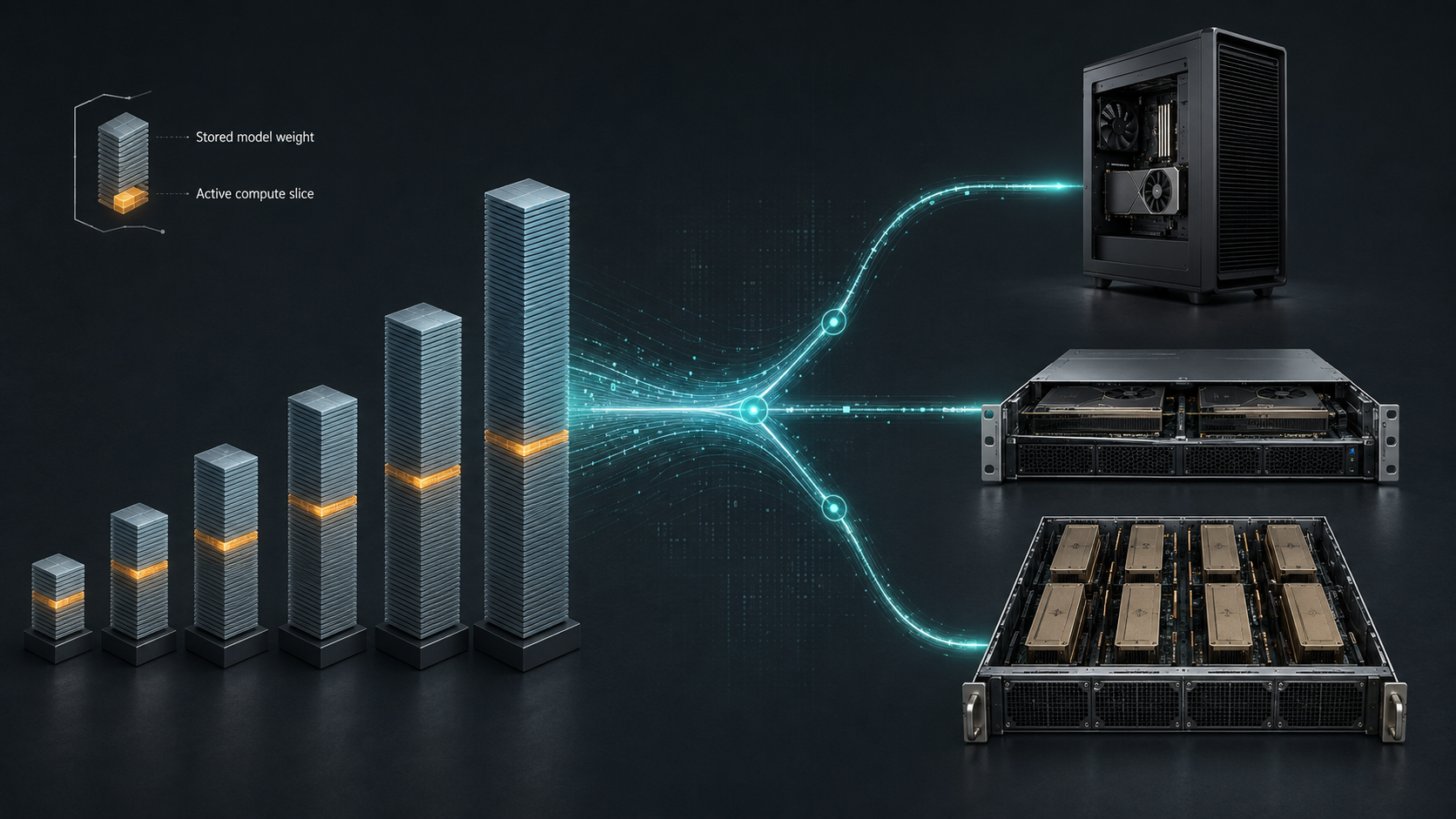
The name K2-Horizon-MoVA-36B-A4B invites an expensive mistake. The A4B suffix says that roughly four billion parameters are active for each token. It does not mean the system stores only four billion parameters. The model card says 36 billion parameters are stored, so the weight-memory problem remains closer to a 36B model than a 4B dense model.
The same distinction matters more for K2-Horizon-375B-A23B. It activates 23 billion parameters per token, but stores 375 billion. IFM's tested BF16 serving recipe uses eight H200 GPUs with tensor and expert parallelism. That is an eight-GPU server workload, not a workstation model wearing a large name.
Quick answer
For a first local evaluation, start with K2-Horizon-3.7B or 7B on a GPU workstation. They have official single-GPU BF16 recipes and are much easier to test at realistic prompt lengths.
Treat the 32B checkpoint as an evaluation release for now: its repository is named 32B, but the model card calls the current checkpoint Stage1 and says the final checkpoint is still to come. IFM's reference recipe uses two H200 GPUs in BF16.
The sparse 36B-A4B model is the more interesting server candidate. It stores 36B parameters, activates 4B per token and has a two-H200 BF16 recipe with expert parallelism. That may lower per-token computation, but it does not remove the need to hold the full weight set and leave memory for the KV cache.
The 375B-A23B flagship belongs on an eight-GPU HGX-class system if the goal is to follow the published BF16 recipe. Its partially FP8-quantised repository may reduce memory use on supported accelerators, but IFM states that attention, shared experts, routers, the first three dense layers and the language-model head remain BF16. Do not budget it as a fully FP8 model.
What IFM released
The Institute of Foundation Models announced the K2 Horizon family on 3 September 2026. The launch covers six model classes: 0.9B, 3.7B, 7B, 32B, sparse 36B-A4B and sparse 375B-A23B. Repositories are published under Apache 2.0, with vLLM and SGLang serving instructions.
The announcement calls the fleet fully open, including code, data and methods. Buyers should still inspect the exact repository they intend to deploy. The 7B and 3.7B cards say their training and evaluation resources are public. Other cards use future tense for some artefacts or checkpoints. That is a release-maturity issue, not a licence problem, and it can change as repositories are updated.
| Model | What the name means | Context stated by IFM | Official reference serving path | Sensible first hardware test | | --- | --- | --- | --- | --- | | K2-Horizon-0.9B | Compact dense model | 128K | BF16, tensor parallel size 1 | A modest single-GPU development system | | K2-Horizon-3.7B | Small dense model | 512K native | BF16, tensor parallel size 1 | A single-GPU AI workstation | | K2-Horizon-7B | Medium dense model | 512K native | BF16, tensor parallel size 1 | A higher-memory workstation or small inference server | | K2-Horizon-32B | Dense model; current card says Stage1 | 512K native | BF16, tensor parallel size 2; SGLang recipe validated on two H200s | A dual high-memory GPU server, with checkpoint maturity noted | | K2-Horizon-MoVA-36B-A4B | 36B stored, 4B active per token | 512K native | BF16, tensor and expert parallel size 2; validated on two H200s | A dual high-memory GPU server | | K2-Horizon-375B-A23B | 375B stored, 23B active per token | 512K native | BF16, tensor and expert parallel size 8; validated on eight H200s | An eight-GPU HGX-class node |
These are reference starting points, not minimum-system guarantees. IFM's recipes show configurations the project has documented or validated. A smaller quantised deployment may work, but it must be tested against the same latency, throughput, context and output requirements as the full-precision path.
Active parameters do not size the weight store
A dense model uses its parameter set for each token. A sparse mixture model keeps many experts available and routes each token through only part of them. This can reduce computation per generated token. It does not make the unused expert weights disappear from memory.
Using the headline counts alone, BF16 weights require roughly two bytes per parameter before runtime overhead:
- 7B is about 14 GB of raw weights.
- 32B is about 64 GB.
- 36B is about 72 GB, even though only 4B parameters are active per token.
- 375B is about 750 GB, even though 23B are active per token.
Those figures are rough lower bounds. Real serving memory also includes framework allocations, temporary buffers, communication workspaces and the KV cache. Repository metadata may not match the rounded name exactly. Use the actual checkpoint files and runtime memory measurements for a purchase decision.
If terms such as dense, sparse, active and total parameters are new to your team, read what model parameter counts mean before comparing machines.
The context window is a separate memory decision
The 3.7B, 7B, 32B, 36B and 375B cards state a native 524,288-token context window. That is a capability ceiling, not a sensible default for every service.
The published vLLM examples for those models set --max-model-len 131072. Even this shorter value can consume substantial KV-cache memory when several users or requests run at once. Prompt length, output allowance, batch size and concurrency must therefore be in the test plan.
A machine that loads the weights is not automatically a machine that serves your workload. One user at 8K tokens and eight concurrent users at 64K tokens are different capacity problems. Our local-model GPU memory guide explains how weights, precision and context compete for the same memory.
Workstation, PCIe server or HGX node?
GPU workstation: test the 3.7B and 7B models first
The 3.7B and 7B models have single-GPU BF16 recipes. That makes them the clearest fit for a tower GPU workstation used by one researcher or a small development team.
Do not begin by allocating the advertised 512K context. Pin the model revision, run the project's recommended parser and sampling settings, then test the prompt lengths your applications actually use. Record tokens per second, time to first token, peak GPU memory and task success. If the model passes, you have evidence for a workstation purchase rather than a specification comparison.
The 0.9B model is lighter, but IFM positions it for constrained and on-device uses. It can be useful for routing, tool calling or tightly scoped local functions. A large GPU workstation bought solely to run it would usually be an odd match unless the same machine serves other models.
PCIe GPU server: shared 7B service or 32B/36B evaluation
A PCIe GPU server makes sense when several people need the service, when you want multiple model replicas, or when the 32B and 36B checkpoints require more memory than a single workstation GPU provides.
The server's GPU count is only half the question. Tensor parallelism moves data between GPUs during generation. Two accelerators connected only through ordinary PCIe may behave differently from an H200 pair with a faster scale-up path. Ask for measured results on the proposed GPU and interconnect, not a claim that the model merely starts.
For the 36B-A4B model, expert parallelism is part of the official recipe. Test request routing, tail latency and concurrency on the exact runtime version. Sparse models can be economical, but their performance depends on how well the software and hardware move expert weights and activations.
Eight-GPU HGX: the published home for 375B BF16
The 375B-A23B model card documents tensor parallel size 8, expert parallelism and BF16. Its SGLang recipe was validated on eight H200 GPUs. That maps naturally to an eight-GPU HGX server with a high-bandwidth scale-up fabric.
The active 23B figure may help generation efficiency relative to a 375B dense model. It does not turn the checkpoint into a dual-GPU system. The raw BF16 weight estimate alone is about 750 GB before cache and runtime overhead.
IFM also publishes a 375B FP8 repository, but only the routed-expert linear layers are quantised to FP8. Expert parallelism is required at common tensor-parallel sizes, according to the model card. Check accelerator FP8 support and run the vendor recipe before assuming a smaller GPU count will meet production targets.
If eight-GPU ownership is too early for the project, Buy & Host lets a team own a server while leaving power, cooling and physical operation to a data-centre provider. That still requires a measured model acceptance test before the equipment order.
Do not buy from the benchmark chart
IFM publishes extensive benchmark results for the family. They are useful test candidates, not independent proof that a model will beat another model on your data. Harnesses, reasoning settings, output limits and comparison conditions differ.
Build a small evaluation set from work the system will be paid to do. Keep private material out of third-party comparisons unless the handling terms permit it. Score task completion, factual errors, tool-call correctness and failure cost. Then test the smallest K2 model that passes.
The hardware trial should record at least:
- the exact repository revision and runtime build;
- checkpoint precision and any quantisation method;
- prompt, output and concurrency distributions;
- time to first token, sustained generation rate and tail latency;
- peak GPU and host-memory use;
- restart behaviour and model load time;
- quality results from the buyer's own evaluation set.
Without that record, a faster demo can become a slower production service after context and concurrency arrive.
Which K2 Horizon model should you start with?
Choose 3.7B when local development, low resource use or fine-tuning experiments matter more than maximum model capability.
Choose 7B for the first serious workstation evaluation. It is still a single-GPU reference deployment, and its repository includes public training and evaluation resources.
Evaluate 36B-A4B when 7B misses the required task quality and a dual-GPU server is acceptable. Its four active billion parameters may improve compute economics, but size the machine for the stored 36B weights and your context load.
Wait for the final 32B checkpoint if repeatability across the release matters. The current card explicitly identifies the model as Stage1.
Move to 375B-A23B only after smaller checkpoints fail a representative evaluation and the workload can justify an eight-GPU system. Start from the documented H200 recipe, then change precision or hardware one variable at a time.
Questions buyers ask
Can K2-Horizon-36B-A4B run like a 4B model?
Not in memory terms. The card says it stores 36B parameters and activates 4B per token. Its compute behaviour may resemble a smaller dense model in some operations, but the system still needs the 36B weight set plus runtime memory.
Can K2-Horizon-375B-A23B run on a workstation?
Not by following the published BF16 serving path. IFM's documented SGLang configuration uses eight H200 GPUs. Heavy quantisation or CPU offload may make experiments possible on different hardware, but loading a model is not the same as meeting an interactive or multi-user service target.
Does 512K context work on the default recipe?
The model cards state 524,288-token native context for most of the family, while their vLLM examples set a 131,072-token maximum. Long-context service needs its own memory and concurrency test.
Is K2 Horizon open source or only open weight?
The repositories use Apache 2.0, and the launch says weights, code, data and methods are open. Individual model cards do not all describe the same release state: some resources are public, while several cards say particular checkpoints or artefacts will be released. Check the chosen repository and pinned revision. Our open-weight versus open-source guide explains why that distinction matters.
Sources and Further Reading
- IFM K2 Horizon launch announcement, 3 September 2026
- IFM K2 Horizon model and dataset collection
- K2-Horizon-375B-A23B model card and serving recipe
- K2-Horizon-375B-A23B-FP8 quantisation notes
- K2-Horizon-MoVA-36B-A4B model card and serving recipe
- K2-Horizon-32B Stage1 model card
- K2-Horizon-7B model card and serving recipe
- K2-Horizon-3.7B model card and serving recipe
- K2-Horizon-0.9B model card and serving recipe