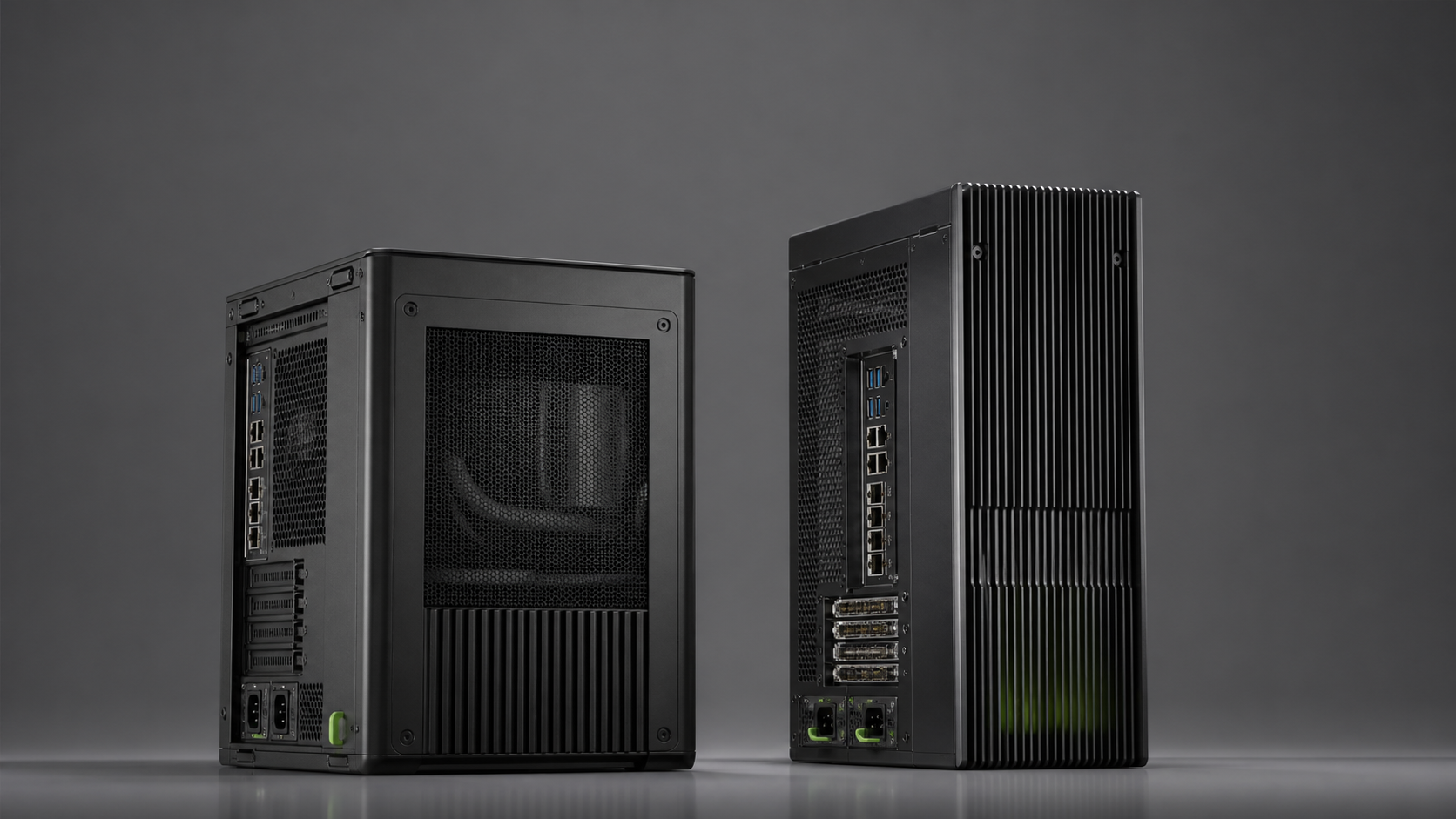
The GIGABYTE W775-V10-L01 and MSI XpertStation WS300 share the same NVIDIA GB300 Grace Blackwell Ultra Desktop Superchip. Both combine a 72-core Grace Arm CPU, one Blackwell Ultra GPU, 252GB of HBM3e and 496GB of LPDDR5X in a coherent 748GB address space. Both include dual 400Gb/s ConnectX-8 networking, four M.2 positions and three full-height PCIe slots.
That much similarity can make the purchasing decision look cosmetic. It is not. Chassis depth, operating temperature, supplied boot storage, USB layout, security features, management, power rules and the manufacturer's documented options decide which system is easier to deploy in a real laboratory.
This comparison uses the manufacturers' current specifications rather than a performance contest. GPUMachines has not benchmarked the two systems against each other, and the shared compute platform gives no reason to invent a speed winner. Buyers should compare the GIGABYTE W775-V10-L01 configurator with the MSI XpertStation WS300 configurator using the site, software and support requirements below.
Quick Recommendation
Choose the GIGABYTE W775-V10-L01 when the shorter chassis, wider published 10C to 35C operating range, detailed audio provision or the GIGABYTE service route better fits the site. Its specification states that the system requires a 20A circuit and recommends 115-240V input, which gives facilities a clear check to complete.
Choose the MSI XpertStation WS300 when a factory-configured mirrored 2 x 2TB boot volume, published TPM 2.0 and hardware-root-of-trust support, detailed Redfish/IPMI management, two front USB-C ports or the MSI support route are more valuable. MSI publishes a 10C to 30C operating range, so room temperature deserves particular attention.
Choose neither until the software runs on Arm64 and the research workload benefits from the 748GB coherent-memory design. A conventional RTX PRO workstation can be more useful when Windows, x86 binaries, professional graphics or greater local-drive flexibility matter more.
Verified Comparison Table
| Area | GIGABYTE W775-V10-L01 | MSI XpertStation WS300 | | --- | --- | --- | | Form factor | Pedestal workstation | Tower workstation | | Dimensions | 245 x 500.4 x 531mm | 247.8 x 527.9 x 582.7mm | | Compute | NVIDIA GB300 Grace Blackwell Ultra Desktop Superchip | NVIDIA GB300 Grace Blackwell Ultra Desktop Superchip | | CPU | 72-core Grace Arm Neoverse V2 | 72-core Grace Arm Neoverse V2 | | GPU | One Blackwell Ultra GPU | One Blackwell Ultra GPU | | Coherent memory | 496GB LPDDR5X plus 252GB HBM3e | 496GB LPDDR5X plus 252GB HBM3e | | Storage positions | 2 x CPU-attached Gen5 x4 M.2; 2 x ConnectX-8-attached Gen6 x4 M.2 | Same four paths; two 2TB Gen5 boot SSDs included and configured as RAID 1, two Gen6 positions open | | Expansion | 1 x Gen5 x16 double-width GPU slot; 2 x Gen5 x8 slots; E-key M.2 | 1 x Gen5 x16 FHFL double-width slot; 2 x Gen5 x8 FHFL single-width slots; E-key M.2 | | High-speed network | 2 x 400Gb/s QSFP through ConnectX-8 | 2 x QSFP112 through ConnectX-8 | | Other network | 10GbE plus 1Gb management | 10GBase-T plus 1Gb dedicated management | | Power | Single 1600W ATX 80 PLUS Platinum; C19; 20A circuit stated; 115-240V recommended | Single 1600W ATX 80 PLUS Platinum; 1300W max at 100-114V, 1600W max at 115-240V; C19 | | Cooling | Closed-loop liquid cooling plus three 120mm system fans | Liquid module rated for up to 1400W CPU+GPU plus one 120mm system fan | | Published operating temperature | 10C to 35C | 10C to 30C | | Management | Dedicated management LAN and onboard BMC video | AST2600 with AMI MegaRAC, IPMI 2.0, Redfish and local BMC storage | | Published security detail | Check final platform and quote | Chassis intrusion, TPM 2.0 and Microchip CEC1736 hardware root of trust supported | | OS statement | NVIDIA DGX OS compatibility | Ubuntu 24.04 LTS with NVIDIA AI developer tools on supplied boot drives |
Specifications can change by region and build. The final quote should state the included storage, operating system, power cable, support package and validated options.
What Will Not Decide the Comparison
Peak GB300 compute
The same Grace Blackwell Ultra Desktop Superchip sits at the centre of both systems. GIGABYTE and MSI cite the same 72-core Grace CPU, 252GB HBM3e, 496GB LPDDR5X, 7.1TB/s HBM bandwidth and 396GB/s CPU-memory bandwidth. Without independent test data, it would be misleading to declare one faster.
Firmware, cooling behaviour and power allocation can affect sustained application results, but that needs a controlled benchmark of production units. Treat performance as equivalent at the platform-selection stage and make the chassis and service decision separately.
The "one trillion parameters" statement
NVIDIA states that DGX Station can support models up to one trillion parameters. That is a capacity statement under supported precision, runtime and model conditions. It does not become more true in one chassis than the other, and it does not predict token rate or fine-tuning time.
The useful sizing exercise includes weights, quantisation, KV cache, context, batch size, activations, framework workspace and other resident services. Test the exact model if the purchase depends on that boundary.
Dual 400Gb/s ports by themselves
Both systems provide ConnectX-8 high-speed networking. Neither automatically delivers a fast storage or two-node environment. Cables, optics, switch, protocol, filesystem, security and tuning must be specified. A laboratory with only 10GbE should not score one platform higher because the front of the product page says 800Gb/s aggregate connectivity.
Chassis Size and Placement
The GIGABYTE chassis is 531mm deep; MSI publishes 582.7mm. The 51.7mm difference can matter in furniture, acoustic enclosures and equipment rooms. Width is almost identical, while MSI is roughly 27.5mm taller.
Do not use dimensions alone. Leave clearance for air intake, exhaust, cables and service. The QSFP links, 10GbE, management port, power cable and any display or PCIe card all need bend radius and reach behind the system. A nominally shorter tower can still require more working depth once C19 and QSFP cabling are installed.
The systems are better treated as laboratory instruments than ordinary desktop PCs. Check floor loading only where required, but plan safe lifting and service access. Avoid enclosed desks and cupboards that recirculate hot air.
GIGABYTE publishes a net weight of 29.2kg. MSI's public specification reviewed here does not state a comparable system weight. Ask for shipping and installed weights if handling rules matter.
Operating Temperature and Cooling
GIGABYTE publishes an operating range of 10C to 35C, with 8 to 80 per cent non-condensing humidity. MSI publishes 10C to 30C and 10 to 80 per cent non-condensing humidity. This gives GIGABYTE more stated ambient-temperature margin, but the room should not be designed to operate at the upper limit.
Both systems use liquid cooling around a very high-power module. Closed-loop cooling reduces the facility burden compared with a rack liquid-cooling loop, but heat still enters the room. The buyer remains responsible for supply air, dust control and clearance.
GIGABYTE's product page includes condensation guidance: when relative humidity exceeds 50 per cent, the coolant inlet should be above the dry-bulb temperature and should not exceed the stated limit. Facilities should obtain the current service manual and confirm how the closed loop is maintained.
MSI publishes a liquid-cooling module rating of up to 1400W for CPU and GPU. That rating is not the same as measured wall draw. Ask both vendors or GPUMachines for expected workload power and acoustics if the station will sit near people.
Power Provision
Both manufacturers specify a single 1600W 80 PLUS Platinum ATX supply and a C19 power cord. Neither has the redundant hot-swap PSU arrangement of a rack server. A power-supply fault can therefore stop the workstation until service is completed.
GIGABYTE states that the W775 requires a 20A circuit and recommends 115-240V AC for the intended experience. MSI gives a more explicit derating table: 1300W maximum output at 100-114V and 1600W maximum at 115-240V.
This should be settled before procurement. Record circuit voltage, breaker rating, socket, C19 cable, UPS support and whether other equipment shares the feed. If continuous service matters, compare a rack server or hosted deployment rather than trying to make a single-PSU tower behave like redundant infrastructure.
Boot Storage and Recovery
MSI has the clearer out-of-box statement. It includes two 2TB NVMe M.2 SSDs in the CPU-attached Gen5 positions, configured as RAID 1 for the operating system. Ubuntu 24.04 LTS and NVIDIA AI developer tools are preinstalled. Two Gen6 x4 M.2 positions remain open for expansion.
GIGABYTE specifies two CPU-attached Gen5 M.2 positions with software RAID 1 support and two ConnectX-8-attached Gen6 positions. The public specification does not make the same promise about supplied SSD capacity in the base package. GPUMachines should state the included drives and OS image in the quote.
Neither layout is large by scientific-storage standards. Four M.2 positions must cover boot, model cache, active datasets and scratch unless shared storage is used. Plan durable storage and backup separately. Mirrored boot protects against one device failure; it does not protect against deletion, corruption, ransomware or chassis loss.
The buyer should ask for documented recovery media, firmware versions, RAID ownership and the process for replacing a boot device. This is often more important than the difference between Gen5 and Gen6 for day-to-day administration.
Expansion and Graphics
Both systems publish one full x16 double-width position and two x8 single-width positions in physical x16 slots. Both list optional RTX PRO graphics choices. Adding a separate display GPU can make the station useful for visualisation and physical-AI workflows, but it changes power, cooling and software behaviour.
NVIDIA's development guide describes a mixed-coherency environment when an RTX PRO GPU is installed alongside GB300. The integrated GB300 path is hardware-coherent; the PCIe GPU uses a different memory relationship. Applications must select the correct device for AI compute and graphics.
Confirm card length, height, power connector, approved SKU and driver support. A slot appearing in a block diagram is not a universal compatibility guarantee. Arm64 support is required for add-in device drivers as well as user applications.
Front I/O differs slightly. GIGABYTE publishes one USB-C and two USB-A ports at the front, with audio connections. MSI publishes two USB-C and two USB-A ports on top of the chassis. If the station will sit under a bench or in an enclosure, connector position may decide which is more usable.
Management and Security
MSI gives more public detail in this area. It specifies a dedicated 1Gb management port, ASPEED AST2600 BMC, AMI MegaRAC firmware, IPMI 2.0, Redfish, eMMC for BMC storage, chassis-intrusion detection, TPM 2.0 and support for a Microchip CEC1736 hardware root of trust.
GIGABYTE publishes a dedicated management LAN and BMC-integrated display output. Its final security and management feature set should be confirmed from current documentation and the quoted configuration.
This does not prove that MSI is operationally better. It means the evidence is easier to evaluate from the current public specification. Buyers should compare firmware-update policy, vulnerability response, remote-console licensing, API access, audit logs, secure boot, credential management and support ownership.
Put the BMC on a restricted management network. Do not expose it directly to an ordinary user or public network. Change default credentials and integrate access with the organisation's administrative process.
Software and Arm64 Readiness
The shared Grace CPU makes software compatibility the same first-order issue for both systems. MSI explicitly supplies Ubuntu 24.04 LTS with NVIDIA tools. GIGABYTE lists DGX OS compatibility. Confirm the exact OS image, driver branch and NVIDIA software entitlement before purchase.
Build an Arm64 readiness list for compiled Python packages, commercial scientific applications, container images, security agents, storage clients, monitoring tools and PCIe drivers. NVIDIA documents differences in Arm instructions and memory ordering. Correct portable code should behave as expected, but x86 intrinsics and proprietary binaries may need work.
Do not choose a manufacturer as a way to avoid the Arm64 question. The CPU architecture is part of the GB300 platform in both.
Which Workloads Fit Either System?
Both products suit:
- large local language and multimodal model inference;
- model quantisation, distillation and conversion;
- parameter-efficient fine-tuning research;
- data science with large working sets;
- AI agent development using private data;
- software development for Grace Blackwell targets;
- high-speed access to compatible research storage;
- local experiments before cloud or cluster scale-out.
Both may be poor choices for Windows-only engineering applications, x86-only solvers, graphics-led workflows that fit an RTX PRO workstation, or sustained multi-GPU training. The GPUMachines scientific GB300 workstation guide covers those boundaries in more depth.
Site-Specific Decision Checklist
Choose GIGABYTE if these points matter
- the shorter chassis materially improves placement;
- the 35C published upper operating limit is needed, with adequate margin;
- GIGABYTE support, spares or fleet standardisation are preferred;
- the quoted storage and OS image match the laboratory's plan;
- the published 20A circuit requirement fits the facility;
- the front and rear I/O arrangement suits the installation.
Choose MSI if these points matter
- mirrored 2 x 2TB boot storage is wanted out of the box;
- the published Redfish/IPMI management stack fits existing tooling;
- TPM 2.0, root-of-trust support and chassis-intrusion detail help security review;
- two accessible USB-C ports are useful;
- the MSI warranty and service route are preferred;
- the room can remain comfortably below the 30C published upper limit.
The final decision may still be commercial: availability, warranty response, included support, local spares, validated SSDs and total quote. Those facts should be recorded rather than implied.
Who Should Not Buy Either GB300 Workstation?
Do not buy either when the model fits in a 96GB professional GPU and the user needs a normal Windows or x86 workstation. Do not buy because the platform can theoretically hold a very large model if no research workload needs it. Do not place a single-PSU tower into a production service that requires redundancy.
Cloud can be better for short projects, changing GPU requirements or multi-GPU bursts. A rack server can be better for remote shared use, larger local storage, redundant power and service access. GPUMachines can compare these routes with Buy & Host where ownership is justified but office placement is not.
Questions for the Quote Review
1. Which boot SSDs and expansion SSDs are included? 2. Which OS, NVIDIA driver and recovery image ship with the system? 3. Which RTX PRO cards and NICs are validated in each slot? 4. Is the required C19 lead included, and what circuit is expected? 5. What are the acoustic and measured power expectations for the target workload? 6. What warranty response and liquid-cooling service are provided? 7. Which firmware and BMC security features are enabled? 8. What Arm64 software proof has the buyer completed? 9. What acceptance test will be run after delivery? 10. Should the system sit on-premise, in a lab equipment room or in a hosted facility?
FAQ
Is the MSI WS300 faster than the GIGABYTE W775?
There is no verified basis for a general speed claim. Both use the same GB300 Grace Blackwell Ultra Desktop Superchip and publish the same main memory capacities and bandwidths. Application tests would be needed.
Which system is smaller?
GIGABYTE publishes 245 x 500.4 x 531mm. MSI publishes 247.8 x 527.9 x 582.7mm. GIGABYTE is shorter and shallower on those specifications.
Which includes boot drives?
MSI states that two 2TB Gen5 M.2 SSDs are included and configured as RAID 1. GIGABYTE publishes the drive positions and software RAID support; confirm included media in the GPUMachines quote.
Do both have 400Gb/s networking?
Yes. Both publish two QSFP ports through ConnectX-8, alongside 10GbE and dedicated management. The network requires matching cables, optics, switches or direct-connect design.
Can both take an RTX PRO graphics card?
Both publish a double-width Gen5 x16 slot and optional RTX PRO choices. Validate the exact card, cooling, power and driver support before ordering.
Which is better for a warm room?
GIGABYTE publishes a 35C upper operating temperature, while MSI publishes 30C. Neither should be designed to run continuously at the limit, and room cooling must account for sustained heat output.
Can GPUMachines host either workstation?
GPUMachines can review hosted ownership and Buy & Host options. Confirm the service scope, location, remote access and support arrangement during quotation.
Verdict
The GIGABYTE W775-V10-L01 and MSI XpertStation WS300 are closer in compute architecture than their names suggest. The decision should be made on the surrounding system.
GIGABYTE offers the more compact published chassis and a wider stated operating-temperature range. MSI provides a clearer ready-to-run boot-storage specification and more public detail on management and platform security. Neither difference changes the GB300 memory architecture, and neither removes the need to prove Arm64 software support.
Ask GPUMachines to quote both against the same acceptance workload, storage capacity, display GPU, network connection, power circuit and support term. That turns a logo choice into a deployment decision.
Configure the GIGABYTE W775-V10-L01 or MSI XpertStation WS300, and include the required software and site checks in the quote review.
Sources and Further Reading
- GIGABYTE W775-V10-L01 product page
- GIGABYTE W775-V10-L01 datasheet
- MSI XpertStation WS300 specifications
- MSI XpertStation WS300 platform overview
- NVIDIA DGX Station development guide
- NVIDIA guidance on mixed coherent and PCIe GPU memory
Specifications were checked on 17 August 2026. Manufacturer pages can change. GPUMachines has not claimed a hands-on performance comparison, and final product content, warranty and validated options should be confirmed in the quote.