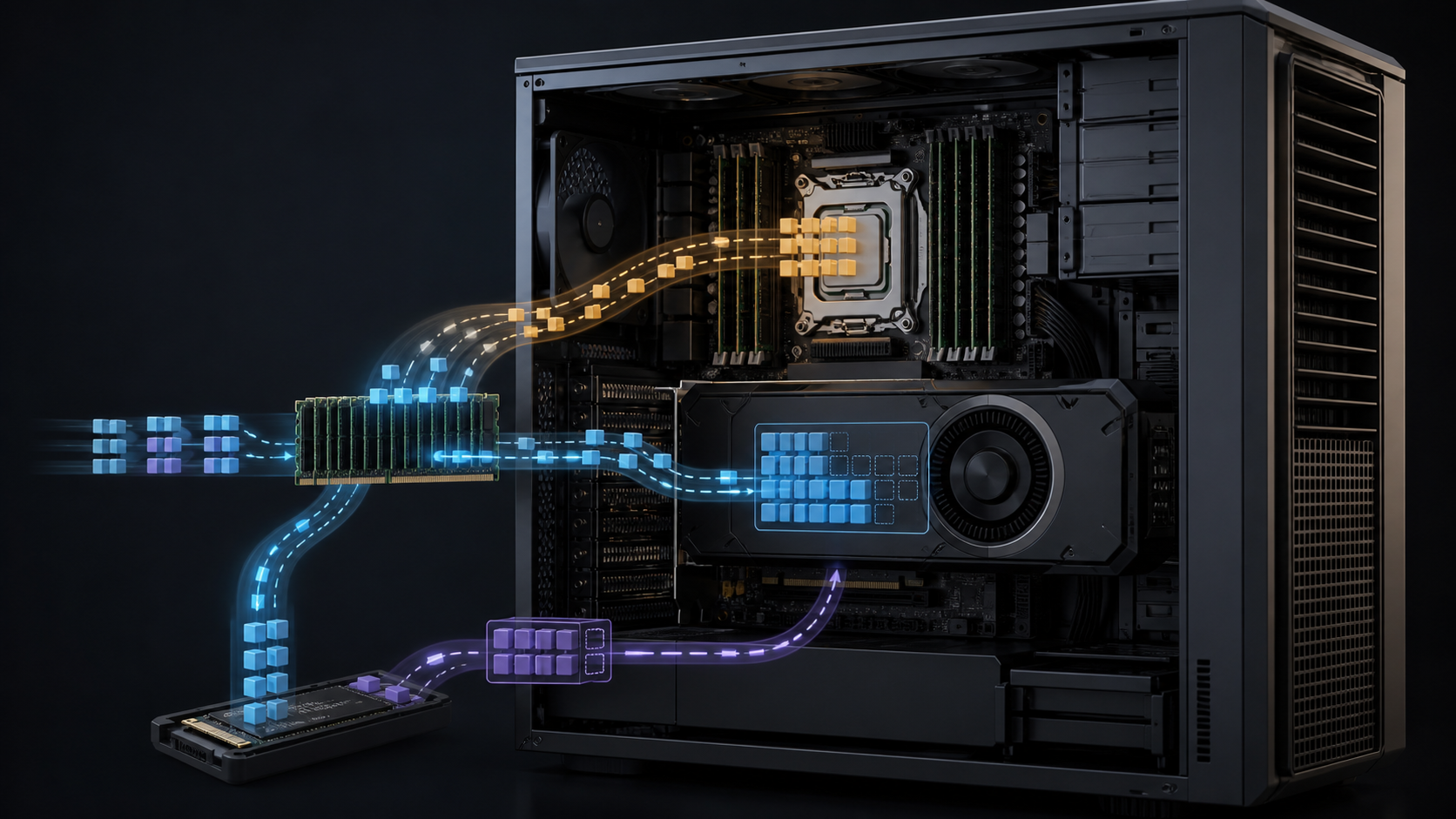
A 753-billion-parameter model does not fit into 96 GB of GPU memory. FreeToken's authors do not claim that it does. Their result is more interesting: a sparse mixture-of-experts model can be served by treating a workstation as a memory hierarchy, with the complete expert pool in system RAM and a changing subset of experts in VRAM.
That distinction decides whether the result is relevant to a buyer or merely a striking headline. The paper reports GLM-5.2 running on one NVIDIA RTX PRO 6000 Blackwell Workstation Edition GPU, but the host also had 512 GiB of DDR5 memory, a full PCIe 5.0 x16 connection and measured CPU-side expert bandwidth of 178 GB/s. The software decides which missing experts should cross PCIe, which should execute on the CPU, and which should remain in the GPU cache.
So, can a single AI workstation serve a 753B MoE model? According to the FreeToken paper, yes, for the tested model, quantisation and workload. That does not make the workstation equivalent to an HGX server or a cloud deployment. It creates a new local-inference option for research, evaluation and private agent work where one user can accept a hierarchical-memory serving path.
GPUMachines has not reproduced the paper's benchmarks. All performance figures below belong to the FreeToken authors and should be tested on the exact workstation, model revision and runtime planned for use.
The purchasing answer
FreeToken makes a high-memory workstation more useful for very large sparse models, but it also changes which workstation specifications matter. GPU VRAM remains important because it holds non-expert weights, the KV cache and the hottest routed experts. Yet host memory capacity, DRAM bandwidth, PCIe topology and local storage now sit directly in the token-generation path.
A buyer considering this approach should favour a platform with:
- enough system RAM for the complete expert pool, conversion artefacts and operating margin;
- an electrically full PCIe 5.0 x16 link to the GPU, without a lane split hidden by the slot's physical size;
- a memory subsystem with enough channels and sustained bandwidth to feed both CPU execution and GPU transfers;
- fast NVMe storage for several hundred gigabytes of source and converted weights;
- cooling and power delivery sized for a 600 W workstation GPU plus the host platform.
The GPUMachines tower GPU workstation range is the natural starting point for that configuration. Compact systems in the SFF local-LLM category suit smaller models and development work, but the 753B demonstration's 512 GiB host-memory requirement places it well outside ordinary small-form-factor hardware.
If the intended service has many concurrent users, a strict latency target or an uptime commitment, local offload may be the wrong architecture. A dedicated GPU Cloud instance gives the team a cleaner route to resident model weights, scale-out capacity and operational separation.
What FreeToken actually changes
Mixture-of-experts models contain many expert blocks, but route each token through only a small selection. Total parameter count therefore describes all available experts, not the amount of computation performed for every token.
The FreeToken paper uses DeepSeek-V4-Flash as an example: the model has 284B total parameters while activating 13B for a token. It also evaluates GLM-5.2, which NVIDIA's model card describes as a 753B model with 40B active parameters. Sparse activation can bring the compute working set within reach of one GPU even though the complete checkpoint remains much larger than VRAM.
Memory remains the hard part. Every expert may be selected eventually, so the machine still needs access to the complete pool. FreeToken keeps routed-expert weights in host memory as the source of truth. It uses spare GPU memory as an expert cache that changes with the model's routing behaviour.
This is not ordinary model offload with a fixed set of layers on the CPU. FreeToken makes per-step choices around the resources it measures on the deployed machine. A cache hit runs on the GPU. For a miss, the runtime can copy an expert over PCIe and retain it for likely reuse, or execute that expert where it already resides in system memory. CPU and GPU partial results are then combined.
The choice matters because both paths consume host-memory bandwidth. Copying everything can saturate PCIe while leaving CPU capacity unused. Executing every miss on the CPU avoids transfers but gives up the GPU's much faster on-package memory and leaves the PCIe link idle. FreeToken's scheduling policy measures pinned transfer bandwidth and effective CPU expert bandwidth, then divides work between the two.
The paper also addresses prefill. A long prompt may route across nearly every expert, so MoE sparsity during token-by-token decoding does not remove the need to move a large expert set during prefill. FreeToken double-buffers complete layers: while the GPU computes one layer, the next layer's experts move across PCIe. That approach only helps when compute and transfer can overlap effectively.
For agent workloads, the runtime stores recurrent-state checkpoints at semantic boundaries such as tool calls and conversation turns. If an agent edits or trims earlier context, it can resume from a surviving boundary instead of recomputing the entire prompt. This is a software result, but it has a hardware consequence: repeated prefill can dominate the experience on a workstation that has far less dense compute than a data-centre accelerator.
The 753B demonstration in context
The largest result used NVIDIA's NVFP4 version of GLM-5.2. The paper describes 753B total parameters, 40B active parameters and a 433 GB checkpoint for its test. NVIDIA's current Hugging Face repository lists roughly 465 GB of files for the published model package. The figures are not necessarily contradictory because packaging and runtime conversion can change the stored footprint, but a buyer should not size RAM or storage to the smaller number without inspecting the files that will actually be deployed.
The test workstation paired one 96 GB RTX PRO 6000 Blackwell Workstation Edition with 512 GiB of DDR5. The authors measured 51.5 GB/s for host-to-device expert transfer and 178 GB/s for the host-side MoE expert kernel. Those measured rates are more informative than the labels "DDR5" and "PCIe 5.0" on a specification sheet.
NVIDIA specifies the RTX PRO 6000 Workstation Edition with 96 GB of ECC GDDR7, 1,792 GB/s GPU-memory bandwidth, a PCIe Gen 5 x16 interface and up to 600 W board power. FreeToken does not turn system RAM into GDDR7. Its value comes from keeping a useful working set in the fast tier while coordinating traffic to the slower tiers.
The paper reports that the RTX PRO 6000 system served GLM-5.2 at twice the throughput of llama.cpp in its comparison. It does not establish that every 753B MoE model will behave similarly. Expert count, active parameter count, quantisation, attention design, routing locality, context length and runtime kernel support all change the result.
The evaluation also does not make a one-GPU workstation a multi-tenant inference service. The workloads included coding and tool-using agents, including concurrent subagents in one scenario, but the paper does not provide a broad production concurrency study, an uptime record or an operations cost comparison against cloud and HGX platforms.
Why workstation memory architecture now matters more
Conventional workstation buying advice often starts with GPU count and VRAM. FreeToken adds a more awkward question: how quickly can the rest of the machine supply a cache miss?
System RAM capacity
The complete expert pool has to live somewhere accessible. For the GLM-5.2 demonstration, 512 GiB was not decorative capacity. A 256 GB workstation cannot hold a checkpoint reported at more than 400 GB in system memory, even before the operating system, non-expert state, buffers and conversion overhead are considered.
Capacity should also allow for the FreeToken Weight format if the team converts source weights into the runtime bank layout. Keeping the original checkpoint, converted weights and one rollback version can consume well over a terabyte of storage even though only one copy sits in RAM during service.
DRAM channels and placement
The CPU branch is memory-bound, according to the paper. More cores do not repair a narrow memory interface once the workers can already consume available bandwidth. That favours workstation and server CPU platforms with more memory channels over mainstream desktop platforms when the model regularly executes experts from host memory.
NUMA placement matters on multi-socket hosts. A GPU connected to one CPU socket should not fetch most of its expert pool from memory attached to the other socket. The FreeToken evaluation pinned rented server tests to the GPU's NUMA node and capped CPU resources to model edge-class bandwidth. Buyers should insist on topology checks rather than assuming a large aggregate memory figure describes the local path to the GPU.
PCIe lanes and negotiated speed
A full-length slot may operate at x8 after another device is installed. It may also negotiate at an older generation because of a riser, BIOS setting or platform limitation. The RTX 5090 desktop in the paper measured 49.0 GB/s of host-to-device expert transfer over PCIe 5.0 x16; the RTX 4090 and 3090 server configurations measured about 25 GB/s over PCIe 4.0 x16. The RTX 4060 laptop measured 11.8 GB/s on PCIe 4.0 x8.
Those numbers came from the authors' tensor-shaped measurements, not theoretical link rates. A procurement acceptance test should do the same. Run the transfer benchmark after all NICs and NVMe devices are installed, because lane bifurcation and platform topology can change between an empty chassis and the delivered system.
NVMe capacity and startup behaviour
The paper estimates roughly 20 seconds merely to read a 140 GB expert pool from a 7 GB/s NVMe drive, before other startup work. A model package above 400 GB raises the stakes. Slow or shared storage turns every engine restart and model switch into a visible delay.
FreeToken's FTW format reads weights into their final host layout and pins populated memory afterwards, avoiding an unnecessary zero-and-overwrite cycle. Even so, storage must supply the bytes. A serious workstation should use enterprise or high-endurance NVMe with sustained read performance, adequate thermal control and enough space for model revisions. A nearly full consumer SSD that throttles under a long sequential read is a poor foundation for this workload.
RTX 5090 or RTX PRO 6000?
The FreeToken study gives both GPUs distinct roles. Its RTX 5090 configurations served Qwen3.6-35B-A3B and DeepSeek-V4-Flash; the largest GLM-5.2 demonstration used RTX PRO 6000.
The 32 GB RTX 5090 can be attractive for developers who want to test heterogeneous MoE serving without buying a professional GPU. The paper reports 77 to 83 tokens per second for Qwen3.6-35B-A3B and 22 to 25 tokens per second for DeepSeek-V4-Flash across its four agent workloads on the rented RTX 5090 system. These are author-reported results tied to exact models, formats and hardware.
RTX PRO 6000 changes the cache budget. Its 96 GB VRAM can hold more non-expert weights, KV state and routed experts, reducing pressure on slower tiers. ECC memory, professional drivers and 96 GB capacity also fit research groups that use the same machine for dense models, fine-tuning, simulation or rendering.
The trade is cost, 600 W board power and workstation design. A chassis must provide physical clearance, airflow and a power supply with adequate headroom. A cheap desktop motherboard with one nominal x16 slot and two DIMM channels may leave much of the software's intended hierarchy underfed.
Our RTX 5090 versus RTX PRO 6000 comparison covers the wider GPU decision. FreeToken strengthens the case for the professional card when the team values a larger expert and KV cache, but it does not remove the 5090's place in lower-cost experiments.
When local FreeToken inference makes sense
The strongest fit is a research or engineering team that needs intermittent access to a very large open-weight MoE model and wants the weights, prompts and tool traces to remain on its own machine. Interactive evaluation, coding-agent development, quantisation studies and private prototype work can all benefit from avoiding a remote API round trip.
It can also make sense when the workload is bursty. A workstation can support development, data preparation, smaller dense models and visual computing when the largest MoE model is idle. Cloud instances remain easier to scale, but an intermittently used local machine may avoid leaving an expensive accelerator allocation running between experiments.
FreeToken is less convincing for a public service with unpredictable concurrency. Its design extracts useful single-machine performance by coordinating scarce resources. A multi-user endpoint introduces queueing, larger KV demand, isolation requirements, observability and failure recovery. Those concerns may favour a server with resident weights, several GPUs or a managed cloud deployment even when the workstation can technically generate tokens.
It is also a poor reason to buy underspecified hardware. A single RTX PRO 6000 attached to too little RAM or a narrow host-memory subsystem will not reproduce the paper's system. The whole machine is the inference platform.
A sensible validation plan before purchase
Ask the runtime to prove the proposed configuration before using it in a procurement model.
1. Freeze the model and format. Record the exact model revision, quantisation, source checkpoint size and converted FTW footprint. "A 753B model" is not an acceptance criterion. 2. Measure the delivered topology. Confirm PCIe generation and width under load, local NUMA placement, pinned host-to-device bandwidth, CPU expert bandwidth and sustained NVMe read rate. 3. Use the real agent harness. Test the prompts, tool calls, context editing and maximum context expected in production. A short chat prompt will not expose repeated-prefill behaviour. 4. Separate cold and warm results. Record model-load time, first request, cache warm-up, steady decode, time to first token and worst observed turn. 5. Test memory pressure. Grow the context, run ordinary desktop or research applications where appropriate, and check whether dynamic cache resizing remains stable. 6. Validate output quality. Compare the quantised deployment against an agreed reference on domain tasks. A fast answer that fails the research task is not capacity. 7. Exercise recovery. Restart the engine, reload the model, clear generated caches and repeat. Check whether the platform can pin the required memory after a clean boot.
GPUMachines can review CPU platform, memory population, PCIe lane mapping, NVMe layout, GPU cooling and local versus hosted deployment around this test. That review should use the model package and workload supplied by the buyer; the paper alone cannot guarantee compatibility.
Frequently Asked Questions
Does FreeToken make GPU memory size irrelevant?
No. VRAM still holds non-expert weights, KV state, runtime buffers and cached experts. More VRAM increases the fast working set and can reduce misses. FreeToken makes host resources useful rather than pretending they have GPU-memory latency or bandwidth.
Can any dense 753B model run this way?
The paper concerns sparse MoE models. Dense models activate their full weight set for each token, so the compute and transfer assumptions are different. Do not apply the GLM-5.2 result to a dense model with the same total parameter count.
Is 512 GB of RAM enough for GLM-5.2?
It was the host capacity used in the paper's RTX PRO 6000 demonstration. Whether it is enough for another build depends on checkpoint packaging, converted weights, pinning limits, runtime buffers and other processes. Read the actual files and measure peak committed memory before placing an order.
Does FreeToken replace vLLM or SGLang?
FreeToken builds on ideas and components from GPU-centric serving systems and provides its own OpenAI- and Anthropic-compatible interfaces. The project's repository should be checked for current model and platform support. Teams already operating vLLM or SGLang should compare integration, observability and maintenance requirements rather than assuming a drop-in replacement.
Would two GPUs be better than one?
Not automatically. Additional VRAM can reduce offload, but two cards need software support, sufficient PCIe lanes, cooling and a suitable execution plan. FreeToken's headline GLM-5.2 result is specifically a single-GPU demonstration. A multi-GPU resident or partly resident deployment needs its own benchmark.
Is cloud inference still faster?
Often, particularly when the cloud instance keeps more or all weights in accelerator memory and serves concurrent users. The useful comparison is not local versus cloud in the abstract. Compare measured latency, concurrency, privacy, engineering time, utilisation and operating responsibility for the intended workload.
Can GPUMachines configure a workstation for FreeToken?
GPUMachines can specify a suitable workstation around verified GPU, RAM, storage, PCIe, power and cooling requirements. Runtime and model compatibility still need a buyer-specific proof of concept because FreeToken is a new project and support can change quickly.
Sources and Further Reading
- FreeToken paper on arXiv
- FreeToken source repository
- NVIDIA RTX PRO 6000 Blackwell Workstation Edition specifications
- NVIDIA GLM-5.2-NVFP4 model card
Verdict
FreeToken does not squeeze 753B parameters into 96 GB. It makes sparse inference possible by turning the whole workstation into an active memory and execution hierarchy. That is a credible systems result, and it makes host RAM, DRAM bandwidth, PCIe and NVMe part of the AI buying decision rather than background specifications.
The right buyer is a research or engineering team that wants local control of very large open-weight MoE models, can tolerate a software-defined offload path and will test the exact workload. The wrong buyer needs guaranteed multi-user latency, appliance-like support or a dense model whose complete working set has no comparable sparsity.
Start by comparing the GPUMachines tower GPU workstation range, then validate the intended model before fixing the final CPU, RAM, storage and GPU configuration.