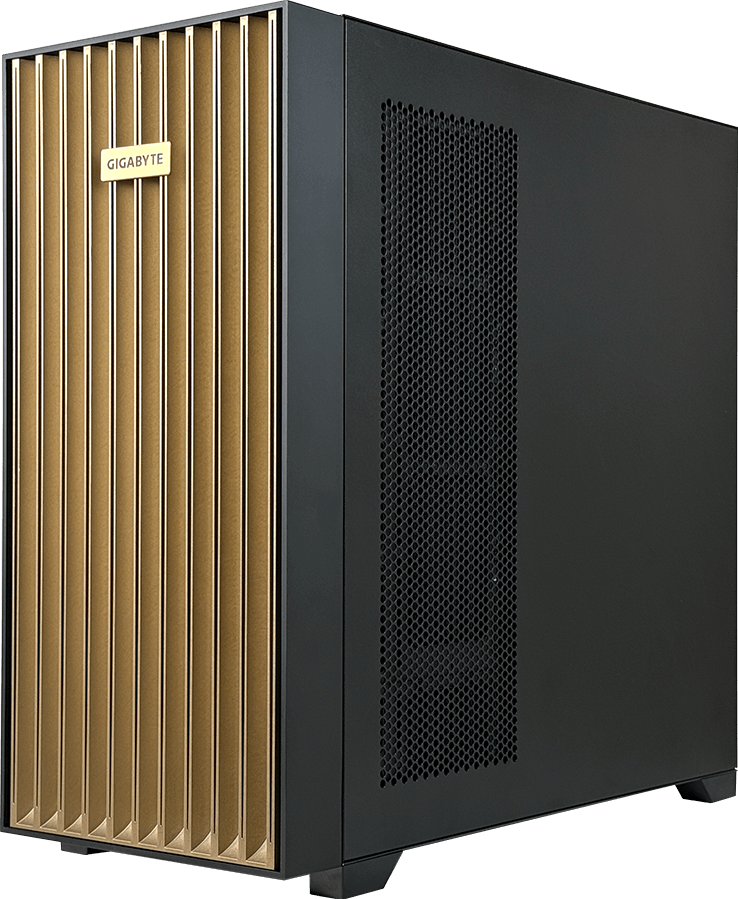
The GIGABYTE W775-V10-L01 is a deskside AI system built around one NVIDIA GB300 Grace Blackwell Ultra Desktop Superchip. It combines a 72-core Arm CPU, a Blackwell Ultra GPU, 748 GB of coherent CPU and GPU memory, four M.2 storage positions and two 400Gb/s network ports in a liquid-cooled pedestal chassis.
It is not a conventional x86 workstation and it is not an eight-GPU HGX server in tower form. The Grace CPU and Blackwell Ultra GPU form one NVLink-C2C-connected superchip. That architecture gives developers a large local memory domain and direct access to NVIDIA's data-centre AI software, but it also makes Arm software support, power delivery and network planning part of the buying decision.
W775-V10-L01 suits teams that need large-model development, inference or fine-tuning close to the desk without installing a rack server. Buyers whose applications require x86 binaries, several independent PCIe GPUs or ordinary office power should start elsewhere.
Technical review summary
The GB300 Desktop Superchip combines one NVIDIA Grace CPU with one Blackwell Ultra GPU. GIGABYTE specifies 496 GB of LPDDR5X ECC memory on the CPU side and 252 GB of HBM3E on the GPU side, for 748 GB of coherent memory. NVLink-C2C connects the two processors.
The workstation includes a ConnectX-8 SuperNIC with two 400Gb/s QSFP ports, plus 10GbE and a dedicated management port. Storage consists of two CPU-attached PCIe Gen 5 x4 M.2 sockets and two ConnectX-8-attached PCIe Gen 6 x4 M.2 sockets. Three full-length PCIe slots remain for supported expansion, including selected RTX PRO graphics cards.
A closed-loop liquid cooler handles the superchip. The system uses a single 1,600 W ATX 80 PLUS Platinum supply, requires a C19 power cord and, according to GIGABYTE, needs a 20-amp circuit. The vendor recommends 115 V to 240 V AC for the intended user experience.
Verified specification
| Area | GIGABYTE W775-V10-L01 | |---|---| | Platform | NVIDIA GB300 Grace Blackwell Ultra Desktop Superchip | | CPU | 1 x NVIDIA Grace, 72 Arm Neoverse V2 cores | | GPU | 1 x NVIDIA Blackwell Ultra GPU | | CPU to GPU link | NVIDIA NVLink-C2C | | CPU memory | 496 GB LPDDR5X ECC, up to 396 GB/s | | GPU memory | 252 GB HBM3E, 7.1 TB/s | | Coherent memory total | 748 GB | | High-speed network | 2 x 400Gb/s QSFP through ConnectX-8 | | Other network | 1 x 10GbE RJ45, 1 x dedicated management port | | Storage | 2 x M.2 PCIe Gen 6 x4 plus 2 x M.2 PCIe Gen 5 x4 | | Expansion | 1 x PCIe Gen 5 x16 plus 2 x PCIe Gen 5 x8 | | Cooling | Closed-loop liquid cooling | | Power | Single 1,600 W ATX 80 PLUS Platinum PSU | | Current chassis size | 245 x 500.4 x 531 mm on the current GIGABYTE product page |
Specifications can change by ordering revision. Confirm the exact chassis dimensions, storage carriers, optional GPU list and OS image on the final quotation.
What the GB300 Desktop Superchip changes
A normal GPU workstation has an x86 processor, replaceable DIMMs and one or more PCIe graphics cards. Data moves between separate CPU and GPU memory pools across PCIe. W775-V10-L01 uses a different model: Grace and Blackwell Ultra share a coherent memory architecture over NVLink-C2C.
The GPU still has its own high-bandwidth HBM3E, while the CPU has LPDDR5X memory. Coherence does not turn them into one pool with identical latency or bandwidth, but it can simplify software access to a much larger address space than the 252 GB HBM capacity alone. Framework behaviour and memory placement still matter.
This makes the system interesting for models and datasets that strain ordinary workstation VRAM. A developer can work with a much larger local memory budget without dividing the project across several discrete cards. The benefit must be demonstrated in the intended framework; a large capacity figure cannot guarantee application speed.
The platform also fixes the main CPU and GPU. Buyers select storage, supported PCIe expansion and the surrounding software rather than choosing a Threadripper, Xeon or separate base GPU. Treat it as an appliance-like development system with workstation access, not as a bare tower awaiting a conventional component build.
Arm software compatibility comes first
NVIDIA Grace uses the Arm architecture. Linux distributions, CUDA libraries, containers and development tools need AArch64 builds. Much modern AI software supports Arm, but an organisation's complete stack may include x86-only agents, proprietary plugins, monitoring software or compiled extensions.
Create a software inventory before ordering:
- operating system and NVIDIA software image;
- framework, CUDA and container versions;
- Python wheels and native extensions;
- storage, security and monitoring agents;
- licence servers and developer tools;
- any closed-source application required by the team.
Run the real container or source build on a Grace platform if possible. An application that installs cleanly is only the first checkpoint; test data loading, GPU kernels, checkpoint save and restore, monitoring and updates.
Do not assume an x86 virtual machine will remove the issue. Emulation can carry a performance and support cost, while direct GPU access may add another compatibility boundary. The cleanest deployment uses supported Arm-native software.
Model development and inference fit
The workstation's main attraction is local memory. A developer can test large checkpoints, long contexts and higher-concurrency inference without immediately reserving an eight-GPU server. It can also serve as a pre-production system for software destined for Grace Blackwell infrastructure.
Memory still needs a proper estimate. Include model weights at the selected precision, key-value cache, activation or fine-tuning state, runtime workspace and framework overhead. The 748 GB coherent figure includes 496 GB of CPU memory and 252 GB of HBM3E; it is not the same as 748 GB of HBM.
For inference, record time to first token, inter-token latency, throughput and memory placement across representative prompt lengths. Long-context services may benefit from the capacity, but poor data movement can still reduce performance.
For fine-tuning, check whether the method fits the one-GPU design. Parameter-efficient techniques can be practical, while training plans that expect several independent GPUs or an HGX NVSwitch fabric belong on another platform. The workstation can develop and validate a job that later runs on a cluster, but hardware topology changes can affect scaling.
Optional PCIe GPUs need a separate use case
GIGABYTE lists selected RTX PRO Blackwell cards as optional graphics expansion. The current product page names RTX PRO 6000 Workstation Edition, RTX PRO 6000 Max-Q Workstation Edition, RTX PRO 4000 SFF and RTX PRO 2000 options.
Those cards can add professional graphics, display, rendering or a separate CUDA resource. Do not assume that an optional card joins the GB300 GPU through NVLink or forms one transparent accelerator pool. Confirm the software model, slot, card cooling and PSU budget for the exact option.
The base system's Mini DisplayPort comes from the onboard management controller. A buyer needing high-end local visual output should include an approved RTX PRO card and check displays, driver branch and application certification.
Three expansion slots do not mean three high-power cards can always be fitted. Slot one has a Gen 5 x16 link, while slots two and three provide x8. Card width, airflow and the single 1,600 W PSU place real limits on the final arrangement.
Storage: four M.2 positions with two different data paths
W775-V10-L01 has four M.2 sockets, not two. The layout is unusual:
- Two PCIe Gen 5 x4 M.2 sockets connect to the Grace CPU.
- Two PCIe Gen 6 x4 M.2 sockets connect through the ConnectX-8 device.
GIGABYTE lists software RAID 1 support for the CPU-attached pair on its current product page. Confirm boot support, approved drive form factors and RAID behaviour for the selected software image.
Use enterprise NVMe media with suitable endurance. A large model workstation can write checkpoints, compile caches, container layers and temporary datasets at a high rate. Consumer drives may reach thermal or endurance limits that are hidden by their short benchmark results.
Four M.2 drives can provide fast local working storage, but serviceability differs from front hot-swap bays. Plan backups and replacement before a drive fails. Large shared datasets may still belong on a networked storage system, with local NVMe used for active models and cache.
Networking: why a deskside system has two 400Gb/s ports
The ConnectX-8 SuperNIC supplies two 400Gb/s QSFP ports. That is far beyond ordinary office networking and points to clustered development, fast storage access or direct links between several GB300 deskside systems.
Using those ports requires more than a cable. The design needs compatible switch ports or a validated direct-attach topology, supported optics or DACs, correct firmware, network configuration and a storage or peer system able to use the bandwidth. Check whether the ports run Ethernet, InfiniBand or another supported mode for the exact software stack.
The separate 10GbE RJ45 port can serve normal site traffic, while the management port should sit on a controlled administration network. Do not expose the BMC directly to an untrusted public network.
For one user loading models from local NVMe, the 400Gb/s ports may remain unnecessary. For a team moving checkpoints to shared AI storage or clustering systems, they can become a central part of the purchase.
Power, cooling and room suitability
This is a deskside form factor with data-centre electrical expectations. GIGABYTE specifies a single 1,600 W power supply, a C19 cord and a 20-amp circuit. At lower input conditions the power supply may not provide the full 1,600 W output; the vendor recommends the higher input range for the intended experience.
An electrician or facilities engineer should confirm the circuit, outlet, protection and connector before delivery. Ordinary office sockets, extension leads and shared circuits may not be suitable. The optional PCIe card configuration affects the final draw.
The superchip uses closed-loop liquid cooling. It removes the need for a facility water loop, but it does not make the system silent or eliminate heat. All consumed power eventually enters the room. Check acoustic limits, room ventilation, clearance and service access.
If several units will share one lab, calculate the combined electrical and heat load. At that point a rack or hosted deployment may be easier to operate than a row of high-power pedestal systems.
Local workstation or rack server?
W775-V10-L01 wins when proximity changes the workflow. A researcher can compile, inspect and iterate locally without competing for a shared queue. Sensitive datasets can remain in the lab, subject to the organisation's security controls.
A rack server wins when many users need scheduled access, redundant components, front hot-swap storage, central network cabling or consistent remote operations. The W775 uses one PSU rather than a redundant data-centre PSU arrangement, and its M.2 storage is internal.
For tightly coupled multi-GPU training, an HGX server provides eight SXM GPUs and NVSwitch. For many independent GPU workers, a PCIe server can expose several cards to a scheduler. The W775 sits between those worlds: one exceptionally large Grace Blackwell development superchip close to the user.
Best-fit buyers
Large-model development teams
The coherent memory capacity can support projects that outgrow 96 GB workstation GPUs. Arm-native toolchains and a clear path to production Grace Blackwell systems strengthen the case.
Research labs with local data
A lab may need a powerful system beside instruments or private datasets. The workstation form can reduce round trips to a remote cluster, though backup and access controls still need proper design.
Platform engineers preparing cluster software
The ConnectX-8 network and Grace Blackwell architecture can provide a useful development target for software that will later run in a larger AI estate. Hardware scale differs, so final performance testing still belongs on production topology.
Specialist inference services
One large local model or a small set of services may fit the platform well. A production service still needs monitoring, restart, capacity and support plans; workstation placement does not remove those duties.
Who should not buy it
Choose an x86 workstation when the required application, driver or enterprise agent lacks Arm support. Compatibility risk can outweigh the memory advantage.
Choose a conventional RTX PRO workstation when graphics, rendering and local displays are the main job. It may provide a simpler application and support path.
Choose a PCIe GPU server when several independent users need separate cards. Choose HGX when one training job needs eight GPUs and NVSwitch. Use cloud capacity for a short experiment if utilisation and software requirements remain unknown.
The W775 also makes little sense where the building cannot provide the specified circuit or handle the room heat.
Configuring W775-V10-L01 on GPUMachines
The GIGABYTE W775-V10-L01 configurator records the fixed GB300 superchip, M.2 storage and network options. The GB300 GPU comes with the platform and is not a selectable PCIe accelerator.
Before requesting a final quotation, provide:
- target models, precision and context lengths;
- Arm software and container requirements;
- local versus shared storage plan;
- need for the two 400Gb/s links;
- optional RTX PRO card and display requirements;
- site voltage, circuit and acoustic constraints;
- ownership of updates, monitoring and backups.
GPUMachines should check the current GIGABYTE QVL, ordering code, software image, drive list and optional GPU power before the configuration is approved.
Acceptance test
Record the delivered ordering number, firmware, NVIDIA software release and OS image. Confirm that the Grace CPU, Blackwell Ultra GPU, coherent memory, ConnectX-8 ports and all four M.2 positions appear correctly.
Run the team's real container or application. Measure model load, GPU memory, CPU memory, inference or fine-tuning behaviour, NVMe throughput, network links and wall power. Test a restart and restore path, not only a successful first run.
The system should also pass a sustained thermal test in its intended room with any optional PCIe card installed. A short idle demonstration cannot validate the cooling or circuit.
FAQ
Is W775-V10-L01 an HGX server?
No. It uses one GB300 Grace Blackwell Ultra Desktop Superchip with one Grace CPU and one Blackwell Ultra GPU. HGX systems use multi-GPU baseboards and NVSwitch.
Does it really have 748 GB of GPU memory?
No. It has 252 GB of HBM3E on the GPU and 496 GB of LPDDR5X on the Grace CPU. NVIDIA describes the combined architecture as 748 GB of coherent memory, but the two pools have different bandwidth and placement.
Can I add an RTX PRO GPU?
GIGABYTE lists selected RTX PRO Blackwell cards as optional. The exact card, slot, cooling, power and software use require qualification. It should not be assumed to join the GB300 GPU as an NVLink pair.
How many storage drives are supported?
Four M.2 NVMe positions: two PCIe Gen 5 x4 sockets from the CPU and two PCIe Gen 6 x4 sockets through ConnectX-8.
Does it need special electrical power?
Yes. GIGABYTE specifies a C19 cord and a 20-amp circuit for the 1,600 W supply. Confirm the site with a qualified facilities professional before delivery.
Is Arm compatibility a concern?
It can be. The Grace CPU is Arm-based, so operating systems, containers, native extensions and management agents need supported AArch64 builds. Test the complete stack, not just the main framework.
Can several W775 systems be clustered?
The two 400Gb/s ConnectX-8 ports provide the hardware path for high-speed networking, but the topology, switch, optics, software and storage must be designed together. A fast port does not create a working cluster by itself.
Technical sources
- GIGABYTE W775-V10-L01 product page
- GIGABYTE W775-V10-L01 datasheet
- GIGABYTE W775-V10-L01 support and QVL
- GIGABYTE 2026 NVIDIA platform guide
Specifications and software support can change. Confirm the ordering revision, OS image, Arm compatibility, storage QVL, optional GPU list, electrical requirement and network mode before purchase. This is a source-backed technical review, not a record of hands-on GPUMachines testing.