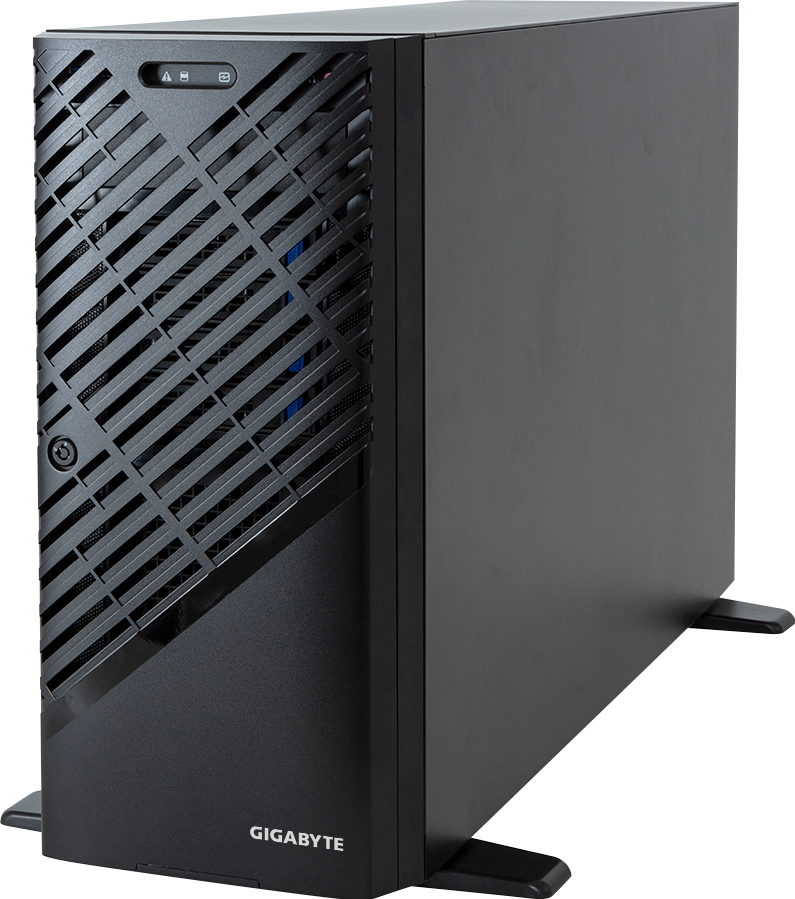
GIGABYTE's W773-W80 is a large pedestal workstation for buyers who need server-grade management, ECC RDIMM memory and several PCIe accelerators beside a desk or lab bench. It supports one Intel Xeon W processor, up to four qualified dual-slot GPUs and seven full-length PCIe slots in a chassis deeper than many rack servers.
The headline needs a caveat. "Up to four GPUs" describes physical and electrical platform capability for supported cards; it does not mean four of the highest-power GPUs can be installed behind the single 2,000 W supply. CPU family also changes the machine substantially. Xeon W-3500 or W-3400 enables all platform functions and eight memory channels, while W-2500 or W-2400 limits the system to four DIMM slots and fewer CPU PCIe lanes.
Configure the GIGABYTE W773-W80 on GPUMachines only after fixing the GPU power budget, processor family and required slot layout. Those choices are linked.
Technical review summary
W773-W80 uses GIGABYTE's MW83-RP0 motherboard and Intel's W790 workstation platform. The LGA4677 socket accepts Xeon W-3500, W-2500, W-3400 and W-2400 processors, with CPU thermal design power support up to 385 W. GIGABYTE includes the carrier for W-3500 and W-3400; W-2500 and W-2400 need a different optional carrier.
Eight DDR5 RDIMM slots connect across eight channels when a Xeon W-3500 or W-3400 processor is installed. With W-2500 or W-2400, only four DIMM slots operate. That is not a minor footnote for AI development or simulation: halving the active channels changes both maximum practical capacity and memory bandwidth.
The chassis exposes five PCIe Gen5 x16 slots and two Gen4 x16 slots. GIGABYTE rates it for up to four supported dual-slot Gen5 GPUs, subject to the GPU support list, power and cooling. Two 10GbE copper ports use an Intel X710-AT2 controller, and a separate management port connects to the AST2600 BMC.
Local storage comprises four front hot-swap SATA bays, space for four more optional SATA bays and two internal M.2 2280 sockets on PCIe Gen4 x4 links. GIGABYTE notes that NVMe or SAS drive support needs an additional storage card.
Verified specification
| Area | GIGABYTE W773-W80 specification | | --- | --- | | Form factor | Pedestal workstation, optional rack conversion parts | | Dimensions | 218 x 455 x 726.3 mm | | Motherboard | GIGABYTE MW83-RP0 | | Processor socket | 1 x LGA4677 | | Processor families | Intel Xeon W-3500, W-2500, W-3400 and W-2400 | | Processor power support | Up to 385 W TDP, subject to GIGABYTE QVL | | Chipset | Intel W790 | | Memory | 8 x DDR5 RDIMM slots with W-3500/W-3400; 4 active slots with W-2500/W-2400 | | GPU capacity | Up to 4 x supported dual-slot PCIe Gen5 GPUs | | Expansion | 5 x PCIe Gen5 x16; 2 x PCIe Gen4 x16 | | Front storage | 4 x hot-swap 3.5-inch/2.5-inch SATA; 4 more SATA bays optional | | Internal storage | 2 x M.2 2280, PCIe Gen4 x4 | | Data network | 2 x 10GbE RJ45 through Intel X710-AT2 | | Management | AST2600 BMC and dedicated management LAN | | Power supply | Single 2,000 W ATX, 80 PLUS Gold, C19 input |
This table describes the barebone boundary. The final number and type of GPUs depend on card qualification, slot width, auxiliary power, total system power and airflow. Storage also depends on which optional bay kit and controller are fitted.
The processor family controls the rest of the workstation
Intel divides this platform into expert and mainstream workstation families. Xeon W-3500 and W-3400 processors expose up to eight memory channels and, depending on the SKU, far more CPU-attached PCIe lanes than W-2500 and W-2400. The mainstream families use four memory channels and fewer PCIe lanes.
GIGABYTE therefore advises using W-3500 or W-3400 to enable all W773-W80 functions. That matters in a chassis whose selling point is several GPUs and add-in cards. A lower-cost W-2500 or W-2400 can be appropriate for a lighter workstation, but it does not turn the same seven slots into an equally connected system.
For a four-GPU build, start with W-3500 or W-3400 and verify the motherboard block diagram. GPU, NIC and storage-controller traffic should stay on CPU-attached lanes where possible. A processor with too few lanes can force compromises in slot availability or link width, even though the physical connector still fits the card.
CPU core count is a separate decision. Rendering preparation, simulation, data loading and compilation may benefit from many host cores. Interactive CAD or lightly threaded engineering applications can favour frequency. The most expensive CPU is not always the fastest choice once licence cost, thermal limits and the application's scaling behaviour are included.
Xeon Gold and Xeon Platinum server parts are not valid substitutes just because some share a generation number or similar core count. W773-W80 is an LGA4677 Xeon W workstation platform, so the ordering list should stay within the supported Xeon W families.
Memory: eight slots does not always mean eight active slots
With W-3500 or W-3400, the eight RDIMM sockets provide one slot per memory channel. A balanced population across all channels gives the processor the best available memory bandwidth. This suits data preparation, CPU rendering, simulation and GPU workloads that repeatedly stage large data sets through host memory.
W-2500 and W-2400 support only four active DIMM sockets in this workstation. A buyer who selects one of those processors and then plans an eight-DIMM memory kit has created an invalid build. The carrier also differs, so changing processor family later may require more than swapping the CPU.
GIGABYTE lists DDR5 RDIMM operation up to 4,800 MT/s for the platform. Memory speed still depends on the chosen processor and qualified module. Modules advertised at a higher nominal data rate do not force the workstation to run beyond its supported memory controller and firmware settings.
Capacity should follow the working set. GPU memory holds active model weights, tensors, scenes or simulation data, while system memory carries the operating system, data loaders, preprocessing, cache and CPU-side applications. Four large GPUs can create a substantial host-memory requirement, but there is no universal ratio. Measure the workflow and leave headroom for peak data preparation rather than multiplying GPU VRAM by an arbitrary number.
Four GPUs behind one 2,000 W supply
This is the part most likely to be misunderstood. The W773-W80 has a single 2,000 W 80 PLUS Gold supply. Four 600 W GPUs would require 2,400 W before the CPU, memory, drives, fans, BMC or conversion losses are counted. That combination cannot be justified by the platform's four-GPU headline.
The safe GPU count therefore falls as individual card power rises. Four lower-power dual-slot cards may fit the platform envelope; two very high-power cards may be the sensible ceiling for another design. Three cards can also create a better result when the remaining slot and power budget are needed for a high-speed NIC or storage controller.
Use the exact GIGABYTE GPU support list, not only physical dimensions. A qualified card has been considered against mechanical fit, firmware, auxiliary power and thermal behaviour. RTX PRO Blackwell options also vary widely in power. The 70 W and 600 W ends of the range cannot share one quantity rule.
Power arithmetic should include:
- GPU board power for every installed accelerator.
- Processor maximum operating power rather than base TDP alone.
- Memory, drives, network cards, storage controllers and fans.
- Conversion loss and transient headroom.
- Site voltage, connector rating and the supplied C19 power lead.
The 2,000 W label is not a target load. Sustained operation close to the supply limit leaves little room for transients or ageing, and it can raise noise as the chassis fans respond to heat.
PCIe slot planning
Seven x16-length connectors create useful flexibility, but dual-slot GPUs cover neighbouring positions. A four-GPU layout consumes most of the physical expansion area even before power cables are routed. The remaining usable slot, if any, must be checked against the actual GPU cooler and chassis diagram.
The five Gen5 slots suit current accelerators and high-bandwidth devices. Two Gen4 slots remain useful for a NIC, audio or video I/O, storage controller or other supported adapter. Link generation is only one variable; processor family and motherboard wiring determine the available lanes.
A sensible slot plan starts on paper. Record each card's width, length, power connectors, link requirement and preferred CPU root complex. Then check which card blocks which neighbour and where cables must pass. Installing GPUs first and trying to squeeze the storage or network card into the last visible connector often produces a compromised build.
Multi-GPU software scaling also deserves scrutiny. Four independent GPUs can serve separate users, render frames or run several inference workers effectively. Workloads that need constant GPU-to-GPU exchange may be constrained by PCIe and software topology. For tightly coupled large-model training, an HGX server with NVLink and an NVSwitch fabric serves a different job.
Storage is ten device positions, not eighteen
The standard chassis provides four front hot-swap SATA bays. An optional cage adds four more SATA positions, giving eight front bays in the fully expanded storage configuration. Two internal M.2 sockets bring the platform total to ten device positions, not eighteen.
Those two M.2 sockets use PCIe Gen4 x4 links and suit operating-system drives, application storage or local project cache. They are internal, so replacing one requires opening the chassis. For an organisation that expects frequent drive service, the front hot-swap bays are the more practical data tier.
The front bays are SATA in the published base design. GIGABYTE states that NVMe or SAS support requires a storage card. That requirement should be resolved with the bay kit, cabling and controller during quoting. The word "optional" covers physical parts, not a software switch.
For AI development, local NVMe is useful for model caches, active datasets and scratch files, but the W773-W80 does not provide a front U.2 or E3.S NVMe backplane as standard. A PCIe storage card may consume a slot that would otherwise hold a GPU or NIC. Buyers should decide whether local storage or accelerator count has priority.
Networking and remote management
Dual 10GbE RJ45 ports are valuable in a workstation because they support separate client and storage paths without an add-in card. They are not a substitute for 100GbE, 200GbE or InfiniBand when several GPUs must stream from shared storage or join a compute fabric.
A high-speed network adapter can be added, subject to slot, lane, cooling and power constraints. One GPU may need to be removed in a fully populated layout. That trade can improve real throughput if four accelerators would otherwise wait for data over 10GbE.
The AST2600 BMC distinguishes W773-W80 from many ordinary workstations. Administrators can use the dedicated management network for remote console, power control, hardware monitoring and firmware work. Keep that interface on a protected management network; do not expose it directly to the public internet.
Noise, power and physical placement
This pedestal measures more than 72 cm deep and uses three 120 x 38 mm middle fans plus a rear fan. It may be quieter than a 1U rack server, but a multi-GPU configuration under load is not an ordinary office desktop. Ask where it will sit, who must work near it and whether the room can remove the heat.
The single PSU removes power-supply redundancy. If it fails, the workstation stops. Buyers who require uninterrupted multi-user service should consider a rackmount platform with redundant supplies or plan a spare unit and recovery process.
The C19 inlet and 2,000 W rating also deserve a facilities check. GIGABYTE accepts 100 to 240 V AC, but circuit capacity, connector type and available power differ by site. A qualified electrician or facilities team should confirm the intended feed before delivery, especially for a high-GPU configuration.
An optional rail kit can convert the pedestal for rack installation. Cabinet depth, centre of gravity, rail support and rear cable clearance still need checking. A tower placed on a shelf is not the same as a rack-qualified installation.
Workloads that suit W773-W80
Visualisation, rendering and content production
Several independent professional GPUs can accelerate frame rendering, virtual production and large visualisation workloads. The workstation format keeps display and peripheral access close to the user, while the BMC gives IT staff remote control.
Local AI development and inference
Large GPU memory pools across independent cards can support model development, evaluation and several inference workers. Treat each GPU's memory as a separate domain unless the application explicitly supports the required multi-GPU method. Adding VRAM totals in a spreadsheet does not make one flat memory pool.
Engineering simulation
Xeon W-3500 or W-3400 provides host cores, memory bandwidth and PCIe lanes for CPU and GPU solvers. Application certification matters here. Check the software vendor's supported GPU, driver and operating-system combinations before selecting hardware.
Remote workstation service
The dual 10GbE ports, BMC and multiple GPU slots can support remote engineering or creative users. User isolation, licence servers, display protocol and storage performance need design work; the hardware alone does not create a secure multi-user service.
When not to buy it
Choose a smaller workstation when one GPU meets the workload. It will use less power, make less noise and cost less to maintain.
A rack GPU workstation is preferable when the system belongs in a data centre, needs redundant power or must fit standard service procedures. A PCIe GPU server provides better rack density for shared inference and batch jobs. Tightly coupled multi-GPU training belongs on HGX or another scale-up accelerator platform when the software benefits from its interconnect.
W773-W80 is also a poor storage server. Eight optional SATA bays and two internal M.2 sockets support a workstation data tier, not a large shared repository. Keep the durable copy on backed-up shared storage.
Practical configuration profiles
Two high-power GPU AI workstation
Use Xeon W-3500 or W-3400, populate all eight memory channels, fit two qualified high-memory GPUs and reserve a slot for fast networking. Mirror enterprise M.2 devices for the operating system where the chosen platform supports it; use shared storage for durable data.
Four moderate-power GPU render node
Select four qualified dual-slot cards whose combined board power leaves room for the CPU and the rest of the system. Confirm renderer scaling and licence cost before buying the fourth card. The optional SATA cage can hold project data, but central storage should remain authoritative.
CPU-heavy engineering workstation
Prioritise a Xeon W processor that matches the solver's thread behaviour, balanced RDIMM population and one or two application-certified GPUs. The unused PCIe positions can hold specialist I/O, high-speed networking or storage adapters.
Remote shared workstation
Use supported professional GPUs, enough system memory for concurrent sessions and a fast adapter if dual 10GbE is insufficient. Define user isolation, monitoring and recovery. The single PSU remains a service risk even when the rest of the configuration is redundant.
Questions to settle before ordering
- Which exact GPUs appear on the current GIGABYTE support list?
- What is the combined sustained and transient power requirement?
- Does the processor expose enough lanes and active memory channels for the intended cards?
- Will the storage controller displace a GPU or network adapter?
- Are four standard SATA bays enough, or is the optional cage required?
- Does the room have the right C19 power feed, ventilation and acceptable noise level?
- Is a single power supply acceptable for the workload's recovery objective?
A quote should answer those questions, not merely list four GPUs.
FAQ
Can W773-W80 use four RTX PRO 6000 Blackwell GPUs?
Do not assume so. Four 600 W cards alone would total 2,400 W, already above the single 2,000 W PSU rating before the CPU and other components. The final count must follow GIGABYTE qualification, power, cabling and thermal limits.
Which CPU family should I choose for four GPUs?
Start with Xeon W-3500 or W-3400 because GIGABYTE specifies those families to enable all platform functions. W-2500 and W-2400 provide fewer CPU PCIe lanes and only four active DIMM slots in this system.
Does the workstation really have eight memory channels?
Yes with a supported Xeon W-3500 or W-3400 processor. With W-2500 or W-2400, only four DIMM slots operate.
How many storage devices fit?
The base configuration has four front SATA bays and two internal M.2 sockets. An optional cage adds four more SATA bays, for ten positions in total when fully fitted.
Are the front bays NVMe?
The published standard bays are SATA. GIGABYTE states that an additional storage card is required for NVMe or SAS support. Confirm the controller, cables and bay configuration before ordering.
Does W773-W80 have redundant power?
No. It uses one 2,000 W ATX power supply. A PSU failure stops the workstation.
Can it be installed in a rack?
GIGABYTE lists an optional rail and rack-ear kit for the W7x3 series. Confirm cabinet depth, supported orientation, rear clearance and the exact accessory part numbers.
Verdict
W773-W80 is a capable multi-GPU tower when local access, ECC memory, remote management and PCIe expansion matter more than rack density. Xeon W-3500 or W-3400 unlocks the platform's strongest configuration, while the dual 10GbE ports and BMC make it easier to operate as managed technical equipment rather than a personal desktop.
The four-GPU label must be read with discipline. GPU power determines the realistic count, and the single 2,000 W supply places a hard boundary around high-wattage configurations. Storage is also smaller than the old article claimed: four standard SATA bays, four optional bays and two M.2 sockets.
Configure the GIGABYTE W773-W80 with a checked slot map, power budget and processor lane plan.
Technical sources
- GIGABYTE W773-W80 product page
- GIGABYTE W773-W80 current datasheet
- GIGABYTE W773-W80 support and QVL
- GIGABYTE 2026 Intel workstation guide
- Intel Xeon W-3500 and W-2500 platform brief
Specifications and support lists can change. Confirm the workstation revision, processor carrier, CPU and memory QVL, GPU list, slot topology, power cables, storage options and site electrical supply before purchase. This is a source-backed technical review, not a record of hands-on GPUMachines testing.