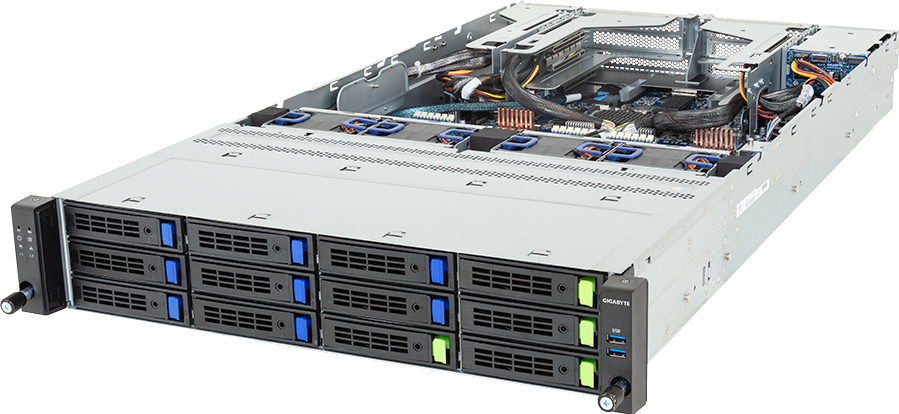
The drive count on the GIGABYTE R284-A94-AAL1 is easy to misread. It has 14 hot-swap positions, not 35, and only four of the front bays support Gen5 NVMe. Eight more front bays and two rear bays support SATA or SAS-4, while three internal M.2 slots form separate service-storage paths.
That mix is the reason to consider this 2U server. It can place a small, fast NVMe tier beside a larger capacity pool without forcing every drive into the same media type. Dual Intel Xeon 6900E+/6900 processors, 24 memory channels, a SAS-4 expander, seven general Gen5 expansion slots and two OCP NIC 3.0 positions give the storage software room to work.
Configure the GIGABYTE R284-A94-AAL1 only after mapping the four physical storage pools. The current public selector cannot express every location and interface boundary cleanly, so the final controller, drive count and bay assignment need a manual compatibility check.
Exact model and current revision
This review covers R284-A94-AAL1, barebone order code 6NR284A94DR000AAL1*, with MA94-FS0 motherboard. GIGABYTE's current page adds Xeon 6900E+ support to the earlier 6900-series specification. The February 2026 datasheet and Rev. 1.0 manual provide the base hardware detail.
| Area | Published specification | Design consequence | | --- | --- | --- | | Chassis | 2U, 438 x 87.5 x 815 mm | Shorter than many GPU servers, but drive and cable service space still matters | | Processors | Two LGA7529 Xeon 6900E+/6900 CPUs, up to 500 W each | PCIe and memory resources are split between sockets | | Memory | 24 DDR5 slots, 12 channels per CPU | A full 24-DIMM population uses every channel | | Front pool A | Four 3.5/2.5-inch Gen5 NVMe/SATA/SAS-4 bays | Only front pool with published NVMe support | | Front pool B | Eight 3.5/2.5-inch SATA/SAS-4 bays | Capacity tier, not eight extra NVMe bays | | Rear pool | Two 2.5-inch SATA/SAS-4 bays | Separate service or mirrored storage positions | | Internal storage | Two Gen5 x4 M.2 plus one Gen5 x2 M.2 | All three connect to CPU 0; one has a narrower link | | Drive connectivity | Broadcom SAS4x32 expander | SATA/SAS still need a storage card; RAID needs a controller | | Expansion | Six FHHL and one LP Gen5 x16 slots | Storage cards and network adapters can be distributed across sockets | | Network slots | Two OCP NIC 3.0 Gen5 x16, one per CPU | Direct high-speed network paths available on both sockets | | Base network | Two 1GbE data ports and one 1GbE BMC port | Adequate for management, too slow for serious shared storage | | Power | Two 2700 W Titanium PSUs | Full output needs high-voltage input; C19 cords are separate |
The source page calls the chassis a 12+2-bay server. That count refers to 12 front hot-swap positions plus two rear positions. The three internal M.2 slots sit outside that label.
Four storage pools, each with its own limit
The first four front bays accept 3.5-inch or 2.5-inch devices and have Gen5 NVMe, SATA and SAS-4 paths. NVMe comes from CPU 1. SATA and SAS require the appropriate storage card, and the SAS path can use the onboard Broadcom SAS4x32 expander.
Those four bays are physically shared. Selecting two NVMe drives leaves two positions for SATA or SAS in that group, not four of each. A configurator that exposes four NVMe, four SATA and four SAS choices must cap their combined quantity at four.
The next eight front bays accept 3.5-inch or 2.5-inch SATA/SAS-4 devices. They are a second shared pool with a combined maximum of eight. Large nearline SAS or enterprise SATA drives can provide capacity, while 2.5-inch SSDs may be fitted where their endurance and controller support match the workload. GIGABYTE asks buyers to use verified enterprise SATA devices.
Two rear 2.5-inch bays make up the third hot-swap pool. They support SATA or SAS-4 with the storage card. Their location can be useful for an operating-system mirror, log devices or service volumes, although rear access and replacement procedures must be considered before assigning a critical role.
The fourth pool sits inside the chassis. Two M.2 2280/22110 slots connect at PCIe Gen5 x4; one M.2 2280 slot connects at Gen5 x2 through the I/O board. All three paths originate from CPU 0. If the narrower slot joins a mirror with an x4 device, test the actual implementation rather than assuming equal behaviour from the shared M.2 form factor.
The existing GPUMachines record tried to express these capabilities as independent counts: four NVMe, four SATA, four SAS, eight SATA, eight SAS, two SATA, two SAS and three M.2. Adding those numbers produces 35, which is physically false. The admin record needs location-aware shared-pool support before the configurator can model this chassis without ambiguity.
SAS-4 expander does not replace the controller
The Broadcom SAS4x32 expander supplies connectivity at up to 24 Gb/s per SAS-4 port. It lets a storage card reach more drives than a direct-attach port count would otherwise permit. It does not create a hardware RAID volume and it does not make SATA/SAS work without a suitable controller.
GIGABYTE states two separate requirements. A storage card enables SATA and SAS devices, and hardware RAID requires an add-in card. The motherboard also has a VROC key header for supported Intel storage arrangements. A quote must name the controller or HBA, its mode, cables, firmware and drive qualification rather than listing the expander as if it were the complete storage subsystem.
Hardware RAID can provide familiar block volumes, cache protection and controller-managed rebuilds. It also creates a controller dependency and may hide individual drive behaviour from software. An HBA with direct drive presentation can suit ZFS, Ceph and other software-defined systems, provided the filesystem, replication count, write policy and monitoring are designed around it.
Do not mix those approaches casually. A cache mode that helps one filesystem can damage another system's durability assumptions. Drive error handling, power-loss protection, sector format and rebuild behaviour need to match the selected software.
A useful hybrid AI data node, not an all-flash array
Four Gen5 NVMe bays can form an active tier for current data sets, checkpoint bursts, metadata or cache. The eight front capacity bays and two rear positions can hold a larger SATA/SAS tier for retained checkpoints, source data, backup or lower-frequency files.
That arrangement may suit an AI team whose compute nodes need fast access to a working set but whose full corpus does not justify an all-NVMe array. It can also support private-cloud storage, virtualisation, backup or general software-defined storage. The value comes from deliberate tiering, not simply filling every bay.
Only four hot-swap bays have published NVMe support. Teams that need a dense all-flash parallel filesystem, many independent NVMe namespaces or high aggregate write throughput should compare a 24-bay U.2/U.3 platform or an E1.S storage server. Forcing an NVMe-heavy workload into R284-A94-AAL1 leaves most of its front capacity unused.
Four NVMe drives do not guarantee a fast storage service. The filesystem, network, client concurrency, CPU placement and write protection can become the limit first. A single 25GbE link may cap a workload far below the local media's combined bandwidth. Conversely, several high-speed network links can expose metadata or controller bottlenecks.
Dual Xeon 6900E+/6900 and 24 memory channels
Two LGA7529 sockets support Intel Xeon 6900E+ or 6900-series processors up to 500 W, subject to GIGABYTE's qualification list. CPU 0 and CPU 1 each own memory channels and PCIe devices. Installing one processor leaves some functions unavailable, so a single-socket quote needs a complete lane map.
The current 6900E+ path supports RDIMM up to 8000 MT/s. Standard 6900 P-core processors support RDIMM up to 6400 MT/s or MRDIMM up to 8800 MT/s, with MRDIMM limited to selected CPUs. Twenty-four DIMM slots provide one position for each channel across the two sockets.
Storage software can use substantial host memory. Read cache, metadata, deduplication tables, object maps, checksums, compression buffers, virtual machines and containers all compete for RAM. The correct capacity depends on software and working set; a drive-capacity ratio copied from another platform is not evidence.
Start with a symmetric population between sockets. Where bandwidth matters, use all 24 channels with matched DIMMs. Then pin or distribute storage and network processing so the CPU handling a controller is not constantly reading remote memory from the other socket.
CPU selection should follow the data services. Compression, encryption, erasure coding and virtualisation can use cores. A simple backup target may gain little from the largest dual-500 W configuration. Fewer, faster cores can suit latency-sensitive metadata work, while high core counts may help many concurrent services. Measure the intended software before paying for both socket ceilings.
Expansion and NUMA placement
Six full-height, half-length Gen5 x16 slots divide evenly across the processors: three from CPU 0 and three from CPU 1. One low-profile Gen5 x16 slot also comes from CPU 0. Two OCP NIC 3.0 Gen5 x16 slots provide one socket-local network position per CPU and support NCSI.
This distribution gives the system a sensible path for a dual-port HBA or RAID controller plus fast network adapters. It does not remove NUMA effects. A storage card attached to CPU 1 and a network card attached to CPU 0 may send data across the socket interconnect. That can be acceptable, but it should be a conscious topology rather than an accident of free slots.
Build a device map before ordering:
1. Assign each backplane or expander path to its storage card and CPU. 2. Place OCP and PCIe network adapters near the CPU serving their data path. 3. Reserve a slot for a second HBA, accelerator or future network upgrade only when airflow and power allow it. 4. Record firmware, driver, cable and slot dependencies for replacement work. 5. Test failure behaviour for each controller, NIC, PSU and storage tier.
The seven general x16 slots are not an invitation to turn this into a GPU server. The chassis has storage-oriented airflow and no published GPU qualification. Use the slots for verified storage, network or service adapters unless GIGABYTE explicitly qualifies another device.
Network design starts above 1GbE
Two Intel I350-AM2 1GbE ports ship as the base data network, and a separate 1GbE connection serves the AST2600 BMC. The onboard ports are suitable for management, provisioning or a low-rate service path. They are not credible as the main route to four Gen5 NVMe drives and ten more hot-swap devices.
The two OCP slots make a faster design possible without consuming the full-height bays. NVIDIA ConnectX adapters can provide 25, 50, 100, 200, 400 or 800GbE options where the exact server, switch and cable generation support them. InfiniBand may fit an HPC environment, while Ethernet often suits file, object, virtualisation and AI data services.
Choose speed from traffic. Estimate concurrent clients, read and write mix, protocol overhead, replication, backup windows and rebuild activity. A 100GbE port can carry roughly 12.5 GB/s before protocol overhead, but a real service will be limited by drives, controllers, PCIe paths, software and client behaviour. Do not quote line rate as application throughput.
Separate BMC access from storage traffic. Larger deployments may also split client, replication and backup networks. Redundancy should cover switches and cables as well as a dual-port adapter; two ports into one switch remain one failure domain.
Power, voltage and rack installation
R284-A94-AAL1 is 815 mm deep and weighs 21.2 kg as a bare system. Drives, controllers, NICs, rails and cabling increase the installed weight. Four 80 x 80 x 56 mm fans cool the chassis, and GIGABYTE publishes a 10 to 35 C operating range.
The standard two-section rail kit does not support a cable-management arm. GIGABYTE offers a three-section rail kit and CMA as options. That matters in a storage server with many rear cables: two PSUs, management, data networks and possibly external storage connections can make service movement difficult without a planned cable path.
Two 2700 W Titanium PSUs operate as 1+1. At 200 to 240 V AC, each can supply up to 2700 W. At 100 to 127 V AC, output falls to 1008 W. A build that appears valid from the PSU label can lose redundancy or overload a low-voltage feed once two 500 W CPUs, memory, drives, controllers and fans are installed.
C19 power cords are required and are not included. Record the site voltage, plug, PDU outlet, branch-circuit limit and redundancy rule. Drive spin-up can produce a short peak in HDD-heavy systems, while NVMe and high-speed NICs add sustained load. The current GPUMachines barebone estimate of 860 W covers the platform before configurable CPUs, memory, drives and cards; commissioning measurements should replace estimates where rack capacity is tight.
Workload fit and alternatives
R284-A94-AAL1 fits a hybrid data service where four hot NVMe devices work beside a larger SATA/SAS pool. Examples include AI dataset staging, checkpoint retention, backup, private-cloud storage, virtualisation and a software-defined storage node with enough CPU and network expansion for its services.
It should not be the default choice for every storage project. A backup target that needs capacity but little compute may be cheaper with a single-socket platform. An all-flash filesystem needs more hot-swap NVMe bays. A GPU training node should keep local scratch close to its accelerators and use this server only if the external storage network can meet its access pattern.
Buyers should also decide whether this is one storage server or one member of a replicated system. A redundant PSU does not protect against motherboard, controller, firmware or chassis failure. Data durability may require another node, another rack or another site, plus tested recovery procedures.
Compare the GPUMachines storage server range for denser NVMe or capacity layouts. Where the storage will feed GPU compute, the PCIe GPU server catalogue can help map client-side slots and network adapters.
Configuration checklist
Before approving the system, record:
1. Exact R284-A94-AAL1 model and 6NR284A94DR000AAL1* barebone code. 2. Dual-socket-qualified Xeon 6900E+/6900 CPUs and their power limits. 3. Twenty-four-DIMM population, memory technology and expected speed. 4. Four-bay hybrid front pool with a combined NVMe/SATA/SAS maximum of four. 5. Eight-bay SATA/SAS front pool and two-bay SATA/SAS rear pool. 6. Two Gen5 x4 M.2 devices and one Gen5 x2 M.2 device, all on CPU 0. 7. HBA or RAID controller, expander path, cables, firmware and drive QVL. 8. Filesystem or RAID level, cache policy, rebuild plan and spare drives. 9. OCP or PCIe NIC model, socket locality, switch ports and cables. 10. Client, replication, backup and BMC network separation. 11. Input voltage, C19 cords, PDU capacity and PSU-failure rule. 12. Rail kit, optional CMA, rack depth, rear service space and installed weight. 13. Monitoring for drives, expander, controller, filesystem, NICs, PSU and temperature. 14. Backup and recovery tests outside the chassis failure domain.
Acceptance testing should exercise all tiers at once. Run sustained reads and writes, force rebuild or resilver activity in a safe test set, move client and replication traffic, inspect NUMA placement and confirm that management remains reachable. Test one supported PSU failure at the intended site voltage.
FAQ
How many drives does the R284-A94-AAL1 support?
It has 14 hot-swap bays and three internal M.2 positions. Twelve hot-swap bays sit at the front and two at the rear.
Which bays support NVMe?
Four front 3.5/2.5-inch hybrid bays support Gen5 NVMe. The other eight front bays and two rear bays support SATA or SAS-4. The three internal M.2 slots use Gen5 PCIe links.
Can I install four NVMe plus four SATA drives in the first group?
No. The first group contains four physical bays shared by NVMe, SATA and SAS. The combined number of drives in that pool cannot exceed four.
Does the SAS-4 expander provide RAID?
No. The expander connects drives to a storage card. GIGABYTE lists an add-in RAID card as necessary for hardware RAID, while an HBA can expose drives to software-defined storage.
Can it use one processor?
It can boot with one CPU, but some memory and PCIe functions become unavailable. The final controller, OCP, expansion and M.2 map must be checked against the installed socket.
Is 1GbE enough for this storage server?
Not for most shared high-performance uses. The two onboard 1GbE ports suit management or low-rate traffic. Data service normally needs a faster OCP or PCIe adapter sized for clients, replication and backup.
Why does input voltage matter?
Each 2700 W PSU supplies only 1008 W at 100 to 127 V. Full 2700 W output requires 200 to 240 V AC or the specified 240 V DC input. Redundancy calculations must use the actual site voltage.
Does the standard rail kit support a cable-management arm?
No. The included two-section rail kit does not support a CMA. GIGABYTE lists a three-section rail kit and compatible CMA as optional parts.
Verdict
R284-A94-AAL1 is strongest as a hybrid storage node. Four Gen5 NVMe-capable bays can carry the active tier, ten additional SATA/SAS hot-swap positions provide capacity or service storage, and three M.2 links cover internal roles. Dual Xeon 6900E+/6900 processors and nine Gen5 expansion or OCP positions leave room for demanding storage software and fast networks.
Its limits are equally clear. It is not a 12-bay NVMe server, the SAS-4 expander is not a RAID controller, onboard 1GbE cannot carry a serious shared-storage workload, and low-voltage power sharply reduces PSU output. A correct quote must preserve every physical bay boundary and name the controller, network and voltage assumptions.
Open the R284-A94-AAL1 configurator and submit the drive map, storage software, protection policy, client traffic, network topology and rack power for manual review.
Technical sources
- GIGABYTE R284-A94-AAL1 product page
- GIGABYTE R284-A94-AAL1 February 2026 datasheet
- GIGABYTE R284-A94-AAL1 Rev. 1.0 manual
- GIGABYTE R284-A94-AAL1 QVL
- Intel Xeon 6 product brief
Specifications, CPU lists, drive qualifications and firmware can change. Confirm the current revision and complete storage path before ordering.