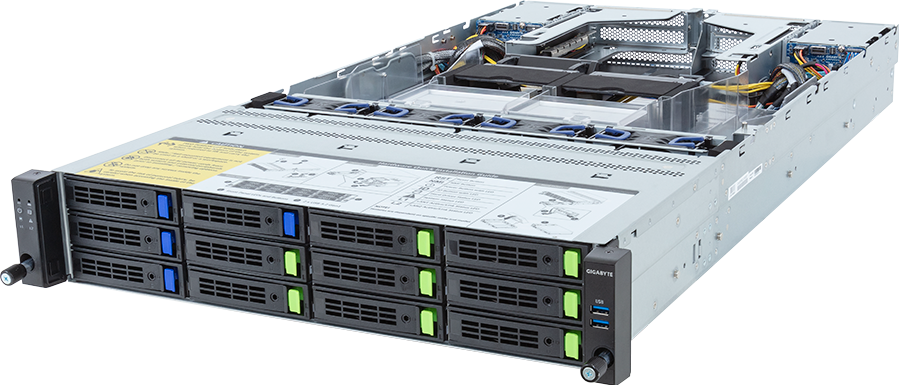
The GIGABYTE R283-Z97-AAF1 is easier to understand as a data-heavy compute server than as a small GPU server. It combines two full-length PCIe GPU positions with dual AMD EPYC processors, twenty-four memory channels and sixteen physical drive bays spread across the front and rear of a 2U chassis. That balance favours workloads which move a lot of data through one or two accelerators.
It is a good candidate for retrieval, scientific analysis, media processing, storage-aware inference and mixed CPU/GPU pipelines. It is not the best route to maximum GPU density, and its EPYC family labels require care: the current revision supports EPYC 9005 and 9004 processors within a published 240 W cTDP limit. Many higher-power parts in those families fall outside that boundary.
This is a source-backed technical review, not a hands-on benchmark. GIGABYTE publishes more than one hardware revision, so the exact revision, processor support list, GPU qualification, backplane wiring and firmware must be fixed before quotation.
The useful specification in one view
The current R283-Z97-AAF1 revision is a dual-socket SP5 server for AMD EPYC 9005 and 9004 processors. It provides twenty-four DDR5 DIMM slots, which maps one slot to each of the twelve memory channels per socket. Two full-height, full-length PCIe Gen5 x16 slots are reserved for GPUs. Two more full-height, half-length Gen5 x16 positions and two OCP NIC 3.0 Gen5 x16 positions support network, storage or other adapters.
Storage is split into three groups:
- eight front 3.5-inch or 2.5-inch bays supporting Gen5 NVMe, SATA or SAS-4;
- four additional front 3.5-inch or 2.5-inch bays supporting SATA or SAS-4;
- four rear 2.5-inch bays supporting SATA or SAS-4.
That is sixteen physical positions, not sixteen NVMe plus eight SATA plus eight SAS. The first eight are protocol-flexible. Every drive installed there consumes one real bay regardless of interface.
GIGABYTE uses redundant 2,400 W Platinum power supplies and four 80 mm fans. The chassis is 815 mm deep and has a published net weight of 30.9 kg before CPUs, memory, GPUs and drives are fully populated. Rack depth, rail clearance, cable access and lifting procedure belong in the design.
Two GPUs suit a different workload from four or eight
Two PCIe accelerators can serve independent inference replicas, split a rendering queue, process two data streams or run software that scales acceptably over a PCIe path. The format also permits one high-memory GPU for production and another for development, although GIGABYTE's current qualification rules should be checked before mixing models.
There is no NVSwitch scale-up fabric. A model that requires four or eight tightly connected GPUs belongs on a different platform. The same applies when a training job depends on high collective bandwidth and shows poor scaling over PCIe.
The two-GPU limit can be an advantage. It leaves chassis volume, lanes and power for storage and networking rather than forcing every subsystem around accelerator density. For a retrieval service, genomics pipeline or media system, feeding two GPUs consistently may produce more useful work than installing four cards behind an under-sized data path.
GPU support still depends on card length, height, power connector, airflow direction, firmware and the GIGABYTE qualified list. A dual-slot label is not enough. Current 600 W accelerators also demand a full system power calculation even though two such cards appear to fit inside the 2.4 kW supply rating.
EPYC 9005 and 9004 support has a power boundary
AMD EPYC 9005 spans a wide range of core counts and power levels. AMD's public family data includes parts far above 240 W, while GIGABYTE specifies dual processors with cTDP up to 240 W for this server revision. The server limit controls the build.
That means a configurator should not present every SP5 processor as interchangeable. The exact CPU must appear on the GIGABYTE support list and operate inside the chassis limit. High-core or frequency-optimised EPYC parts designed for 300, 400 or 500 W cannot be inferred to work because they share the socket.
Within the supported set, choose CPUs for the work that remains outside the GPU. Retrieval, decompression, simulation, database work, media decode, networking and drive queues can need considerable host compute. A workload that mostly launches long GPU kernels may not benefit from the largest core count available inside the limit.
Dual sockets create a NUMA system. Place each GPU, its feeder threads, memory and NIC traffic with the platform topology in mind. Use the server block diagram and operating-system topology tools to verify locality. Poor placement can make data cross the socket interconnect before it reaches the accelerator.
Twenty-four DIMMs: one per memory channel
The R283-Z97-AAF1 exposes twelve DDR5 channels per CPU and twenty-four DIMM slots in total. A balanced minimum population therefore uses twelve matched DIMMs per installed processor if memory bandwidth matters. With both CPUs present, twenty-four matched modules use every channel.
GIGABYTE's revision 3 documentation lists EPYC 9005 support with faster DDR5 than the earlier EPYC 9004 revision, subject to the selected CPU and memory. Do not mix an AMD family maximum with a board guarantee. The motherboard manual and qualified memory list decide the supported data rate and module organisation.
Capacity depends on workload shape. Two high-memory GPUs may need enough system RAM to stage model weights, cache datasets or maintain a vector index. Scientific software can hold a large CPU-side domain as well. Calculate peak resident memory, concurrent jobs, page cache, operating-system allowance and a recovery margin, then choose equal-capacity modules across all channels.
Because every channel has one slot, there is no later option to add a second DIMM beside an existing small one. An undersized initial module means replacing it rather than filling an empty partner slot. That makes day-one capacity planning more important.
The 8+4+4 drive layout
The first eight front bays are the flexible group. They can take supported NVMe, SATA or SAS media. The next four front bays and four rear bays are SATA or SAS. SAS requires an add-in controller, and RAID behaviour depends on the selected controller, firmware and operating system.
This arrangement supports several useful designs. A data-intensive AI node could use the eight flexible positions for Gen5 NVMe, four front SAS drives for capacity or durable staging and the rear bays for mirrored boot or service volumes. A storage-led build might prioritise SAS across more bays and use only a small NVMe cache. The correct choice follows the I/O pattern and failure model.
Rear hot-swap bays are convenient for boot media because they leave the front data set undisturbed during service. They can also complicate cable and airflow access in a dense rack. Check whether the selected rail kit and cable-management arrangement provide enough rear service clearance.
RAID and usable capacity
Raw bay count does not equal usable capacity. Mirroring halves the paired capacity. Parity RAID spends drives on protection and must survive rebuild load. Software-defined storage can replicate data across nodes, but that consumes network bandwidth and capacity elsewhere.
NVMe RAID support also differs from SAS hardware RAID. If the application depends on a specific RAID level, hot-spare policy or boot arrangement, prove it with the actual controller and drive firmware. GIGABYTE lists compatibility with GRAID SupremeRAID for this platform, but the desired card, licence and topology must be included in the bill of materials.
For AI work, test cold model loads, random index reads, checkpoint writes and drive rebuilds under GPU load. A sequential drive benchmark alone says little about a production retrieval or training pipeline.
Networking is not provided by the onboard 1 GbE ports
The system includes two 1 GbE data ports through an Intel I350 controller and a separate management interface. Those ports are useful for management or low-rate services, but they cannot feed a storage-heavy two-GPU workload from a remote data tier.
The two OCP NIC 3.0 Gen5 x16 positions are the important network feature. They permit fast Ethernet or InfiniBand adapters without consuming both conventional expansion slots. A design can separate application or accelerator traffic from storage and replication traffic, provided the selected NICs, optics, switches and cables are qualified as one fabric.
Choose bandwidth by measuring the intended data movement. A node whose active dataset lives locally may need a modest service uplink and a fast replication window. A node reading from shared storage can need far more sustained bandwidth. Distributed GPU jobs add collective traffic with stricter latency and congestion requirements.
Map each NIC to its CPU and GPU path. A fast adapter on the wrong NUMA side can still create avoidable cross-socket traffic. The topology should appear in the deployment runbook, not live only in one engineer's memory.
Power and cooling
Two 2,400 W PSUs operate as a redundant pair, so a resilient design must remain within the output of one supply during a feed or PSU failure. Do not add both labels and call the result available power.
A proposed maximum might include two 600 W GPUs, two 240 W CPUs, twenty-four DIMMs, sixteen drives, two high-speed NICs, fans and conversion losses. That is enough equipment to make the margin meaningful. Use manufacturer limits for the first calculation, then measure the assembled server under a representative sustained load.
The four 80 mm fans must cool drives, DIMMs, processors, adapters and GPUs through a 2U path. Drive type and add-in-card placement can change airflow resistance. Confirm blanking panels, heatsinks and air shrouds for the final configuration rather than assuming that an empty-chassis photograph represents the finished thermal path.
The site needs the correct C19 power cords, PDU sockets and supply voltage. Rack cooling should account for the measured input power as heat. A nominal 2U height does not make the server a low-density appliance.
Workloads that fit
Retrieval and private inference
Two high-memory GPUs can serve separate models or replicas while local NVMe holds indexes, model artefacts and document data. Large host-memory capacity and twelve channels per CPU support CPU-side retrieval and preprocessing. Benchmark the whole request path at target concurrency.
Scientific data analysis
Dual EPYC processors, two GPUs and a mixed flash or SAS tier suit applications that alternate between CPU processing, accelerator kernels and large local datasets. NUMA placement and storage access pattern often matter more than theoretical component peaks.
Media processing and visual computing
Two accelerators can divide transcoding, rendering or inspection queues. The drive layout can provide ingest, scratch and archive tiers in one chassis. Confirm codec support, graphics licensing and exact card qualification.
Data preparation beside a GPU cluster
The server can prepare, clean or index data before it reaches larger GPU nodes. In that role, CPU, memory and storage may be the main resources, while one or two GPUs accelerate selected stages.
Workloads that should use another system
Choose a four-GPU PCIe server when independent jobs need more accelerator density and the storage requirement is modest. Choose HGX when a single job needs several GPUs linked through a scale-up fabric. Choose a dedicated storage server when capacity, RAID controllers and network throughput dominate and GPUs add little.
The R283 is also unsuitable for unsupported high-power EPYC processors, however attractive their family specifications look. A different SP5 chassis with the required thermal design is safer than forcing a CPU outside the published 240 W limit.
Configuration profiles
Two-GPU retrieval server
Use supported EPYC processors selected for retrieval and parsing, populate all memory channels, install two validated high-memory GPUs and allocate the eight flexible bays to enterprise NVMe. Keep boot volumes separate and size the OCP fabric for index refresh, replication and client traffic.
Scientific mixed-compute node
Balance CPU frequency, core count and memory capacity against the application's host phase. Use one or two GPUs according to measured scaling, and divide the storage tier between fast scratch and protected results. Test CPU, GPU and storage concurrently.
Media ingest and processing
Use NVMe for active jobs, SATA or SAS for capacity and two identical accelerators if the application divides work cleanly. Network sizing should cover both incoming media and completed output without starving shared storage or management traffic.
The R283-Z97-AAF1 configurator provides a component-selection starting point. Compare the wider PCIe GPU server range when the project needs more accelerators, a different CPU power envelope or another storage balance.
Acceptance testing
Record the exact server revision and update BIOS, BMC and adapter firmware to approved versions. Verify CPU model support, DIMM speed, GPU link width, drive protocol, controller state and NIC topology before application testing.
Run a cold data load, sustained production workload, checkpoint or output write and a drive rebuild. Capture GPU utilisation, both CPU nodes, memory locality, drive latency, network throughput, fan speed, temperatures and wall power. Repeat the agreed service test with one PSU feed or one network path unavailable.
The result should establish operating limits, not merely prove that the server boots. Document the NUMA policy, storage layout, firmware versions and measured power beside the final quotation.
Final assessment
The GIGABYTE R283-Z97-AAF1 is strongest when two GPUs need more local data and host compute than a dense accelerator chassis usually provides. Sixteen physical bays, dual OCP positions and twenty-four memory channels make it a capable data mover and processor, while the two GPU slots accelerate the stages that benefit.
Its constraints are specific: a 240 W CPU limit, eight genuinely NVMe-capable positions rather than sixteen, no NVSwitch fabric and a full-system 2.4 kW power budget. Respect those boundaries and the platform can be a well-balanced production node. Ignore them and the component list may look impressive without forming a valid server.
Configure the GIGABYTE R283-Z97-AAF1, then ask GPUMachines to verify the chassis revision, CPU support, GPU qualification, mixed-drive mapping, RAID design, NIC placement and power budget before quotation.
Sources
- GIGABYTE R283-Z97-AAF1 revision 3 product page
- GIGABYTE R283-Z97-AAF1 datasheet
- AMD EPYC 9005 Series processor datasheet
- NVIDIA RTX PRO 6000 Blackwell Server Edition
Sources checked 22 September 2026. Specifications vary by server revision and supported component list; confirm the exact hardware revision before purchase.