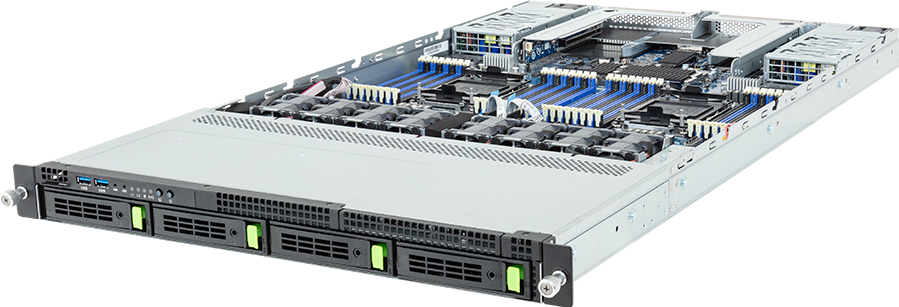
The GIGABYTE R184-S90-AAV1 is a dual-socket 1U server for buyers who need more CPU, memory and network I/O than storage capacity. Its four front hybrid bays, three internal M.2 sockets, two full-height PCIe slots and two OCP NIC slots make the intended role fairly clear: dense compute, virtualisation, control-plane services and data processing close to a fast network.
It is not a GPU server in disguise. Nor is it a high-capacity storage node. The value lies in fitting two Intel Xeon 6 processors, 32 DIMMs and four high-bandwidth expansion positions into 1U while retaining redundant power and serviceable front storage.
Configure the GIGABYTE R184-S90-AAV1 on GPUMachines after deciding which job the node will own. That choice should drive the processor type, memory population, drive protocol and NIC layout.
Technical review summary
GIGABYTE builds the R184-S90-AAV1 around two LGA4710 sockets for Intel Xeon 6 6700 and 6500 series processors. The platform accepts processors with a thermal design power of up to 350 W, subject to the supported CPU list and the correct heatsink configuration. It exposes eight memory channels per processor across 32 DIMM slots.
The front of the chassis has four 3.5-inch or 2.5-inch hot-swap positions. They can be wired for PCIe Gen5 NVMe, SATA or SAS-4, but those labels do not mean every protocol works without the right controller and cabling. NVMe connectivity comes from CPU 0. A SAS build needs a compatible SAS or tri-mode adapter selected against the GIGABYTE support list.
Boot and local service storage can use three internal M.2 positions. Two are PCIe Gen5 x4 sockets connected to CPU 1 and accept 2280 or 22110 devices; the third is a 2280 socket with a Gen5 x2 link from CPU 0. That split matters for availability planning and for buyers who expect all three M.2 devices to have the same link width.
Expansion consists of two full-height, half-length PCIe Gen5 x16 slots and two OCP NIC 3.0 positions, also on Gen5 x16 links. Two Intel I350-AM2 1GbE ports provide basic onboard network connectivity. A pair of 1,600 W 80 PLUS Titanium power supplies operates in a 1+1 redundant arrangement.
Verified specification
| Area | GIGABYTE R184-S90-AAV1 specification | | --- | --- | | Chassis | 1U rack server, 438 x 43.5 x 815 mm | | Motherboard | GIGABYTE MS94-FS0 | | Processor sockets | 2 x LGA4710, Socket E2 | | Supported processor family | Intel Xeon 6 6700 and 6500 series | | Processor power support | Up to 350 W TDP per CPU, subject to GIGABYTE QVL | | Memory | 32 DIMM slots, eight channels per processor | | Memory types | DDR5 RDIMM and supported MRDIMM | | Front storage | 4 x 3.5-inch or 2.5-inch hot-swap NVMe, SATA or SAS-4 bays | | Internal storage | 2 x M.2 Gen5 x4 from CPU 1; 1 x M.2 Gen5 x2 from CPU 0 | | PCIe expansion | 2 x FHHL PCIe Gen5 x16 | | OCP expansion | 2 x OCP NIC 3.0, PCIe Gen5 x16 | | Onboard data network | 2 x 1GbE through Intel I350-AM2 | | Management | Dedicated BMC management interface with GIGABYTE Management Console | | Power supplies | 2 x 1,600 W, 1+1 redundant, 80 PLUS Titanium |
The figures above describe the platform, not a finished bill of materials. CPU choice affects supported memory type and speed, while drive protocol affects the required controller path. A single-processor build also leaves some memory and PCIe functions unavailable, so it should not be treated as a cheaper version of the fully populated topology without checking the block diagram.
Xeon 6 processor choice: P-cores or E-cores?
This is the most important configuration decision. Intel sells Xeon 6 processors with Performance-cores and Efficient-cores, and the suffix changes the type of work that fits the server.
P-core parts suit workloads that depend on stronger per-core performance, wider instruction capability or fewer, heavier software threads. Database engines, compute services, virtual machines with demanding individual guests and host-side processing for fast storage or networking often fit this profile.
E-core parts trade some per-core performance for a larger number of efficient cores. They make sense for dense scale-out services, container fleets, web tiers and parallel tasks that can distribute work cleanly across many threads. A higher core count is not automatically faster for licensed software, latency-sensitive code or applications that scale poorly.
The current GPUMachines configurator exposes supported examples from both groups, including Xeon 6505P, 6515P, 6520P, 6530P, 6740P, 6760P and 6787P, alongside 6710E, 6740E and 6780E. Final availability and compatibility should follow the GIGABYTE CPU support list rather than a family-name assumption.
Do not choose two processors merely because the chassis has two sockets. A dual-socket build adds memory channels, I/O ownership and aggregate compute, but it also raises software licensing, power and cooling costs. If the workload fits one socket, a purpose-built single-socket platform may provide a cleaner lane layout and lower operating cost.
Memory population is part of the design
Thirty-two DIMM slots give the R184-S90-AAV1 two slots per memory channel. That allows high capacity, but the fastest supported memory mode depends on processor type, DIMM technology and how many modules occupy each channel.
GIGABYTE lists RDIMM operation up to 6,400 MT/s at one DIMM per channel and lower rates for some two-DIMM-per-channel populations. Supported MRDIMM can reach higher transfer rates, but only with selected Xeon 6 P-core processors and a one-DIMM-per-channel layout. A label such as "MRDIMM 8800" on a module is not proof that the configured server will run it at 8,800 MT/s.
For a balanced dual-processor build, populate corresponding channels on both CPUs. Leaving one CPU with little or no local memory can force remote NUMA access, which adds latency and consumes the socket interconnect. Virtualisation hosts also need spare capacity for the hypervisor, storage services and failure handling; allocating every gigabyte to guests leaves no room for maintenance or workload movement.
Buyers should define capacity and bandwidth separately. A control node with modest services may favour conventional RDIMMs and lower acquisition cost. A memory-bandwidth-bound data-processing node can justify a one-DIMM-per-channel layout with faster supported memory. Large in-memory databases may put capacity first, accepting the speed effect of denser population.
Four hybrid front bays: useful, but not a storage server
The front-bay arrangement is flexible because each position can participate in an NVMe, SATA or SAS design. It is still only four bays. That is enough for mirrored boot, a local database set, a compact cache tier or fast scratch space, but not for a large capacity pool with many failure domains.
Protocol mixing must be planned before ordering. NVMe uses direct PCIe connectivity from CPU 0. SATA follows the platform's storage path, while SAS requires a supported controller. A tri-mode RAID adapter can simplify some mixed deployments, yet controller support, cable kit, backplane mode and drive qualification all need to agree. Never infer a working mixed array from the fact that the carrier accepts several drive types.
There are two common and sensible approaches:
- Use enterprise NVMe drives in the four front bays for a local high-throughput working set, with durable data held on shared storage.
- Use SATA or SAS drives for a compact resilient service volume, reserving the internal M.2 devices for mirrored operating-system media where the chosen software stack supports that design.
The internal M.2 links are not identical. Two have Gen5 x4 connectivity and one has Gen5 x2. That difference rarely matters for a simple boot mirror, but it can affect a striped set or a workload that expects equal devices and equal paths. Enterprise M.2 drives with power-loss protection are preferable to desktop SSDs for write-heavy service roles.
If the main requirement is dozens of drives, large erasure-coded capacity or front-serviceable boot media, choose a deeper storage platform. Four hybrid bays are a useful part of this server, not its reason to exist.
PCIe and OCP layout
Two full-height Gen5 x16 slots allow storage controllers, DPUs, accelerators or additional network adapters. The two OCP NIC 3.0 positions preserve the conventional PCIe slots for other devices and give buyers a cleaner path to redundant high-speed networking.
That does not mean four arbitrary x16 cards will always work together. Card dimensions, airflow, firmware, cable reach, thermal limits and the supported-device list still apply. A 1U chassis forces air through a narrow path, so passive adapters rely on the server's fan profile and approved installation position.
The useful question is which traffic belongs on which interface. The onboard 1GbE ports are suitable for basic service traffic in some deployments, while the dedicated management port should remain on the out-of-band network. Storage, east-west application traffic and cluster services may each justify separate high-speed links. Two OCP positions make physical separation possible without consuming the general expansion slots.
For a storage-facing node, one OCP adapter could carry client traffic while the second connects to the storage fabric or a redundant switching plane. For a virtualisation host, bonding across separate adapters and switches can reduce the effect of one link or switch failure. The exact design depends on switch ports, optics, transceivers, breakout mode and the operating system's driver support, not just the number printed on the NIC.
Power, cooling and rack fit
The two 1,600 W supplies describe capacity and redundancy; they do not imply a continuous 3.2kW draw. In normal 1+1 operation, either supply must be able to support the configured system after its partner fails. Actual consumption depends on CPU selection, memory population, drives, add-in cards, fan speed and workload.
Dual 350 W processors already create a demanding 1U thermal problem. Dense memory and high-speed adapters add heat in the same airflow path. Confirm that the rack has cold-air delivery at the server inlet, blanking around unused spaces and a return path that does not recycle exhaust. Firmware fan policies should follow the supported card population; lowering fan speed to reduce noise can compromise passive NIC or storage-controller cooling.
At 815 mm deep, the chassis also needs a cabinet, rail kit and cable-management arrangement that leaves service room behind it. Check usable rail depth rather than the cabinet's nominal external depth. Large power leads, high-speed network cables and rear OCP adapters can consume more clearance than expected.
This is a data-centre server. It is not a sensible deskside machine: fan noise, redundant power connections and chassis depth all assume a rack environment.
Best-fit workloads
R184-S90-AAV1 makes most sense when CPU and network density matter more than front-drive count.
Virtualisation and private cloud
Two sockets and 32 DIMMs support a large pool of compute and memory in 1U. The OCP positions can provide redundant fabric connectivity while the PCIe slots remain available for a storage controller or DPU. Buyers should model software licensing per socket or core before choosing the highest-core processors.
AI cluster control and data services
GPU clusters need CPU nodes for schedulers, authentication, monitoring, package repositories, data preparation and application services. This server can fill those roles, but the services should be divided deliberately. A control node that also becomes an experimental database, shared file server and jump host soon becomes difficult to patch or reboot.
Network and security services
The combination of two OCP positions and two general PCIe slots suits network functions that need several fast interfaces or an offload card. Device support, packet-processing framework, NUMA placement and interrupt affinity need testing with the exact adapter.
Compact database or application node
Four front drives and three M.2 positions can support a small local data set, log tier or transaction volume. Database buyers should measure write endurance, latency under failure, backup path and recovery time rather than judging the platform only by peak drive bandwidth.
When another platform is better
Do not buy R184-S90-AAV1 for dense accelerator compute. A PCIe GPU server provides the slot spacing, power delivery and cooling for add-in GPUs, while an HGX server serves tightly coupled training and large shared-memory accelerator workloads.
A single-socket server is often the better answer when software licensing dominates cost or the workload does not use the second NUMA domain. Choose a storage server when capacity, drive count or front-serviceable media is the main requirement. And if the intended role needs quiet operation near users, start with a workstation rather than trying to tame a 1U fan wall.
Sensible configuration profiles
Control-plane and management node
Use moderate P-core processors, balanced RDIMM population, mirrored enterprise M.2 boot media and redundant 10GbE or 25GbE connectivity. Keep logs and backups off the node. This profile values predictable response and serviceability over maximum core count.
Dense service or container host
E-core processors can make sense when the workload scales across many independent workers. Populate memory symmetrically and confirm per-core software costs. Use the OCP positions for redundant data paths, leaving both PCIe slots available for future offload or storage requirements.
Data-processing node
Choose P-core processors when individual threads, vector work or host-side processing matter. Use one DIMM per channel where memory bandwidth is the limiting factor and the required capacity allows it. Enterprise NVMe in the front bays can hold the active set, but shared storage should carry the durable copy.
Network-heavy infrastructure host
Select supported OCP adapters for the primary and redundant fabrics. Map each high-speed device to its owning CPU and place software threads and memory accordingly. A nominally fast NIC can underperform when traffic crosses the socket interconnect or lands on the wrong NUMA node.
Questions to settle before ordering
Write down the server's job in one sentence. Then answer these points:
- Does the software favour stronger P-cores or a larger E-core count?
- Will both sockets earn their licensing, power and NUMA cost?
- What capacity and memory bandwidth are required, and at what DIMM population?
- Which front bays use NVMe, SATA or SAS, and which controller path supports them?
- Which M.2 devices hold the operating system, logs or local services?
- What belongs on onboard Ethernet, each OCP adapter and the management network?
- Can the rack supply the airflow, depth, power connections and rear clearance?
These answers are more useful than selecting the most expensive option in every menu.
FAQ
Is the R184-S90-AAV1 a GPU server?
No. Its two FHHL PCIe slots can accept supported expansion devices, but the chassis is designed as a CPU and I/O server rather than a dense GPU platform. Use a GPU-specific server for accelerator workloads.
Does it support both Xeon 6 P-core and E-core processors?
GIGABYTE lists Xeon 6 6700 and 6500 series support on the LGA4710 platform. The exact processor, firmware and memory combination must appear on the current support list. P-core and E-core options serve different workload profiles, so they should not be selected by core count alone.
Can all four front bays use NVMe?
GIGABYTE specifies four front Gen5 NVMe-capable hybrid bays, with NVMe connectivity from CPU 0. Confirm the selected backplane mode, cables, carrier and drive QVL in the final build.
Can the server mix NVMe, SATA and SAS drives?
The bays support those protocol families, but a mixed build depends on the controller, cabling and supported backplane configuration. SAS requires suitable additional hardware. GPUMachines should validate the exact combination before quoting it as operational.
How many M.2 drives fit?
Three. Two sockets support 2280 or 22110 M.2 devices over PCIe Gen5 x4 from CPU 1. The third accepts a 2280 device over a Gen5 x2 link from CPU 0.
Does the 1,600 W redundant PSU pair mean the server consumes 3.2kW?
No. The rating states power-supply capacity. In 1+1 operation, one supply can carry the configured load if the other fails. Measure or estimate the completed system under its intended workload for rack planning.
Is one processor a sensible starting configuration?
Only when the reduced topology has been checked. GIGABYTE warns that some memory and PCIe functions become unavailable with one CPU. A dedicated single-socket model may be a better purchase when the second socket is not needed.
Verdict
R184-S90-AAV1 is a good 1U choice for dual-socket Xeon 6 compute, virtualisation and network-heavy infrastructure. The four front bays are enough for a focused local storage role, while three M.2 sockets and four high-bandwidth expansion positions give architects several ways to separate boot, data and network paths.
Its compromises are equally clear. Four bays do not make a capacity server, 1U airflow leaves little tolerance for unsupported cards, and a dual-socket design only pays off when the workload uses both CPUs and their memory channels. Build it around a named service role, not a generic desire for more cores.
Configure the GIGABYTE R184-S90-AAV1 with the processor, memory, storage and network paths defined together.
Technical sources
- GIGABYTE R184-S90-AAV1 product page
- GIGABYTE R184-S90-AAV1 datasheet
- GIGABYTE R184-S90-AAV1 support and QVL
- GIGABYTE R184-S90 series system manual
- Intel Xeon 6 P-core and E-core architecture
Specifications and support lists can change. Confirm the ordering revision, processor QVL, memory population, backplane mode, controller, drive QVL, add-in cards and rack environment before purchase. This is a source-backed technical review, not a record of hands-on GPUMachines testing.