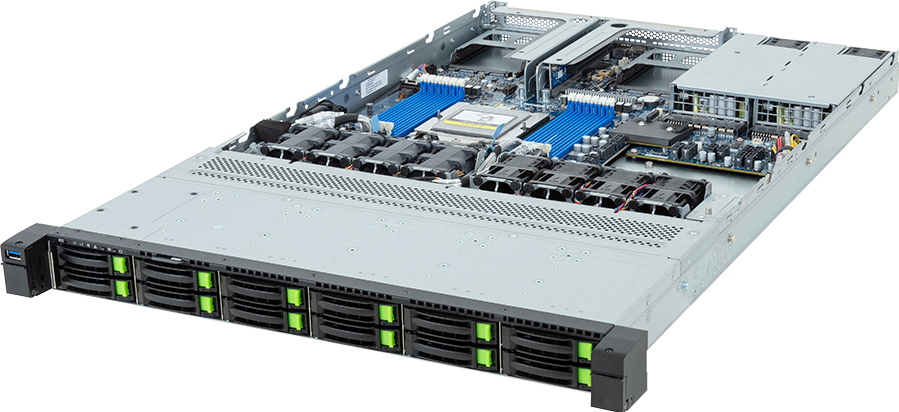
Twelve front carriers sit behind the bezel of the GIGABYTE R163-Z35-AAH1. The configurator can describe each position as NVMe, SATA or SAS, but that does not turn twelve carriers into 36 bays. It is one shared physical pool, and getting that point wrong changes the controller count, media budget, power estimate and the entire storage design.
The Rev. 3.x R163-Z35-AAH1 is a 1U single-socket AMD EPYC server built around GIGABYTE's MZ33-DC1 motherboard. It supports qualified EPYC 9005 and 9004 processors, twelve DDR5 channels, twelve front 2.5-inch drive positions, one internal M.2 connector, two full-height PCIe Gen5 x16 slots and two OCP NIC 3.0 positions. This source-based technical review checks what those specifications mean in an actual configuration and where the platform's boundaries sit.
GPUMachines has not presented the server as a hands-on benchmark sample. Performance depends too heavily on the selected drives, controller, filesystem, NIC, CPU and workload to manufacture a useful number from a datasheet. The purpose here is narrower and more useful for procurement: establish the exact physical resources, expose dependencies and stop incompatible parts entering a quote.
Configure the GIGABYTE R163-Z35-AAH1 or compare it with other storage servers.
R163-Z35-AAH1 Rev. 3.x specification
| Area | Verified specification | | --- | --- | | Form factor | 1U rack server, 438 x 43.5 x 710 mm | | Motherboard | GIGABYTE MZ33-DC1 | | Processor | 1 x SP5 socket; qualified AMD EPYC 9005 or 9004 | | CPU thermal boundary | 300 W normally; up to 400 W at 25 degrees C, subject to current GIGABYTE QVL and approval | | Memory | 12 DDR5 RDIMM slots, 12 channels | | Memory speed | Up to 6400 MT/s with EPYC 9005; up to 4800 MT/s with EPYC 9004, subject to DIMM and population rules | | Front storage | 12 x 2.5-inch Gen5 NVMe or SATA or SAS-4 in one shared physical pool | | Internal storage | 1 x M.2 2280/22110, PCIe Gen3 x4 | | PCIe expansion | 2 x FHHL PCIe Gen5 x16 | | OCP expansion | 2 x OCP NIC 3.0 PCIe Gen5 x16 with NCSI | | Onboard network | 1 x Intel I210 1GbE plus 1 x dedicated 1GbE management LAN | | Power | 1+1 redundant 1300 W 80 PLUS Titanium PSUs | | Fans | 4 x 40 x 40 x 28 mm plus 4 x 40 x 40 x 56 mm |
The dimensions matter. A 710 mm chassis still needs rail clearance, rear cable space and a workable bend radius for high-speed copper or fibre. Someone planning only from the nominal rack depth can discover the problem after the cabinet is on site.
How the twelve-bay tri-mode front pool works
GIGABYTE specifies twelve 2.5-inch drive positions that can carry Gen5 NVMe, SATA or SAS-4 media. These are interface choices for the same slots. The correct maximum is twelve front drives in total, plus one separate internal M.2 device.
Suppose a build uses six front NVMe SSDs. At most six physical front positions remain for compatible SATA or SAS devices; the product does not acquire another twelve SATA and twelve SAS carriers. The admin configurator needs twelve rows under each interface so a mixed build can be expressed, but the customer-facing logic must enforce a shared cap of twelve.
SAS introduces another condition. The product page states that SAS support requires a SAS add-in card, so a SAS selection consumes an expansion resource and introduces controller, cable and firmware decisions. A quote that lists SAS drives without the required data path is incomplete even if every individual part fits the chassis.
NVMe avoids a traditional SAS controller path, but that does not make design work disappear. Namespaces, PCIe topology, hot-swap behaviour, firmware qualification, drive endurance and fault handling still matter. A write-heavy metadata node needs a different SSD profile from a read cache, and neither should inherit a consumer-drive assumption just because both use the M.2 or U.2 form factor.
The internal M.2 connector takes 2280 or 22110 devices over PCIe Gen3 x4. It is a sensible operating-system or service-device position because it leaves the front pool available for data media. Yet it is only one connector. If the boot design requires mirrored devices, the integrator needs a different arrangement rather than pretending that one M.2 slot provides redundancy.
The CPU list needs a thermal test, not a socket test
An SP5 processor fits the socket; that is the start of compatibility checking, not the end. GIGABYTE gives this Rev. 3.x platform a 300 W CPU limit under normal conditions. It allows up to 400 W at 25 degrees C, subject to its qualified-vendor list and confirmation from sales.
That wording creates two purchasing classes. Processors at or below 300 W sit within the ordinary chassis envelope, assuming they appear on the current QVL. Parts between 300 W and 400 W need the stated 25 degrees C condition and explicit model confirmation. Anything above 400 W does not fit the published boundary.
AMD lists EPYC 9755 with a 450-500 W cTDP range. It shares the EPYC 9005 family name and SP5 socket, but it exceeds this server's ceiling throughout that range. GPUMachines has therefore removed it from the R163-Z35-AAH1 selector. This is exactly why a configurator cannot assign processors solely by socket or family.
Some retained processors also deserve care. EPYC 9754 has a 360 W default TDP, while certain EPYC 9005 frequency or core-count options can reach the 400 W conditional boundary. Their presence in a family list should not be read as unconditional approval. Check the current GIGABYTE QVL, selected BIOS, inlet-temperature assumption and ordered fan configuration on the final bill of materials.
The best CPU is rarely the one with the largest core count. Storage software may use host cores for checksums, compression, encryption, erasure coding, protocol handling and background rebuilds, but a lightly processed block target can leave an expensive CPU idle. Measure or model the actual host workload. The single-socket design already avoids NUMA traffic between processors, which can simplify tuning when the storage and network devices sit under a coherent lane plan.
Twelve memory channels deserve twelve-way planning
The motherboard provides twelve DDR5 RDIMM slots, matching the processor's twelve memory channels. GIGABYTE states support up to 6400 MT/s with EPYC 9005 and up to 4800 MT/s with EPYC 9004. Those are platform ceilings; processor model, DIMM construction, capacity, rank, BIOS and population determine the operating rate.
Populate the channels evenly. Twelve matched Micron enterprise RDIMMs, one per channel, use the full channel set and make capacity arithmetic simple. A smaller population may boot, but unused channels reduce aggregate bandwidth, which is a poor trade in a server selected for dense I/O.
Capacity depends on software as much as drive count. Filesystem metadata, page cache, deduplication tables, object indexes, virtual machines and storage daemons all compete for memory. ZFS, Ceph and database-backed services have different appetites, so a fixed number of gigabytes per drive is not a reliable universal rule. Work backwards from the software design and failure conditions, including rebuild activity.
Mixed DIMM capacities or ranks can complicate channel balance and speed. Treat a memory upgrade as a new population plan, not an invitation to fill whichever empty slots remain. AMD's EPYC 9005 memory guide and the current GIGABYTE QVL should be checked together before the order is released.
Expansion is generous for 1U, but it is not free space
Two full-height, half-length PCIe Gen5 x16 slots and two OCP NIC 3.0 Gen5 x16 positions give the R163-Z35-AAH1 useful I/O flexibility. That is enough on paper for high-speed network interfaces and a storage controller while retaining another expansion path. The physical and firmware details decide whether the proposed combination works.
Card height and length are only part of the check. Power, airflow, connector orientation, cable reach, heatsink position and supported firmware can disqualify an otherwise correct PCIe card. A SAS controller consumes a slot. An optional Graid card consumes a resource too, and a multi-port NIC may need transceivers or cables that affect rear clearance.
The two OCP positions support NCSI, which can help management integration with a compatible adapter. Their PCIe Gen5 x16 electrical links also give enough host bandwidth for modern NVIDIA Networking interfaces. The exact NIC should follow the existing switch fabric, media type and protocol plan; buying the fastest card available does not repair an oversubscribed leaf switch or slow storage backend.
Base networking consists of one Intel I210 1GbE port and a dedicated 1GbE management LAN. Use those for low-rate host access and BMC management. They are not plausible production data paths for a twelve-drive flash server.
Line-rate arithmetic illustrates the gap. Divide gigabits by eight and 100 GbE becomes 12.5 GB/s, 200 GbE becomes 25 GB/s, and 400 GbE becomes 50 GB/s. Real application throughput will be lower after Ethernet framing, protocol overhead, queue behaviour and storage work. These figures do not claim that this server reaches any of those rates; they show why network selection has to be considered alongside the drive pool.
RAID, software-defined storage and failure ownership
GIGABYTE lists the optional Graid SupremeRAID SR-1000-FD32 for this system. Its supported levels include RAID 0, 1, 5, 6 and 10. That provides a controller route for buyers who need block-level RAID, but it is not the automatic answer for every twelve-drive configuration.
RAID 0 offers capacity and striping without fault tolerance. RAID 1 or 10 trades usable capacity for mirroring and comparatively direct recovery behaviour. Parity schemes can improve usable capacity, although write pattern, endurance, rebuild time and failure exposure need scrutiny. The selected drive model and workload matter more than a generic statement that one level is faster.
Ceph, ZFS, distributed databases and object stores often want direct device visibility and may provide protection above the controller. Placing hardware RAID underneath software that expects independent drives can obscure health data or duplicate redundancy work. Conversely, removing a controller without confirming boot, cabling and hot-swap support can leave the physical design unfinished.
Pick one layer to own each protection function. Document where mirroring or erasure coding happens, how failed drives are identified, which component records health, and how the service behaves during a controller or host failure. Then test the recovery path. A list of RAID levels is not a recovery procedure.
Where this server fits in AI infrastructure
GPU clusters spend heavily on accelerators, then lose utilisation when their data path cannot supply work quickly enough. The R163-Z35-AAH1 can serve several supporting roles: a fast ingest node, local dataset cache, checkpoint staging server, metadata service or compact storage target. It can also host preprocessing tasks when the selected CPU and memory capacity match the pipeline.
It is not a substitute for a scale-out storage design. One server remains one failure domain, and its two power supplies do not protect against motherboard, backplane, software or operator faults. Capacity and availability plans should include node loss, switch failure and rebuild traffic rather than stopping at drive-level redundancy.
Nor is it a GPU compute platform. The two PCIe slots may accept approved accelerators for specialised storage functions, but the chassis is sold and cooled as a dense storage server. Buyers who need double-width GPUs, direct GPU fabrics or accelerator-qualified airflow should start from a GPU-server design instead of forcing cards into available-looking slots.
The single-socket format is attractive when lane count and memory bandwidth meet the job. It removes the cost and idle power of a second CPU, keeps the NUMA map simpler, and lets organisations add capacity in 1U increments. If the service requires more DIMM capacity, more controllers, rear-access drives or a CPU over the thermal ceiling, a larger or dual-socket platform is the better purchase.
Power, cooling and rack arithmetic
Redundant 1300 W 80 PLUS Titanium power supplies do not mean the server consumes 1300 W continuously, nor do two PSUs create a 2600 W planning figure in a normal redundant arrangement. They state delivery capacity and redundancy. Actual wall power follows the ordered parts and workload.
GPUMachines currently uses a 280 W barebone allowance for the chassis, motherboard, fans and platform electronics before selectable CPUs, DIMMs, drives and cards. GIGABYTE does not publish that as a measured chassis-only value, so it must remain labelled as an engineering estimate. Acceptance testing should replace it with an idle and loaded measurement from the delivered build.
Fan behaviour can change sharply with inlet temperature, drive load and high-power cards. The chassis uses four 40 x 40 x 28 mm fans and four deeper 40 x 40 x 56 mm units, which reflects the pressure needed in 1U. Rack power and cooling calculations should leave operating margin rather than assuming a quiet office-like fan profile.
The 25 degrees C condition attached to 400 W CPUs also matters at rack level. A room set point does not prove that every server inlet stays at 25 degrees C during a hot-aisle upset or when blanking panels are missing. Use measured inlet temperatures and the manufacturer's permitted operating conditions for any build above the ordinary 300 W CPU limit.
Who should buy it, and who should not
Choose the R163-Z35-AAH1 when a design needs twelve front drives, high-bandwidth Gen5 I/O, twelve memory channels and single-socket economics in 1U. It suits integrators building repeatable storage nodes, research teams staging AI datasets, managed-service providers adding compact capacity, and enterprises that have already chosen their filesystem and network architecture.
Do not buy it because a spreadsheet appears to show 36 drives. There are twelve front positions. Look elsewhere if the design needs a 500 W EPYC processor, more than one internal M.2 device, many add-in controllers, rear-access service drives, double-width GPUs or more memory sockets.
A slower NIC can be sensible when the storage media or upstream fabric cannot feed 200 or 400 GbE. Likewise, fewer but higher-endurance SSDs can be preferable to filling every bay with media unsuited to the write workload. The right configuration follows the service, not the empty slots.
Procurement checklist
Before releasing a quote, confirm all of the following against the exact Rev. 3.x system:
- The CPU appears on GIGABYTE's current QVL and falls within the 300 W normal boundary, or has written approval for the conditional 400 W at 25 degrees C case.
- The twelve front positions have the required factory backplane and cabling for the intended NVMe, SATA or SAS mix.
- Any SAS drives have a compatible add-in controller, firmware and cable path.
- The DIMMs are matched and distributed across the twelve channels according to AMD and GIGABYTE population rules.
- OCP and PCIe slots have been reserved for every NIC, RAID or storage card, with physical fit and airflow checked.
- Transceivers, cables, switch ports, link speed and protocol match the network design.
- Rack depth includes rails, connectors and cable bend radius, while the power plan uses measured build data when available.
That final check is short compared with the cost of correcting an incompatible rack of storage nodes.
Frequently asked questions
Does the R163-Z35-AAH1 have 36 hot-swap bays?
No. It has twelve physical front 2.5-inch positions. NVMe, SATA and SAS are supported interface choices for that shared pool, so their individual configurator maxima must obey a combined limit of twelve. One internal M.2 position sits outside the front pool.
Can it use AMD EPYC 9755?
No, not within the published Rev. 3.x thermal limits. AMD specifies a 450-500 W cTDP range for EPYC 9755, while GIGABYTE states 300 W normally and up to 400 W at 25 degrees C for this chassis. Sharing the SP5 socket does not make the CPU valid.
Can the server run SAS drives without another card?
GIGABYTE states that SAS support requires a SAS add-in card. The final configuration must include a compatible controller and the appropriate factory cabling or backplane arrangement.
What is the fastest supported memory speed?
GIGABYTE states up to 6400 MT/s with EPYC 9005 and up to 4800 MT/s with EPYC 9004. The final rate depends on the exact CPU, qualified DIMMs, BIOS and twelve-channel population.
Does the base server include high-speed networking?
No. It includes one Intel I210 1GbE port plus a dedicated 1GbE management port. High-speed storage traffic needs a suitable adapter in an OCP NIC 3.0 or PCIe Gen5 x16 position.
Is the 280 W barebone value a measured figure?
No. It is a conservative GPUMachines engineering allowance for configuration and rack-planning work. The delivered system should be measured at idle and under the intended load, then the rack model should be updated with those readings.
Buying assessment
The R163-Z35-AAH1 Rev. 3.x is a well-proportioned 1U storage platform when the design genuinely needs one shared twelve-drive pool and four fast expansion positions around a single EPYC processor. Its strongest trait is not a headline capacity number; it is the balance between front-drive density, twelve-channel memory and Gen5 I/O without a second socket.
That balance holds only when the build respects its limits. Treat the interface rows as twelve shared bays, reject processors above the published thermal ceiling, plan the controller and NIC slot budget before ordering, and verify high-wattage CPUs against the current QVL. Done properly, the server can anchor a compact storage or AI data-service node. Done from family names alone, it is easy to quote a configuration that the chassis cannot cool or connect.
Configure the GIGABYTE R163-Z35-AAH1 with a source-checked CPU, memory, storage and network plan. For a wider chassis comparison, browse the GPUMachines storage server range.
Official sources
- GIGABYTE R163-Z35-AAH1 Rev. 3.x product page
- GIGABYTE R163-Z35-AAH1 Rev. 3.x datasheet
- AMD EPYC 9005 series
- AMD EPYC 9755 specifications
- AMD EPYC 9005 memory population recommendations
- Graid SupremeRAID user guide
Specifications and qualification lists can change. Sources were checked on 22 September 2026; confirm the exact processor, backplane, controller, drive, DIMM, NIC and firmware combination on the final quote.