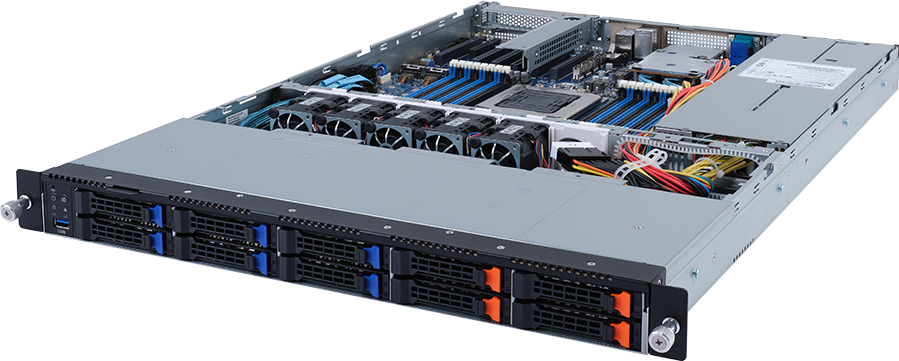
Four front NVMe bays and six front SATA bays make the GIGABYTE R152-P31 look like a straightforward 1U storage server. The harder question is whether the software belongs on Arm. This system uses one Ampere Altra Max or Ampere Altra processor in the LGA4926 socket, not an x86 CPU and not the newer AmpereOne platform. That distinction affects operating-system images, commercial software, plug-ins, drivers and recovery tools before it affects hardware selection.
The chassis is 660 mm deep and provides 16 DDR4 DIMM slots, two internal M.2 positions, one free full-height PCIe Gen4 x16 slot and redundant 650 W power supplies. It can suit cloud-native services, Arm build infrastructure, storage gateways and edge deployments, provided every required software component has a supported aarch64 build.
Configure the GIGABYTE R152-P31 after checking the application stack and deciding how the separate NVMe and SATA groups will be used. Do not treat its ten front bays as ten interchangeable positions.
What the R152-P31 actually is
R152-P31 Rev. 100 is a single-socket Arm server based on GIGABYTE's MP32-AR0 motherboard. GIGABYTE identifies the barebone as 6NR152P31MR-00-1. One Ampere Altra family processor supplies the compute, while eight DDR4 memory channels connect to 16 RDIMM or LRDIMM slots.
It is not an AmpereOne server. AmpereOne belongs to a newer socket and DDR5 platform. It is also not a GPU server: one PCIe x16 slot does not turn a short-depth 1U chassis into a qualified accelerator platform. The R152-P31 is better understood as a dense Arm compute, networking and storage node.
| Area | Published specification | Buying consequence | | --- | --- | --- | | Chassis | 1U, 438 x 43.5 x 660 mm | Fits many conventional and edge racks, subject to rail and rear-cable clearance | | Processor | One Ampere Altra Max or Ampere Altra, LGA4926, up to 250 W | Up to 128 physical Arm cores with no simultaneous multithreading | | Memory | 16 DDR4 RDIMM/LRDIMM slots, eight channels, up to 3200 MT/s | Populate channels deliberately; this is not a DDR5 system | | Fast front storage | Four 2.5-inch PCIe Gen3 NVMe hot-swap bays | Four dedicated NVMe positions | | Capacity front storage | Six 2.5-inch SATA hot-swap bays | Separate SATA group served by the bundled ASM1164 HBA | | Internal storage | Two M.2 slots, PCIe Gen4 x4 | Possible boot or service-drive positions | | PCIe expansion | One FHHL PCIe Gen4 x16 slot | One conventional slot must cover any faster NIC or other adapter | | OCP position | One OCP 2.0 mezzanine, occupied by the SATA HBA | Not a spare OCP network slot | | Onboard network | Two Intel I350-AM2 1GbE ports plus management LAN | Faster production traffic usually needs the x16 slot | | Power | 1+1 650 W 80 PLUS Platinum supplies | Redundant feed, not 1.3 kW of usable load in a 1+1 design | | Cooling | Five 40 mm dual-rotor fans | Data-centre acoustics and front-to-rear airflow |
The R152-P31 sits in an unusual position. Its processor can provide far more cores than many compact single-socket x86 systems, yet the chassis has modest local expansion. That makes software fit and I/O planning more important than chasing the highest CPU model.
Ampere Altra or Altra Max
Standard Ampere Altra parts extend to 80 cores, while Altra Max reaches 128. The family uses single-threaded physical cores, so a 128-core specification means 128 execution cores rather than 64 cores presented as 128 threads. That can work well for independent services, build jobs and container replicas, but a high core count does not rescue a serial application or an x86-only binary.
Choose the CPU according to the work that can run concurrently:
- A web or API tier may spread cleanly across many independent workers.
- Continuous integration can benefit when many Arm builds or tests run at once.
- A storage gateway may use CPU time for checksums, compression, encryption and protocol handling.
- Virtual machines and containers need enough memory per guest as the core count rises.
- A lightly threaded commercial application may favour a lower-core, higher-frequency part, assuming the vendor supports Arm at all.
The platform accepts processors up to a published 250 W envelope. CPU selection still needs the exact GIGABYTE support list, current firmware and the finished memory and adapter configuration. A socket match alone is not a qualification.
Altra Max is most defensible when the workload genuinely scales across the extra cores and the licensing model does not charge heavily per core. Standard Altra can be the sounder choice for network services, development environments and applications whose throughput stops rising before 96 or 128 workers. Buying unused cores also raises memory demand and software cost without improving the limiting path.
Arm software compatibility is the first gate
An operating system booting on aarch64 proves only the first layer. A production review should follow the full dependency chain: hypervisor or container runtime, application binaries, package repositories, database extensions, monitoring agents, security tools, backup software, storage drivers and recovery media.
Current Linux distributions and many open-source projects publish Arm builds. Container registries also carry multi-architecture images. Problems tend to appear at the edges, where one proprietary library, plug-in or vendor agent remains x86-only. An image tag may exist for Arm while a required optional module does not.
Check these points before hardware is ordered:
1. The exact operating-system release supports the server, BMC interfaces and selected adapters. 2. Every container image resolves to a native linux/arm64 manifest rather than x86 emulation. 3. Commercial software licences allow the chosen core count and architecture. 4. Backup, observability, endpoint-security and management agents publish supported Arm packages. 5. The selected NIC and any add-in card have aarch64 drivers and firmware tools. 6. Installation, rescue and bare-metal recovery paths work without an x86 helper binary. 7. Performance acceptance criteria have been tested on representative Arm hardware.
Emulation can help development, but it is a poor basis for a production purchasing decision. It adds another failure path and may change performance sharply. If a required component remains x86-only, choose an x86 server rather than forcing the R152-P31 into the design.
Arm SystemReady support helps standardise firmware and operating-system behaviour. It does not certify an application stack. The buyer still owns that validation.
DDR4 memory channels and population
Sixteen slots connect to eight DDR4 memory channels, which allows two DIMMs per channel. GIGABYTE lists RDIMM and LRDIMM support at up to 3200 MT/s, with permitted populations of 1, 2, 4, 6, 8, 12 or 16 modules.
For production use, eight matched DIMMs give one module per channel and 16 matched DIMMs fill both positions on every channel. Those balanced layouts make bandwidth and capacity easier to predict. Smaller populations can be valid for a development node or modest service, but they leave memory channels unused.
Memory requirements should follow the application and concurrency plan. A 128-core CPU can schedule many workers; each one still needs stack, heap, cache and operating-system resources. Virtualisation adds guest overhead, while storage services may reserve large page caches or metadata structures. Calculate capacity from the real worker or guest count, then check that the chosen DIMM quantity uses the channels sensibly.
This server needs DDR4 ECC registered memory qualified for the platform. Do not select DDR5 modules listed for AmpereOne or current x86 systems. Record the DIMM part number, rank, quantity and expected speed in the quote, since a capacity label alone cannot establish compatibility.
Ten front bays, two physical groups
The front panel contains ten 2.5-inch hot-swap bays, but the backplane divides them into two fixed groups.
Four PCIe Gen3 NVMe bays
Four positions connect as PCIe Gen3 NVMe. They can hold a fast active-data tier, application volumes, cache or a small all-flash pool. The Gen3 interface is older than the Gen4 and Gen5 storage used by current platforms, although four enterprise NVMe drives can still create more throughput than the onboard 1GbE network can carry.
These positions are not SATA or SAS hybrid bays according to the current product specification. Configure them as NVMe and keep their physical limit at four.
Six SATA bays
Six separate positions connect through a CSTO180 expansion board using an ASMedia ASM1164 SATA HBA. They can form a lower-cost capacity tier with enterprise SATA SSDs. GIGABYTE does not publish SAS support for this group, so a SAS drive or controller should not be assumed compatible.
The bundled board is an HBA path, not evidence of a hardware RAID controller with protected cache. Decide how the data will be protected. Linux software RAID, a file system, a distributed storage layer or an approved add-in controller may all be possible, but each has different recovery and observability requirements.
Two internal M.2 positions
Two M.2 slots connect over PCIe Gen4 x4 and accept 2242, 2260, 2280 or 22110 devices. They can keep boot media away from the front data bays. If the operating system needs a mirrored boot pair, confirm that the firmware and selected modules support the intended arrangement and that field replacement remains practical.
A sensible storage plan names every pool. For example, two internal M.2 devices might hold a mirrored operating system, four NVMe drives might serve active application data, and six SATA SSDs might hold a capacity or backup tier. Combining all 12 device positions into one generic total would hide the different interfaces and service paths.
One expansion slot forces an early network decision
The rear panel supplies two 1GbE data ports through an Intel I350-AM2 controller and a separate management connection for the ASPEED AST2500 BMC. Those ports are useful for management, a low-throughput service or initial deployment. They are unlikely to suit a storage node expected to move data from four NVMe drives.
One full-height, half-length PCIe Gen4 x16 slot remains for conventional expansion. The OCP 2.0 mezzanine position is already used by the SATA HBA, so it cannot be counted as a spare network slot. If the x16 position takes a high-speed NIC, no second standard slot remains for a RAID card, accelerator or security adapter.
Map the requirement before selecting the network card. A supported NVIDIA ConnectX adapter can provide 25, 50, 100 or 200GbE depending on model, optics and switch compatibility. Intel remains a practical choice for ordinary 10GbE SFP+ or RJ45. Faster adapters need more than a matching connector; check card length, airflow, transceiver support, firmware tools and Arm drivers.
Network speed should follow measured application traffic and storage behaviour. A backup target may favour capacity over low latency. A storage gateway serving several hosts may need redundant links and enough bandwidth for rebuild traffic as well as client I/O. A build farm may care more about source and artefact transfers than local disk latency.
The single-slot limit makes some combinations poor fits. If the design needs independent high-speed data and storage fabrics, a hardware RAID controller and another specialist adapter, choose a platform with more PCIe or OCP positions.
Power, cooling and rack fit
Two 650 W 80 PLUS Platinum supplies operate as a 1+1 redundant pair. In normal redundant planning, one supply must carry the supported server load if its partner or feed fails. Do not add both labels together and treat 1,300 W as the available component budget.
The final estimate should include the selected CPU, up to 16 DIMMs, four NVMe drives, six SATA drives, two M.2 devices, the PCIe adapter, motherboard and fan load. PSU rating is an upper limit, not expected consumption. Measure a representative finished system where rack power or circuit headroom is tight.
Five 40 mm fans move air through the 1U enclosure. They are designed for a server room and can be loud. Keep front-to-rear airflow clear, fit blanking panels around the chassis and check the facility's inlet temperature at the rack face. GIGABYTE publishes an operating range of 10 to 35 C, subject to the qualified component list.
The chassis measures 660 mm deep before rear cables and service loops. Confirm cabinet depth, rail compatibility, PDU position and bend radius for the selected network cable. A nominally short server can still be awkward in a shallow cabinet if the rear PDU blocks the power supplies or the network cable presses against the door.
Management and operational ownership
An ASPEED AST2500 BMC provides out-of-band access through GIGABYTE Management Console. Remote console, sensor data, event logs and media redirection matter most when Arm systems sit at edge sites or in distributed racks where local hands are limited.
Keep the management interface on a restricted network. Use named accounts, rotate credentials, control firmware changes and forward events into the monitoring system. The operating team also needs tools that understand the selected SATA HBA, NVMe devices and high-speed NIC on Arm. Hardware support is incomplete if the firmware updater or health utility runs only on x86.
Drive replacement procedures should identify both the physical bay and the software device. Test LED behaviour, hot-swap handling and recovery under load. For software-defined protection, document how the team distinguishes a failed member from a transient path or controller problem.
Lifecycle and support need a direct answer
R152-P31 Rev. 100 belongs to the original Altra generation. Some regional GIGABYTE pages label it End of Support, while GIGABYTE published a datasheet revision dated February 2026. Those signals are not interchangeable with confirmed stock, warranty or long-term firmware coverage.
Before ordering, get written confirmation for the exact revision and SKU covering availability, warranty term, firmware updates, spare parts and replacement policy. A server available through distribution may still have a shorter remaining support window than a current AmpereOne platform.
That does not make the R152-P31 unusable. It can be attractive for an existing Altra estate, a controlled deployment with validated software or a project that values DDR4 reuse and known behaviour. A new service expected to run for five years or more should compare current Arm systems before committing.
Where the R152-P31 fits
Good candidates include:
- Arm-native web, API and microservice hosts with many independent workers.
- Continuous-integration nodes that build and test aarch64 software.
- Container platforms whose images and operational agents have verified Arm support.
- Storage gateways using four NVMe drives for active data and six SATA drives for capacity.
- Edge services that benefit from a 660 mm chassis and many physical cores.
- Network and control-plane applications with a qualified PCIe adapter.
Choose another system if the application is x86-only, the project needs DDR5 or AmpereOne, more than four front NVMe drives are required, or several add-in cards must coexist. It is also the wrong platform for a qualified multi-GPU build.
The wider storage server range includes systems with more NVMe positions, SAS options and additional expansion. For software that needs conventional x86 processors rather than Arm, compare the CPU server catalogue.
Configuration and acceptance checklist
Record the following before approving a quote:
1. Exact Altra or Altra Max CPU and its current GIGABYTE qualification. 2. Eight- or 16-DIMM population, module part number, capacity and expected speed. 3. Evidence that every application, library, agent and recovery tool supports aarch64. 4. Purpose and protection method for the four NVMe bays. 5. Purpose and protection method for the six SATA bays. 6. Boot layout across the two internal M.2 positions. 7. PCIe NIC model, Arm driver, firmware utility, optics or cable and switch port. 8. Whether any non-network adapter is needed in the only free expansion slot. 9. Power-feed redundancy, measured load target, rack depth and airflow. 10. Warranty, firmware and spare-parts commitment for Rev. 100.
Acceptance testing should cover native Arm application deployment, CPU and memory stress, every storage path, link failover where configured, sustained network traffic, BMC access and recovery from a failed power feed. Test the real monitoring and backup agents too. A benchmark that ignores those dependencies cannot prove production readiness.
FAQ
Does the GIGABYTE R152-P31 support AmpereOne?
No. It supports Ampere Altra Max and Ampere Altra processors in the LGA4926 socket. AmpereOne uses a different platform and DDR5 memory.
How many CPU cores can it support?
The platform supports Altra Max models with up to 128 physical Arm cores and standard Altra models with up to 80. Check the current processor support list and firmware for the exact CPU being quoted.
Does it use DDR4 or DDR5?
R152-P31 uses DDR4 RDIMM or LRDIMM memory. It has 16 slots across eight channels and supports speeds up to 3200 MT/s according to GIGABYTE's published specification.
Can all ten front bays use NVMe drives?
No. Four front bays are dedicated PCIe Gen3 NVMe positions. Six separate bays connect as SATA through the bundled ASM1164 HBA.
Does the server support SAS drives?
GIGABYTE lists the six capacity bays as SATA and the four fast bays as NVMe. Do not assume SAS support for this exact model.
Is hardware RAID included?
The specification identifies a SATA HBA, not a protected-cache hardware RAID controller. Select the data-protection method according to the operating system, storage software and recovery requirements.
Can it take a high-speed network adapter?
Yes, subject to qualification. One full-height PCIe Gen4 x16 slot can take a supported NIC. The OCP 2.0 position is occupied by the SATA HBA.
Is R152-P31 suitable for GPU workloads?
No. It is an Arm compute, networking and storage server rather than a qualified GPU platform. Use a purpose-built GPU server where an accelerator is required.
Is Rev. 100 still supported?
Regional GIGABYTE pages show differing lifecycle signals. Confirm availability, warranty, firmware coverage and spare parts for product code 6NR152P31MR-00-1 before purchase.
Verdict
R152-P31 gives Arm buyers a dense single-socket 1U node with up to 128 physical cores, 16 DDR4 slots and a useful two-tier storage arrangement. Its 660 mm chassis can fit places where a deep dual-socket server cannot, and redundant 650 W supplies keep the platform within a manageable power class.
Its limits are equally clear. The software stack must be Arm-native, only four front bays are NVMe, onboard data networking stops at 1GbE and one conventional expansion slot must carry any faster adapter. The platform's lifecycle also needs written confirmation.
Open the GIGABYTE R152-P31 configurator with the intended software, memory population, storage pools and network design. GPUMachines can then check the proposed parts against the physical slot and interface limits before quoting.
Technical sources
- GIGABYTE R152-P31 Rev. 100 product page
- GIGABYTE R152-P31 Rev. 100 datasheet
- GIGABYTE R152-P31 system manual
- Ampere processor family overview
- Ampere Altra family product brief
Specifications, firmware and qualified components can change. Confirm the current GIGABYTE support list, exact revision and supplier-approved bill of materials before ordering.