H233-Z80-AAW1 needs a defined job before it needs a component list. A specification table helps only after the team has agreed which bottleneck or operating constraint the purchase must solve.
The practical answer comes down to workload shape. Choose H233-Z80-AAW1 when preprocessing, orchestration, storage services or application backends need dedicated capacity. Do not buy it as a substitute for GPU compute when accelerator work is the real bottleneck.
Review the H233-Z80-AAW1 configuration options on GPUMachines before treating the base chassis as a finished design.
Executive Summary
The H233-Z80-AAW1 is best suited to infrastructure teams that need reliable CPU capacity, NVMe storage, and expansion for services that sit around GPU clusters, including data staging, orchestration, management, and application backends.
The headline configuration story is not primarily designed as a GPU-dense platform, backed by 4 CPU socket(s), 48 DIMM slots, DDR5, 4 storage positions, and 6 PCIe expansion slots.
It is not intended to replace a GPU-dense training server when the main bottleneck is accelerator compute.
Start configuration here: configure the H233-Z80-AAW1 on GPUMachines.
Key Specifications
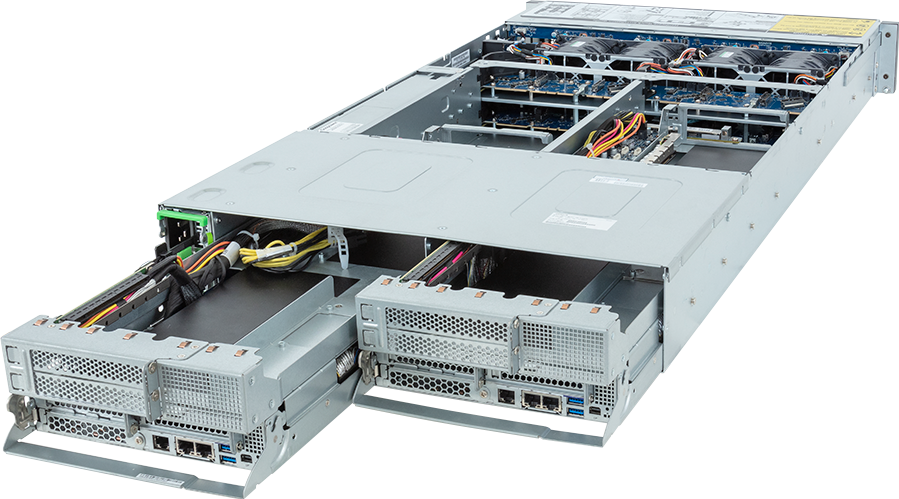
| Area | Specification | | --- | --- | | Form factor | 2U rackmount | | CPU platform | SP5 | | CPU sockets | 4 | | GPU support | not primarily designed as a GPU-dense platform | | Memory | 48 DIMM slots, DDR5 | | Storage | 4 x 2.5" Gen4 NVMe hot-swap bays | | PCIe expansion | 4 x FHFL PCIe Gen5 x16 slots for GPUs; 2 x LP PCIe Gen5 x16 slots | | Networking | Configurable networking options | | Power | Dual 3000W 80 PLUS Titanium redundant power supply | | Best-fit workloads | application backends; data preprocessing; orchestration and management nodes; storage-adjacent services | | Dimensions | 440 x 87.5 x 877 |
Platform Highlights
- GPU platform: not primarily designed as a GPU-dense platform. This matters because accelerator choice drives the rest of the configuration: CPU lanes, rack or chassis power, airflow, local storage, and network design.
- CPU and memory base: SP5 with 48 DIMM slots, DDR5. The right CPU and memory plan should be sized around data preparation, host-side model work, and how many accelerators or services need to be kept busy.
- Storage layout: 4 x 2.5" Gen4 NVMe hot-swap bays. Local NVMe is useful for active datasets, checkpoints, scratch space, and staging work before data moves to shared storage.
- Expansion and networking: 4 x FHFL PCIe Gen5 x16 slots for GPUs; 2 x LP PCIe Gen5 x16 slots. NIC placement and PCIe lane planning are important when the system will connect to storage, other GPU nodes, or remote users.
- Power and cooling: Dual 3000W 80 PLUS Titanium redundant power supply. Final power draw is configuration-dependent, especially once GPUs, NICs, and NVMe devices are selected.
- Product-specific fit: The product-specific point to notice is 4-GPU PCIe density. That combination changes the buying conversation from a generic server choice into a decision about rack density, thermal design, accelerator fit, data movement, and operational support.
Our Technical View
In the GPUMachines portfolio, H233-Z80-AAW1 is a practical infrastructure node for the services that sit around GPU systems. These supporting systems often matter more than buyers expect: orchestration, storage control, data preparation, application services, monitoring, and access management all need reliable CPU and I/O capacity.
This model is strongest when the requirement is balanced infrastructure rather than maximum accelerator density. It may not be the right choice if the main bottleneck is GPU compute, in which case a GPU workstation, PCIe GPU server, HGX system, or hosted GPU option should be considered instead.
The product-specific point to notice is 4-GPU PCIe density. That combination changes the buying conversation from a generic server choice into a decision about rack density, thermal design, accelerator fit, data movement, and operational support.
Best-Fit Workloads
Best-fit workloads include:
- application backends
- data preprocessing
- orchestration and management nodes
- storage-adjacent services
- virtualisation
- supporting infrastructure for AI clusters
Who Should Consider It
The H233-Z80-AAW1 makes sense when the project needs a properly specified infrastructure node, not just a part number. For AI teams, that usually means thinking through data movement, GPU or CPU utilisation, local scratch, shared storage, network fabric, and how the server will be operated after delivery.
It is most relevant for buyers that already understand their workload profile, have a target deployment model, and need help turning that requirement into a balanced hardware configuration. That may mean on-premise ownership, a hosted system, a leased deployment, or part of a larger private AI cluster.
Who Should Not Buy It
This is not the right purchase when the main requirement is dense GPU acceleration. Buyers focused on LLM training, GPU rendering, or multi-GPU inference should compare GPU workstations, PCIe GPU servers, HGX systems, or hosted GPU options before selecting a CPU-focused node.
Architecture Notes
The practical value of this system depends on balance. CPU infrastructure around an AI platform often handles orchestration, data preprocessing, application services, storage control, monitoring, authentication, and management workloads.
For H233-Z80-AAW1, the right version for a model-training team may look very different from the right version for web services, edge workloads, storage control, or management infrastructure.
Configuration Guidance
Important configuration decisions include:
- CPU choices include AMD EPYC 9115 (16C/32T, 3.0 GHz), AMD EPYC 9124 (16C/32T, 3.0 GHz), AMD EPYC 9175F (16C/32T, 4.2 GHz)
- Memory can be sized from options such as 128GB DDR5-5600 ECC REG, 128GB DDR5-6400 ECC REG, 16GB DDR5-5600 ECC REG
- Networking options include high-speed Ethernet and InfiniBand adapters for cluster or storage traffic
- confirm GPU length, slot spacing, riser layout, host lanes, NIC placement, and PSU headroom before finalising the build
For CPU infrastructure, size the processors, memory, boot media, network adapters, and management access around the services this node will run. GPUMachines can review the final configuration during quoting, but buyers should still define the intended workload, data sources, model size, user count, storage pattern, and network environment before selecting components.
Recommended Configuration Paths
- Best for supporting AI infrastructure: choose AMD EPYC 9115 (16C/32T, 3.0 GHz) or AMD EPYC 9124 (16C/32T, 3.0 GHz), enough memory for orchestration or application services, and resilient boot/storage media.
- Best for data services: prioritise local NVMe, network throughput, and management separation.
- Best for cost-controlled deployment: keep the CPU, RAM, and storage practical, then reserve budget for the GPU nodes or hosted GPU capacity that will do the accelerator work.
Alternatives and Related Systems
If the requirement is accelerator-heavy, compare PCIe GPU servers, HGX systems, or tower GPU workstations. If the system will support edge services, the edge AI server range may also be relevant.
Buying Through GPUMachines
The fastest next step is to use the H233-Z80-AAW1 configurator and select the CPU, RAM, storage, GPU, and networking options that match your workload. GPUMachines can then review the build for compatibility, thermals, power draw, lead time, and cluster fit.
For teams without suitable data centre space, GPUMachines can also discuss Buy & Host, leasing, and GPU Cloud alternatives. That is especially useful when the server needs high-density power, managed networking, or a private hosted environment.
Host-Side Planning Notes
H233-Z80-AAW1 belongs in the part of AI infrastructure that users only notice when it is missing. CPU servers run schedulers, databases, storage services, preprocessing, monitoring, authentication and control-plane tasks. Those jobs do not need GPU marketing; they need predictable memory, I/O and uptime.
The starting detail is not primarily designed as a GPU-dense platform. CPU generation, memory channels and PCIe lanes decide how much useful work the system can carry. If the server will support GPU nodes, check how it connects to storage, management networks and workload fabrics before choosing the final configuration.
Storage planning starts with the published layout: 4 x 2.5" Gen4 NVMe hot-swap bays. That needs to be mapped to model staging, scratch space, checkpoint writes, logs and any shared dataset path before the system is ordered.
Networking also deserves early attention. The listed network path is Configurable networking options, but the final choice should separate management, storage and workload traffic where the deployment needs that separation. A CPU node used for orchestration may only need modest bandwidth. A node used for data services, inference support or preprocessing can need far more. Treat those roles differently.
Power is not a footnote here: Dual 3000W 80 PLUS Titanium redundant power supply. Before purchase, check the rack feed, redundancy plan, heat load and service process against the target site. The right configuration depends on service ownership as much as raw hardware. Decide who patches it, who monitors it, how backups work and what happens if it fails during a training run. GPUMachines can help place this kind of server in the wider GPU estate instead of treating it as an afterthought.
Before purchase, write down the services this host will run and the ones it must not run. That single list prevents a common failure mode: the control node slowly becomes a file server, jump box, monitoring host, package cache and experimental database until nobody knows what is safe to reboot.
Final Host Sizing Check
For H233-Z80-AAW1, the storage line starts with 4 x 2.5" Gen4 NVMe hot-swap bays. Treat that as a layout to test, not a promise that every dataset or checkpoint pattern will behave well. The network line starts with Configurable networking options, so check how that maps to management access, storage traffic and user workloads. The last useful exercise before purchase is a plain workload walk-through. Pick one normal week: who logs in, what data moves, where models are staged, how failures are noticed and who has permission to change the configuration.
That exercise often changes the build. Sometimes it means more RAM and fewer drives. Sometimes it means a different NIC, a hosted deployment, or a smaller server bought sooner. GPUMachines can help make that trade before the order is placed, which is cheaper than discovering the mismatch after delivery.
Ownership Check
H233-Z80-AAW1 also needs an owner before it needs another option ticked. Decide who approves firmware changes, who receives alerts, where configuration notes live, how access is removed when a user leaves, and what evidence counts as a successful handover. Those decisions rarely appear on a product page, but they decide whether a 2U CPU server becomes reliable infrastructure or another machine that only one person knows how to operate.
For GPUMachines buyers, this is where quote review is useful. A short call can catch missing rails, remote access assumptions, unsupported memory population, weak backup planning or a deployment route that would be easier to host than to run in-house.
That check is small compared with the cost of reworking a system after it has landed in the wrong room.
FAQ
Is H233-Z80-AAW1 better for training or inference?
It is not primarily a GPU training system. It is better viewed as supporting infrastructure around GPU workloads.
How much RAM should I configure?
RAM is configuration-dependent. Match memory capacity to CPU count, dataset preparation, model serving processes, virtualisation needs, and whether the system will run storage or orchestration services alongside GPU workloads.
Does this system need InfiniBand or 400GbE?
High-speed networking depends on deployment design. Single-node systems may only need fast Ethernet, while multi-node training, shared storage, and hosted GPU environments often justify 100GbE, 200GbE, 400GbE, InfiniBand, or separate management networks.
Is this overkill for small AI workloads?
It can be. If the workload is a small inference endpoint, proof-of-concept project, or one-GPU development task, a smaller workstation, hosted GPU option, or lower-density server may be more practical.
Can GPUMachines host this system?
GPUMachines can discuss hosted deployment, leasing, and Buy & Host options where appropriate. This is especially useful when rack power, cooling, remote access, or data-centre operations are concerns.
What should I check before deploying it in a data centre?
Review rack depth, power feeds, cooling, service access, networking, management separation, storage integration, and whether the system needs to operate alone or as part of a cluster.
Verdict
The H233-Z80-AAW1 is a strong fit when you want a configurable CPU server that can be matched to a real AI, HPC, rendering, storage, or infrastructure workload. Its value is not only in the headline component list, but in how those components are selected and integrated.
Choose it when your team needs a serious infrastructure node with expert configuration support and a clear path to on-premise, hosted, or cluster deployment.
Configure it here: H233-Z80-AAW1 on GPUMachines.