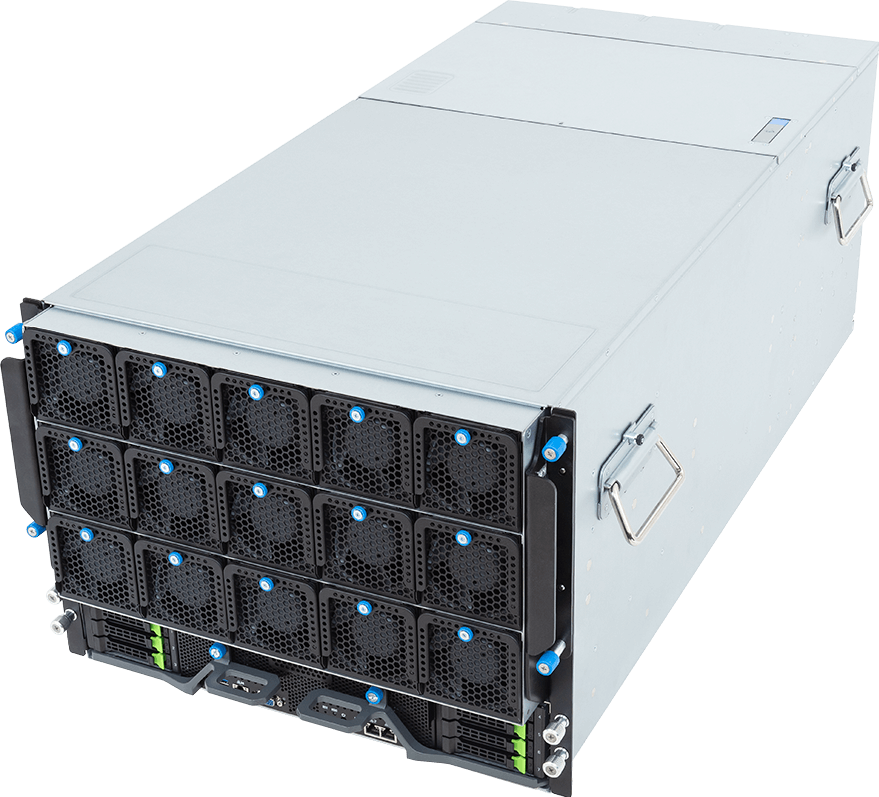
The GIGABYTE G894-ZD3-AAX7 is an 8U NVIDIA HGX B300 server with eight Blackwell Ultra SXM GPUs, eight ConnectX-8 network ports, dual AMD EPYC processors and eight front Gen5 NVMe bays. It is built for large AI training, high-throughput inference and GPU-heavy HPC, not for buyers who merely want eight independent accelerator cards in one chassis.
HGX changes the buying decision. The GPUs, fifth-generation NVLink and NVLink Switch fabric form one fixed scale-up subsystem with up to 2.304 TB of HBM3e memory across the node. That gives software a much faster path between GPUs than ordinary PCIe server layouts, but it also commits the buyer to a dense platform with demanding network, storage, power and cooling requirements.
Configure the GIGABYTE G894-ZD3-AAX7 on GPUMachines after the workload and site design have been checked together. A valid server bill of materials is only one part of an HGX deployment.
Technical review summary
GIGABYTE integrates the complete NVIDIA HGX B300 eight-GPU baseboard. NVIDIA's current enterprise reference architecture lists 288 GB of HBM3e per B300 GPU, up to 2,304 GB per node, 1,800 GB/s GPU-to-GPU bandwidth and 14.4 TB/s aggregate NVLink bandwidth. Those figures describe the HGX platform; application results still depend on software, precision, parallelism and data delivery.
The host side uses two socket SP5 processors from the AMD EPYC 9005 or 9004 families. GIGABYTE supports CPU cTDP up to 500 W and fits 24 DDR5 RDIMM sockets, twelve memory channels per processor. EPYC 9005 supports published memory rates up to 6,400 MT/s on this system, while EPYC 9004 is listed up to 4,800 MT/s, subject to the selected DIMMs and population.
Eight rear OSFP ports connect through onboard NVIDIA ConnectX-8 SuperNICs. Each port supports up to 800Gb/s InfiniBand XDR or a dual 400Gb/s Ethernet mode in a compatible design. This is the east-west GPU fabric. It does not remove the need to specify switches, optics or cables, rail mapping, management and storage networks.
Local storage comprises eight front hot-swap 2.5-inch Gen5 NVMe bays and two internal M.2 sockets. Four FHHL PCIe Gen5 x16 positions support qualified DPUs, storage or additional I/O. GIGABYTE lists twelve 3,000 W 80 PLUS Titanium power supplies in a redundant arrangement.
Verified system specification
| Area | GIGABYTE G894-ZD3-AAX7 specification | | --- | --- | | Form factor | 8U, 447 x 351 x 923 mm | | Motherboard | GIGABYTE MZB3-PE2 | | Accelerator subsystem | NVIDIA HGX B300 with 8 x SXM GPUs | | HGX memory | Up to 2,304 GB HBM3e across eight B300 GPUs | | GPU interconnect | Fifth-generation NVLink and NVLink Switch, 1,800 GB/s GPU-to-GPU | | Host processors | 2 x AMD EPYC 9005 or 9004, socket SP5 | | CPU power support | Up to 500 W cTDP per processor, subject to QVL | | Host memory | 24 x DDR5 RDIMM, twelve channels per CPU | | GPU networking | 8 x OSFP through onboard ConnectX-8 SuperNICs | | Network modes | Up to 800Gb/s InfiniBand XDR or dual 400Gb/s Ethernet per port | | Onboard LAN | 2 x 10GbE RJ45 through Intel X710-AT2 | | Management | Front and rear management interfaces through AST2600 BMC | | Front storage | 8 x hot-swap 2.5-inch Gen5 NVMe | | Internal storage | 1 x M.2 Gen3 x4; 1 x M.2 Gen3 x1 | | PCIe expansion | 4 x FHHL PCIe Gen5 x16 | | Power supplies | 12 x 3,000 W, 80 PLUS Titanium, redundant | | Published net weight | 91.6 kg before final deployment accessories |
The table does not state steady power draw, rack inlet requirement or switch count. Those values belong in the completed deployment design, based on the exact CPUs, memory, drives, DPUs, firmware mode and workload.
Why HGX B300 is different from eight PCIe GPUs
An eight-GPU PCIe server usually treats each accelerator as a separate add-in device behind one or more CPU root complexes and PCIe switches. Peer transfers can work, but the topology and available bandwidth differ from an HGX scale-up fabric.
HGX B300 fixes eight SXM GPUs to a baseboard with NVLink and NVLink Switch. NVIDIA specifies 1,800 GB/s of bidirectional GPU-to-GPU bandwidth for B300 and 14.4 TB/s across the node. Frameworks can use that fabric for tensor, pipeline, expert and data-parallel communication when the model and software stack are configured correctly.
The large HBM3e pool is still distributed memory. Eight GPUs with 288 GB each do not behave like one ordinary 2.3 TB allocation unless the framework shards the model and moves data across the fabric. Buyers should confirm how the target framework handles tensor parallelism, expert parallelism, KV cache and checkpointing rather than relying on the aggregate number alone.
A PCIe system remains a better purchase when workloads are independent, a smaller GPU count meets the need or professional graphics cards are required. HGX earns its cost when the application repeatedly communicates across GPUs or needs the larger scale-up domain.
B300 memory and workload fit
Up to 2.304 TB of HBM3e creates room for large model weights, optimizer states, activation data and a substantial inference KV cache. Precision changes how far that capacity goes. An FP8 or lower-precision deployment uses memory differently from FP16 training, while mixture-of-experts routing and long-context inference can consume capacity in less obvious places.
Memory fit is necessary, but not sufficient. A model that fits can still underperform if attention, all-reduce, storage reads or host preprocessing become the bottleneck. Conversely, a model that does not fit in one GPU can work efficiently across HGX when the framework and communication pattern match the NVLink topology.
G894-ZD3-AAX7 suits:
- Foundation-model training and fine-tuning that can use eight-way scale-up communication.
- High-throughput inference with model, batch and cache planning designed for B300.
- Multimodal, retrieval and agentic services whose data path can keep the GPUs supplied.
- CUDA-based HPC applications qualified for Blackwell Ultra and multi-GPU execution.
- Multi-node AI factories using an engineered InfiniBand or Ethernet fabric.
It is wasteful for a lightly used development service, a single independent inference endpoint or software that cannot scale beyond one or two GPUs.
ConnectX-8 networking is part of the compute architecture
The eight ConnectX-8 ports correspond to the HGX east-west fabric model: one high-bandwidth network path per GPU. In XDR InfiniBand mode, each port can operate at up to 800Gb/s. In Ethernet mode, the published design supports two 400Gb/s links per OSFP port with the right breakout media and switch configuration.
That is a potential 6.4Tb/s of adapter bandwidth across the eight ports, but summing port rates does not predict application throughput. PCIe topology, message size, congestion, collective library, switch design and oversubscription all matter. The fabric also needs a rail plan so that a cable, port or switch fault does not isolate an arbitrary set of GPUs.
A quote for one node should name the network mode and physical media. A cluster quote must go further:
- Switch model, port count and topology.
- Number of rails and mapping from each ConnectX-8 port.
- OSFP optics, active electrical cables or direct-attach copper, including reach.
- Breakout method where dual 400GbE is used.
- Fabric management, telemetry and firmware scope.
- Separate paths for storage, cluster management and out-of-band access.
Using one or two of the eight GPU ports may be valid for a specific inference deployment, but it changes the balance of the server. Do not buy the full network subsystem and then connect it through an undersized switch without modelling the workload.
BlueField-3 and general PCIe expansion
GIGABYTE lists compatibility with NVIDIA BlueField-3 DPUs. NVIDIA's HGX B300 reference architecture uses a BlueField-3 path for north-south services, while the ConnectX-8 devices handle east-west GPU communication.
A DPU can offload or isolate infrastructure functions, but it brings its own firmware, operating mode and management responsibility. Include it when the security, storage or tenant design needs it. Do not add one merely because a slot exists.
The four FHHL Gen5 x16 positions can also support qualified network or storage adapters. Slot assignment should follow the motherboard block diagram and CPU ownership. Cross-socket traffic can consume host interconnect bandwidth and add latency, particularly when a storage or service adapter feeds GPUs attached through the other CPU root complex.
EPYC host processors and 24 DIMM slots
The GPUs carry the main accelerated workload, yet two host CPUs still handle data loading, tokenisation, decompression, networking, orchestration and operating-system services. A weak or poorly placed host pipeline can leave expensive GPUs waiting.
EPYC 9005 and 9004 provide twelve memory channels per socket on this platform. Populate corresponding channels across both processors and keep NUMA placement visible to the scheduler. NVIDIA's HGX B300 enterprise reference architecture calls for at least 2 TB of system memory across the host sockets and at least 500 GB/s of host-memory bandwidth for its validated design. A different deployment can use another capacity, but it should do so from measured workload requirements, not guesswork.
EPYC 9005 may appeal where higher supported memory rates, newer core options or host-side throughput matter. EPYC 9004 can remain suitable where the application is GPU-bound and procurement or software qualification favours the earlier generation. The exact CPU must appear on GIGABYTE's support list, and both sockets should use matching supported processors.
CPU cTDP up to 500 W does not mean every deployment needs the highest-power parts. More host cores can help input pipelines and dense service stacks; they also add rack power and heat. Profile the CPU side with representative data processing before defaulting to the largest SKU.
Local NVMe and shared storage
Eight front Gen5 NVMe bays provide a useful node-local tier for datasets, caches, checkpoints and temporary results. The drives connect through a PCIe switch in the published GIGABYTE topology, so final performance depends on the switch path, drive choice and software queueing.
Two internal M.2 devices use unequal links: one Gen3 x4 path from CPU 1 and one Gen3 x1 path from CPU 0. They are better treated as boot or service media than as a matched high-performance stripe. Select enterprise devices and check power-loss protection, endurance and supported capacity.
Node-local NVMe cannot replace shared storage in a training cluster unless the data workflow deliberately replicates and manages it. The storage design must cover:
- Sustained reads during training or batch inference.
- Checkpoint size, frequency and write burst.
- Restart and rescheduling on a different node.
- Dataset versioning, retention and backup.
- Metadata and small-file behaviour.
- Network path from the shared tier to every compute node.
Eight fast drives are useful only when the filesystem and job workflow can use them.
Power, cooling and rack planning
Twelve 3,000 W supplies have 36 kW of aggregate nameplate capacity. That is not the expected server draw and should not be used as a rack-planning number. The redundant operating pattern, input voltage, feed split and approved load belong in the final vendor design.
GIGABYTE requires C19 power cords and lists a 10 to 30 degrees C operating inlet range. The chassis contains dedicated fan groups for the motherboard, OSFP ports, PCIe area and GPU tray. Those details show why the node needs a high-density data-centre environment, not an ordinary server room circuit.
At 923 mm deep and 91.6 kg net, installation needs more than an empty 8U gap. Confirm:
- Cabinet rail depth, door clearance and cable bend radius.
- Floor and cabinet loading, including other equipment in the rack.
- Available A and B feeds at the required voltage and connector count.
- Cooling delivery at the actual rack position, plus exhaust containment.
- Lift equipment and a safe installation method.
- Front and rear service clearance for the GPU tray, drives, network ports and PSUs.
Rack placement should consider the centre of gravity and the effect of concentrating several HGX nodes in adjacent spaces. A rack planner that counts only U positions will produce an unsafe or unusable design.
Single-node versus multi-node deployment
One G894-ZD3-AAX7 can serve large fine-tuning, inference and HPC jobs without a scale-out fabric beyond its storage and client networks. Even then, the software needs queueing, monitoring, access control and a recovery plan.
Multi-node training turns the server into one component of an AI factory. The design must coordinate compute, east-west fabric, shared storage, management, job scheduling, observability, power and cooling. NVIDIA's HGX B300 reference architecture uses repeated node and network patterns at 32, 64 and 128 nodes; copying only the server count without the accompanying fabric does not reproduce that architecture.
Acceptance testing should include more than a health screen. Test every GPU, NVLink and NVLink Switch path, all network ports, local storage, both CPUs, memory channels, BMC, redundant feeds and representative collective communication. Record firmware and software versions so a later replacement returns the node to a known state.
When not to buy G894-ZD3-AAX7
Choose a smaller PCIe GPU server when jobs run independently, two to four GPUs are enough or the required cards are not SXM B300. It will usually be easier to power, cool and service.
An H200 or B200 HGX platform can remain sensible when the software estate is already qualified and the additional B300 memory or compute does not change job completion, concurrency or model fit. Migration cost belongs in the decision.
Hosted capacity may be preferable for irregular use. Owning an HGX B300 system makes most sense when utilisation, data control, deployment duration or custom integration justify the facilities and operational load.
What a complete quote should contain
The system line should identify the exact G894-ZD3-AAX7 ordering revision and HGX B300 subsystem. It should list both EPYC processors, the complete DIMM population, boot media, every front NVMe drive, each PCIe adapter and the management hardware.
Network scope should name mode, switches, ports, optics or cables, breakout parts and management tooling. Facility scope needs expected node load, feed arrangement, connector type, rack position, cooling method and installation plan. Software scope should state operating system, NVIDIA driver and container stack, cluster components and acceptance tests.
Anything left as "800G networking" or "redundant power" is not yet a deployable specification.
FAQ
How many GPUs and how much GPU memory are in G894-ZD3-AAX7?
It contains eight NVIDIA B300 SXM GPUs on an HGX B300 baseboard. NVIDIA's current enterprise reference architecture lists up to 288 GB HBM3e per GPU and 2,304 GB across the node.
Can the B300 GPUs be replaced with PCIe cards?
No. The eight GPUs are part of the fixed HGX B300 SXM subsystem. The four conventional PCIe slots serve supported network, DPU, storage and other I/O devices.
Does the server include eight 800Gb/s network ports?
Yes. GIGABYTE lists eight OSFP ports through onboard ConnectX-8 SuperNICs. They support an 800Gb/s InfiniBand XDR mode or dual 400Gb/s Ethernet operation with compatible switching and media.
Which host CPUs are supported?
GIGABYTE supports two AMD EPYC 9005 or 9004 processors on socket SP5, with cTDP up to 500 W. Select CPUs from the current QVL and populate host memory symmetrically.
How much system RAM should be installed?
It depends on the data pipeline and services. NVIDIA's enterprise HGX B300 reference design specifies at least 2 TB across both host sockets, but a final build should follow measured host-memory capacity and bandwidth needs.
How many local NVMe drives fit?
Eight front hot-swap 2.5-inch Gen5 NVMe drives, plus two internal M.2 devices for boot or service use.
Do twelve 3,000 W PSUs mean the server draws 36 kW?
No. That is aggregate nameplate capacity across all installed supplies. Use the vendor-approved configured load and redundancy pattern for electrical and cooling design.
Is G894-ZD3-AAX7 suitable for an ordinary office server room?
Generally no. Its size, weight, C19 power connections, network density and cooling requirement call for a planned high-density data-centre environment.
Verdict
G894-ZD3-AAX7 is a serious HGX B300 building block: eight Blackwell Ultra GPUs, the full NVLink scale-up fabric, eight ConnectX-8 network rails and a modern dual-EPYC host in 8U. It can support very large single-node jobs or become one unit in a multi-node AI factory.
Its value depends on the surrounding design. A weak storage path, partially connected fabric or unsuitable rack can waste far more money than a small CPU or DIMM choice. Buyers should approve the node, network, data path and facility plan as one technical package.
Configure the GIGABYTE G894-ZD3-AAX7 and validate the complete deployment before pricing the server in isolation.
Technical sources
- GIGABYTE G894-ZD3-AAX7 product page
- GIGABYTE G894-ZD3-AAX7 datasheet
- GIGABYTE G894-ZD3-AAX7 support and QVL
- GIGABYTE G894-ZD3 series system manual
- NVIDIA HGX B300 enterprise reference architecture
Specifications, QVLs and software support can change. Confirm the ordering revision, HGX subsystem, CPUs, DIMM population, NVMe drives, DPU, network mode, firmware, rack power and cooling before purchase. This is a source-backed technical review, not a record of hands-on GPUMachines testing.