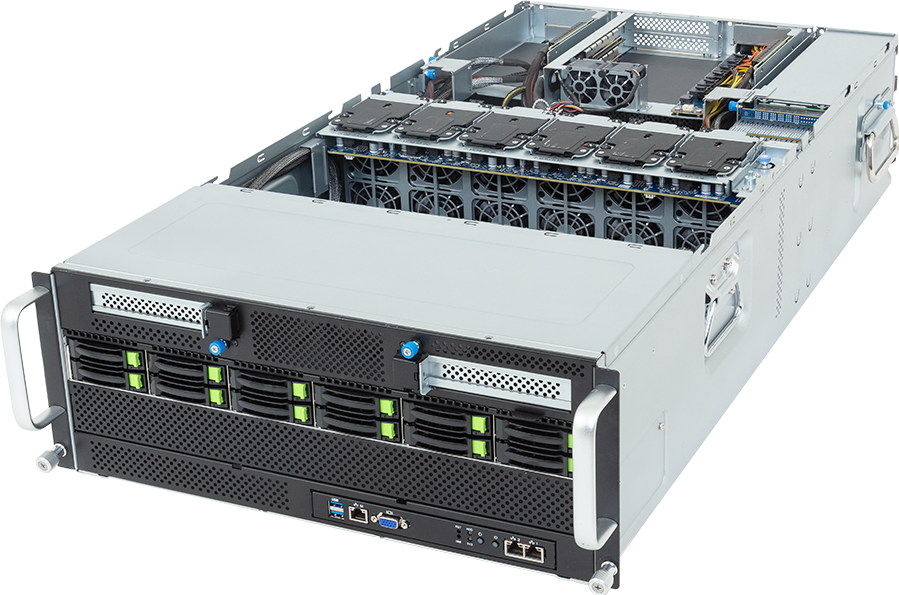
Eight GPUs fit inside the GIGABYTE G494-ZB4-AAP2, but that figure hides the decision that matters: this is a switched PCIe platform, not an HGX baseboard. It suits buyers who want eight qualified add-in accelerators, a large dual-socket host and useful local storage in 4U. It is the wrong choice when software expects one uniform eight-GPU NVSwitch domain.
GIGABYTE currently names two eight-card configurations for this exact AAP2 model: NVIDIA H200 NVL PCIe GPUs arranged as two four-card NVLink groups, or NVIDIA RTX PRO 6000 Blackwell Server Edition GPUs. Both carry a 25 C ambient condition, and all eight cards must use the same GPU model. Those details should drive the design before anyone fills in the rest of the bill of materials.
Configure the GIGABYTE G494-ZB4-AAP2 on GPUMachines once the accelerator, rack and network requirements are known. This review is based on the current GIGABYTE product page, datasheet and system manual rather than a hands-on laboratory test.
The short verdict
Choose the G494-ZB4-AAP2 for dense inference, rendering, virtual workstations, selected fine-tuning and HPC jobs that fit qualified PCIe accelerators. Its eight GPU slots connect through two Broadcom PEX89144 switches, while six further Gen5 x16 positions remain available for network, DPU or storage cards. Forty-eight DIMM slots and 12 shared front drive carriers give the host more room than many GPU-only chassis.
Do not buy it merely because the chassis accepts eight GPUs. H200 NVL forms two separate four-card groups, not one eight-card NVLink island. A training job that depends on uniform all-to-all GPU communication may fit an HGX server better. A team that needs only one or two independent cards will usually get easier service, lower idle power and a smaller failure domain from another PCIe GPU server.
The G494 is also a demanding physical object. Its published net weight is 66.8 kg before final configuration. The standard chassis is 880 mm deep, and the optional fan kit extends it to 1000.5 mm. Four 3000 W power supplies do not guarantee full output on an ordinary low-voltage circuit. Rack depth, input voltage, PDU outlets and lifting arrangements belong in the purchasing decision.
Verified G494-ZB4-AAP2 specification
| Area | Exact AAP2 specification | | --- | --- | | Form factor | 4U rack server | | Dimensions | 448 x 176 x 880 mm; 1000.5 mm deep with optional fan kit | | Net weight | 66.8 kg before the final build | | Processor platform | 2 x AMD EPYC 9005 or 9004, socket SP5 | | CPU power support | Up to 400 W cTDP; up to 500 W at 30 C ambient | | Memory | 48 x DDR5 RDIMM, 24 per processor, twelve channels per processor | | EPYC 9005 memory rate | Up to 5200 MT/s at 1DPC; lower published rates at 2DPC | | EPYC 9004 memory rate | Up to 4800 MT/s at 1DPC; 3600 MT/s at 2DPC | | GPU positions | 8 x FHFL PCIe Gen5 x16 through two PEX89144 switches | | Current named GPU layouts | 8 x H200 NVL PCIe or 8 x RTX PRO 6000 Blackwell Server Edition | | Additional expansion | 2 rear FHHL, 1 front FHHL and 3 low-profile Gen5 x16 positions | | Front storage | 12 shared 2.5-inch Gen5 NVMe, SATA or SAS-4 carriers | | Internal storage | 2 x M.2 2280/22110, PCIe Gen3 x4, one per CPU | | Onboard network | 2 x 1GbE via Intel I350-AM2 plus dedicated management Ethernet | | Management | ASPEED AST2600 BMC and front VGA | | Cooling | 12 x 60 mm and 2 x 40 mm fans; optional kit for 600 W GPU support | | Power | 4 x 3000 W 80 PLUS Titanium redundant supplies; C19 cords required | | Ordering number | 6NG494ZB4DR000ACP2 |
These are platform limits, not a promise that every listed component can be combined. The current GPU, memory, drive and operating-system qualification lists still govern the finished build.
Eight switched PCIe GPUs
The two PEX89144 switches define this server. Four GPU slots hang from each switch, and each slot is mechanically full-height and full-length with a Gen5 x16 electrical link. That arrangement lets the server host eight high-power cards without asking the two EPYC processors to provide eight direct GPU links.
Switches solve lane fan-out and packaging problems, but they do not turn PCIe cards into an HGX module. Traffic between cards on one switch follows a different path from traffic crossing to the other switch domain. Software placement, NIC locality and storage locality can therefore affect performance. A scheduler that treats all eight GPUs as interchangeable may leave bandwidth on the table.
This topology works well when jobs can remain on one GPU, one four-card group or several independent workers. Inference replicas, rendering frames, simulation batches and virtual workstation sessions often have that shape. Tightly coupled jobs deserve more scrutiny. Ask how much data crosses between GPUs, how often it crosses, and whether the software can pin processes to the intended four-card group.
The six non-GPU Gen5 x16 positions are a real advantage. Two rear full-height slots, one front full-height slot and three low-profile slots leave room for fast Ethernet, InfiniBand, a DPU or a SAS controller. Physical room does not remove topology constraints. Place each high-speed adapter against the CPU or switch domain it is meant to serve, then check airflow and cable reach before quotation.
H200 NVL means two groups of four
GIGABYTE validates eight H200 NVL PCIe cards at 25 C ambient. The important sentence follows the number: the cards are arranged as two sets of four, and each set uses its own four-way NVLink bridge. There is no single eight-card NVLink bridge in this chassis.
That can be a sensible layout for large inference services, selected fine-tuning and HPC work. A job may stay inside one four-card group, while the second group handles another service or a separate batch. H200 NVL also gives each card 141 GB of HBM3e, which can reduce the need to split a model across as many devices as a lower-memory accelerator would require.
Jobs spanning all eight cards still cross the PCIe and host topology between groups. Buyers should not compare this arrangement with an eight-GPU HGX H200 node by counting GPUs alone. The communication fabric, collective behaviour and failure characteristics differ.
The bridge kit, firmware, driver branch and exact card revision need to match the qualification entry. H200 NVL names a product class, not permission to combine any eight boards from any source. Preserve the uniform-card rule and confirm the current GIGABYTE QVL at ordering time.
RTX PRO 6000 Blackwell Server Edition
The second named layout uses eight NVIDIA RTX PRO 6000 Blackwell Server Edition cards, again at a stated 25 C ambient. This option fits organisations that need one host for AI inference, rendering, engineering visualisation, media processing or remote workstation sessions. Its 96 GB of GDDR7 per card offers a large memory pool for independent workers without moving to a fixed SXM board.
This is the Server Edition, not a desktop card placed into a rack chassis. Passive cooling depends on the server's fan pressure, and 600 W support requires the optional fan kit. GIGABYTE also says that GPU video outputs are unavailable in this system. Even if a card family normally has display capability, the G494 should be operated as a remote data-centre node.
The product page validates a uniform eight-card set. A mixed group of RTX PRO models may look electrically possible, yet it is not the published configuration. Smaller RTX PRO cards shown by a configurator should be treated as quote candidates until the exact card, fan kit and GIGABYTE qualification are confirmed.
CPU and memory planning
Two SP5 sockets accept qualified AMD EPYC 9005 or 9004 processors. GIGABYTE publishes a normal cTDP ceiling of 400 W and allows up to 500 W at 30 C ambient. Higher CPU power is not automatically useful. The processor choice should follow host-side work: data loading, tokenisation, compilation, simulation, storage queues, virtual machines and network processing.
The motherboard carries 48 RDIMM slots, 24 per CPU. Each processor exposes twelve memory channels with two DIMM positions per channel. EPYC 9005 is listed at up to 5200 MT/s with one DIMM per channel, then 4400 MT/s for one-rank 2DPC and 4000 MT/s for two-rank 2DPC. EPYC 9004 reaches up to 4800 MT/s at 1DPC and 3600 MT/s at 2DPC.
Capacity and bandwidth pull in different directions. Filling every slot may deliver a very large host-memory pool, but the published data rate falls at 2DPC. Many GPU inference builds gain more from a balanced one-DIMM-per-channel population than from maximum capacity. Data-heavy simulation, virtualisation or CPU preprocessing may justify the second bank.
Populate both CPUs symmetrically unless a measured workload and the block diagram justify another plan. GIGABYTE warns that installing only one processor disables some PCIe or memory functions. For an eight-GPU quotation, a single-socket build should be treated as an exception that needs a documented slot map, not as a cheap default.
The public configurator may display single-socket EPYC models whose names end in 'P'. Those processors do not belong in a two-socket build. The final quote must use dual-socket-capable EPYC parts from the current platform list.
Twelve carriers, not 38 drives
The front panel has 12 physical 2.5-inch carriers. Each can participate in the supported NVMe, SATA or SAS-4 layouts, so a configurator may show 12 choices under each protocol. That does not create 36 front bays. The combined selection across those protocol groups cannot exceed 12.
The internal wiring is more specific than the common front panel suggests. Four NVMe paths come directly from the processors, two per CPU. Eight additional NVMe paths arrive through the two PEX89144 switches, four per switch. SATA divides as eight paths from CPU 0 and four from CPU 1. SAS needs an add-in controller.
Locality matters when the drives feed particular GPUs or network rails. A dataset staged on a CPU-direct drive may follow a different route from one on a switch-attached bay. For ordinary model cache or scratch, the distinction may be minor. Sustained ingest, checkpointing or GPU Direct Storage plans need the final device-to-switch map.
Two internal M.2 positions sit outside the front pool. Both accept 2280 or 22110 devices and run at PCIe Gen3 x4, with one connected to each CPU. They suit mirrored boot devices, service partitions or local tooling. Calling them Gen5 drives because the front backplane supports Gen5 NVMe would be inaccurate.
SAS also changes the expansion plan because it consumes a supported controller, slot and cooling allowance. Define the protocol mix before allocating every spare slot to network cards.
Network design starts above 1GbE
Factory networking consists of two Intel I350-AM2 1GbE host ports with NCSI and a dedicated 10/100/1000 Mb/s management port. That is enough for installation, management and low-rate service traffic. It is not a data path for eight GPUs.
A standalone rendering node may need one fast Ethernet adapter for project data. Shared inference can need separate service and model-loading paths. Multi-node training or distributed HPC may require two fabric rails, careful process placement and a switch design sized for the traffic pattern. The answer cannot be derived from GPU count alone.
Map adapters to both GPU-switch domains where the workload can use the locality. One high-speed NIC may make half the chassis cross another host path. Two adapters can reduce that detour, though they also consume switch ports, optics, cables and operational attention. Record which rail serves which four-GPU group.
Do not describe an optional ConnectX or BlueField card as included networking. The barebone includes only the two host 1GbE ports and the management interface. High-speed fabric belongs in the configurable bill of materials.
Power, cooling and the one-metre chassis
Four 3000 W Titanium supplies form the redundant power system, yet their usable output changes with the input. GIGABYTE lists about 1097 W per supply at 100 to 127 V, 2598 W at 200 to 220 V, and 3037.2 W at 220 to 240 V. An eight-GPU build needs the correct high-voltage feed, C19 cords and PDU outlets. Power cords are not included.
The chassis ships with twelve 60 mm fans and two 40 mm fans. Qualified 600 W GPUs require the optional fan kit, which extends depth from 880 mm to 1000.5 mm. A cabinet advertised as 1000 mm deep may still be too short once rail geometry, rear doors and cable bend radius are considered.
GPUMachines currently uses a 1050 W engineering allowance for the barebone platform before configurable CPUs, GPUs, memory, drives and add-in cards. It covers the board, BMC, switches, backplane, fans, risers and onboard controllers. It is not a GIGABYTE measured figure. Rack planning should replace it with acceptance-test data from the delivered configuration.
At 66.8 kg before CPUs, GPUs and drives, the server also needs a lifting plan. Two people improvising beside a live rack isn't a plan. Check rail compatibility, loading equipment and the route into the data hall.
Workloads that fit
The G494-ZB4-AAP2 makes sense for eight-card inference estates, rendering farms, scientific workloads, remote graphics and selected model development where PCIe communication is sufficient. Its switched topology and six auxiliary slots give designers room to build two balanced four-GPU domains with local storage and high-speed network adapters.
It is particularly attractive when the GPUs run independent jobs. An inference scheduler can assign replicas to cards; a renderer can divide frames; virtual workstation software can place users on separate devices. The host then benefits from density without requiring every card to exchange data at full rate.
Fine-tuning and HPC fit depends on communication. Measure or model collective traffic before choosing this server. If a job spends a large share of time exchanging tensors across all eight devices, the saving against HGX can disappear through lower utilisation.
Small projects should start elsewhere. One developer, one model and one or two GPUs rarely justify a 4U, 66.8 kg platform with four high-power supplies. A workstation, a smaller PCIe server or hosted capacity can provide a cleaner first deployment. The G494 earns its rack space when several high-value workloads can use the density consistently.
What to confirm before quotation
- Use one qualified GPU model across all eight positions.
- Match H200 NVL cards and bridge kits to the two four-card topology.
- Include the optional fan kit for 600 W GPUs and allow for 1000.5 mm chassis depth.
- Select dual-socket-capable EPYC processors; exclude 'P' suffix single-socket parts.
- Decide between 1DPC bandwidth and 2DPC capacity before choosing 48 DIMMs.
- Treat NVMe, SATA and SAS as one shared 12-carrier front pool.
- Reserve a slot and controller for SAS when needed.
- Map NICs or DPUs to the intended CPU and GPU-switch domains.
- Provide high-voltage feeds, C19 cords, suitable PDUs and a redundancy plan.
- Check rack loading, rails, rear clearance and the installation method.
- Validate the final GPU, memory, drive, firmware and operating-system combination against current GIGABYTE lists.
Frequently asked questions
Is the G494-ZB4-AAP2 an HGX server?
No. It uses eight PCIe Gen5 add-in GPU slots through two PCIe switches. It does not contain an SXM baseboard or NVSwitch fabric.
Can it use eight H200 GPUs?
GIGABYTE validates eight H200 NVL PCIe cards at 25 C ambient as two four-card groups. Each group uses a four-way NVLink bridge. The result is not one eight-card NVLink domain.
How many front drives fit?
Twelve. NVMe, SATA and SAS-4 are protocol choices for the same 12 physical carriers. Two separate internal M.2 devices bring the physical total to 14 storage positions, not 38.
Does the barebone include high-speed networking?
No. It includes two 1GbE host ports and a management port. Ethernet, InfiniBand or DPU adapters for workload traffic must be selected separately.
Are four 3000 W supplies enough on any circuit?
No. Per-supply output falls sharply on 100 to 127 V input. Full-power configurations need the voltage, cords, outlets and failover design specified for the finished build.
Should every buyer populate all eight GPU slots?
No. Fewer GPUs may reduce purchase cost and power, but this chassis still carries the size and platform overhead of an eight-card server. A lower-density model often makes more sense when expansion is uncertain.
Buying decision
The G494-ZB4-AAP2 is a sound eight-GPU platform when the workload benefits from PCIe flexibility and can respect two four-card topology domains. It offers more host memory and more local storage than a bare accelerator chassis, while leaving six Gen5 positions for the fabric and storage hardware that make the GPUs useful.
Its limits are equally clear. This isn't HGX, 12 carriers aren't 38 drives, and four 3000 W labels do not remove the facility work. Buyers who document GPU communication, drive locality, network rails and rack power before ordering can build a capable dense node. Buyers who start with eight empty GPU slots and work backwards are likely to pay for awkward compromises.
Open the GIGABYTE G494-ZB4-AAP2 configurator to build a candidate system. GPUMachines should then check the exact GPU QVL entry, dual-socket CPU choice, memory population, storage controller, NIC placement and facility envelope before issuing the final quote.
Sources
- GIGABYTE G494-ZB4-AAP2 product page
- GIGABYTE G494-ZB4-AAP2 v1.0 datasheet
- GIGABYTE G494-ZB4-AAP2 v1.0 system manual
- GIGABYTE support and qualification lists
- NVIDIA H200 product information
- NVIDIA RTX PRO 6000 Blackwell Server Edition
Sources checked 22 September 2026. Specifications and qualification lists can change; the ordering revision and current QVL take precedence over this review.