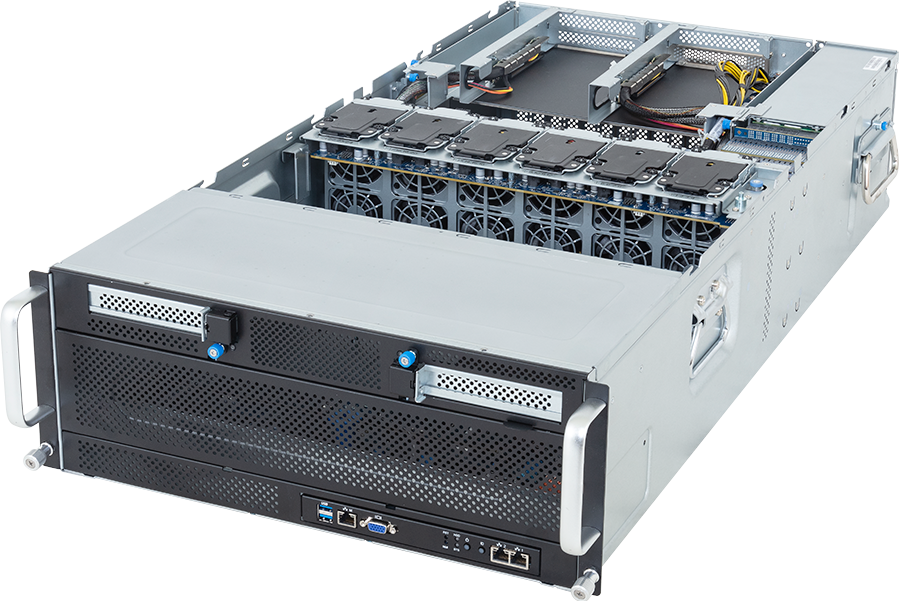
The GIGABYTE G494-ZB0-AAP2 is a 4U dual-socket AMD EPYC server for up to eight full-height, full-length, double-width PCIe Gen5 GPUs. GIGABYTE currently validates uniform eight-card configurations using NVIDIA H200 NVL, NVIDIA RTX PRO 6000 Blackwell Server Edition or AMD Instinct MI350P accelerators, subject to the stated environmental and accessory conditions.
This is not a generic 4U chassis with eight slots on a diagram. Each GPU position receives a Gen5 x16 link, split evenly across two EPYC processors, and the system adds two further Gen5 x16 positions for network, storage or other adapters. It is built for dense PCIe accelerator fleets, but it has only two internal M.2 devices and no front hot-swap data tier. Network and shared storage design are therefore part of the server decision.
Configure the GIGABYTE G494-ZB0-AAP2 on GPUMachines after selecting the accelerator family and facility envelope. The GPU choice changes power, cooling, software and interconnect requirements enough that the barebone should never be treated as a finished specification.
Technical review summary
G494-ZB0-AAP2 supports two AMD EPYC 9005 or 9004 processors on socket SP5. GIGABYTE lists a normal cTDP limit of 400 W per CPU, rising to 500 W at a 30°C ambient condition. Twenty-four DDR5 RDIMM sockets provide all twelve memory channels per processor, with published speeds up to 6,400 MT/s for EPYC 9005 and 4,800 MT/s for EPYC 9004.
Eight rear GPU positions connect as four Gen5 x16 slots from each CPU. Two additional full-height Gen5 x16 positions, one from each processor, can take auxiliary cards. With the optional fan kit, GIGABYTE describes support for one double-width and one single-width auxiliary card beside the eight GPUs. That kit also increases chassis depth from 880 mm to 1,000.5 mm.
The current product page gives three important qualified examples. Eight H200 NVL cards are supported at 25°C ambient as two groups of four, with one four-way NVLink bridge per group. Eight RTX PRO 6000 Blackwell Server Edition cards and eight AMD Instinct MI350P cards are also listed at 25°C. GIGABYTE states that validation is for a uniform GPU model, so a mixed eight-card set should not be assumed compatible.
Local storage comprises one M.2 Gen3 x4 device from CPU 1 and one M.2 Gen3 x1 device from CPU 0. This is a boot and service arrangement, not an active-dataset tier. The server needs a suitable network adapter and an external storage service for most training, rendering, simulation or data-heavy inference workloads.
Four 3,000 W 80 PLUS Titanium power supplies form the redundant power system. Output depends on input voltage: GIGABYTE publishes only about 1,097 W per supply at 100 to 127 V, rising to about 2,598 W at 200 to 220 V and 3,037 W at 220 to 240 V. C19 power cords are required and are not included in the barebone package.
Verified system specification
| Area | GIGABYTE G494-ZB0-AAP2 specification | | --- | --- | | Form factor | 4U rack server | | Dimensions | 448 x 176 x 880 mm; 1,000.5 mm deep with optional fan kit | | Net weight | 66.8 kg before final configuration | | Processor | 2 x AMD EPYC 9005 or 9004, socket SP5 | | CPU power support | Up to 400 W cTDP; up to 500 W at 30°C ambient | | Memory | 24 x DDR5 RDIMM, twelve channels per processor | | Published memory speed | EPYC 9005 up to 6,400 MT/s; EPYC 9004 up to 4,800 MT/s | | GPU positions | 8 x FHFL PCIe Gen5 x16, four from each CPU | | GPU power class | Up to 600 W per qualified card with required system conditions | | Additional expansion | 2 x FHFL PCIe Gen5 x16, one from each CPU | | Validated GPU examples | 8 x H200 NVL; 8 x RTX PRO 6000 Blackwell Server Edition; 8 x Instinct MI350P | | Internal storage | 1 x M.2 Gen3 x4 and 1 x M.2 Gen3 x1 | | Onboard network | 2 x 10GbE through Intel X710-AT2 | | Management | Dedicated 1GbE management port and ASPEED AST2600 BMC | | Cooling | 12 x 60 mm system fans; optional fan kit for specified 600 W layouts | | Power supplies | 4 x 3,000 W 80 PLUS Titanium, redundant | | Power connection | C19 cords required; cords not included |
Published maximums do not prove that every part can be combined. Use the current GIGABYTE QVL, operating-system list and ordering revision for the finished bill of materials.
Why this is a true eight-GPU PCIe platform
Many servers advertise numerous expansion slots but cannot power or cool eight current double-width accelerators. G494-ZB0-AAP2 is designed around that density. It provides eight dedicated x16 mechanical positions with Gen5 x16 electrical links, eight supplied 16-pin GPU power cables and a fan system sized for high static pressure.
The layout can suit:
- fleets of independent AI inference workers;
- batch model fine-tuning where PCIe communication is sufficient;
- distributed rendering and media processing;
- virtual workstation or remote graphics pools;
- scientific simulation and analytics on qualified PCIe accelerators;
- mixed CPU and GPU services that need all twelve EPYC memory channels; and
- development estates that need the same accelerator type repeated across one host.
It also permits a useful separation of failure domains. An eight-card server takes more GPUs offline during maintenance than a four-card system, but it uses rack space, host CPUs and management ports more efficiently. Whether that trade is worthwhile depends on job scheduling and service availability.
The chassis is not intended to provide display output from the installed GPUs. GIGABYTE explicitly states that GPU video outputs are unavailable. Use it as a remote data-centre compute node, not as an eight-card workstation connected to local monitors.
The qualified GPU choices lead to different systems
The same barebone can support markedly different workload profiles. Accelerator selection should happen before CPU, networking and storage are finalised.
NVIDIA H200 NVL
GIGABYTE validates eight NVIDIA H200 NVL PCIe GPUs at 25°C ambient. They are arranged as two independent four-GPU sets, each joined by a four-way NVLink bridge. That is more inter-GPU connectivity than eight unrelated PCIe cards, but it is not one eight-GPU NVLink domain and is not equivalent to an HGX H200 baseboard.
H200 NVL provides 141 GB of GPU memory per card. Two four-card groups can suit large inference, fine-tuning and HPC jobs whose software maps well to that topology. A job that expects all eight GPUs to communicate over one uniform high-bandwidth scale-up fabric needs a different platform.
The 25°C qualification condition belongs in the facility plan. Inlet temperature, fan policy, altitude, rack airflow and neighbouring equipment can change thermal margin. Confirm the current H200 NVL QVL entry, bridge kit and software support rather than ordering eight cards and bridges separately.
NVIDIA RTX PRO 6000 Blackwell Server Edition
The RTX PRO 6000 Blackwell Server Edition combines 96 GB of GDDR7 memory with Blackwell Tensor cores, RT cores, media engines and data-centre passive cooling. It is the broadest fit of the three listed examples when one system must handle AI inference, fine-tuning, virtual workstations, rendering, video and engineering applications.
NVIDIA supports Multi-Instance GPU on this card, which can help divide capacity among services, subject to the chosen software and licensing. Display capability on the GPU does not change GIGABYTE's statement that video output ports are unavailable in this server.
Eight 600 W-class cards require the optional cooling arrangement and an approved power configuration. RTX PRO also has application certification and virtual-GPU considerations that may be as important as raw compute figures.
AMD Instinct MI350P
AMD Instinct MI350P is a passive, double-width PCIe Gen5 x16 card with 144 GB of HBM3e, published peak memory bandwidth of 4 TB/s and a maximum 600 W board-power setting that can be configured to 450 W. It targets AI and HPC through the ROCm software stack.
Eight MI350P cards make G494-ZB0-AAP2 an unusually dense PCIe AMD accelerator node. Software readiness must be checked at the exact framework, container and kernel level. A codebase tested only on CUDA is not automatically ready for ROCm, even if the model architecture is supported.
The lower configurable power point may help a deployment fit its electrical or thermal envelope, but it can change application throughput. Treat power limits as a measured performance decision, not a free reduction in facility demand.
PCIe topology and NUMA planning
Four GPU slots and one auxiliary x16 path originate from each processor. This balanced wiring is useful, but it creates two host I/O domains. CPU affinity, memory placement, NIC location and process binding can affect data movement.
For independent inference replicas, each service can be bound to a local CPU and GPU. For a job spanning both halves of the server, traffic may cross the CPU interconnect as well as PCIe. The effect depends on the framework and communication pattern.
Map the finished topology with operating-system tools before benchmarking. Record:
- which four GPUs are local to each CPU;
- where each high-speed NIC is attached;
- which M.2 device belongs to each CPU;
- the location of any DPU or storage adapter;
- the H200 NVL bridge groups, if fitted; and
- whether the scheduler preserves locality when allocating GPUs.
GIGABYTE warns that installing only one processor can disable some PCIe or memory functions. This is a dual-socket eight-GPU design, not a sensible single-CPU starter chassis. Populate both processors and their memory channels as a balanced platform.
CPU and memory configuration
EPYC 9005 and 9004 give the buyer a wide choice of core count, frequency, cache and power. The best host CPU is determined by work outside the GPUs.
Higher frequency can help serial orchestration, preprocessing and applications that do not scale across many host cores. More cores may suit heavy data preparation, compilation, virtualisation, simulation or numerous independent inference services. Large-cache models can help selected technical workloads. A 500 W CPU is not automatically faster for the complete GPU job, and GIGABYTE's 500 W support is tied to a 30°C ambient condition.
Twenty-four DIMM slots are a better host-memory layout than the reduced eight-slot designs found in some GPU servers. Twelve channels per CPU can provide the bandwidth needed to prepare batches and feed accelerators when populated correctly.
Size memory from measurement. Allow for datasets, caches, tokenisation, model loading, CPU services, containers, monitoring and failure recovery. Populate both sockets symmetrically with vendor-qualified modules. EPYC 9005 can run at a higher published memory rate than EPYC 9004 on this platform, but actual speed depends on the selected processor, module and population.
Storage: two boot devices are not a data tier
G494-ZB0-AAP2 has no front hot-swap drive bays. Its two internal M.2 sockets run at Gen3 x4 and Gen3 x1, which is enough for mirrored operating-system devices or separate boot and service drives. The x1 device is particularly unsuitable as a headline scratch volume for eight GPUs.
Most deployments should stage active data from shared storage over an added high-speed NIC. The right design depends on workload behaviour:
- inference may need fast model loading, cache and log storage;
- fine-tuning adds datasets and checkpoints;
- rendering reads assets and writes large frames;
- simulation can create sustained checkpoint and result traffic; and
- virtual workstations need user profiles, project data and predictable latency.
Use enterprise M.2 devices with suitable endurance and power-loss behaviour. Internal placement also makes service less convenient than front hot-swap media.
A local NVMe add-in card could use an auxiliary x16 position, but that competes with the network and must be checked for airflow, boot support and lane locality. Do not assume the two spare slots solve storage and networking at the same time without drawing the full expansion map.
Network design for eight accelerators
The onboard Intel X710-AT2 provides two 10GbE ports and NCSI support. That is useful for service traffic, installation and lower-rate access, but it is rarely the data path for eight modern GPUs.
A production build may need 100, 200, 400 or 800Gb/s adapters for storage, east-west GPU communication or client traffic. One or two auxiliary x16 slots give room for fast NICs or DPUs, subject to the optional fan kit and mechanical layout.
Place adapters with NUMA locality in mind. If one NIC serves all eight GPUs, traffic from half the devices may cross the CPU interconnect. Two adapters, one per CPU domain, can provide a cleaner rail layout, but require matching switch ports, optics, cables and routing.
Distributed training needs more than a fast port. Check collective communication, oversubscription, congestion control, switch buffers and the storage network. Inference fleets may care more about predictable client latency and rapid model distribution. The network bill of materials should follow measured traffic rather than the largest port speed available.
Power and cooling constraints
Eight 600 W GPUs represent 4.8 kW of accelerator rating before two CPUs, 24 DIMMs, twelve fans, NICs and drives are counted. That does not equal measured wall draw, but it explains the four high-output PSUs and the system's environmental conditions.
Input voltage changes available output sharply. A rack supplied at 120 V cannot use the power system as though it were on 230 V. At the published figures, each supply is limited to roughly 1.1 kW at 100 to 127 V, compared with roughly 2.6 kW at 200 to 220 V and 3.0 kW at 220 to 240 V.
Plan C19 cords, PDU outlets, circuit capacity and A/B feeds from the exact redundancy arrangement. The barebone does not include power cords. The facility review should also cover connector retention, cable routing and the inrush policy of the rack PDU.
High-power configurations are qualified at specified inlet temperatures. GIGABYTE lists the eight H200 NVL, RTX PRO 6000 and MI350P examples at 25°C. CPU support above 400 W is listed at 30°C. Use the more restrictive condition applicable to the full build and confirm altitude derating if relevant.
The optional 600 W GPU fan kit changes both airflow and chassis depth. At 1,000.5 mm deep, the system needs an appropriate rack, rail clearance and rear service space. A 66.8 kg net barebone plus accelerators also requires a safe installation method.
G494-ZB0-AAP2 versus HGX
An HGX server integrates eight SXM GPUs with NVLink and NVLink Switch into one scale-up domain. It is the better match for large training and inference jobs that constantly exchange data across every accelerator.
G494-ZB0-AAP2 offers choice. It can take qualified NVIDIA or AMD PCIe cards, supports graphics and virtual-workstation use with RTX PRO, and allows H200 NVL in two bridged four-GPU groups. Components are standard add-in cards rather than one fixed baseboard.
Choose this PCIe platform when jobs are independent, use four-GPU communication groups, require professional visualisation or benefit from accelerator choice. Choose HGX when the software needs one tightly connected eight-GPU unit and can justify the higher platform and facility cost.
The distinction should be made from profiling. An eight-GPU count on a purchase order says nothing about how often those GPUs communicate.
Who should buy it?
G494-ZB0-AAP2 is a strong candidate for:
- inference providers running many replicas across eight cards;
- teams deploying qualified H200 NVL four-GPU groups;
- mixed AI and visual-computing estates using RTX PRO 6000 Blackwell;
- ROCm users building an eight-card MI350P node;
- render farms and engineering organisations needing dense professional GPUs;
- laboratories that value full twelve-channel memory on each EPYC CPU; and
- data centres with high-voltage power, deep racks and shared storage already planned.
When not to buy it
Do not choose this system when one or two GPUs meet the requirement, when local hot-swap NVMe is essential, or when the site cannot support the power, inlet temperature, depth and weight of a fully populated node.
It is also the wrong architecture for an application that requires all eight GPUs in one HGX-class NVLink domain. The H200 NVL layout provides two groups of four, not one group of eight. A mixed GPU fleet is another poor assumption because GIGABYTE's published validation specifies a uniform GPU model.
Configuration checklist
Before placing an order, approve:
1. the exact eight-card GPU model and its current QVL status; 2. the H200 bridge arrangement or required 600 W optional fan kit; 3. two CPU OPNs, cTDP settings and the applicable ambient condition; 4. a symmetric 24-DIMM plan with qualified modules; 5. the M.2 boot design and external data-storage path; 6. the auxiliary-card slot map and NUMA locality; 7. NIC, switch, optic or cable and storage-fabric requirements; 8. input voltage, C19 cords, PDU outlets and PSU redundancy; 9. rack depth, rail clearance, weight handling and airflow; and 10. operating system, driver, firmware, CUDA or ROCm stack and acceptance tests.
Acceptance should include sustained thermal load, GPU error checks, CPU-to-GPU throughput, cross-GPU communication, network and storage tests, and PSU or fan-failure behaviour where the approved procedure allows it.
Frequently asked questions
How many GPUs fit in the GIGABYTE G494-ZB0-AAP2?
Up to eight qualified full-height, full-length, double-width PCIe Gen5 GPUs. GIGABYTE states support for cards up to 600 W under the applicable accessory and environmental conditions.
Which eight-GPU configurations are currently listed?
GIGABYTE lists eight NVIDIA H200 NVL cards, eight NVIDIA RTX PRO 6000 Blackwell Server Edition cards or eight AMD Instinct MI350P cards. Validation is for a uniform GPU model.
Do all eight H200 NVL GPUs share one NVLink domain?
No. The published layout uses two four-GPU groups, each with a four-way NVLink bridge.
Does the server support AMD EPYC 9005?
Yes. It supports dual EPYC 9005 or 9004 processors on SP5, with 24 DDR5 RDIMM sockets and twelve memory channels per CPU.
How many front NVMe bays does it have?
None. Local storage is limited to two internal M.2 devices, one Gen3 x4 and one Gen3 x1. Plan shared storage or a qualified add-in storage path for data-heavy work.
Are the two onboard 10GbE ports enough?
They can cover management or modest service traffic. Most eight-GPU training, rendering or high-rate inference deployments need a faster network adapter and an appropriate external storage and switching design.
Can it run from ordinary 120 V rack power?
The PSUs accept 100 to 127 V, but their published output falls to about 1.1 kW each in that range. High-power GPU configurations generally need the output available at higher input voltage. The exact electrical design must be approved for the ordered build.
Are power cords included?
No. GIGABYTE states that C19 power cords are required and not included with the server package.
How deep is the system?
The standard published depth is 880 mm. It increases to 1,000.5 mm with the optional fan kit, so rack and rear-cable clearance must be checked against the final configuration.
Verdict
G494-ZB0-AAP2 is a specialised eight-GPU PCIe server with unusually clear qualified paths for H200 NVL, RTX PRO 6000 Blackwell Server Edition and Instinct MI350P. Dual EPYC processors, all 24 memory channels and ten Gen5 x16 positions give it a strong host and I/O foundation.
Its limitations are just as important. There is no front data-storage tier, the H200 layout is two groups of four, the validated GPU set must be uniform, and high-power operation depends on fan-kit, inlet-temperature and input-voltage conditions. These are design inputs, not footnotes.
Configure the GIGABYTE G494-ZB0-AAP2 around the chosen accelerator and have the complete CPU, memory, network, storage, power and rack plan checked as one system.
Technical sources
- GIGABYTE G494-ZB0-AAP2 product page
- GIGABYTE G494-ZB0-AAP2 datasheet
- GIGABYTE G494-ZB0-AAP2 support and QVL
- NVIDIA RTX PRO 6000 Blackwell Server Edition
- AMD Instinct MI350P PCIe card
- NVIDIA AI Enterprise H200 NVL reference
Specifications, QVLs and software support can change. Confirm the ordering revision, CPUs, DIMMs, uniform GPU set, bridge or fan kit, M.2 devices, NICs, power feeds, rack and software stack before purchase. This is a source-backed technical review, not a record of hands-on GPUMachines testing.