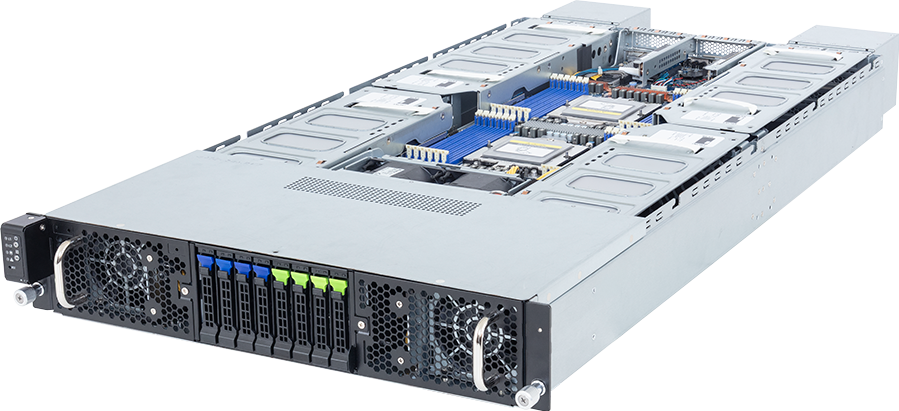
The GIGABYTE G294-Z41-AAP2 is a 2U, dual-socket AMD EPYC server built for four qualified dual-slot PCIe GPUs. That distinction matters because its riser specification can be read as either four PCIe Gen5 x16 slots or eight Gen5 x8 mechanical positions. It does not turn the Z41 into the eight dual-slot GPU model in this family. GIGABYTE's current examples for this exact SKU are four NVIDIA H200 NVL cards or four NVIDIA RTX PRO 6000 Blackwell Server Edition cards.
For buyers, the G294-Z41-AAP2 sits between a conventional one or two-GPU server and an eight-GPU HGX platform. It offers four independent PCIe accelerators, two AMD EPYC processors, 24 memory channels, eight front drive bays and two low-profile expansion slots in 2U. It is suited to inference replicas, virtual workstations, rendering, simulation and other work that can be divided across individual cards. It is not a substitute for an HGX H200 system when one job needs an eight-GPU NVSwitch domain.
Configure the GIGABYTE G294-Z41-AAP2 with the intended workload, accelerator model, host memory and network plan. The exact combination should be checked against GIGABYTE's current qualified-component list before an order is released.
G294-Z41-AAP2 specification summary
| Area | Published specification | What it means for the build | | --- | --- | --- | | Chassis | 2U, 448 x 87.5 x 962 mm including rear fans | Check usable rack depth, rear clearance and cable bend radius | | Processors | Two AMD EPYC 9005 or EPYC 9004 processors, SP5 | Use both sockets for the complete memory and PCIe design | | CPU power | Up to 240 W cTDP; up to 300 W at 30 C ambient | High-power CPUs reduce thermal margin inside a dense 2U chassis | | Memory | 24 DDR5 RDIMM slots, 12 channels per CPU | Balanced 12-DIMM-per-socket population preserves host bandwidth | | GPU expansion | Four FHFL Gen5 x16 or eight FHFL Gen5 x8 positions | The exact Z41 is qualified as a four dual-slot GPU platform | | Other expansion | Two low-profile PCIe Gen5 x16 slots from CPU 0 | Useful for cluster networking, storage or security adapters | | Front storage | Four Gen5 NVMe/SATA/SAS-4 hybrid bays plus four SATA/SAS-4 bays | Only the first four positions have a published NVMe path | | Onboard network | Two 10GbE ports and one management port | Add a faster NIC for demanding storage or multi-node GPU traffic | | Power | Two 3000 W 80 PLUS Titanium power supplies | Input voltage and one-supply operation must be checked | | Cooling | Eight 80 x 80 x 80 mm fans | Accelerator power, inlet temperature and fan policy form one design |
The barebone ordering code is 6NG294Z41DR000ACP2. Keep that exact identity on quotes and purchase orders. G294-Z42 and G294-Z43 are related systems, but they have different accelerator layouts and should not be used as evidence for what fits in the Z41.
Four dual-slot GPUs, not eight
The most common mistake with this server is to turn a PCIe slot description into an unsupported accelerator count. The board can present four full-height, full-length Gen5 x16 connections or eight Gen5 x8 mechanical positions, depending on the riser layout. The current GIGABYTE material nevertheless positions G294-Z41-AAP2 as the four dual-slot member of the family.
GIGABYTE separates the related variants as follows:
- G294-Z41-AAP2 is the four dual-slot GPU model.
- G294-Z42-AAP2 is designed for eight dual-slot GPUs behind PCIe switches.
- G294-Z43 is aimed at a higher count of single-slot accelerators.
Those suffixes are not minor regional or power-supply changes. They identify different physical GPU arrangements. A buyer who needs eight dual-slot cards should evaluate the Z42 or an HGX platform rather than assuming an alternate Z41 riser creates the same system.
The product page currently gives two qualified accelerator examples for the Z41: four H200 NVL PCIe cards and four RTX PRO 6000 Blackwell Server Edition cards. GIGABYTE also states that the system is validated with a uniform GPU model. Mixed accelerator families, unlisted board designs or a higher card count need written supplier approval.
NVIDIA H200 NVL in this server
NVIDIA H200 NVL is a PCIe accelerator with 141 GB of HBM3e per card. Four cards provide 564 GB of aggregate GPU memory across the server. Aggregate capacity should not be described as one shared 564 GB address space. Each GPU owns its local memory, and the software decides how models, tensors or independent jobs are placed.
The exact Z41 qualification has a major topology constraint: GIGABYTE specifies four individual H200 NVL GPUs with no NVLink bridge support. The NVL name does not prove that the cards are bridged in every qualified chassis. In the G294-Z41-AAP2, buyers should plan for four independent PCIe H200 NVL devices unless a later, model-specific qualification says otherwise.
This layout works well when the workload can be divided by GPU. Examples include separate inference replicas, batch jobs, independent fine-tuning tasks or services with explicit PCIe communication. It is less suitable for a large training job designed around an all-to-all NVSwitch fabric. For that workload, compare an eight-GPU HGX server and test the application at the intended model and sequence length.
GIGABYTE qualifies the four-card H200 NVL configuration at a 25 C ambient condition. That limit belongs in the deployment specification. A room designed around a warmer inlet cannot assume the same accelerator and CPU envelope. The supplier should confirm the chosen GPU power setting, processor cTDP and fan policy together.
RTX PRO 6000 Blackwell Server Edition option
The second current example is four NVIDIA RTX PRO 6000 Blackwell Server Edition GPUs. Each card provides 96 GB of ECC GDDR7 memory and supports a configurable power range. Four cards therefore provide 384 GB of aggregate graphics memory, again divided across four independent devices.
This option gives the server a broad workload profile. It can suit AI inference, fine-tuning that fits the available per-GPU memory, rendering, visualisation, media processing, simulation and remote graphics. It also suits service providers that allocate one GPU to a worker or user instead of tying the complete node to one tightly coupled job.
The distinction between Server Edition and Workstation Edition should be retained on the bill of materials. Mechanical design, thermal validation and supported deployment can differ even when the GPU family name looks similar. Use the precise NVIDIA part and the server's current support list rather than selecting a card solely by VRAM capacity.
GIGABYTE notes that physical display outputs are not available in the chassis because of mechanical constraints. This is a rack server, not a deskside workstation with four local monitors. Remote visualisation, vGPU, licensing and display protocols must be designed separately.
PCIe topology and add-in networking
Four full-bandwidth GPU positions can put substantial traffic through the host. The platform also provides two low-profile PCIe Gen5 x16 slots connected from CPU 0. Those positions are valuable for a high-speed Ethernet or InfiniBand adapter, a storage controller or another supported device, but placement should follow the data path.
For GPUDirect RDMA or storage-to-GPU traffic, ask for a PCIe topology capture from the completed server. It should show the relationship between each accelerator, the two CPU sockets and the selected network adapter. A nominal x16 slot width does not tell you whether traffic crosses the inter-socket link or shares an upstream path.
The onboard Broadcom BCM57416 controller provides two 10GbE data ports, with a separate management interface. That is enough for administration and modest application traffic. It is not an AI cluster fabric. Multi-node training, remote model loading or high-rate storage access may need 100, 200 or 400 Gb/s adapters and a matched switch design.
Network sizing should come from the job rather than the GPU label. Four independent inference services may generate mostly north-south request traffic. Distributed compute can generate much heavier east-west transfers. The final design should state adapter model, link count, optics or cables, switch ports, rail mapping and failure behaviour.
EPYC 9005 and 9004 host platform
G294-Z41-AAP2 accepts two AMD EPYC 9005 or EPYC 9004 processors in SP5 sockets. A one-CPU installation can leave memory channels and PCIe functions unavailable, so a dense GPU build should be treated as a dual-socket design unless the supplier has validated a particular exception.
Processor selection should match the host-side work:
- Data preparation, tokenisation, decompression and simulation may need a high core count.
- Inference orchestration can value clock speed and predictable latency.
- Virtualisation needs enough cores for each tenant, service or remote workstation.
- Fast networking and local storage consume CPU and memory bandwidth alongside the application.
The chassis supports processor cTDP up to 240 W under its general operating envelope. GIGABYTE permits up to 300 W at 30 C ambient. Do not treat the higher figure as unconditional socket support. Four high-power GPUs, two processors, memory, NICs, drives and eight high-speed fans all share the same thermal system.
Single-socket EPYC parts whose model designation is intended for one-socket systems should not appear as valid choices for this dual-socket build. The configurator and quote need a pair of compatible server processors from the current GIGABYTE QVL.
Memory population
The server has 24 DDR5 RDIMM slots, with 12 memory channels attached to each processor. GIGABYTE lists up to 6400 MT/s with EPYC 9005 and up to 4800 MT/s with EPYC 9004, subject to the processor generation, DIMM type, capacity and population rules.
For most GPU nodes, memory bandwidth matters as much as total capacity. Populate both sockets symmetrically and aim to use all 12 channels per CPU where the budget and target capacity allow. Building a large capacity from only a few DIMMs can leave channels idle and limit data preparation or CPU-to-GPU transfers.
Size RAM for the whole node. The operating system, containers, page cache, data workers, model staging, monitoring and any virtual machines consume host memory before the primary application starts. Large GPU memory does not remove the need for adequate system RAM.
Use matched enterprise RDIMMs from the current support list. Mixing speeds or memory organisations can lower the operating rate or create a configuration that has not been qualified. Record the module part number, quantity, rank and final speed on the quote.
Storage layout: four hybrid bays plus four SATA bays
The server has eight front 2.5-inch hot-swap bays, but they are not eight equivalent NVMe positions. GIGABYTE divides them into two physical pools:
- Four bays accept PCIe Gen5 NVMe, SATA or SAS-4 drives.
- Four additional bays accept SATA or SAS-4 drives.
NVMe and SATA paths for the hybrid group come from CPU 1. SAS operation requires a separate SAS controller. If two hybrid positions contain NVMe drives, those same two positions cannot simultaneously hold SATA or SAS disks. The configurator should enforce one shared four-bay total across the interfaces available in that group.
This arrangement supports a sensible split between a fast local tier and a capacity or boot tier. The NVMe positions can hold model cache, active data, checkpoint scratch or high-rate application storage. SATA SSDs can provide mirrored boot volumes or lower-cost local capacity. SAS may make sense where the operational standard requires it, provided the controller, cabling and slot use are included.
Do not design data protection from the visible drive count alone. Confirm which controller owns each bay, whether boot mirroring is supported in the chosen mode and how a failed drive is replaced. In a cluster, authoritative datasets and checkpoints normally belong on protected shared storage rather than one node's local disks.
Power and facility requirements
The server uses two 3000 W 80 PLUS Titanium power supplies and C19 power connections. The 3000 W figure depends on input voltage:
- 100 to 127 V AC limits each supply to 1000 W.
- 200 to 220 V AC allows up to 2600 W.
- 220 to 240 V AC allows up to 3000 W.
A dense four-GPU configuration belongs on a verified 200 to 240 V data-centre feed. Do not add the two PSU labels and call the result 6 kW of redundant capacity. If the system must continue running after one supply or feed fails, the complete configured load must remain inside the supported one-supply envelope.
Four accelerators at 600 W would account for 2.4 kW before the CPUs, memory, storage, network cards, motherboard and fans are counted. The exact GPU power limit and CPU cTDP therefore affect whether full redundancy is possible. Ask the supplier for a component-level power budget and the approved redundancy mode for the final bill of materials.
The chassis is 962 mm deep when the rear fans are included. Measure usable rail depth and leave room for C19 connectors, high-speed network cables and rear service access. Rack planner entries should use the complete configured power estimate, not only accelerator TDP or the maximum PSU nameplate.
Workloads that fit the Z41
The G294-Z41-AAP2 is a strong candidate for:
- Four independent AI inference workers with substantial per-GPU memory.
- Fine-tuning or development jobs that fit one GPU or use an application-tested PCIe topology.
- Rendering and visualisation farms using qualified RTX PRO cards.
- Remote workstation services where each user or pool receives a defined accelerator share.
- Simulation, media and batch compute that can schedule work per GPU.
- Compact clusters that need four accelerators per 2U node and an add-in network fabric.
It is a poor choice when:
- One job requires eight GPUs connected through NVSwitch.
- The purchase assumes H200 NVL cards have an NVLink bridge in this exact server.
- Eight dual-slot GPUs are required; that is the related Z42 design, not the Z41.
- The rack cannot provide the required depth, inlet temperature or high-voltage feed.
- More than four local NVMe drives are required without a separate storage design.
- The accelerator model is absent from the current qualification list.
For a wider range of add-in accelerator systems, browse the PCIe GPU server catalogue. Where an application depends on eight-way scale-up communication, compare the HGX server range.
Configuration checklist
Before approving a G294-Z41-AAP2 build, record:
1. The exact accelerator part number, quantity and power setting. 2. Confirmation that the card appears on the current Z41 qualification list. 3. Whether the software uses independent GPUs or cross-GPU PCIe communication. 4. Both EPYC processor models and their cTDP settings. 5. A symmetric 24-channel memory population plan. 6. The split between four hybrid bays and four SATA/SAS-only bays. 7. Any SAS, RAID or HBA card and the expansion slot it consumes. 8. The network adapter, slot, firmware, link speed, optics and switch ports. 9. Input voltage, C19 cabling, PDU capacity and one-feed failure behaviour. 10. Rack depth, inlet temperature, airflow direction and service clearance. 11. Operating system, accelerator driver, CUDA version and application test plan.
Acceptance testing should exercise the intended GPU count and power profile, network path, storage traffic and sustained workload. A successful barebone POST does not establish application stability or rack-level power behaviour.
FAQ
How many GPUs does the G294-Z41-AAP2 support?
GIGABYTE positions this exact variant for four dual-slot GPUs. Its current examples are four NVIDIA H200 NVL cards or four NVIDIA RTX PRO 6000 Blackwell Server Edition cards. The related G294-Z42-AAP2 is the eight dual-slot GPU model.
Does H200 NVL use NVLink in this server?
No NVLink bridge is supported in the current four-card H200 NVL qualification for G294-Z41-AAP2. Plan for four independent PCIe GPUs. This is different from both bridged H200 NVL layouts in some other servers and the NVSwitch fabric in HGX H200.
Can the eight front bays all take NVMe drives?
No. Four front bays support Gen5 NVMe, SATA or SAS-4. The other four support SATA or SAS-4. SAS requires an add-in controller. The configuration must respect the four-bay shared limit for the hybrid group.
Can it run with one processor?
The server can have functions disabled when only one CPU is installed because memory and PCIe resources are split between sockets. A four-GPU production build should normally use two matched processors unless a supplier-approved one-socket configuration meets the exact requirements.
Is this an HGX server?
No. It is a PCIe GPU server. HGX uses SXM accelerators and NVSwitch for a tightly connected scale-up domain. Choose between them from the application's communication pattern rather than the GPU generation alone.
Is 120 V power suitable for a four-GPU build?
The supplies accept 100 to 127 V, but GIGABYTE limits output to 1000 W per supply at that input. That is not a practical basis for the dense configurations discussed here. Confirm 200 to 240 V feeds, C19 connections and redundancy with the supplier.
What networking is included?
The motherboard provides two 10GbE ports and a dedicated management port. Faster cluster or storage networking can use the low-profile Gen5 x16 expansion positions, subject to support, airflow and PCIe topology checks.
Verdict
The GIGABYTE G294-Z41-AAP2 is a compact four-GPU platform for buyers who want high-memory PCIe accelerators without moving to a fixed HGX baseboard. Its dual EPYC host, 24 DIMM slots, mixed front storage and two low-profile expansion slots give it enough supporting capacity for serious inference, visual computing and parallel application work.
Its limits are equally clear. The Z41 is not the eight dual-slot Z42, H200 NVL runs as four independent GPUs in the current qualification, only four front bays support NVMe and the 2U thermal envelope depends on inlet temperature. A good purchase starts with those constraints and validates the application, power feed and PCIe topology around them.
Open the G294-Z41-AAP2 configurator and submit the intended workload for GPU, CPU, memory, storage, network and facility review.
Technical sources
- GIGABYTE G294-Z41-AAP2 product page
- GIGABYTE G294-Z41-AAP2 qualified-component list
- GIGABYTE G294-Z41-AAP2 datasheet
- GIGABYTE G294-Z41-AAP2 system manual
- NVIDIA H200 product specifications
- NVIDIA RTX PRO 6000 Blackwell Server Edition
Specifications and qualified components can change. Confirm the current GIGABYTE support list and supplier-approved bill of materials before ordering.