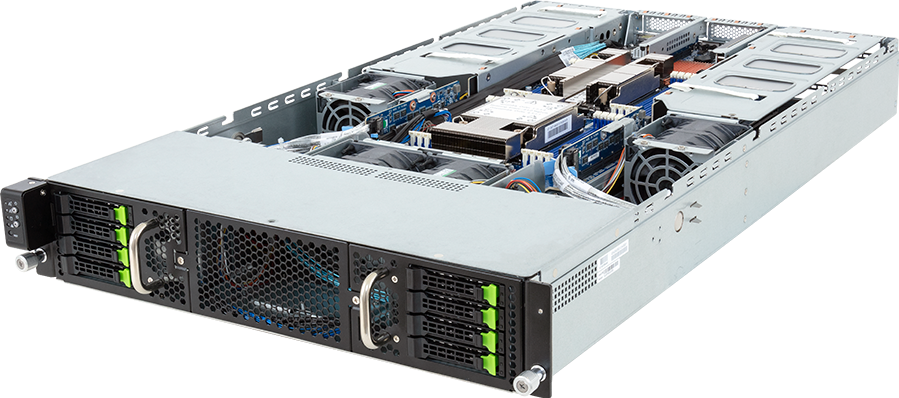
Four dual-slot GPUs in 2U sounds simple until the power, airflow and PCIe diagram are examined. The GIGABYTE G293-S46-AAM1 puts all four accelerator slots behind CPU 0, limits card dimensions, requires one uniform GPU model and provides a 2.2 kW redundant power system whose full output depends on the site voltage. Those details decide whether a proposed build is sensible.
The server remains a useful platform. It can concentrate four independent inference, rendering or scientific jobs into 2U, and it can run multi-GPU software whose communication pattern works over PCIe. It is not an HGX substitute, and a configurator showing four quantity positions does not mean every modern 600 W card can be installed four at a time.
This review uses GIGABYTE, Intel and NVIDIA specifications. It does not claim that GPUMachines has benchmarked every component combination. The exact GPU part number, thermal design, power cable, firmware and GIGABYTE qualification status need approval before a bill of materials is released.
Platform overview
The G293-S46-AAM1 is a 2U, dual-socket server for fourth- and fifth-generation Intel Xeon Scalable processors, with support for Intel Xeon CPU Max Series parts. GIGABYTE specifies CPUs up to 350 W, sixteen DDR5 DIMM slots, eight front 2.5-inch hot-swap bays and four full-height, full-length PCIe Gen5 x16 GPU positions.
Two low-profile PCIe Gen5 x16 slots remain for network or storage adapters. The server includes two 10 GbE ports through a Broadcom BCM57416 controller plus a separate management port. Four 80 mm fan modules pull air through the accelerator zone, and redundant 2,200 W Titanium power supplies feed the system.
The chassis measures 448 mm wide, 87.5 mm high and 800 mm deep. GIGABYTE publishes a maximum GPU envelope of 285 x 111.5 x 39.5 mm and states that the system is validated with a uniform GPU model. Buyers should treat both as hard design inputs.
The PCIe topology matters more than the slot count
All four GPU x16 slots originate from CPU 0 according to GIGABYTE's published slot map. That arrangement keeps the accelerators on one PCIe root complex, which can be useful for peer-to-peer traffic and avoids splitting a four-GPU job across two CPU sockets. It also creates an asymmetric host.
Memory allocated on CPU 1 may have to cross the socket interconnect before reaching a GPU. A process scheduled on CPU 1 can do the same. The effect depends on software, data movement and the processor pair, but it must be measured rather than ignored.
Pin GPU-feeding threads and their memory to CPU 0 during initial testing. Then compare that result with the intended production scheduler policy. If CPU 0 saturates while CPU 1 remains underused, the application may need different process placement, preprocessing distribution or a platform whose accelerator lanes are divided differently.
The topology does not create NVLink or NVSwitch. Four PCIe devices can still run distributed training or inference, but collective operations travel through the supported PCIe and network paths. A workload dominated by all-to-all GPU communication should be tested against an HGX system before a purchase decision.
GPU compatibility is a mechanical and electrical decision
The published 39.5 mm card-height limit is unusually precise. A nominally dual-slot GPU can exceed it through a shroud, connector or manufacturing variation. Card length, auxiliary power connector position and passive airflow direction matter as well. Confirm the complete manufacturer part number, not only the GPU family.
GIGABYTE also requires a uniform GPU model in the validated four-card arrangement. Mixing cards can produce uneven thermals, driver behaviour and scheduling results even when each card boots on its own. If a deployment needs two graphics cards and two compute cards, this is not the platform to assume will support that plan.
Current high-end PCIe GPUs span a wide power range. NVIDIA's RTX PRO 6000 Blackwell Server Edition carries 96 GB of GDDR7 and is specified at up to 600 W, for example. Four such devices alone would represent 2.4 kW before either CPU, memory, NVMe, NICs, fans or motherboard losses are counted. That exceeds the rating of one 2.2 kW PSU, so a fully redundant four-card configuration cannot be inferred from slot count. A lower-power GPU or a different chassis may be required.
The right process is to start with the exact card's maximum board power and thermal form, add both CPU limits and the rest of the platform, then check the manufacturer's supported configuration. Do not size from average application power. A transient, cold start or stress condition still has to remain inside the electrical and thermal envelope.
Power feeds can invalidate an otherwise sound build
GIGABYTE rates each installed PSU at up to 2,200 W on a 200 to 240 V AC input. The product specification limits output to 1,000 W on a 100 to 127 V feed. A server ordered for four accelerators therefore needs its rack power confirmed before it leaves the design stage.
Redundant supplies do not add their labels together when the design must survive one failed feed. A 1+1 configuration should remain within the supported output of one PSU during the agreed failure case. If the site intends to run both supplies as a non-redundant combined source, that needs explicit engineering approval and a clear availability consequence.
Use C19 power cords, appropriate PDUs and separate A/B feeds where resilience is required. Measure the finished configuration at idle, sustained application load and a stress condition. The rack plan should use the observed maximum plus the operator's safety margin, not the lowest number shown on a software dashboard.
CPU and memory choices
The platform supports dual fourth- or fifth-generation Intel Xeon Scalable processors and Xeon CPU Max Series parts. Fifth-generation Xeon raises supported DDR5 speed to 5,600 MT/s on this server, while fourth-generation and CPU Max configurations run at their published limits. Xeon CPU Max adds 64 GB of on-package HBM2e per processor for memory-bandwidth-sensitive HPC work, but it is a specialist choice rather than a general GPU-host upgrade.
Sixteen DIMM slots mean eight memory channels per socket with one slot per channel. Populate both CPUs symmetrically unless a measured application and supported platform rule justify another layout. A four-GPU node can need substantial host RAM for model staging, data loaders, CPU preprocessing, virtual machines or page cache, yet buying capacity without feeding each channel wastes part of the platform.
CPU selection should follow the host workload. Rendering and independent inference workers may need enough cores to keep four queues supplied. Scientific codes can care more about frequency, vector performance or HBM. If the application mostly launches long GPU kernels and performs little host work, two top-bin processors may spend power without improving throughput.
There is another practical limit: the G293-S46-AAM1 belongs to the LGA4677 Xeon Scalable platform. CPU options must come from the GIGABYTE support list for this board and revision. A processor sharing the same physical socket format or a similar name is not automatically supported.
Eight hybrid drive bays
The front backplane provides eight 2.5-inch positions that GIGABYTE describes as PCIe Gen5 NVMe, SATA or SAS. SAS requires a suitable add-in controller. SATA RAID and Intel VROC options depend on the selected devices, keys, operating system and desired RAID level.
Hybrid does not mean that the server contains twenty-four physical bays. It means each of eight positions can be populated with a supported protocol. A layout of four NVMe drives and four SAS drives consumes all eight slots. This distinction needs to survive from the product record into the configurator and quotation.
For GPU workloads, use the bays deliberately. Two mirrored devices can hold the operating system and service state, while the rest provide model staging, scratch or local datasets. If the workload reads from a shared filesystem and writes little locally, filling every bay may add cost and heat without a result.
Test storage and GPUs together. Four busy accelerators can expose an I/O bottleneck that a standalone drive benchmark hides, while an array rebuild can disturb tail latency even when headline throughput looks acceptable.
Network design beyond the onboard 10 GbE ports
The two onboard 10 GbE interfaces suit management, service traffic or modest data movement. They are not a default training fabric for four high-end GPUs. One low-profile Gen5 x16 slot connects to CPU 0 and the other to CPU 1, so NIC placement can be matched to the traffic path.
A single fast NIC may serve a node running independent local jobs. Distributed training, remote storage or tightly timed inference can need more bandwidth, separate network planes or two adapters. The selected NIC still has to fit the low-profile slot, receive adequate airflow and appear on the platform support list.
Map traffic before picking a number. Model distribution, checkpoint writes, dataset reads, client requests, east-west collectives, management and replication do not peak at the same time, but they can collide. A fabric acceptance test should include the storage and application traffic that will share it.
Workloads that suit the G293-S46-AAM1
Independent inference replicas
Four identical GPUs can run separate model replicas or tenant queues. This reduces the need for high-bandwidth GPU-to-GPU communication and uses the chassis density well. Confirm that one GPU has enough memory for the selected model, context and concurrency target.
Rendering and visual computing
Batch render jobs often divide cleanly across GPUs. The platform's four-card density can work well if the exact graphics cards fit the passive cooling and physical envelope. Remote graphics or virtual GPU deployments also require the correct NVIDIA licensing and validated GPU.
Scientific and engineering workloads
Applications that place independent domains or parameter sweeps on each accelerator can tolerate PCIe better than tightly coupled training. Xeon CPU Max can be interesting where a CPU-side phase is constrained by memory bandwidth, but the application must be profiled to justify it.
Mixed CPU and accelerator pipelines
Two sockets provide cores for preprocessing, simulation control or data transformation. The CPU 0 attachment of all GPUs makes placement discipline important, especially when CPU 1 also hosts a fast NIC or storage controller.
Workloads that need another platform
Large-model training that constantly exchanges data among four GPUs deserves an HGX comparison. NVSwitch changes the scale-up communication path; adding more CPU cores cannot reproduce it.
The server is also a poor match for four current 600 W accelerators if the intended configuration cannot remain inside one 2.2 kW PSU for redundancy. A larger 4U or 5U PCIe platform can provide more power and cooling headroom.
Do not use the G293-S46-AAM1 when eight drive bays are insufficient or when 16 DIMM slots restrict the required host-memory capacity. Its strength is dense accelerator placement, not maximum expansion in every subsystem.
Configuration profiles worth testing
Four independent inference workers
Choose four identical, validated GPUs whose power and dimensions fit the chassis. Size both CPUs for preprocessing and service overhead, populate all memory channels, use mirrored boot storage plus a local model cache and add a network adapter based on measured request and model-distribution traffic.
Four-GPU rendering node
Prioritise GPU certification for the rendering stack, enough RAM for the largest scene and fast local scratch. Validate sustained thermals with all cards busy; rendering can hold a stable high load long enough to expose cooling limits.
PCIe multi-GPU development server
Use this profile only after confirming that the framework and model run acceptably over the actual PCIe topology. Record collective bandwidth, scaling efficiency from one to four GPUs and CPU-affinity settings. If scaling flattens early, the extra GPUs are not creating useful capacity.
The G293-S46-AAM1 configurator is a starting point for component selection, not a substitute for the GIGABYTE qualification matrix. Compare it with the wider PCIe GPU server range when card power, memory capacity or expansion pushes beyond this 2U envelope.
Acceptance testing
Begin with firmware, BIOS, BMC and GPU firmware at the approved revisions. Confirm that every card negotiates PCIe Gen5 x16 where expected, the operating system reports the intended NUMA nodes and the NIC or storage controllers occupy the planned slots.
Run one-GPU and four-GPU versions of the real workload. Capture throughput, latency, GPU memory, PCIe traffic, CPU 0 and CPU 1 utilisation, host-memory allocation, network load, drive latency, fan speed and wall power. The comparison shows whether the fourth card adds useful work or only contention.
Test the agreed failure conditions. Remove one power feed, interrupt one fabric path and rebuild a failed drive while the service runs. If the design cannot maintain its target under those conditions, the quotation and service-level expectation should say so.
Final assessment
The G293-S46-AAM1 earns its place as a dense four-GPU PCIe server, particularly for workloads that divide cleanly by card. Its useful specification is not "four GPUs in 2U" on its own. The useful specification is four identical, mechanically compatible and power-valid GPUs attached to CPU 0, with enough host memory, storage and network bandwidth to keep them occupied.
That level of qualification may remove some attractive-looking GPU combinations. Good. Discovering an invalid power or card-fit assumption before purchase is cheaper than finding it during installation.
Configure the GIGABYTE G293-S46-AAM1, then ask GPUMachines to check the exact GPU part number, system power budget, input voltage, riser layout, firmware and current manufacturer support list before quotation.
Sources
- GIGABYTE G293-S46-AAM1 product page
- GIGABYTE G293-S46-AAM1 datasheet
- Intel fifth-generation Xeon processor overview
- Intel Xeon CPU Max Series
- NVIDIA RTX PRO 6000 Blackwell Server Edition
Sources checked 22 September 2026. Component support can change with server revision, firmware and vendor qualification; confirm the exact configuration before purchase.