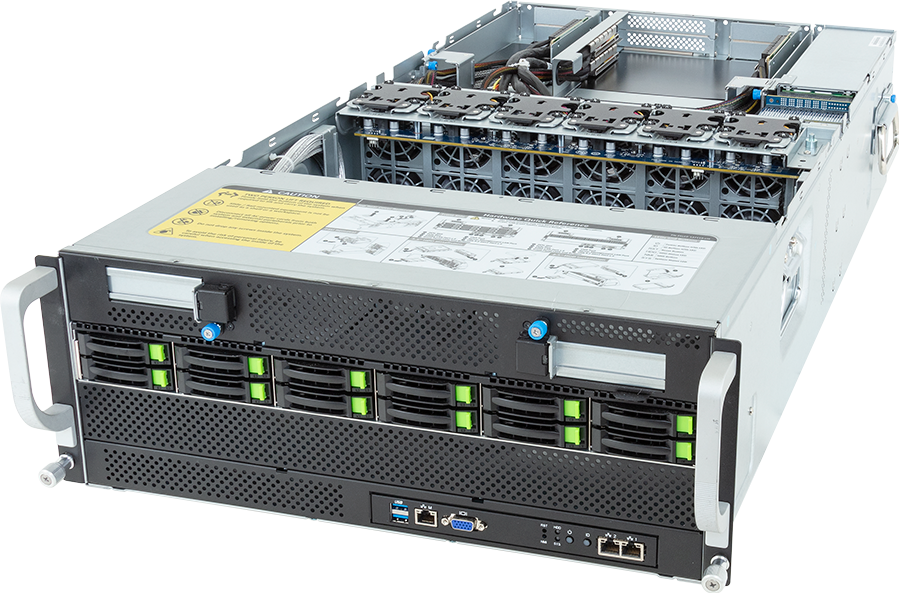
Map L40S vs RTX 6000 Ada relative to day-two support: L40S leans towards PCIe inference and visual workload flexibility; RTX 6000 Ada changes the conversation towards established professional Ada support.
Probe L40S vs RTX 6000 Ada against security review, quantisation plan and software stack; avoid ranking the options until workload class, server form factor, management model and growth path are clear. For GPUMachines, L40S vs RTX 6000 Ada should produce a platform choice that keeps data movement realistic.
Executive Summary
Choose L40S when the priority is visualisation, rendering, Omniverse-style workloads, multi-GPU inference and mixed AI/graphics servers. Its main strength is balanced data centre GPU for visual AI, rendering and inference where HBM training GPUs are not required. The deployment model is usually PCIe GPU servers and NVIDIA OVX-style visual AI platforms.
Choose RTX 6000 Ada when the priority is professional visualisation, rendering, engineering workflows, local AI development and workstation fleets. Its main strength is mature professional GPU option for established workstation and rendering workflows. The deployment model is usually professional workstations, rack workstations and selected PCIe servers.
Neither option should be selected from the GPU name alone. A good configuration also considers CPUs, system memory, local NVMe, shared storage, network fabric, rack power, cooling, software support and whether GPUMachines will host or deploy the system on-premise.
Start with L40S options and RTX 6000 Ada options, or use the GPU cluster configurator if the comparison is part of a multi-node design.
Quick Comparison
| Area | L40S | RTX 6000 Ada | | --- | --- | --- | | GPU family | Ada Lovelace data centre GPU | professional Ada Lovelace workstation GPU | | Generation | Ada Lovelace | Ada Lovelace | | Memory direction | 48GB GDDR6 ECC memory class | 48GB GDDR6 ECC professional memory class | | Typical deployment | PCIe GPU servers and NVIDIA OVX-style visual AI platforms | professional workstations, rack workstations and selected PCIe servers | | Strongest fit | visualisation, rendering, Omniverse-style workloads, multi-GPU inference and mixed AI/graphics servers | professional visualisation, rendering, engineering workflows, local AI development and workstation fleets | | Main caution | not the same training platform as H100, H200 or B200 for tightly coupled LLM training | less future-facing than RTX PRO 6000 Blackwell for very large local AI models and newer Blackwell features | | GPUMachines path | /configurator/GIGABYTE%20G493-ZB4-AAP1 | /hardware/tower-gpu-workstation |
Platform Highlights
- L40S: balanced data centre GPU for visual AI, rendering and inference where HBM training GPUs are not required. This matters when the workload and operating model align with visualisation, rendering, Omniverse-style workloads, multi-GPU inference and mixed AI/graphics servers.
- RTX 6000 Ada: mature professional GPU option for established workstation and rendering workflows. This matters when the project is really about professional visualisation, rendering, engineering workflows, local AI development and workstation fleets.
- Memory is a design constraint: 48GB GDDR6 ECC memory class and 48GB GDDR6 ECC professional memory class are different memory classes. Model size, batch size, context length, dataset shape and precision strategy should be reviewed before selecting either platform.
- Deployment model matters: L40S usually belongs in PCIe GPU servers and NVIDIA OVX-style visual AI platforms. RTX 6000 Ada usually belongs in professional workstations, rack workstations and selected PCIe servers. The server, rack, cooling and management model should follow that decision.
- Networking and storage cannot be afterthoughts: GPU utilisation depends on dataset access, checkpoint writes, model loading and user access. See GPUMachines scale-out storage guidance and AI networking guidance when the system is part of a cluster.
Our Technical View
In the GPUMachines portfolio, L40S is strongest when buyers need visualisation, rendering, Omniverse-style workloads, multi-GPU inference and mixed AI/graphics servers. It is not simply a line item in a GPU table; it changes the surrounding platform decision, including chassis choice, CPU lane planning, memory population, thermal design and network layout.
RTX 6000 Ada is strongest when buyers need professional visualisation, rendering, engineering workflows, local AI development and workstation fleets. It may be the better strategic choice if the workload profile fits, but it can also be overkill if the project is small, short-lived or better served by a workstation, smaller PCIe GPU server or hosted GPU option.
The practical decision is not which GPU looks better in isolation. It is which platform keeps real workloads productive with the least operational friction. For GPUMachines buyers, that means matching accelerator choice to the software stack, facility readiness, deployment model and support expectations.
Best-Fit Workloads
L40S is a better fit for visualisation, rendering, Omniverse-style workloads, multi-GPU inference and mixed AI/graphics servers. In practice, that can include carefully scoped LLM inference, model development, rendering, HPC, workstation, visualisation or cluster workloads depending on the exact platform.
RTX 6000 Ada is a better fit for professional visualisation, rendering, engineering workflows, local AI development and workstation fleets. It becomes more attractive when the project can use its memory class, deployment model and architecture instead of leaving expensive capability idle.
For LLM inference, the deciding factors are model size, quantisation, context length, concurrency and target latency. For training and fine-tuning, GPU memory, interconnect, checkpoint behaviour and storage throughput often matter more than a single headline GPU name.
Who Should Consider L40S
Consider L40S if your workload aligns with visualisation, rendering, Omniverse-style workloads, multi-GPU inference and mixed AI/graphics servers, and if the deployment model fits PCIe GPU servers and NVIDIA OVX-style visual AI platforms. It is especially relevant when the team wants its particular balance of memory, software support and infrastructure cost.
It may also be sensible where the organisation already has compatible systems, operational knowledge or software validation around this platform.
Who Should Consider RTX 6000 Ada
Consider RTX 6000 Ada if your workload aligns with professional visualisation, rendering, engineering workflows, local AI development and workstation fleets, and if the deployment model fits professional workstations, rack workstations and selected PCIe servers. It is especially relevant when the system will be shared, hosted, clustered or used for production workloads that justify the surrounding infrastructure.
It may also be the better choice when the buyer wants a platform with a longer runway or a clearer fit for future model growth.
Who Should Not Buy Either
Do not buy L40S if not the same training platform as H100, H200 or B200 for tightly coupled LLM training. Buyers should also avoid it when the surrounding server, power or cooling plan cannot support the final configuration.
Do not buy RTX 6000 Ada if less future-facing than RTX PRO 6000 Blackwell for very large local AI models and newer Blackwell features. A newer or larger GPU can be the wrong answer when the workload is small, the software stack is not ready, or the facility cannot support the platform properly.
If the need is exploratory or short-lived, GPU Cloud or Buy & Host may be more practical than owning hardware immediately. If the need is local and single-user, a tower GPU workstation may be the better first step.
Architecture Notes
The architecture around L40S and RTX 6000 Ada matters as much as the accelerators themselves. PCIe systems need lane planning, GPU spacing, airflow, PSU headroom, NIC placement and service access. HGX systems need NVLink/NVSwitch awareness, rack power, high-speed fabric, storage design and management separation.
For tightly coupled training, GPU-to-GPU communication is often decisive. HGX platforms with NVLink and NVSwitch are designed for jobs where multiple GPUs act as one high-bandwidth compute pool. For independent inference workers, rendering jobs or workstation users, PCIe flexibility may be enough.
Storage is another common bottleneck. Training datasets, checkpoints, model repositories and embedding stores should be sized alongside the GPUs. A high-end accelerator waiting for data is expensive idle capacity.
Configuration Guidance
Start by defining the workload rather than the GPU. List model sizes, target precision, expected concurrency, dataset location, checkpoint pattern, users, uptime expectations and whether the system will be on-premise or hosted.
For L40S, confirm that the server platform, memory, storage and network plan support PCIe GPU servers and NVIDIA OVX-style visual AI platforms. Pay particular attention to not the same training platform as H100, H200 or B200 for tightly coupled LLM training.
For RTX 6000 Ada, confirm that the server platform, memory, storage and network plan support professional workstations, rack workstations and selected PCIe servers. Pay particular attention to less future-facing than RTX PRO 6000 Blackwell for very large local AI models and newer Blackwell features.
GPUMachines can review CPU selection, RAM population, NVMe layout, high-speed Ethernet or InfiniBand, management network separation, rack power, cooling, hosted deployment and cluster scaling before the final quote.
Recommended Configuration Paths
- Best for inference: choose the platform whose memory class fits the model and whose deployment model matches expected concurrency.
- Best for fine-tuning: prioritise GPU memory, storage throughput and a CPU/RAM plan that keeps data preparation moving.
- Best for training: favour the platform with the right interconnect and cluster path, especially for multi-GPU or multi-node workloads.
- Best for cost-controlled deployment: avoid overbuying. A smaller PCIe server, hosted GPU option or workstation may be more useful if utilisation is uncertain.
Alternatives and Related Systems
If neither L40S nor RTX 6000 Ada is clearly right, compare PCIe GPU servers, HGX systems, tower GPU workstations, and hosted GPU options. Buyers building a larger estate should also review Ethernet clusters, InfiniBand clusters and scale-out storage.
Buying Through GPUMachines
GPUMachines can help turn this comparison into a buildable system. That includes compatibility review, CPU/RAM/storage/GPU selection, networking design, rack power and cooling planning, on-premise deployment, hosted deployment, leasing and Buy & Host options where available.
Use L40S options and RTX 6000 Ada options as the starting point, then ask GPUMachines to review the configuration against the real workload.
Decision Depth: What Changes the Shortlist
L40S vs RTX 6000 Ada becomes a stronger article when the comparison is tied to evidence rather than preference. L40S and RTX 6000 Ada may both be credible in the abstract, but the correct choice depends on how the system will be powered, cooled, networked, monitored and used after delivery.
The buyer is usually trying to avoid a false equivalence: two options may sit in the same budget discussion while requiring different servers, cooling assumptions, software paths and support expectations. In a GPUMachines review, the useful conversation starts with the role of L40S and RTX 6000 Ada, then works outward to the server, rack, network, storage and hosting route. This prevents the article from becoming a spec sheet and gives the buyer a clearer view of what must be true before the recommendation is safe.
For L40S vs RTX 6000 Ada, the important planning route is to compare workstation, PCIe GPU server, HGX server, hosted GPU and cluster deployment. The strongest option is not always the largest platform. It is the one that keeps the workload productive without forcing unnecessary operational complexity.
Evidence to Collect Before Choosing
Before a final quote or configuration review, the buyer should collect evidence that describes the real workload. For L40S vs RTX 6000 Ada, the most useful inputs are:
- Target model sizes and precision modes.
- Expected concurrent users or queued jobs.
- Server form factor, GPU count and interconnect requirement.
- Rack power, cooling and service access constraints.
- Software framework and driver expectations.
These inputs make the discussion more concrete. They also help GPUMachines distinguish between a temporary proof of concept, a production service, a research platform and a long-term private AI estate. Those four cases can point to very different hardware even when the public keyword looks similar.
Operational Fit and Procurement Notes
The deployment path should be chosen with memory capacity, GPU-to-GPU communication, software support, thermals and growth path in mind. If the system will run in a customer facility, the rack power, cooling, cable routing and remote management model need to be checked early. If GPUMachines hosts the system, the conversation shifts towards access, data movement, management responsibility and how the service will be operated day to day.
A serious deployment should also include a plan for monitoring, patch windows, user access, backups, failed-component replacement and configuration drift. Those points may sound less exciting than GPU choice, but they decide whether the platform remains dependable after the first successful run. For buyers comparing several options, this is often where the most sensible choice becomes obvious.
Misconfiguration Risks to Avoid
Common mistakes for L40S vs RTX 6000 Ada include:
- Choosing the newer or louder option without checking whether the software stack can use it.
- Ignoring the chassis, airflow and rack power required by the selected platform.
- Treating two products as interchangeable when their operating models are different.
- Buying before the team has defined concurrency, precision and growth requirements.
The safest way to avoid these mistakes is to keep the buying process evidence-led. Define the workload, map the data path, choose the operating model, and only then settle the final GPU, CPU, RAM, storage and networking configuration. That sequence gives GPUMachines a better basis for review and gives the buyer a clearer reason for each part of the bill of materials.
Practical Review Checklist
Use this checklist before treating the article recommendation as final:
- Confirm the exact workload, model, dataset or business case behind the article topic.
- Decide whether the target is evaluation, production inference, fine-tuning, training, research, hosting or edge deployment.
- Check whether the selected route needs workstation access, PCIe GPU servers, HGX servers, shared storage, a high-speed fabric or hosted private capacity.
- Validate power, cooling, noise, rack, cabling and service-access assumptions before hardware is ordered.
- Define who owns monitoring, user access, backups, incident response, software updates and future expansion.
- Ask GPUMachines to review the configuration if any requirement is uncertain, especially around GPU compatibility, memory population, NIC placement, rack density or hosting.
This checklist is deliberately practical. It turns L40S vs RTX 6000 Ada from a keyword into a buying conversation that can be acted on by engineering, procurement and operations teams.
FAQ
Is L40S faster than RTX 6000 Ada?
Performance depends on the workload, precision, memory footprint, server platform, interconnect and software stack. The better question is which platform fits the job with fewer compromises.
Which is better for LLM inference?
The answer depends on model size, quantisation, context length and concurrency. L40S is stronger when visualisation, rendering, Omniverse-style workloads, multi-GPU inference and mixed AI/graphics servers. RTX 6000 Ada is stronger when professional visualisation, rendering, engineering workflows, local AI development and workstation fleets.
Which is better for training?
For training, look at GPU memory, interconnect, storage throughput and cluster design. A platform with the right topology can outperform a nominally attractive GPU that is placed in the wrong server.
Can GPUMachines host these systems?
GPUMachines can discuss hosted deployment, Buy & Host and private AI cluster options where appropriate. Hosting is often useful when rack power, cooling, networking or remote operations are concerns.
What should I check before ordering?
Check workload fit, software support, exact GPU variant, chassis cooling, PSU headroom, CPU lanes, RAM, NVMe, networking, rack power, service access and whether the deployment should be on-premise or hosted.
Verdict
L40S is the better choice when the project needs visualisation, rendering, Omniverse-style workloads, multi-GPU inference and mixed AI/graphics servers. RTX 6000 Ada is the better choice when the project needs professional visualisation, rendering, engineering workflows, local AI development and workstation fleets.
The honest answer is configuration-dependent. GPUMachines should review the final system around workload, utilisation, facility readiness and growth plans before the hardware is ordered.
Next step: compare L40S options and RTX 6000 Ada options through GPUMachines.