Model memory should eliminate unsuitable workstations before CPU brands, case styling or headline TOPS enter the conversation. A system that cannot hold the model and its working state is wrong; a system that holds it but spends all day moving data may be wrong too.
For 2026, the useful workstation shortlist has split into three architectures. Compact NVIDIA GB10 systems provide 128 GB of coherent memory in a very small device. Conventional x86 towers use one to four NVIDIA RTX PRO Blackwell cards and offer the widest choice of CPUs, drives and software. Deskside GB300 platforms provide 748 GB of coherent CPU-GPU memory for much larger local work, at server-like size, power and cost.
There is no universal winner. This guide maps those architectures to real workloads and current GPUMachines products. GPUMachines sells the systems discussed, and the analysis uses manufacturer specifications rather than claimed in-house benchmarks.
Browse the current tower GPU workstation range for live models. First, work out which memory and operating model your project needs.
Short answer
Choose a single-GPU RTX PRO tower for the broadest mix of AI development, engineering, visual computing and Windows or Linux software. NVIDIA's RTX PRO 6000 Blackwell Workstation Edition has 96 GB of ECC GDDR7 and a 600 W maximum board power, giving one developer a large local GPU without distributed software.
Choose a multi-GPU tower when the application can split work across separate PCIe GPUs or several users need independent devices. Four 96 GB cards provide 384 GB in aggregate, but applications do not automatically see one 384 GB memory pool. The software and topology decide whether that capacity helps.
Choose GB10 when 128 GB of coherent memory, low desk-side power and an Arm-based NVIDIA software environment matter more than component upgrades. Choose GB300 deskside systems when the job needs hundreds of gigabytes of coherent memory and the organisation accepts 1.6 kW-class power, liquid cooling and enterprise-style procurement.
Move to a rack server when several people need shared production capacity, redundant power, serviceable storage, formal scheduling or 24-hour operations. Calling a tower a “server” does not add those properties.
Start with a model-memory worksheet
Raw model weights provide a useful first estimate:
parameter count x bits per parameter / 8 = bytes of model weights
That arithmetic gives the following lower bounds before runtime overhead:
| Model size and representation | Raw weight storage | | --- | ---: | | 7 billion parameters at 16-bit | 14 GB | | 32 billion parameters at 16-bit | 64 GB | | 70 billion parameters at 16-bit | 140 GB | | 70 billion parameters at 8-bit | 70 GB | | 70 billion parameters at 4-bit | 35 GB | | 200 billion parameters at 4-bit | 100 GB |
Actual memory use is higher. Inference needs runtime buffers and key-value cache, which grows with context length, batch size, concurrent sequences, layer shape and precision. Fine-tuning adds activations and optimiser state; full-parameter training can require several times the weight storage. Parameter-efficient methods such as LoRA reduce the requirement but don't make memory planning optional.
Write down the exact model, quantisation, maximum context, expected concurrent users and fine-tuning method. Add a margin for the framework and test with the intended software where possible. “Runs a 70B model” means little without those details.
Memory bandwidth matters after capacity. A GB10 device may hold a model that exceeds a 96 GB graphics card, while the RTX PRO card can have much higher local GPU-memory bandwidth. One system wins the fit test; the other may win throughput when both can hold the workload.
Architecture 1: compact GB10 systems
NVIDIA GB10 Grace Blackwell combines a 20-core Arm CPU, integrated Blackwell GPU and 128 GB of coherent LPDDR5x memory. ASUS lists up to 273 GB/s memory bandwidth for Ascent GX10 and a 240 W power supply. The unit measures 150 x 150 x 51 mm and weighs 1.48 kg.
That architecture fits local LLM inference, agent development, retrieval pipelines, model evaluation and selected parameter-efficient fine-tuning. It gives a developer more coherent memory than ordinary desktop graphics cards while consuming far less power than a large tower.
The limits are structural. Memory and GPU cannot be upgraded. ASUS supplies one M.2 2242 NVMe drive and says opening the chassis to replace it may void the warranty. The platform runs NVIDIA's Arm software environment, so x86-only binaries and Windows applications need checking. The 200 Gb/s ConnectX-7 interface is useful for paired systems or fast storage, but it does not turn two boxes into one flat memory pool.
Use the ASUS Ascent GX10 configurator for a compact NVIDIA development appliance. Read the detailed ASUS Ascent GX10 technical review before choosing its factory SSD or assuming an existing software stack will run unchanged.
Best fit:
- one developer or a small lab
- local and private model work
- a model whose memory footprint exceeds common 24 GB or 48 GB cards
- Linux and Arm-compatible containers
- normal office or lab power, with an agreed backup and network-storage path
Avoid it for replaceable GPUs, several internal drives, hardware RAID, certified Windows applications or a multi-user production service.
Architecture 2: one RTX PRO GPU in an x86 tower
A conventional workstation remains the safest general recommendation. It runs familiar x86 operating systems, accepts ECC system memory, offers several NVMe drives and PCIe slots, and can combine AI work with CAD, rendering, simulation or video tools.
NVIDIA's current RTX PRO Blackwell desktop range spans 16 GB to 96 GB of GDDR7 memory. The RTX PRO 6000 Blackwell Workstation Edition provides 96 GB with ECC, a PCIe 5.0 x16 interface, four DisplayPort outputs and a 600 W maximum board power. The 300 W Max-Q edition also has 96 GB and suits denser multi-GPU systems where qualified.
One large GPU avoids distributed model code and gives applications the simplest memory topology. It is usually the right first quote when a single 96 GB GPU holds the intended model and the user needs a broad workstation software stack.
CPU choice should follow data preparation, compilation, simulation and PCIe needs. A high core count does not compensate for insufficient GPU memory, but a weak host can starve data-heavy pipelines. System RAM should hold datasets, preprocessing state and non-GPU services without paging; 256 GB or more is common in serious AI workstations, though the workload should set the figure.
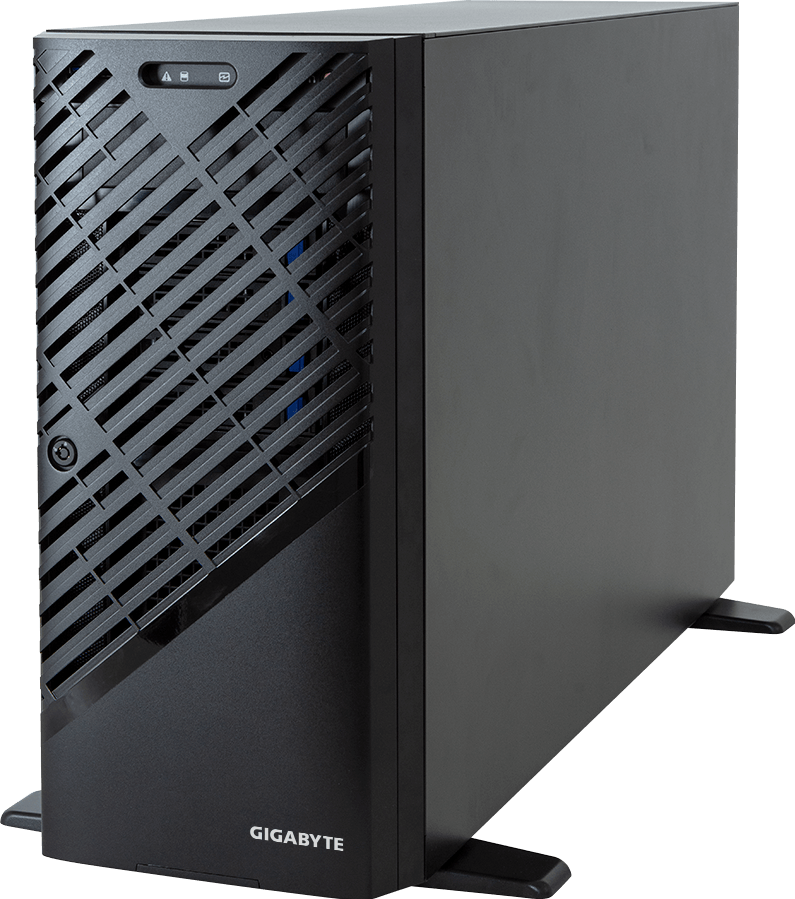
The GIGABYTE W753-W50-AA01 is a current example of a two-GPU-capable tower built around Intel Xeon W-2500 or W-2400. It has eight DDR5 RDIMM slots, three M.2 positions, up to eight SATA bays and a 1,200 W Platinum PSU. The final GPU choice must stay within the manufacturer's qualified power and thermal configurations.
Best fit:
- one primary user
- models that fit within one GPU's memory
- mixed AI, visualisation and engineering software
- local displays or interactive development
- buyers who need replaceable drives, DIMMs and PCIe cards
This class is less attractive when a model needs more than one GPU, several users need isolation or the system must run unattended as a production service.
Architecture 3: two or four PCIe GPUs
Adding GPUs can increase throughput, support several independent users or allow a model to split across devices. It also introduces topology, power and cooling constraints that a single-GPU workstation avoids.
Count physical slots and electrical lanes. A motherboard may expose several x16-length connectors while only some run at x16 electrically, and a double-width card blocks its neighbour. Check which slots attach to the CPU, whether NICs and NVMe devices share lanes, and how air reaches each GPU.
Power arithmetic is unforgiving. Four 300 W Max-Q cards draw up to 1,200 W before the CPU, memory, drives, fans and conversion losses. Four 600 W workstation cards would require 2,400 W for GPUs alone and may not be a supported configuration even in a 2,500 W chassis. Use the workstation manufacturer's qualification table rather than multiplying the advertised slot count by any card that fits on paper.
GIGABYTE's current W773-H5D-AAF1 pairs a Threadripper PRO 9000 or 7000 WX processor with eight-channel DDR5, four M.2 PCIe 5.0 positions and six PCIe 5.0 x16 slots. The manufacturer explicitly lists four RTX PRO 6000 Blackwell Max-Q cards, four RTX 6000 Ada cards or four Radeon AI PRO R9700 cards among its supported layouts. It lists only one dual-slot 600 W GPU or two triple-slot cards, which shows why “up to four GPUs” needs a suffix.
The 2,500 W power supply requires 200-240 V input and a C19 power cord. That is already beyond an ordinary UK desk circuit assumption once displays and other equipment enter the room. Check socket, circuit, heat and acoustic conditions with the facilities team.
Four GPU memories remain separate. Distributed inference, data parallelism and model parallelism can use them, but communication crosses PCIe unless the exact GPU and platform provide another supported path. Software compatibility and scaling efficiency determine whether the fourth card earns its cost.
Best fit:
- several independent local jobs
- rendering or simulation alongside AI
- distributed software that has been tested on PCIe GPUs
- a lab that wants workstation access but can supply server-like power and cooling
Avoid multi-GPU towers when the team expects NVLink/NVSwitch scale-up behaviour, hot-swap service or quiet office operation.
Architecture 4: GB300 deskside AI systems
NVIDIA's GB300 Grace Blackwell Ultra Desktop Superchip creates a new class above normal workstations. Current ASUS, GIGABYTE and MSI systems combine one Blackwell Ultra GPU with a 72-core Grace CPU through NVLink-C2C. Manufacturers list 252 GB of HBM3e for the GPU and 496 GB of LPDDR5x for the CPU, giving 748 GB of coherent memory.
The memory split still matters: HBM3e provides much higher bandwidth for GPU work, while the coherent address space gives software access to the larger combined capacity. Vendors quote up to 20 PFLOPS of sparse FP4 AI performance. Treat that as a precision-specific theoretical figure, not an application benchmark.
These are enterprise deskside systems. The ASUS ExpertCenter Pro ET900N G3 weighs 27 kg, uses a 1,600 W Titanium PSU, supplies two 400 Gb/s ConnectX-8 ports and includes four M.2 positions. ASUS allows one optional RTX PRO Blackwell add-in GPU in the primary PCIe slot, subject to the qualified list.
GIGABYTE's W775-V10-L01 uses closed-loop liquid cooling, the same 748 GB memory arrangement, two 400 Gb/s ConnectX-8 ports, two PCIe 6.0 M.2 positions, two PCIe 5.0 M.2 positions and a 1,600 W Platinum supply. Its expansion layout has one PCIe 5.0 x16 slot plus two x8 slots.
The MSI XpertStation WS300 is another DGX Station-class GB300 option in the GPUMachines range. Its current product configuration includes the 72-core Grace CPU, 252 GB HBM3e, 496 GB LPDDR5x, dual 400 Gb/s networking and optional RTX PRO Blackwell expansion. Confirm the exact OEM revision and qualified add-in cards on the final quote.
Choose this class when a local team genuinely needs hundreds of gigabytes of coherent memory, fast HBM, enterprise networking and the NVIDIA AI software environment. It can suit large-model inference, serious fine-tuning, AI research and simulation that would otherwise move to a rack system.
Don't hide the operational cost behind the word “deskside.” A 1,600 W system needs appropriate electrical supply, sheds substantial heat and may not belong beside a person's chair. Arm software compatibility, liquid-cooling support, warranty, noise and remote management all need review.
How the 2026 options compare
| Requirement | Strongest starting class | Main compromise | | --- | --- | --- | | Quiet, compact local LLM development | GB10 compact system | Fixed hardware, Arm software, one SSD | | Broad Windows/Linux workstation use | One RTX PRO GPU tower | GPU memory limited to the selected card | | Several independent GPU jobs | Two- or four-GPU PCIe tower | Separate memory pools, high power and noise | | Very large local models | GB300 deskside system | High purchase cost, 1.6 kW-class power, Arm platform | | Shared production AI service | Rack PCIe or HGX server | Requires data-centre or hosted operations |
The correct answer can also be a mixed setup: compact or tower systems for interactive development, with heavy runs submitted to a hosted server or cluster. That keeps the quick local feedback loop without forcing a desk-side machine to carry production demand.
CPU and system-memory selection
Discrete-GPU towers still need balanced host hardware. Data loading, tokenisation, augmentation, compilation and simulation may consume many CPU cores. Other jobs spend almost all their time on the GPU and gain little from the most expensive processor.
Choose enough PCIe lanes for the GPUs, NVMe drives and network adapters. Threadripper PRO and Xeon W platforms are attractive because they combine high core counts, ECC memory and workstation I/O. Check the exact CPU generation supported by the motherboard revision; a familiar socket name doesn't guarantee every processor family.
Populate memory channels rather than dropping a small number of huge DIMMs into one side of the board. Eight-channel Threadripper PRO and Xeon W-3400/3500 platforms lose host-memory bandwidth when under-populated. Keep spare capacity for future growth, but do not cripple the first configuration to save two DIMMs.
For GB10 and GB300, CPU and memory are part of the integrated platform. There is no conventional CPU or DIMM selection. Procurement should focus on the fixed architecture, storage, software, networking and support.
Storage that matches development work
AI workstations accumulate data quickly: model weights, quantised variants, container images, virtual environments, datasets, checkpoints and generated outputs. A single fast boot drive can become both full and irreplaceable.
For configurable towers, separate the operating environment from active project data where practical. Use enterprise NVMe for sustained writes or important local work, and keep durable copies on shared or backed-up storage. RAID protects against selected drive failures; it is not a backup.
Estimate local capacity from the actual model library. Five 200 GB model variants, a 1 TB dataset and several checkpoints can consume multiple terabytes before the user creates any output. Leave free space for write amplification, temporary files and updates.
High-speed networking matters once shared storage enters the workflow. 10GbE is useful for normal team storage, but large dataset staging or multi-gigabyte checkpoints may justify 25, 100 or 200 Gb/s. Both ends of the path and the storage system must sustain the target rate.
Power, cooling and acoustics
Add device power before choosing the room. A 600 W GPU, 350 W workstation CPU and the rest of a tower can place sustained heat into an office. Two or four GPUs turn the workstation into a space-heater-sized facilities load, even when the chassis carries a desk-side label.
Check input voltage, connector, circuit, PSU efficiency, UPS support and whether other equipment shares the breaker. Workstations with 2,000 W or 2,500 W supplies may require 200-240 V operation and C19 cables. The PSU rating is a capacity figure, not expected continuous consumption, so request a configured power estimate as well.
Ask for acoustic data or a demonstration if the system will sit with people. Fans that cool several GPUs under sustained training load sound different from an ordinary office PC. A rack or machine room may improve working conditions and service access, even when a tower technically fits under the desk.
When a workstation has become the wrong tool
Move the design to PCIe GPU servers when workloads need shared access, redundant power, remote management, hot-swap storage or formal uptime. Move to HGX servers when one job needs several GPUs to exchange data through NVLink and NVSwitch.
A server also makes ownership clearer. IT can place it on managed power, monitor hardware, separate user access and schedule maintenance. Towers can be managed well, but a row of individually owned workstations often creates duplicated data, untracked software and stranded capacity.
Hosted GPU infrastructure can be the right middle ground. It gives a team dedicated or elastic compute without asking an office to handle the heat and service burden. Compare total usage, data movement, support and security rather than hardware purchase price alone.
Buying checklist
Before requesting a quote, record:
- model names, parameter counts, precision, context length and fine-tuning method
- expected users, concurrent jobs and required operating system
- framework, CUDA, container and CPU-architecture dependencies
- local model and dataset capacity, checkpoint pattern and backup destination
- display, capture-card, NIC and other PCIe requirements
- room power, voltage, connector, noise and heat constraints
- whether the system remains personal, becomes shared or will later feed a cluster
That information lets GPUMachines compare architectures rather than selling the largest chassis in the list.
FAQ
How much GPU memory does a deep-learning workstation need?
Enough for the model weights, runtime buffers, key-value cache, activations and any fine-tuning state at the intended precision and context. Calculate raw weights first, then test or estimate framework overhead. Buy for the real model, not a generic “AI ready” label.
Is 128 GB unified memory better than a 96 GB RTX PRO GPU?
It holds larger workloads, but “better” depends on bandwidth, software and task. GB10's coherent 128 GB pool can fit models that exceed 96 GB, while RTX PRO 6000 supplies a conventional x86 workstation path and much higher local graphics-memory bandwidth.
Can four 96 GB GPUs run one 384 GB model?
Only if the software partitions the model and the workload fits the topology. Four cards provide 384 GB in aggregate, not one automatic shared-memory device. Leave room for runtime overhead and communication.
Is Threadripper PRO or Xeon W better for AI?
Both can build strong workstations. Choose by qualified GPU layout, PCIe lanes, memory channels, CPU-side workload, software certification and platform support. The chassis and motherboard can matter more than the logo on the CPU.
Is a GB300 deskside system a replacement for HGX?
No. GB300 deskside systems provide one Blackwell Ultra GPU with a very large coherent CPU-GPU memory system. HGX joins eight SXM GPUs through NVLink and NVSwitch for scale-up workloads. They serve different model and deployment sizes.
Should a deep-learning workstation use consumer GeForce cards?
Consumer cards can offer strong performance for budget-sensitive experiments, but professional buyers should weigh VRAM, ECC, drivers, cooling, support, form factor and application certification. RTX PRO systems cost more because the product and support assumptions differ.
How many users should share one workstation?
One primary user or a small cooperative team is the cleanest fit. Once users need isolation, quotas, queues and guaranteed availability, deploy a managed server or hosted platform.
Recommendation
Pick the architecture before the brand. GB10 is the compact memory-first choice. A one-GPU RTX PRO tower is the broadest workstation. Multi-GPU towers serve tested distributed or parallel workloads. GB300 deskside systems target buyers who need hundreds of gigabytes of coherent local memory and can support enterprise-scale power and cost.
For most buyers, start with the smallest system that holds the real workload and preserves a sensible growth path. That approach leaves budget for storage, backup, networking and the server capacity that repeated jobs may eventually need.
Compare GPUMachines tower GPU workstations, then send the model-memory worksheet, software dependencies and physical constraints with the quote request. The shortlist should become shorter, not louder.
Sources
Specifications checked 21 September 2026: